\"}"
]
}
}
}
```
To get started, refer to the [CDP documentation](https://edgetunnel-b2h.pages.dev/browser-run/cdp/).
Apr 08, 2026
1. ### [Website Source CSS content selectors for precise content extraction in AI Search](https://edgetunnel-b2h.pages.dev/changelog/post/2026-04-09-ai-search-content-selectors/)
[ AI Search ](https://edgetunnel-b2h.pages.dev/ai-search/)
[AI Search](https://edgetunnel-b2h.pages.dev/ai-search/) now supports [CSS content selectors](https://edgetunnel-b2h.pages.dev/ai-search/configuration/data-source/website/#content-selectors) for website data sources. You can now define which parts of a crawled page are extracted and indexed by specifying CSS selectors paired with URL glob patterns.
Content selectors solve the problem of indexing only relevant content while ignoring navigation, sidebars, footers, and other boilerplate. When a page URL matches a glob pattern, only elements matching the corresponding CSS selector are extracted and converted to Markdown for indexing.
Configure content selectors via the dashboard or API:
```bash
curl "https://api.cloudflare.com/client/v4/accounts/{account_id}/ai-search/instances" \
-H "Authorization: Bearer {api_token}" \
-H "Content-Type: application/json" \
-d '{
"id": "my-ai-search",
"source": "https://example.com",
"type": "web-crawler",
"source_params": {
"web_crawler": {
"parse_options": {
"content_selector": [
{
"path": "**/blog/**",
"selector": "article .post-body"
}
]
}
}
}
}'
```
Selectors are evaluated in order, and the first matching pattern wins. You can define up to 10 content selector entries per instance.
For configuration details and examples, refer to the [content selectors documentation](https://edgetunnel-b2h.pages.dev/ai-search/configuration/data-source/website/#content-selectors).
Apr 08, 2026
1. ### [New Workers AI models for text generation and embedding in AI Search](https://edgetunnel-b2h.pages.dev/changelog/post/2026-04-09-new-workers-ai-models/)
[ AI Search ](https://edgetunnel-b2h.pages.dev/ai-search/)
[AI Search](https://edgetunnel-b2h.pages.dev/ai-search/) now supports four additional [Workers AI](https://edgetunnel-b2h.pages.dev/workers-ai/) models across text generation and embedding.
#### Text generation
| Model | Context window (tokens) |
| -------------------------- | ----------------------- |
| @cf/zai-org/glm-4.7-flash | 131,072 |
| @cf/qwen/qwen3-30b-a3b-fp8 | 32,000 |
GLM-4.7-Flash is a lightweight model from Zhipu AI with a 131,072 token context window, suitable for long-document summarization and retrieval tasks. Qwen3-30B-A3B is a mixture-of-experts model from Alibaba that activates only 3 billion parameters per forward pass, keeping inference fast while maintaining strong response quality.
#### Embedding
| Model | Vector dims | Input tokens | Metric |
| ------------------------------ | ----------- | ------------ | ------ |
| @cf/qwen/qwen3-embedding-0.6b | 1,024 | 4,096 | cosine |
| @cf/google/embeddinggemma-300m | 768 | 512 | cosine |
Qwen3-Embedding-0.6B supports up to 4,096 input tokens, making it a good fit for indexing longer text chunks. EmbeddingGemma-300M from Google produces 768-dimension vectors and is optimized for low-latency embedding workloads.
All four models are available without additional provider keys since they run on Workers AI. Select them when creating or updating an AI Search instance in the dashboard or through the API.
For the full list of supported models, refer to [Supported models](https://edgetunnel-b2h.pages.dev/ai-search/configuration/models/supported-models/).
Apr 04, 2026
1. ### [Google Gemma 4 26B A4B now available on Workers AI](https://edgetunnel-b2h.pages.dev/changelog/post/2026-04-04-gemma-4-26b-a4b-workers-ai/)
[ Workers AI ](https://edgetunnel-b2h.pages.dev/workers-ai/)
We are partnering with Google to bring [@cf/google/gemma-4-26b-a4b-it](https://edgetunnel-b2h.pages.dev/workers-ai/models/gemma-4-26b-a4b-it/) to Workers AI. Gemma 4 26B A4B is a Mixture-of-Experts (MoE) model built from Gemini 3 research, with 26B total parameters and only 4B active per forward pass. By activating a small subset of parameters during inference, the model runs almost as fast as a 4B-parameter model while delivering the quality of a much larger one.
Gemma 4 is Google's most capable family of open models, designed to maximize intelligence-per-parameter.
#### Key capabilities
* **Mixture-of-Experts architecture** with 8 active experts out of 128 total (plus 1 shared expert), delivering frontier-level performance at a fraction of the compute cost of dense models
* **256,000 token context window** for retaining full conversation history, tool definitions, and long documents across extended sessions
* **Built-in thinking mode** that lets the model reason step-by-step before answering, improving accuracy on complex tasks
* **Vision understanding** for object detection, document and PDF parsing, screen and UI understanding, chart comprehension, OCR (including multilingual), and handwriting recognition, with support for variable aspect ratios and resolutions
* **Function calling** with native support for structured tool use, enabling agentic workflows and multi-step planning
* **Multilingual** with out-of-the-box support for 35+ languages, pre-trained on 140+ languages
* **Coding** for code generation, completion, and correction
Use Gemma 4 26B A4B through the [Workers AI binding](https://edgetunnel-b2h.pages.dev/workers-ai/configuration/bindings/) (`env.AI.run()`), the REST API at `/run` or `/v1/chat/completions`, or the [OpenAI-compatible endpoint](https://edgetunnel-b2h.pages.dev/workers-ai/configuration/open-ai-compatibility/).
For more information, refer to the [Gemma 4 26B A4B model page](https://edgetunnel-b2h.pages.dev/workers-ai/models/gemma-4-26b-a4b-it/).
Apr 02, 2026
1. ### [Automatically retry on upstream provider failures on AI Gateway](https://edgetunnel-b2h.pages.dev/changelog/post/2026-04-02-auto-retry-upstream-failures/)
[ AI Gateway ](https://edgetunnel-b2h.pages.dev/ai-gateway/)
AI Gateway now supports automatic retries at the gateway level. When an upstream provider returns an error, your gateway retries the request based on the retry policy you configure, without requiring any client-side changes.
You can configure the retry count (up to 5 attempts), the delay between retries (from 100ms to 5 seconds), and the backoff strategy (Constant, Linear, or Exponential). These defaults apply to all requests through the gateway, and per-request headers can override them.
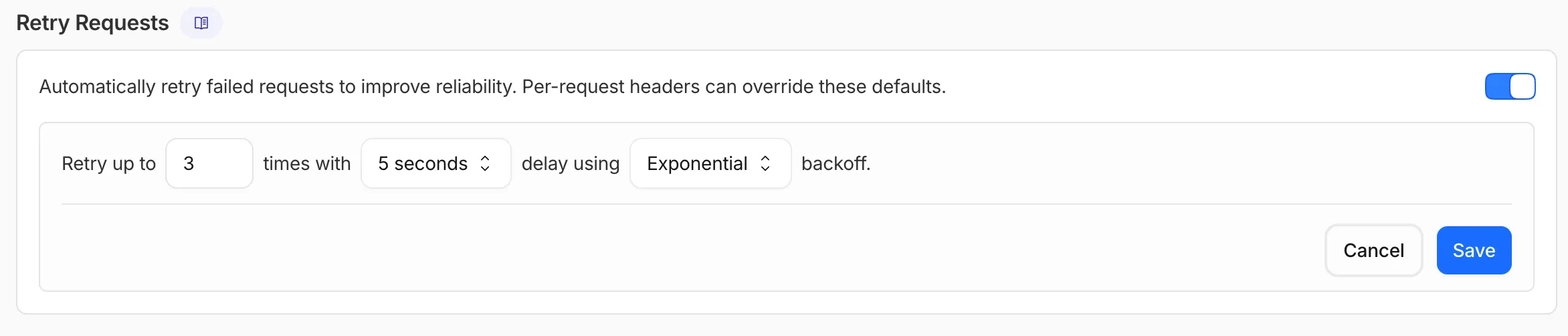
This is particularly useful when you do not control the client making the request and cannot implement retry logic on the caller side. For more complex failover scenarios — such as failing across different providers — use [Dynamic Routing](https://edgetunnel-b2h.pages.dev/ai-gateway/features/dynamic-routing/).
For more information, refer to [Manage gateways](https://edgetunnel-b2h.pages.dev/ai-gateway/configuration/manage-gateway/#retry-requests).
Apr 01, 2026
1. ### [Create, manage, search AI Search instances with Wrangler CLI](https://edgetunnel-b2h.pages.dev/changelog/post/2026-04-01-ai-search-wrangler-commands/)
[ AI Search ](https://edgetunnel-b2h.pages.dev/ai-search/)
[AI Search](https://edgetunnel-b2h.pages.dev/ai-search/) supports a `wrangler ai-search` command namespace. Use it to manage instances from the command line.
The following commands are available:
| Command | Description |
| ------------------------- | ------------------------------------------------ |
| wrangler ai-search create | Create a new instance with an interactive wizard |
| wrangler ai-search list | List all instances in your account |
| wrangler ai-search get | Get details of a specific instance |
| wrangler ai-search update | Update the configuration of an instance |
| wrangler ai-search delete | Delete an instance |
| wrangler ai-search search | Run a search query against an instance |
| wrangler ai-search stats | Get usage statistics for an instance |
The `create` command guides you through setup, choosing a name, source type (`r2` or `web`), and data source. You can also pass all options as flags for non-interactive use:
```sh
wrangler ai-search create my-instance --type r2 --source my-bucket
```
Use `wrangler ai-search search` to query an instance directly from the CLI:
```sh
wrangler ai-search search my-instance --query "how do I configure caching?"
```
All commands support `--json` for structured output that scripts and AI agents can parse directly.
For full usage details, refer to the [Wrangler commands documentation](https://edgetunnel-b2h.pages.dev/ai-search/wrangler-commands/).
Mar 24, 2026
1. ### [Advanced WAF customization for AI Crawl Control blocks](https://edgetunnel-b2h.pages.dev/changelog/post/2026-03-24-waf-rule-preservation/)
[ AI Crawl Control ](https://edgetunnel-b2h.pages.dev/ai-crawl-control/)
AI Crawl Control now supports extending the underlying WAF rule with custom modifications. Any changes you make directly in the WAF custom rules editor — such as adding path-based exceptions, extra user agents, or additional expression clauses — are preserved when you update crawler actions in AI Crawl Control.
If the WAF rule expression has been modified in a way AI Crawl Control cannot parse, a warning banner appears on the **Crawlers** page with a link to view the rule directly in WAF.
For more information, refer to [WAF rule management](https://edgetunnel-b2h.pages.dev/ai-crawl-control/features/manage-ai-crawlers/#waf-rule-management).
Mar 23, 2026
1. ### [Agents SDK v0.8.0: readable state, idempotent schedules, typed AgentClient, and Zod 4](https://edgetunnel-b2h.pages.dev/changelog/post/2026-03-23-agents-sdk-v080/)
[ Agents ](https://edgetunnel-b2h.pages.dev/agents/)[ Workers ](https://edgetunnel-b2h.pages.dev/workers/)
The latest release of the [Agents SDK ↗](https://github.com/cloudflare/agents) exposes agent state as a readable property, prevents duplicate schedule rows across Durable Object restarts, brings full TypeScript inference to `AgentClient`, and migrates to Zod 4.
#### Readable `state` on `useAgent` and `AgentClient`
Both `useAgent` (React) and `AgentClient` (vanilla JS) now expose a `state` property that reflects the current agent state. Previously, reading state required manually tracking it through the `onStateUpdate` callback.
**React (`useAgent`)**
* [ JavaScript ](#tab-panel-3656)
* [ TypeScript ](#tab-panel-3657)
**JavaScript**
```js
const agent = useAgent({
agent: "game-agent",
name: "room-123",
});
// Read state directly — no separate useState + onStateUpdate needed
return Score: {agent.state?.score}
;
// Spread for partial updates
agent.setState({ ...agent.state, score: (agent.state?.score ?? 0) + 10 });
```
**TypeScript**
```ts
const agent = useAgent({
agent: "game-agent",
name: "room-123",
});
// Read state directly — no separate useState + onStateUpdate needed
return Score: {agent.state?.score}
;
// Spread for partial updates
agent.setState({ ...agent.state, score: (agent.state?.score ?? 0) + 10 });
```
`agent.state` is reactive — the component re-renders when state changes from either the server or a client-side `setState()` call.
**Vanilla JS (`AgentClient`)**
* [ JavaScript ](#tab-panel-3658)
* [ TypeScript ](#tab-panel-3659)
**JavaScript**
```js
const client = new AgentClient({
agent: "game-agent",
name: "room-123",
host: "your-worker.workers.dev",
});
client.setState({ score: 100 });
console.log(client.state); // { score: 100 }
```
**TypeScript**
```ts
const client = new AgentClient({
agent: "game-agent",
name: "room-123",
host: "your-worker.workers.dev",
});
client.setState({ score: 100 });
console.log(client.state); // { score: 100 }
```
State starts as `undefined` and is populated when the server sends the initial state on connect (from `initialState`) or when `setState()` is called. Use optional chaining (`agent.state?.field`) for safe access. The `onStateUpdate` callback continues to work as before — the new `state` property is additive.
#### Idempotent `schedule()`
`schedule()` now supports an `idempotent` option that deduplicates by `(type, callback, payload)`, preventing duplicate rows from accumulating when called in places that run on every Durable Object restart such as `onStart()`.
**Cron schedules are idempotent by default.** Calling `schedule("0 * * * *", "tick")` multiple times with the same callback, expression, and payload returns the existing schedule row instead of creating a new one. Pass `{ idempotent: false }` to override.
Delayed and date-scheduled types support opt-in idempotency:
* [ JavaScript ](#tab-panel-3660)
* [ TypeScript ](#tab-panel-3661)
**JavaScript**
```js
import { Agent } from "agents";
class MyAgent extends Agent {
async onStart() {
// Safe across restarts — only one row is created
await this.schedule(60, "maintenance", undefined, { idempotent: true });
}
}
```
**TypeScript**
```ts
import { Agent } from "agents";
class MyAgent extends Agent {
async onStart() {
// Safe across restarts — only one row is created
await this.schedule(60, "maintenance", undefined, { idempotent: true });
}
}
```
Two new warnings help catch common foot-guns:
* Calling `schedule()` inside `onStart()` without `{ idempotent: true }` emits a `console.warn` with actionable guidance (once per callback; skipped for cron and when `idempotent` is set explicitly).
* If an alarm cycle processes 10 or more stale one-shot rows for the same callback, the SDK emits a `console.warn` and a `schedule:duplicate_warning` diagnostics channel event.
#### Typed `AgentClient` with `call` inference and `stub` proxy
`AgentClient` now accepts an optional agent type parameter for full type inference on RPC calls, matching the typed experience already available with `useAgent`.
* [ JavaScript ](#tab-panel-3664)
* [ TypeScript ](#tab-panel-3665)
**JavaScript**
```js
const client = new AgentClient({
agent: "my-agent",
host: window.location.host,
});
// Typed call — method name autocompletes, args and return type inferred
const value = await client.call("getValue");
// Typed stub — direct RPC-style proxy
await client.stub.getValue();
await client.stub.add(1, 2);
```
**TypeScript**
```ts
const client = new AgentClient({
agent: "my-agent",
host: window.location.host,
});
// Typed call — method name autocompletes, args and return type inferred
const value = await client.call("getValue");
// Typed stub — direct RPC-style proxy
await client.stub.getValue();
await client.stub.add(1, 2);
```
State is automatically inferred from the agent type, so `onStateUpdate` is also typed:
* [ JavaScript ](#tab-panel-3662)
* [ TypeScript ](#tab-panel-3663)
**JavaScript**
```js
const client = new AgentClient({
agent: "my-agent",
host: window.location.host,
onStateUpdate: (state) => {
// state is typed as MyAgent's state type
},
});
```
**TypeScript**
```ts
const client = new AgentClient({
agent: "my-agent",
host: window.location.host,
onStateUpdate: (state) => {
// state is typed as MyAgent's state type
},
});
```
Existing untyped usage continues to work without changes. The RPC type utilities (`AgentMethods`, `AgentStub`, `RPCMethods`) are now exported from `agents/client` for advanced typing scenarios. `agents`, `@cloudflare/ai-chat`, and `@cloudflare/codemode` now require `zod ^4.0.0`. Zod v3 is no longer supported.
#### `@cloudflare/ai-chat` fixes
* **Turn serialization** — `onChatMessage()` and `_reply()` work is now queued so user requests, tool continuations, and `saveMessages()` never stream concurrently.
* **Duplicate messages on stop** — Clicking stop during an active stream no longer splits the assistant message into two entries.
* **Duplicate messages after tool calls** — Orphaned client IDs no longer leak into persistent storage.
#### `keepAlive()` and `keepAliveWhile()` are no longer experimental
`keepAlive()` now uses a lightweight in-memory ref count instead of schedule rows. Multiple concurrent callers share a single alarm cycle. The `@experimental` tag has been removed from both `keepAlive()` and `keepAliveWhile()`.
#### `@cloudflare/codemode`: TanStack AI integration
A new entry point `@cloudflare/codemode/tanstack-ai` adds support for [TanStack AI's ↗](https://tanstack.com/ai) `chat()` as an alternative to the Vercel AI SDK's `streamText()`:
* [ JavaScript ](#tab-panel-3670)
* [ TypeScript ](#tab-panel-3671)
**JavaScript**
```js
import {
createCodeTool,
tanstackTools,
} from "@cloudflare/codemode/tanstack-ai";
import { chat } from "@tanstack/ai";
const codeTool = createCodeTool({
tools: [tanstackTools(myServerTools)],
executor,
});
const stream = chat({ adapter, tools: [codeTool], messages });
```
**TypeScript**
```ts
import { createCodeTool, tanstackTools } from "@cloudflare/codemode/tanstack-ai";
import { chat } from "@tanstack/ai";
const codeTool = createCodeTool({
tools: [tanstackTools(myServerTools)],
executor,
});
const stream = chat({ adapter, tools: [codeTool], messages });
```
#### Upgrade
To update to the latest version:
```sh
npm i agents@latest @cloudflare/ai-chat@latest
```
Mar 23, 2026
1. ### [New AI Search REST API endpoints for /search and /chat/completions](https://edgetunnel-b2h.pages.dev/changelog/post/2026-03-23-ai-search-new-rest-api/)
[ AI Search ](https://edgetunnel-b2h.pages.dev/ai-search/)
[AI Search](https://edgetunnel-b2h.pages.dev/ai-search/) now offers new [REST API](https://edgetunnel-b2h.pages.dev/ai-search/api/search/rest-api/) endpoints for search and chat that use an OpenAI compatible format. This means you can use the familiar `messages` array structure that works with existing OpenAI SDKs and tools. The messages array also lets you pass previous messages within a session, so the model can maintain context across multiple turns.
| Endpoint | Path |
| ---------------- | ------------------------------------------------------------------------ |
| Chat Completions | POST /accounts/{account\_id}/ai-search/instances/{name}/chat/completions |
| Search | POST /accounts/{account\_id}/ai-search/instances/{name}/search |
Here is an example request to the Chat Completions endpoint using the new `messages` array format:
```bash
curl https://api.cloudflare.com/client/v4/accounts/{ACCOUNT_ID}/ai-search/instances/{NAME}/chat/completions \
-H "Content-Type: application/json" \
-H "Authorization: Bearer {API_TOKEN}" \
-d '{
"messages": [
{
"role": "system",
"content": "You are a helpful documentation assistant."
},
{
"role": "user",
"content": "How do I get started?"
}
]
}'
```
For more details, refer to the [AI Search REST API guide](https://edgetunnel-b2h.pages.dev/ai-search/api/search/rest-api/).
#### Migration from existing AutoRAG API (recommended)
If you are using the previous AutoRAG API endpoints (`/autorag/rags/`), we recommend migrating to the new endpoints. The previous AutoRAG API endpoints will continue to be fully supported.
Refer to the [migration guide](https://edgetunnel-b2h.pages.dev/ai-search/api/migration/rest-api/) for step-by-step instructions.
Mar 23, 2026
1. ### [AI Search UI snippets and MCP support](https://edgetunnel-b2h.pages.dev/changelog/post/2026-03-23-ai-search-public-endpoint-and-snippets/)
[ AI Search ](https://edgetunnel-b2h.pages.dev/ai-search/)
[AI Search](https://edgetunnel-b2h.pages.dev/ai-search/) now supports public endpoints, UI snippets, and MCP, making it easy to add search to your website or connect AI agents.
Public endpoints allow you to expose AI Search capabilities without requiring API authentication. To enable public endpoints:
1. Go to **AI Search** in the Cloudflare dashboard. [ Go to **AI Search** ](https://dash.cloudflare.com/?to=/:account/ai/ai-search)
2. Select your instance, and turn on **Public Endpoint** in **Settings**. For more details, refer to [Public endpoint configuration](https://edgetunnel-b2h.pages.dev/ai-search/configuration/retrieval/public-endpoint/).
#### UI snippets
UI snippets are pre-built search and chat components you can embed in your website. Visit [search.ai.cloudflare.com ↗](https://search.ai.cloudflare.com/) to configure and preview components for your AI Search instance.
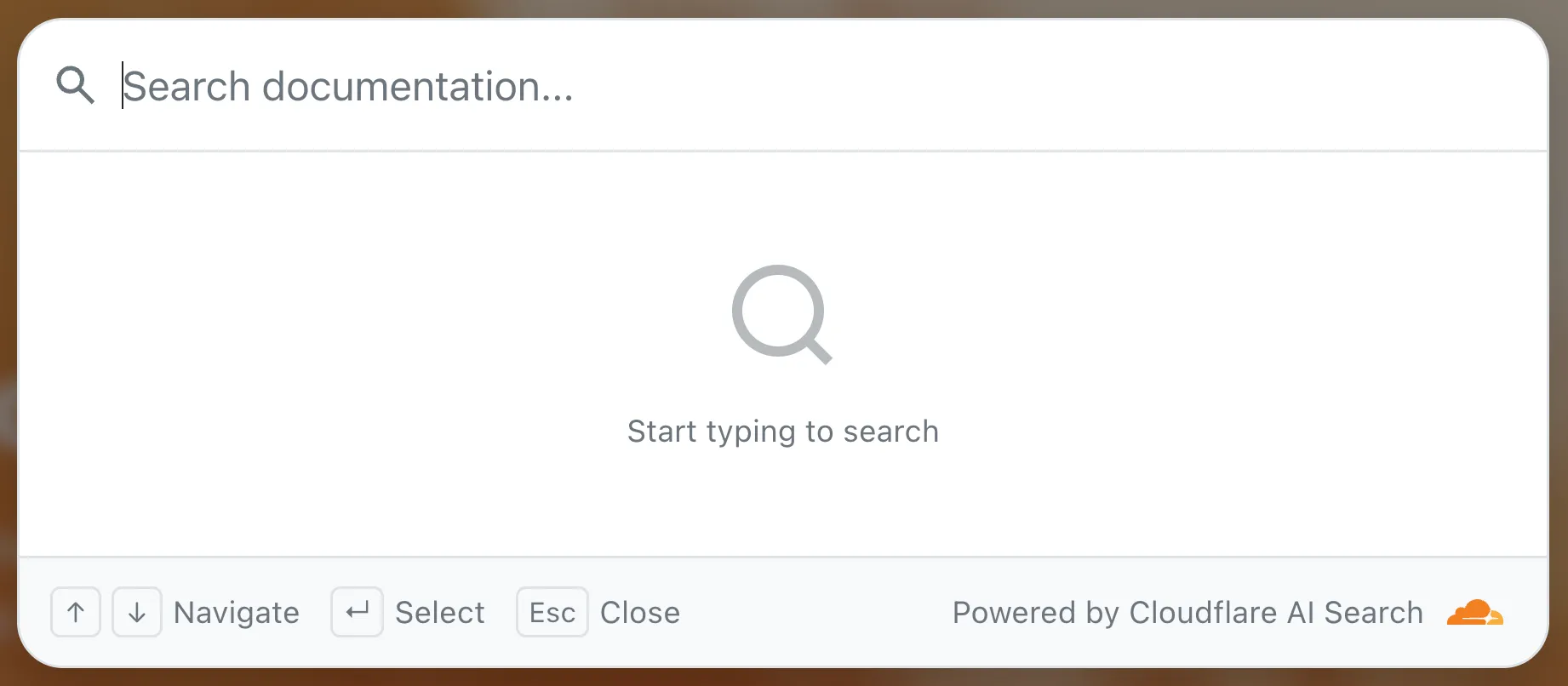
To add a search modal to your page:
```html
```
For more details, refer to the [UI snippets documentation](https://edgetunnel-b2h.pages.dev/ai-search/configuration/retrieval/embed-search-snippets/).
#### MCP
The MCP endpoint allows AI agents to search your content via the Model Context Protocol. Connect your MCP client to:
```txt
https://.search.ai.cloudflare.com/mcp
```
For more details, refer to the [MCP documentation](https://edgetunnel-b2h.pages.dev/ai-search/api/search/mcp/).
Mar 23, 2026
1. ### [Custom metadata filtering for AI Search](https://edgetunnel-b2h.pages.dev/changelog/post/2026-03-23-custom-metadata-filtering/)
[ AI Search ](https://edgetunnel-b2h.pages.dev/ai-search/)
[AI Search](https://edgetunnel-b2h.pages.dev/ai-search/) now supports custom metadata filtering, allowing you to define your own metadata fields and filter search results based on attributes like category, version, or any custom field you define.
#### Define a custom metadata schema
You can define up to 5 custom metadata fields per AI Search instance. Each field has a name and data type (`text`, `number`, or `boolean`):
```bash
curl -X POST https://api.cloudflare.com/client/v4/accounts/{ACCOUNT_ID}/ai-search/instances \
-H "Content-Type: application/json" \
-H "Authorization: Bearer {API_TOKEN}" \
-d '{
"id": "my-instance",
"type": "r2",
"source": "my-bucket",
"custom_metadata": [
{ "field_name": "category", "data_type": "text" },
{ "field_name": "version", "data_type": "number" },
{ "field_name": "is_public", "data_type": "boolean" }
]
}'
```
#### Add metadata to your documents
How you attach metadata depends on your data source:
* **R2 bucket**: Set metadata using S3-compatible custom headers (`x-amz-meta-*`) when uploading objects. Refer to [R2 custom metadata](https://edgetunnel-b2h.pages.dev/ai-search/configuration/data-source/r2/#custom-metadata) for examples.
* **Website**: Add `` tags to your HTML pages. Refer to [Website custom metadata](https://edgetunnel-b2h.pages.dev/ai-search/configuration/data-source/website/#custom-metadata) for details.
#### Filter search results
Use custom metadata fields in your search queries alongside built-in attributes like `folder` and `timestamp`:
```bash
curl https://api.cloudflare.com/client/v4/accounts/{ACCOUNT_ID}/ai-search/instances/{NAME}/search \
-H "Content-Type: application/json" \
-H "Authorization: Bearer {API_TOKEN}" \
-d '{
"messages": [
{
"content": "How do I configure authentication?",
"role": "user"
}
],
"ai_search_options": {
"retrieval": {
"filters": {
"category": "documentation",
"version": { "$gte": 2.0 }
}
}
}
}'
```
Learn more in the [metadata filtering documentation](https://edgetunnel-b2h.pages.dev/ai-search/configuration/indexing/metadata/).
Mar 19, 2026
1. ### [Moonshot AI Kimi K2.5 now available on Workers AI](https://edgetunnel-b2h.pages.dev/changelog/post/2026-03-19-kimi-k2-5-workers-ai/)
[ Workers AI ](https://edgetunnel-b2h.pages.dev/workers-ai/)
Workers AI is officially in the big models game. [@cf/moonshotai/kimi-k2.5](https://edgetunnel-b2h.pages.dev/workers-ai/models/kimi-k2.5/) is the first frontier-scale open-source model on our AI inference platform — a large model with a full 256k context window, multi-turn tool calling, vision inputs, and structured outputs. By bringing a frontier-scale model directly onto the Cloudflare Developer Platform, you can now run the entire agent lifecycle on a single, unified platform.
The model has proven to be a fast, efficient alternative to larger proprietary models without sacrificing quality. As AI adoption increases, the volume of inference is skyrocketing — now you can access frontier intelligence at a fraction of the cost.
#### Key capabilities
* **256,000 token context window** for retaining full conversation history, tool definitions, and entire codebases across long-running agent sessions
* **Multi-turn tool calling** for building agents that invoke tools across multiple conversation turns
* **Vision inputs** for processing images alongside text
* **Structured outputs** with JSON mode and JSON Schema support for reliable downstream parsing
* **Function calling** for integrating external tools and APIs into agent workflows
#### Prefix caching and session affinity
When an agent sends a new prompt, it resends all previous prompts, tools, and context from the session. The delta between consecutive requests is usually just a few new lines of input. Prefix caching avoids reprocessing the shared context, saving time and compute from the prefill stage. This means faster Time to First Token (TTFT) and higher Tokens Per Second (TPS) throughput.
Workers AI has done prefix caching, but we are now surfacing cached tokens as a usage metric and offering a discount on cached tokens compared to input tokens (pricing is listed on the [model page](https://edgetunnel-b2h.pages.dev/workers-ai/models/kimi-k2.5/)).
```bash
curl -X POST \
"https://api.cloudflare.com/client/v4/accounts/{account_id}/ai/run/@cf/moonshotai/kimi-k2.5" \
-H "Authorization: Bearer {api_token}" \
-H "Content-Type: application/json" \
-H "x-session-affinity: ses_12345678" \
-d '{
"messages": [
{
"role": "system",
"content": "You are a helpful assistant."
},
{
"role": "user",
"content": "What is prefix caching and why does it matter?"
}
],
"max_tokens": 2400,
"stream": true
}'
```
Some clients like [OpenCode ↗](https://opencode.ai) implement session affinity automatically. The [Agents SDK ↗](https://github.com/cloudflare/agents) starter also sets up the wiring for you.
#### Redesigned asynchronous API
For volumes of requests that exceed synchronous rate limits, you can submit batches of inferences to be completed asynchronously. We have revamped the [Asynchronous Batch API](https://edgetunnel-b2h.pages.dev/workers-ai/features/batch-api/) with a pull-based system that processes queued requests as soon as capacity is available. With internal testing, async requests usually execute within 5 minutes, but this depends on live traffic.
The async API is the best way to avoid capacity errors in durable workflows. It is ideal for use cases that are not real-time, such as code scanning agents or research agents.
To use the asynchronous API, pass `queueRequest: true`:
**JavaScript**
```js
// 1. Push a batch of requests into the queue
const res = await env.AI.run(
"@cf/moonshotai/kimi-k2.5",
{
requests: [
{
messages: [{ role: "user", content: "Tell me a joke" }],
},
{
messages: [{ role: "user", content: "Explain the Pythagoras theorem" }],
},
],
},
{ queueRequest: true },
);
// 2. Grab the request ID
const requestId = res.request_id;
// 3. Poll for the result
const result = await env.AI.run("@cf/moonshotai/kimi-k2.5", {
request_id: requestId,
});
if (result.status === "queued" || result.status === "running") {
// Retry by polling again
} else {
return Response.json(result);
}
```
You can also set up [event notifications](https://edgetunnel-b2h.pages.dev/workers-ai/platform/event-subscriptions/) to know when inference is complete instead of polling.
#### Get started
Use Kimi K2.5 through the [Workers AI binding](https://edgetunnel-b2h.pages.dev/workers-ai/configuration/bindings/) (`env.AI.run()`), the REST API at `/run` or `/v1/chat/completions`, [AI Gateway](https://edgetunnel-b2h.pages.dev/ai-gateway/), or via the [OpenAI-compatible endpoint](https://edgetunnel-b2h.pages.dev/workers-ai/configuration/open-ai-compatibility/).
For more information, refer to the [Kimi K2.5 model page](https://edgetunnel-b2h.pages.dev/workers-ai/models/kimi-k2.5/), [pricing](https://edgetunnel-b2h.pages.dev/workers-ai/platform/pricing/), and [prompt caching](https://edgetunnel-b2h.pages.dev/workers-ai/features/prompt-caching/).
Mar 17, 2026
1. ### [@cloudflare/codemode v0.2.1: MCP barrel export, zero-dependency main entry point, and custom sandbox modules](https://edgetunnel-b2h.pages.dev/changelog/post/2026-03-17-codemode-sdk-v021/)
[ Agents ](https://edgetunnel-b2h.pages.dev/agents/)[ Workers ](https://edgetunnel-b2h.pages.dev/workers/)
The latest releases of [@cloudflare/codemode ↗](https://www.npmjs.com/package/@cloudflare/codemode) add a new MCP barrel export, remove `ai` and `zod` as required peer dependencies from the main entry point, and give you more control over the sandbox.
#### New `@cloudflare/codemode/mcp` export
A new `@cloudflare/codemode/mcp` entry point provides two functions that wrap MCP servers with Code Mode:
* **`codeMcpServer({ server, executor })`** — wraps an existing MCP server with a single `code` tool where each upstream tool becomes a typed `codemode.*` method.
* **`openApiMcpServer({ spec, executor, request })`** — creates `search` and `execute` MCP tools from an OpenAPI spec with host-side request proxying and automatic `$ref` resolution.
* [ JavaScript ](#tab-panel-3668)
* [ TypeScript ](#tab-panel-3669)
**JavaScript**
```js
import { codeMcpServer } from "@cloudflare/codemode/mcp";
import { DynamicWorkerExecutor } from "@cloudflare/codemode";
const executor = new DynamicWorkerExecutor({ loader: env.LOADER });
// Wrap an existing MCP server — all its tools become
// typed methods the LLM can call from generated code
const server = await codeMcpServer({ server: upstreamMcp, executor });
```
**TypeScript**
```ts
import { codeMcpServer } from "@cloudflare/codemode/mcp";
import { DynamicWorkerExecutor } from "@cloudflare/codemode";
const executor = new DynamicWorkerExecutor({ loader: env.LOADER });
// Wrap an existing MCP server — all its tools become
// typed methods the LLM can call from generated code
const server = await codeMcpServer({ server: upstreamMcp, executor });
```
#### Zero-dependency main entry point
**Breaking change in v0.2.0:** `generateTypes` and the `ToolDescriptor` / `ToolDescriptors` types have moved to `@cloudflare/codemode/ai`:
* [ JavaScript ](#tab-panel-3666)
* [ TypeScript ](#tab-panel-3667)
**JavaScript**
```js
// Before
import { generateTypes } from "@cloudflare/codemode";
// After
import { generateTypes } from "@cloudflare/codemode/ai";
```
**TypeScript**
```ts
// Before
import { generateTypes } from "@cloudflare/codemode";
// After
import { generateTypes } from "@cloudflare/codemode/ai";
```
The main entry point (`@cloudflare/codemode`) no longer requires the `ai` or `zod` peer dependencies. It now exports:
| Export | Description |
| --------------------------- | ----------------------------------------------------------- |
| sanitizeToolName | Sanitize tool names into valid JS identifiers |
| normalizeCode | Normalize LLM-generated code into async arrow functions |
| generateTypesFromJsonSchema | Generate TypeScript type definitions from plain JSON Schema |
| jsonSchemaToType | Convert a single JSON Schema to a TypeScript type string |
| DynamicWorkerExecutor | Sandboxed code execution via Dynamic Worker Loader |
| ToolDispatcher | RPC target for dispatching tool calls from sandbox to host |
The `ai` and `zod` peer dependencies are now optional — only required when importing from `@cloudflare/codemode/ai`.
#### Custom sandbox modules
`DynamicWorkerExecutor` now accepts an optional `modules` option to inject custom ES modules into the sandbox:
* [ JavaScript ](#tab-panel-3672)
* [ TypeScript ](#tab-panel-3673)
**JavaScript**
```js
const executor = new DynamicWorkerExecutor({
loader: env.LOADER,
modules: {
"utils.js": `export function add(a, b) { return a + b; }`,
},
});
// Sandbox code can then: import { add } from "utils.js"
```
**TypeScript**
```ts
const executor = new DynamicWorkerExecutor({
loader: env.LOADER,
modules: {
"utils.js": `export function add(a, b) { return a + b; }`,
},
});
// Sandbox code can then: import { add } from "utils.js"
```
#### Internal normalization and sanitization
`DynamicWorkerExecutor` now normalizes code and sanitizes tool names internally. You no longer need to call `normalizeCode()` or `sanitizeToolName()` before passing code and functions to `execute()`.
#### Upgrade
```sh
npm i @cloudflare/codemode@latest
```
See the [Code Mode documentation](https://edgetunnel-b2h.pages.dev/agents/tools/codemode/) for the full API reference.
Mar 17, 2026
1. ### [Log AI Gateway request metadata without storing payloads](https://edgetunnel-b2h.pages.dev/changelog/post/2026-03-17-collect-log-payload-header/)
[ AI Gateway ](https://edgetunnel-b2h.pages.dev/ai-gateway/)
AI Gateway now supports the `cf-aig-collect-log-payload` header, which controls whether request and response bodies are stored in logs. By default, this header is set to `true` and payloads are stored alongside metadata. Set this header to `false` to skip payload storage while still logging metadata such as token counts, model, provider, status code, cost, and duration.
This is useful when you need usage metrics but do not want to persist sensitive prompt or response data.
```bash
curl https://gateway.ai.cloudflare.com/v1/$ACCOUNT_ID/$GATEWAY_ID/openai/chat/completions \
--header "Authorization: Bearer $TOKEN" \
--header 'Content-Type: application/json' \
--header 'cf-aig-collect-log-payload: false' \
--data '{
"model": "gpt-4o-mini",
"messages": [
{
"role": "user",
"content": "What is the email address and phone number of user123?"
}
]
}'
```
For more information, refer to [Logging](https://edgetunnel-b2h.pages.dev/ai-gateway/observability/logging/#collect-log-payload-cf-aig-collect-log-payload).
```json
{"@context":"https://schema.org","@type":"BlogPosting","@id":"https://edgetunnel-b2h.pages.dev/changelog/product-group/ai/2/#page","headline":"AI Changelog | Cloudflare Docs","url":"https://edgetunnel-b2h.pages.dev/changelog/product-group/ai/2/","inLanguage":"en","image":"https://edgetunnel-b2h.pages.dev/cf-twitter-card.png","publisher":{"@type":"Organization","name":"Cloudflare","url":"https://www.cloudflare.com/"},"isPartOf":{"@type":"WebSite","@id":"https://edgetunnel-b2h.pages.dev/#website","name":"Cloudflare Docs","url":"https://edgetunnel-b2h.pages.dev/"}}
```