
Changelog
New updates and improvements at Cloudflare.

Users in browser-based RDP sessions can now print multiple PDF files as a single print job. Copy the files to your clipboard on the remote machine, then select Print all PDFs in the clipboard panel. The files are combined into one PDF and sent to your local printer.
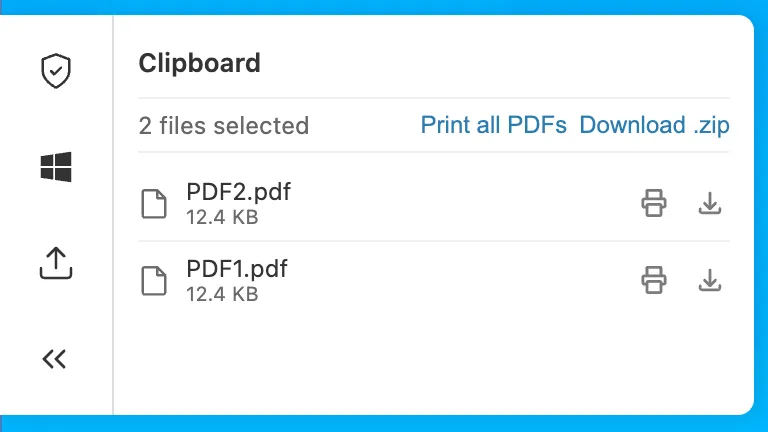
Bulk print is available in Chromium-based browsers and Firefox. For more information, refer to Print PDFs for browser-based RDP.
Internal DNS is now generally available. Internal DNS provides authoritative and recursive DNS for private networks on the same global network and control plane you already use for public DNS, Zero Trust, and application services.
- Consolidate DNS operations. Public and private DNS run on one platform, with one API, one audit trail, and one place to set policy.
- Simplify split-horizon DNS. Internal and external resolution are defined as separate views over shared zones, managed from a single control plane — so there is no drift to chase down.
- Extend Zero Trust to DNS. Resolver policies decide which users and devices resolve against which view, enforced by the same Gateway that already governs the rest of your traffic.
Setting up Internal DNS takes three steps: create a zone, create a view, and define a resolver policy.
POST /zones{"account": {"id": "<ACCOUNT_ID>"},"name": "corp.internal","type": "internal"}Internal DNS is included with Cloudflare Gateway for Enterprise customers. To get started, refer to the Internal DNS documentation.
Data Loss Prevention (DLP) source code detection now focuses on identifying whole source code file uploads and downloads. Previously, source code detection performed partial scans resulting in a higher rate of false positives. Since only whole source code files are evaluated, code embedded in other content — such as chat messages, documentation, or code samples — is no longer flagged as source code, removing a common source of false positives.
Source code detection requires a minimum of 500 characters to evaluate a file. Files below this threshold are not flagged to reduce noise. This threshold filters out small fragments that lack enough context for reliable classification.
Enable and set confidence levels to tune match sensitivity. A higher confidence level reduces false positives by requiring stronger signals that the content is truly source code. A lower confidence level catches more files at the cost of additional noise.
Source code detection applies to standalone source code files in Gateway HTTP policies. It does not detect source code embedded within other file types or payloads, such as
.docxfiles or chat messages.For more information, refer to Source Code predefined profiles.
On October 5, 2026, two changes take effect across the Zero Trust Networks API and Cloudflare Tunnel API: the CIDR-encoded route endpoints are removed, and tunnel list and get responses no longer include the
connectionsfield. If you manage private network routes or read tunnel connection details through the API,cloudflared, Terraform, or another integration, review the changes in the following sections and migrate before the removal date.The CIDR-encoded route endpoints are deprecated in favor of the standard,
route_id-based endpoints that already exist today. Both sets of endpoints route a private network through Cloudflare Tunnel or Cloudflare Mesh (the API still refers to Mesh nodes aswarp_connector) — only the request shape changes.Deprecated endpoints (removed October 5, 2026):
- Create a tunnel route (CIDR Endpoint):
POST /accounts/{account_id}/teamnet/routes/network/{ip_network_encoded} - Update a tunnel route (CIDR Endpoint):
PATCH /accounts/{account_id}/teamnet/routes/network/{ip_network_encoded} - Delete a tunnel route (CIDR Endpoint):
DELETE /accounts/{account_id}/teamnet/routes/network/{ip_network_encoded}
Replacement endpoints:
- Create a tunnel route:
POST /accounts/{account_id}/teamnet/routes - Update a tunnel route:
PATCH /accounts/{account_id}/teamnet/routes/{route_id} - Delete a tunnel route:
DELETE /accounts/{account_id}/teamnet/routes/{route_id}
Deprecated (CIDR-encoded path) Replacement Route identifier URL-encoded CIDR in the path ( /network/{ip_network_encoded})route_idin the path (networkmoves to the request body on create)Create POST .../teamnet/routes/network/{ip_network_encoded}POST .../teamnet/routeswithnetworkandtunnel_idin the bodyUpdate PATCH .../teamnet/routes/network/{ip_network_encoded}PATCH .../teamnet/routes/{route_id}Delete DELETE .../teamnet/routes/network/{ip_network_encoded}DELETE .../teamnet/routes/{route_id}- Capture each route's
route_idby calling List tunnel routes, or read it from the response the first time you create a route with the replacement endpoint. - Update any scripts, backend services, or CI/CD pipelines that call the CIDR-encoded endpoints directly.
- If you manage routes with the
cloudflared tunnel route ip add | deletecommands, upgradecloudflaredto the latest version ↗. - If you manage routes with Terraform, make sure you are on a current version of the
cloudflare_zero_trust_tunnel_cloudflared_route↗ resource and the Cloudflare Terraform provider ↗.
Terminal window # Before: create a route by URL-encoding the CIDR into the pathcurl https://api.cloudflare.com/client/v4/accounts/$ACCOUNT_ID/teamnet/routes/network/172.16.0.0%2F16 \-H 'Content-Type: application/json' \-H "Authorization: Bearer $CLOUDFLARE_API_TOKEN" \-d '{"tunnel_id": "'$TUNNEL_ID'", "comment": "Example comment for this route."}'# After: create a route with the network in the request bodycurl https://api.cloudflare.com/client/v4/accounts/$ACCOUNT_ID/teamnet/routes \-H 'Content-Type: application/json' \-H "Authorization: Bearer $CLOUDFLARE_API_TOKEN" \-d '{"network": "172.16.0.0/16", "tunnel_id": "'$TUNNEL_ID'", "comment": "Example comment for this route."}'# After: update or delete a route using its route_idcurl -X PATCH https://api.cloudflare.com/client/v4/accounts/$ACCOUNT_ID/teamnet/routes/$ROUTE_ID \-H 'Content-Type: application/json' \-H "Authorization: Bearer $CLOUDFLARE_API_TOKEN" \-d '{"comment": "Updated comment for this route."}'curl -X DELETE https://api.cloudflare.com/client/v4/accounts/$ACCOUNT_ID/teamnet/routes/$ROUTE_ID \-H "Authorization: Bearer $CLOUDFLARE_API_TOKEN"Starting the same day, the
connectionsarray is removed from list and get responses for Cloudflare Tunnel and Cloudflare Mesh nodes (thecfd_tunnelandwarp_connectorAPI resources). Query the dedicated connections endpoint instead of reading the field off the tunnel or node object.This affects:
GET /accounts/{account_id}/cfd_tunnel—connectionsremoved from each item inresultGET /accounts/{account_id}/cfd_tunnel/{tunnel_id}—connectionsremoved fromresultGET /accounts/{account_id}/warp_connector—connectionsremoved from each item inresultGET /accounts/{account_id}/warp_connector/{tunnel_id}—connectionsremoved fromresult
Fetch connection details from the tunnel-specific connections endpoint instead of parsing it off the list or get response. For Cloudflare Tunnel, call
GET /accounts/{account_id}/cfd_tunnel/{tunnel_id}/connections. For Cloudflare Mesh, callGET /accounts/{account_id}/warp_connector/{tunnel_id}/connections.Terminal window # Before: read connections off the tunnel objectcurl https://api.cloudflare.com/client/v4/accounts/$ACCOUNT_ID/cfd_tunnel/$TUNNEL_ID \-H "Authorization: Bearer $CLOUDFLARE_API_TOKEN"# After: query connections directlycurl https://api.cloudflare.com/client/v4/accounts/$ACCOUNT_ID/cfd_tunnel/$TUNNEL_ID/connections \-H "Authorization: Bearer $CLOUDFLARE_API_TOKEN"Update any dashboards, monitoring scripts, or automation that parses
connectionsfrom the tunnel list or get response.cloudflaredand the Cloudflare Terraform provider do not read this field, so no changes are required on their side for this part of the update.- Smaller, faster responses. Cloudflare Tunnel and Cloudflare Mesh nodes with many connections no longer inflate every list and get call — connection detail is only fetched when you need it.
- A single way to identify a route. Consolidating on
route_idremoves the need to URL-encode CIDR ranges into the path and matches how every other resource in the Zero Trust Networks API is addressed. - Consistency across the API. Both changes align these endpoints with Cloudflare's standard REST conventions for resource identifiers and nested detail endpoints.
To learn more, refer to the Zero Trust Networks API, the Cloudflare Tunnel API, and Routes documentation.
- Create a tunnel route (CIDR Endpoint):
Cloudflare IPsec now supports the
IKE_SA_INIT_FULL_TRANSCRIPT_AUTH↗ IKEv2 extension to protect against downgrade attacks on IPsec tunnels.IKEv2's original authentication design has each endpoint sign only its own outbound messages, not the full handshake transcript. A quantum-capable on-path attacker ↗ can exploit this to bypass post-quantum key exchange by downgrading the connection to classical cryptography. The
IKE_SA_INIT_FULL_TRANSCRIPT_AUTHextension addresses this by having both peers sign the entire handshake transcript during the authentication exchange, preventing an attacker from manipulating the negotiation without detection.Key details:
- Available in beta for Cloudflare WAN and Magic Transit IPsec tunnels.
- Cloudflare sends the
IKE_SA_INIT_FULL_TRANSCRIPT_AUTHnotification unconditionally as a responder when the feature flag is enabled. - Both the initiator (your device) and responder (Cloudflare) must support the extension for downgrade protection to be effective.
- This feature is currently gated by a per-account feature flag. Contact your account team to turn it on.
Refer to Downgrade protection for more details.
A new GA release for the Windows Cloudflare One Client is now available on the stable releases downloads page.
This hotfix addresses a Windows authentication issue in the embedded WebView2 browser. Single sign-on could fail to use the Windows primary account, causing users to be prompted for an interactive sign-in. The embedded authentication browser now allows SSO providers to use the OS primary account when available.
You can now configure file transfer controls for browser-based RDP with Cloudflare Access, allowing you to restrict whether users can upload or download files between their local machine and the remote Windows server.
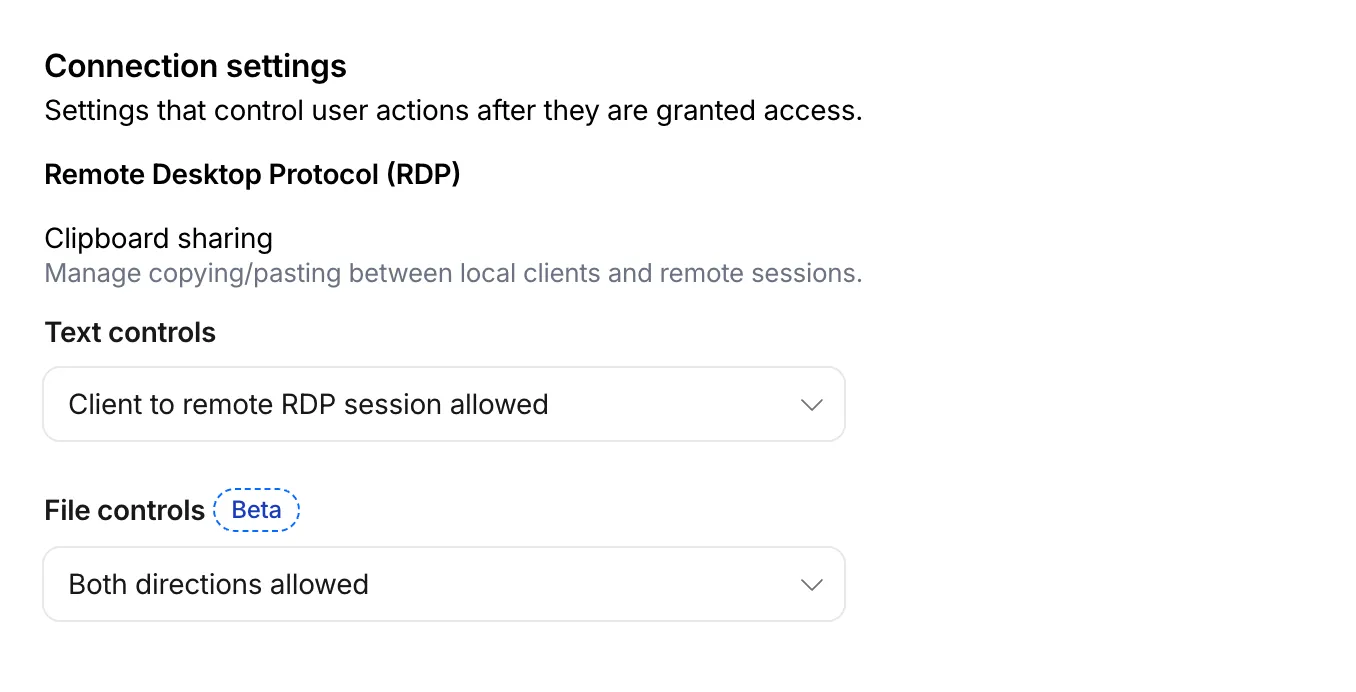
This feature is useful for organizations that support bring-your-own-device (BYOD) policies or third-party contractors using unmanaged devices. By restricting file transfers, you can prevent sensitive data from being moved out of the remote session to a user's personal device.
File transfer controls are configured per policy within your Access application, alongside existing text clipboard controls. For each policy, you can select one of the following options:
- Client to remote RDP session allowed — Users can upload files from their local machine into the browser-based RDP session.
- Remote RDP session to client allowed — Users can download files from the browser-based RDP session to their local machine.
- Both directions allowed — Users can upload and download files between their local machine and the browser-based RDP session.
- Disable copying/pasting — Users are not allowed to transfer files between their local machine and the browser-based RDP session.
By default, file transfer is denied for new policies. For existing Access applications created before this feature was available, file transfer remains denied.
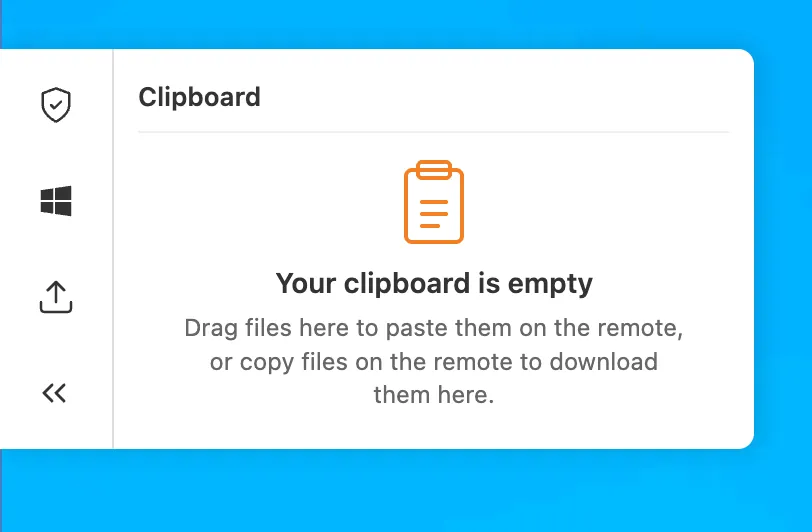
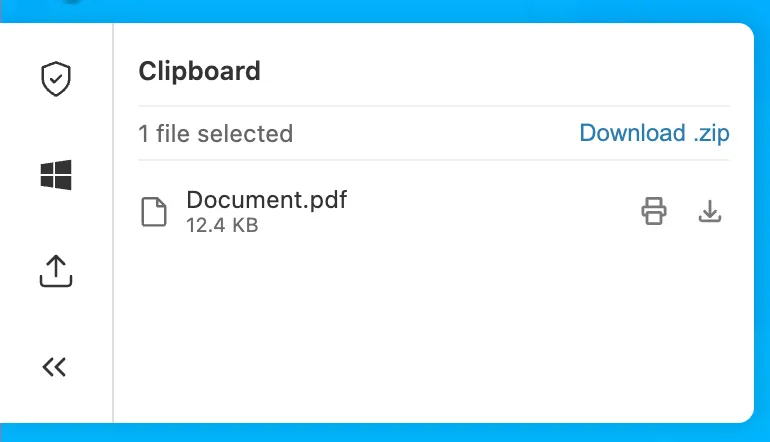
To upload, drag files into the browser window or select the settings gear icon on the left side of the RDP session. To download, copy a file in the remote session and select the settings gear to download it, download multiple files as a zip, or print PDFs to a local printer.
This feature is in beta and available on all Zero Trust plans. For more information, refer to File transfer for browser-based RDP.
Browser Isolation now supports Gateway authorization proxy endpoints. You can apply HTTP Isolate policies to traffic routed through authorization proxy endpoints, the same way you can for traffic from the Cloudflare One Client.
Previously, only source IP proxy endpoints supported Browser Isolation, and only with non-identity policies. Because authorization proxy endpoints authenticate users through an identity provider, you can now apply identity-based Isolate policies to PAC file-proxied traffic without requiring the Cloudflare One Client.
To get started, create an authorization proxy endpoint and build an Isolate policy.
You can now register a Cloudflare One Virtual Appliance and generate its license key directly from the dashboard, without contacting your account team.

- On the Connectors page, select Add an appliance and choose Virtual appliance to register a virtual appliance and generate its authentication key.
- Use Regenerate authentication key from a virtual appliance connector's menu to rotate its key. The previous key is immediately and irrevocably revoked.
- The authentication key is shown only once — copy and store it securely.
This complements the existing API and Terraform self-serve workflow for provisioning virtual appliances. Hardware appliances continue to use the existing account-team fulfillment workflow.
For details, refer to Configure a Cloudflare One Virtual Appliance.
You can now add hostname routes to a Cloudflare Mesh node, in addition to CIDR routes.
-
Requests
wiki.internal.local - DNS query
-
Returns a token IP, then rewrites the destination to the real private IP.
100.80.0.0/16 - Hostname route
-
Forwards traffic to the host on the local network
- Private host
wiki.internal.local·10.0.0.50
Instead of managing IP ranges, you can attract traffic for a hostname to a Mesh node:
- Private hostname (for example,
wiki.internal.local) — reach an internal application by name, which is useful when it has an unknown or ephemeral IP. On Mesh you do not need to run a DNS server; a local hosts-file entry on the node is enough, or you can use a Gateway resolver policy for split DNS. - Public hostname (for example,
www.example.com) — route that hostname's traffic through the node and egress via the node's public IP.
For setup steps, prerequisites, and DNS options, refer to Hostname routes.
-
A new GA release for the Linux Cloudflare One Client is now available on the stable releases downloads page.
This package is the same release as 2026.6.822.0, with a fix for our RPM package. Previously the repository served a single build to every OS version, so an install could pull a dependency that isn't available on that release. The repository now serves the correct build for each operating system version, so installs automatically pull the dependencies that version requires. Debian and Ubuntu were not affected.
If you installed version 2026.6.822.0 on an RPM-based distribution, we recommend refreshing your repository configuration:
sudo curl -fsSL https://pkg.cloudflareclient.com/cloudflare-warp-ascii.repo | sudo tee /etc/yum.repos.d/cloudflare-warp.repo
sudo dnf clean all
sudo dnf install cloudflare-warp
Access now correctly preserves URL fragment characters (
/,?,=,&,;) when redirecting users back to an application after login. Previously, these characters were encoded withencodeURIComponent, which mangled fragment-based routes used by single-page applications (SPAs).For example, an SPA URL like
https://app.example.com/#/dashboard?tab=settings&view=advancedwould previously redirect to a broken URL after login. This is now handled correctly.If your SPA users were experiencing broken navigation after authenticating through Access, this fix resolves the issue without any configuration changes.
Access for Infrastructure now supports independent multi-factor authentication (MFA) for SSH connections using YubiKey PIV keys. This adds a hardware-backed second factor to SSH access, ensuring that a compromised device session alone is not sufficient to reach your servers.
With per-application and per-policy configuration, you can enforce PIV key authentication for sensitive usernames (for example,
root) while applying different requirements for other usernames. You can also set an MFA session duration to control how often users must re-authenticate.Users enroll their YubiKey PIV key through the App Launcher. For enrollment instructions and SSH client setup, refer to Enroll a PIV key for infrastructure apps.
For setup instructions, refer to Enforce MFA for infrastructure applications.
You can now assign granular, resource-scoped roles for Cloudflare Gateway firewall policies and Zero Trust lists. Administrators can delegate access to specific policy types or list management without granting account-wide or product-wide control.
When you add a member or create a permission policy, the following resource-scoped roles are now available:
Role Description Zero Trust Gateway Firewall Policies Admin Can view and edit all Gateway firewall policies, including DNS, HTTP, and Network policies. Zero Trust Gateway DNS Policies Admin Can view and edit Gateway DNS policies. Zero Trust Gateway HTTP Policies Admin Can view and edit Gateway HTTP policies. Zero Trust Gateway Network Policies Admin Can view and edit Gateway Network policies. Zero Trust Gateway Egress Policies Admin Can view and edit Gateway Egress policies. Zero Trust Gateway Resolver Policies Admin Can view and edit Gateway Resolver policies. Zero Trust Gateway Policies Admin Can view and edit all Gateway policies. Zero Trust Gateway Policies Read Can view all Gateway policies. Zero Trust Gateway Read Only Can view all Gateway resources. Zero Trust DNS Locations Admin Can view and edit DNS locations. Zero Trust Proxy Endpoints Admin Can view and edit Gateway Proxy Endpoints. Zero Trust Account Lists Admin Can view and edit all Gateway and Access lists. Zero Trust Account Lists Read Can view all Gateway and Access lists. These roles allow you to:
- Grant a network engineer write access to Network policies only, without exposing DNS or HTTP policy configuration.
- Allow a security analyst to view all Gateway policies in read-only mode for auditing purposes.
- Delegate list management to a team that maintains block and allow lists without giving them access to policy configuration.
You can also now assign Resource-scoped roles. These roles are complementary to existing account-level roles, and allow you to grant access to a specific resource, like an individual Gateway policy or Cloudflare One list. Existing account-level roles continue to work. A member with the
Cloudflare GatewayorCloudflare Zero Trustrole retains full access to all Gateway resources. This ensures backward compatibility for existing automation and API tokens.- Review the resource-scoped roles on the Cloudflare role reference.
- Learn how to create permission policies that use these roles.
A new GA release for the Windows Cloudflare One Client is now available on the stable releases downloads page.
This release introduces multiple features from our previous beta release into stable release, including:
- The client now applies DNS search suffixes configured in your device profile / network policy. Administrators can push a list of DNS search domains that the client appends to single-label queries, alongside any system-configured suffixes. See DNS search suffixes for details.
- Added mandatory authentication. When enabled via MDM, the Cloudflare One Client blocks all Internet traffic from the moment the machine boots until the user authenticates, closing the visibility gap on newly deployed devices and during re-authentication. See the announcement blog and documentation for details.
- Upgraded security of device registration to be hardware-backed. Registration tokens can now be generated in the TPM (with TPM 2.0+) whenever it is available to provide stronger protection against device impersonation. See Hardware-backed registration for details.
- Added a local-file signal source for Emergency Disconnect. In addition to the existing HTTPS polling mechanism, administrators can now configure WARP to monitor for a file on disk; the presence of the file triggers an emergency disconnect even if both Cloudflare and your own infrastructure are unreachable. Either signal being asserted triggers disconnect; both must be cleared for normal operation to resume.
- Added new warp-cli debug commands for interactive connection diagnosis. See Extra debug logging for details.
- The local DNS proxy now supports DNSSEC passthrough. DNSSEC-signed responses are forwarded to the application intact (including DO/AD bits and RRSIG records), so applications that validate DNSSEC locally — including resolvers and the dig/drill tooling — work correctly through the client.
- Added a new MDM format for organization-wide settings, including a cleaner way to configure the compliance environment (e.g. FedRAMP). The previous per-configuration approach still works, but the new format is now recommended. See the updated Cloudflare One MDM documentation for details.
- Added support for dashboard-managed client version deployments. Administrators can now upgrade or downgrade the client version on enrolled devices directly from the Zero Trust dashboard. See Client version assignments for details.
Additional Changes and improvements
- Starting with 2026.6.822.0, the client unifies all API requests under the
api.devices.cloudflare.comSNI, where previously bothzero-trust-client.cloudflareclient.comandnotifications.cloudflareclient.comwere used. Review Cloudflare One Client with firewall to ensure systems that rely on SNI inspection do not block the API traffic. The behavior of previous client versions is unaffected. - Client Certificate device-posture checks now support template variables (e.g.
${serial_number},${device_uuid}) in the Subject Alternative Name field. Previously only the Common Name field accepted variables, which broke posture rules that pinned identity to a SAN entry. - Improved accessibility by using high contrast colors and more defined color boundaries when high contrast is enabled in Windows Accessibility settings.
- Path MTU Discovery (PMTUD) is now enabled by default.
- The UseWebView2 registry value (HKLM\SOFTWARE\Cloudflare\CloudflareWARP\UseWebView2 = y) is once again honored by the new GUI for authentication, so administrators who prefer the embedded WebView2 browser for sign-in can opt back in. This setting was effectively ignored in the previous release; the default browser was always used. This key is now also honored for re-authentications.
- Fixed a crash in the authentication browser when navigating to a site that prompts for browser permissions (microphone, camera, notifications, etc.). The same fix had previously landed for the captive-portal browser; this extends it to the auth browser.
- Fixed an issue in proxy mode where hostnames containing underscores (e.g. ai_app.com) were rejected, breaking apps that depend on such hostnames (notably ChatGPT sandbox apps). The local proxy now accepts underscore-containing hostnames in CONNECT requests.
- Fixed an issue where DNS queries would fail after the connection was idle, requiring users to retry.
- Fixed a high CPU issue when the device wakes from sleep.
- Users can now register with team names in any case format without errors.
- New UI fixes
- Fixed an issue where users with invalid MDM configurations were returned to the onboarding screen after successful authentication.
- Added a re-auth button and banner to the home screen so users don't miss it when their session expires.
- Added clear error messaging when the Cloudflare certificate needs to be installed.
- Brought back support for pausing the tunnel when connected to user-specified Wi-Fi networks for consumer users.
- New client UI now surfaces Split tunnel configuration and Local Domain Fallback configuration.
- Added ability to configure proxy mode for consumer users.
- Added back the option to quit for consumer users.
Known issues
- Single sign-on in the embedded WebView2 authentication browser may fail to use the Windows primary account, prompting for an interactive sign-in.
- An error indicating that Microsoft Edge can't read and write to its data directory may be displayed during captive portal login; this error is benign and can be dismissed.
- In rare cases, a registration may hang at "Checking your organization configuration" due to IPC errors. A system reboot should resolve the error, allowing registration to proceed.
- Windows ARM may prompt the user to close running applications while trying to install this version. Simply click "Ok" with the default highlighted option.
A new GA release for the macOS Cloudflare One Client is now available on the stable releases downloads page.
This release introduces multiple features from our previous beta release into stable release, including:
- The client now applies DNS search suffixes configured in your device profile / network policy. Administrators can push a list of DNS search domains that the client appends to single-label queries, alongside any system-configured suffixes. See DNS search suffixes for details.
- Upgraded security of device registration to be hardware-backed. Registration tokens can now be generated in the Secure Enclave whenever available to provide stronger protection against device impersonation. See Hardware-backed registration for details.
- Added a local-file signal source for Emergency Disconnect. In addition to the existing HTTPS polling mechanism, administrators can now configure WARP to monitor for a file on disk; the presence of the file triggers an emergency disconnect even if both Cloudflare and your own infrastructure are unreachable. Either signal being asserted triggers disconnect; both must be cleared for normal operation to resume.
- Added new warp-cli debug commands for interactive connection diagnosis. See Extra debug logging for details.
- The local DNS proxy now supports DNSSEC passthrough. DNSSEC-signed responses are forwarded to the application intact (including DO/AD bits and RRSIG records), so applications that validate DNSSEC locally — including resolvers and the dig/drill tooling — work correctly through the client.
- Added a new MDM format for organization-wide settings, including a cleaner way to configure the compliance environment (e.g. FedRAMP). The previous per-configuration approach still works, but the new format is now recommended. See the updated Cloudflare One MDM documentation for details.
- Added support for dashboard-managed client version deployments. Administrators can now upgrade or downgrade the client version on enrolled devices directly from the Zero Trust dashboard. See Client version assignments for details.
Additional Changes and improvements
- Starting with 2026.6.822.0, the client unifies all API requests under the
api.devices.cloudflare.comSNI, where previously bothzero-trust-client.cloudflareclient.comandnotifications.cloudflareclient.comwere used. Review Cloudflare One Client with firewall to ensure systems that rely on SNI inspection do not block the API traffic. The behavior of previous client versions is unaffected. - Client Certificate device-posture checks now support template variables (e.g.
${serial_number},${device_uuid}) in the Subject Alternative Name field. Previously only the Common Name field accepted variables, which broke posture rules that pinned identity to a SAN entry. - Improved accessibility by using high contrast colors and more defined color boundaries when high contrast is enabled in the macOS Display settings.
- Path MTU Discovery (PMTUD) is now enabled by default.
- Fixed the in-client captive-portal browser rendering a blank "Success" page on some airline Wi-Fi networks. The browser now more consistently loads the airline's real portal page so users can complete sign-in from inside the client instead of having to open a separate browser.
- Fixed an issue in proxy mode where hostnames containing underscores (e.g. ai_app.com) were rejected, breaking apps that depend on such hostnames (notably ChatGPT sandbox apps). The local proxy now accepts underscore-containing hostnames in CONNECT requests.
- Fixed an issue where DNS queries would fail after the connection was idle, requiring users to retry.
- Users can now register with team names in any case format without errors.
- New UI fixes
- Fixed an issue where users with invalid MDM configurations were returned to the onboarding screen after successful authentication.
- Added a re-auth button and banner to the home screen so users don't miss it when their session expires.
- Added clear error messaging when the Cloudflare certificate needs to be installed.
- Brought back support for pausing the tunnel when connected to user-specified Wi-Fi networks for consumer users.
- New client UI now surfaces Split tunnel configuration and Local Domain Fallback configuration.
- Added ability to configure proxy mode for consumer users.
- Added back the option to quit for consumer users.
Known issues
- Registration may hang at "Checking your organization configuration" due to IPC errors. A system reboot should resolve the error, allowing registration to proceed.
- When deploying with Microsoft Intune, the client may be repeatedly reinstalled because Intune adds the client's embedded framework bundles to its install-detection list, and those frameworks cannot be detected as installed on their own. See Repeated reinstalls on macOS with Microsoft Intune for the workaround.
A new GA release for the Linux Cloudflare One Client is now available on the stable releases downloads page.
This release introduces multiple features from our previous beta release into stable release, including:
- The client now applies DNS search suffixes configured in your device profile / network policy. Administrators can push a list of DNS search domains that the client appends to single-label queries, alongside any system-configured suffixes. See DNS search suffixes for details.
- Upgraded security of device registration to be hardware-backed. Registration tokens can now be generated in the TPM (with TPM 2.0+) whenever it is available to provide stronger protection against device impersonation. See Hardware-backed registration for details.
- Added a local-file signal source for Emergency Disconnect. In addition to the existing HTTPS polling mechanism, administrators can now configure WARP to monitor for a file on disk; the presence of the file triggers an emergency disconnect even if both Cloudflare and your own infrastructure are unreachable. Either signal being asserted triggers disconnect; both must be cleared for normal operation to resume.
- Added new warp-cli debug commands for interactive connection diagnosis. See Extra debug logging for details.
- The local DNS proxy now supports DNSSEC passthrough. DNSSEC-signed responses are forwarded to the application intact (including DO/AD bits and RRSIG records), so applications that validate DNSSEC locally — including resolvers and the dig/drill tooling — work correctly through the client.
- Added a new MDM format for organization-wide settings, including a cleaner way to configure the compliance environment (e.g. FedRAMP). The previous per-configuration approach still works, but the new format is now recommended. See the updated Cloudflare One MDM documentation for details.
Additional changes and improvements
- Starting with 2026.6.822.0, the client unifies all API requests under the
api.devices.cloudflare.comSNI, where previously bothzero-trust-client.cloudflareclient.comandnotifications.cloudflareclient.comwere used. Review Cloudflare One Client with firewall to ensure systems that rely on SNI inspection do not block the API traffic. The behavior of previous client versions is unaffected. - Cloudflare Mesh functionality using the Cloudflare One Client is now supported on RHEL 9 and 10.
- Cloudflare Mesh now supports hostname-based routing.
- Client Certificate device-posture checks now support template variables (e.g.
${serial_number},${device_uuid}) in the Subject Alternative Name field. Previously only the Common Name field accepted variables, which broke posture rules that pinned identity to a SAN entry. - Improved accessibility by using high contrast colors and more defined color boundaries when high contrast is enabled in the system display settings.
- Path MTU Discovery (PMTUD) is now enabled by default.
- Fixed the in-client captive-portal browser rendering a blank "Success" page on some airline Wi-Fi networks. The browser now more consistently loads the airline's real portal page so users can complete sign-in from inside the client instead of having to open a separate browser.
- Fixed an issue in proxy mode where hostnames containing underscores (e.g. ai_app.com) were rejected, breaking apps that depend on such hostnames (notably ChatGPT sandbox apps). The local proxy now accepts underscore-containing hostnames in CONNECT requests.
- Fixed an issue where DNS queries would fail after the connection was idle, requiring users to retry.
- Fixed an issue where some Debian releases experienced inaccurate version reporting for posture checks.
- Users can now register with team names in any case format without errors.
- New UI fixes
- Fixed an issue where users with invalid MDM configurations were returned to the onboarding screen after successful authentication.
- Added a re-auth button and banner to the home screen so users don't miss it when their session expires.
- Added clear error messaging when the Cloudflare certificate needs to be installed.
- Brought back support for pausing the tunnel when connected to user-specified Wi-Fi networks for consumer users.
- New client UI now surfaces Split tunnel configuration and Local Domain Fallback configuration.
- Added ability to configure proxy mode for consumer users.
- Added back the option to quit for consumer users.
For RHEL deployments, this release introduces a dependency on the Extra Packages for Enterprise Linux repository (EPEL). The EPEL repository provides packages that support the captive portal detection’s in-app browser authentication and system tray icon. See Getting started with EPEL for instructions on enabling EPEL.
Known issues
- Registration may hang at "Checking your organization configuration" due to IPC errors. A system reboot should resolve the error, allowing registration to proceed.
You can now connect autonomous agents and bots to an MCP server portal using an Access service token. Service token sessions can reach upstream MCP servers through the portal without a browser-based OAuth flow.
To set this up:
- Add a Service Auth policy that matches your service token to the portal's Access application.
- Add a Service Auth policy that matches the same token to each linked MCP server's Access application.
- Turn Require user auth off (
on_behalf: false) for each linked server so the portal uses the admin credential instead of a per-user OAuth grant.
The bot connects with
CF-Access-Client-IdandCF-Access-Client-Secretheaders and sees the tools from every linked server it is authorized for. Servers that still require per-user OAuth are excluded from service token sessions because a service token cannot complete a per-user OAuth grant.For step-by-step setup, refer to Connect with a service token.
A new Beta release for the macOS Cloudflare One Client is now available on the beta releases downloads page.
This beta release introduces upgraded security of device registration to be hardware-backed. Registration tokens can now be generated in the Secure Enclave whenever available to provide stronger protection against device impersonation.
Additional changes and improvements
This release also introduces multiple fixes and improvements including:
- Improved accessibility by using high contrast colors and more defined color boundaries when high contrast is enabled in the macOS Display settings.
- Path MTU Discovery (PMTUD) is now enabled by default.
- Fixed an issue where DNS queries would fail after the connection was idle, requiring users to retry.
- Users can now register with team names in any case format without errors.
- New UI fixes
- Fixed an issue where users with invalid MDM configurations were returned to the onboarding screen after successful authentication.
- Added a re-auth button and banner to the home screen so users don't miss it when their session expires.
- Added clear error messaging when the Cloudflare certificate needs to be installed.
- Brought back support for pausing the tunnel when connected to user-specified Wi-Fi networks for consumer users.
- New client UI now surfaces Split tunnel configuration and Local Domain Fallback configuration.
- Added ability to configure proxy mode for consumer users.
- Added back the option to quit for consumer users.
Known issues
- Registration may hang at "Checking your organization configuration" due to IPC errors. A system reboot should resolve the error, allowing registration to proceed.
Regional Services now supports Regionalized IP Bindings, letting you regionalize traffic at the IP layer for prefixes you bring to Cloudflare through Bring Your Own IP (BYOIP).
Where Regional Hostnames regionalize traffic by hostname, Regionalized IP Bindings let you bind a CIDR from one of your prefixes to a region — ideal for address-map deployments and any service you address by IP rather than hostname. Cloudflare then terminates TLS and processes traffic to those addresses only within the data centers in that region.
Regionalized IP Bindings requires the Regional Services and Regional Services for BYOIP entitlements. Contact your account team to enable them.
To get started, refer to Regionalized IP Bindings.
The Routes page in the Cloudflare dashboard now shows the routes across all of your connectors — Cloudflare Mesh and Cloudflare Tunnel routes alongside Cloudflare WAN and Magic Transit static routes — in a single table, instead of a separate routes view per product.

From the unified Routes page you can:
- Visualize your network with an interactive map that shows how your destinations flow through to your connectors — including equal-cost multi-path (ECMP) routes where the same prefix is served by several connectors. Select a node to filter the table down to the routes behind it.
- See every route in one table, with its destination, type, connector, priority, and source, and filter or sort to find what you need.
- Create, edit, and delete routes of any supported type without leaving the page. When adding a Cloudflare WAN or Magic Transit static route, you now pick the next hop by connector name instead of typing its IP.
- Manage virtual networks from a dedicated tab.
- Test a route to see which connector and next hop a destination resolves to before you commit a change.
To find it, go to Networking > Routes in the dashboard sidebar.
Go to RoutesYour existing routes, APIs, and configurations are unchanged — this is a dashboard experience that brings them together in one place. Learn how to add routes and manage virtual networks.
When you create a new Zero Trust organization, Cloudflare now adds the Cloudflare identity provider as your default login method. Previously, new organizations started with one-time PIN (OTP).
With the Cloudflare identity provider, your users authenticate using their existing Cloudflare account credentials, and authentication is restricted to members of your account. You can still add OTP or connect any third-party identity provider whenever you need to.
This change only applies to newly created accounts. Existing organizations keep the login methods they already have configured. If you would like to use the Cloudflare Identity Provider in an existing account, you must enable it.
You can now define custom topics for AI prompt protection. Predefined AI prompt topics cover common content and intent categories such as PII, source code, and jailbreak attempts. Custom topics let you detect unique or proprietary concepts that are not included in predefined categories.
You describe a custom topic in natural language, and Cloudflare DLP detects whether a prompt matches that topic based on context rather than specific keywords. For example, a topic that describes confidential merger discussions matches a prompt that paraphrases the deal, even when the prompt never uses the word merger or names the companies involved. To detect literal values such as internal codenames or product identifiers, use a custom wordlist or pattern entry instead.
Custom topics run through the same application granular controls path as predefined AI prompt topics. Custom topics are available for ChatGPT, Google Gemini, Perplexity, and Claude.
- In the Cloudflare dashboard ↗, go to Zero Trust > Data loss prevention > Detection entries.
- Select AI prompt topics, then select Custom Prompt Topic.
- Describe the topic in natural language. Be specific about the concept you want to detect. For example, describe unreleased product roadmap details or confidential customer contract terms.
- Add this detection entry to an existing DLP profile, or create a new DLP profile.
- Use the profile in a Gateway HTTP policy to log or block prompts that match the topic.
For more information, refer to AI prompt topics.
Workers using a VPC Network binding with
network_id: "cf1:network"now egress to public Internet destinations through Cloudflare Gateway. This means your existing Zero Trust traffic policies — DNS, HTTP, Network, and egress — extend to traffic that originates from your Workers, the same way they do for WARP users today.-
Calls
env.EGRESS.fetch() - VPC binding
-
Bind via
cf1:network - Public Internet
Any public hostname or IP
What you get by default:
- Visibility. Worker egress shows up in Gateway DNS, HTTP, and Network logs alongside your other traffic, so you can audit what your Workers are calling and when.
- Enforcement. Any existing Gateway policy whose selectors match a Worker request will apply — including allow / block lists, DNS category filtering, and HTTP destination rules. If you have already blocked a category for your workforce, your Workers inherit that block.
JSONC {"vpc_networks": [{"binding": "EGRESS","network_id": "cf1:network","remote": true,},],}TOML [[vpc_networks]]binding = "EGRESS"network_id = "cf1:network"remote = trueJavaScript // Egress to a public destination — subject to your Gateway policies and loggedconst response = await env.EGRESS.fetch("https://api.example.com/data");TypeScript // Egress to a public destination — subject to your Gateway policies and loggedconst response = await env.EGRESS.fetch("https://api.example.com/data");For configuration options, refer to VPC Networks. For policy authoring, refer to Cloudflare Gateway traffic policies.
-
Cloudflare Access now supports IdP federation, which allows organizations to share a single identity provider across multiple Cloudflare accounts.
Instead of configuring the same IdP (for example, Okta or Entra ID) separately in every account, you configure it once in a source account and share it with the other accounts in your organization. Each recipient account gets a read-only IdP connection that routes authentication back to the source account through a bridge — a hidden application in the source account that brokers the cross-account login. End users sign in with their existing IdP credentials, and each account's Access policies evaluate the resulting identity just like any other IdP login.
Key capabilities:
- One IdP, many accounts — Configure your IdP once and share it with all accounts in your organization.
- Lifecycle management — As accounts join or leave your Cloudflare organization, their IdP connections are provisioned and removed automatically — no manual cleanup required.
- Immutable recipient connections — IdP connections in recipient accounts cannot be accidentally modified or deleted.
To get started, refer to IdP federation.