
Markdown for Agents now preserves security- and cache-relevant response headers from your origin when converting HTML to Markdown:
- Markdown for Agents preserves security headers such as
Strict-Transport-Security(HSTS),Content-Security-Policy(CSP),X-Frame-Options,Set-Cookie, and CORS headers (for example,Access-Control-Allow-Origin) on the converted response. - Caching headers (
Cache-Control,Expires,Age) continue to pass through.
Your origin's Content Signals ↗ policy is now authoritative. If your origin sets a
content-signalheader, Markdown for Agents preserves it. When the origin does not send one, Cloudflare adds the defaultContent-Signal: ai-train=yes, search=yes, ai-input=yes.This release also fixes relative link resolution for directory-style base URLs (those ending in a trailing slash). Previously, relative links such as
../page/could resolve one path segment too high and return a404. Links are now resolved correctly per RFC 3986 ↗.Refer to our developer documentation for more details.
- Markdown for Agents preserves security headers such as
On October 5, 2026, two changes take effect across the Zero Trust Networks API and Cloudflare Tunnel API: the CIDR-encoded route endpoints are removed, and tunnel list and get responses no longer include the
connectionsfield. If you manage private network routes or read tunnel connection details through the API,cloudflared, Terraform, or another integration, review the changes in the following sections and migrate before the removal date.The CIDR-encoded route endpoints are deprecated in favor of the standard,
route_id-based endpoints that already exist today. Both sets of endpoints route a private network through Cloudflare Tunnel or Cloudflare Mesh (the API still refers to Mesh nodes aswarp_connector) — only the request shape changes.Deprecated endpoints (removed October 5, 2026):
- Create a tunnel route (CIDR Endpoint):
POST /accounts/{account_id}/teamnet/routes/network/{ip_network_encoded} - Update a tunnel route (CIDR Endpoint):
PATCH /accounts/{account_id}/teamnet/routes/network/{ip_network_encoded} - Delete a tunnel route (CIDR Endpoint):
DELETE /accounts/{account_id}/teamnet/routes/network/{ip_network_encoded}
Replacement endpoints:
- Create a tunnel route:
POST /accounts/{account_id}/teamnet/routes - Update a tunnel route:
PATCH /accounts/{account_id}/teamnet/routes/{route_id} - Delete a tunnel route:
DELETE /accounts/{account_id}/teamnet/routes/{route_id}
Deprecated (CIDR-encoded path) Replacement Route identifier URL-encoded CIDR in the path ( /network/{ip_network_encoded})route_idin the path (networkmoves to the request body on create)Create POST .../teamnet/routes/network/{ip_network_encoded}POST .../teamnet/routeswithnetworkandtunnel_idin the bodyUpdate PATCH .../teamnet/routes/network/{ip_network_encoded}PATCH .../teamnet/routes/{route_id}Delete DELETE .../teamnet/routes/network/{ip_network_encoded}DELETE .../teamnet/routes/{route_id}- Capture each route's
route_idby calling List tunnel routes, or read it from the response the first time you create a route with the replacement endpoint. - Update any scripts, backend services, or CI/CD pipelines that call the CIDR-encoded endpoints directly.
- If you manage routes with the
cloudflared tunnel route ip add | deletecommands, upgradecloudflaredto the latest version ↗. - If you manage routes with Terraform, make sure you are on a current version of the
cloudflare_zero_trust_tunnel_cloudflared_route↗ resource and the Cloudflare Terraform provider ↗.
Terminal window # Before: create a route by URL-encoding the CIDR into the pathcurl https://api.cloudflare.com/client/v4/accounts/$ACCOUNT_ID/teamnet/routes/network/172.16.0.0%2F16 \-H 'Content-Type: application/json' \-H "Authorization: Bearer $CLOUDFLARE_API_TOKEN" \-d '{"tunnel_id": "'$TUNNEL_ID'", "comment": "Example comment for this route."}'# After: create a route with the network in the request bodycurl https://api.cloudflare.com/client/v4/accounts/$ACCOUNT_ID/teamnet/routes \-H 'Content-Type: application/json' \-H "Authorization: Bearer $CLOUDFLARE_API_TOKEN" \-d '{"network": "172.16.0.0/16", "tunnel_id": "'$TUNNEL_ID'", "comment": "Example comment for this route."}'# After: update or delete a route using its route_idcurl -X PATCH https://api.cloudflare.com/client/v4/accounts/$ACCOUNT_ID/teamnet/routes/$ROUTE_ID \-H 'Content-Type: application/json' \-H "Authorization: Bearer $CLOUDFLARE_API_TOKEN" \-d '{"comment": "Updated comment for this route."}'curl -X DELETE https://api.cloudflare.com/client/v4/accounts/$ACCOUNT_ID/teamnet/routes/$ROUTE_ID \-H "Authorization: Bearer $CLOUDFLARE_API_TOKEN"Starting the same day, the
connectionsarray is removed from list and get responses for Cloudflare Tunnel and Cloudflare Mesh nodes (thecfd_tunnelandwarp_connectorAPI resources). Query the dedicated connections endpoint instead of reading the field off the tunnel or node object.This affects:
GET /accounts/{account_id}/cfd_tunnel—connectionsremoved from each item inresultGET /accounts/{account_id}/cfd_tunnel/{tunnel_id}—connectionsremoved fromresultGET /accounts/{account_id}/warp_connector—connectionsremoved from each item inresultGET /accounts/{account_id}/warp_connector/{tunnel_id}—connectionsremoved fromresult
Fetch connection details from the tunnel-specific connections endpoint instead of parsing it off the list or get response. For Cloudflare Tunnel, call
GET /accounts/{account_id}/cfd_tunnel/{tunnel_id}/connections. For Cloudflare Mesh, callGET /accounts/{account_id}/warp_connector/{tunnel_id}/connections.Terminal window # Before: read connections off the tunnel objectcurl https://api.cloudflare.com/client/v4/accounts/$ACCOUNT_ID/cfd_tunnel/$TUNNEL_ID \-H "Authorization: Bearer $CLOUDFLARE_API_TOKEN"# After: query connections directlycurl https://api.cloudflare.com/client/v4/accounts/$ACCOUNT_ID/cfd_tunnel/$TUNNEL_ID/connections \-H "Authorization: Bearer $CLOUDFLARE_API_TOKEN"Update any dashboards, monitoring scripts, or automation that parses
connectionsfrom the tunnel list or get response.cloudflaredand the Cloudflare Terraform provider do not read this field, so no changes are required on their side for this part of the update.- Smaller, faster responses. Cloudflare Tunnel and Cloudflare Mesh nodes with many connections no longer inflate every list and get call — connection detail is only fetched when you need it.
- A single way to identify a route. Consolidating on
route_idremoves the need to URL-encode CIDR ranges into the path and matches how every other resource in the Zero Trust Networks API is addressed. - Consistency across the API. Both changes align these endpoints with Cloudflare's standard REST conventions for resource identifiers and nested detail endpoints.
To learn more, refer to the Zero Trust Networks API, the Cloudflare Tunnel API, and Routes documentation.
- Create a tunnel route (CIDR Endpoint):
Enterprise customers can now push per-connection WebSocket analytics to any Logpush destination using the new
websocket_analyticsdataset. Each log record is emitted when a WebSocket connection closes and includes fields that were previously only available to Cloudflare engineers via internal tooling.Key fields include:
ConnectionCloseReason— why the connection ended:peerReset,peerNoError,timedOut,upstreamReset,protocolViolation,unspecifiedError, ornone.ConnectionCloseSource— which side initiated the close:upstream,downstream,me, orboth.ConnectionTransportCloseCode— the TLS alert code or TCP-level close code for additional precision.RayID— correlate WebSocket connection events with your existing HTTP Request logs.
The dataset also includes directional byte counts (
BytesSentClient,BytesReceivedClient,BytesSentOrigin,BytesReceivedOrigin), connection timestamps, client IP, colo code, and request metadata from the original WebSocket upgrade.This data lets you build alerts on connection close patterns — for example, detecting spikes in TCP resets (
ConnectionCloseReason == "peerReset") grouped by host and data center — directly in your existing log analysis tools.For the full list of available fields, refer to WebSocket Analytics.
Cloudflare has updated Logpush datasets:
- Gateway DNS (added):
AppliedMaxTTLandUpstreamRecordTTLs. - Gateway HTTP (added):
Warnings. - HTTP requests (added):
CacheLockWaitedMs.
For the complete field definitions for each dataset, refer to Logpush datasets.
- Gateway DNS (added):
You can now assign granular, resource-scoped roles for Cloudflare Gateway firewall policies and Zero Trust lists. Administrators can delegate access to specific policy types or list management without granting account-wide or product-wide control.
When you add a member or create a permission policy, the following resource-scoped roles are now available:
Role Description Zero Trust Gateway Firewall Policies Admin Can view and edit all Gateway firewall policies, including DNS, HTTP, and Network policies. Zero Trust Gateway DNS Policies Admin Can view and edit Gateway DNS policies. Zero Trust Gateway HTTP Policies Admin Can view and edit Gateway HTTP policies. Zero Trust Gateway Network Policies Admin Can view and edit Gateway Network policies. Zero Trust Gateway Egress Policies Admin Can view and edit Gateway Egress policies. Zero Trust Gateway Resolver Policies Admin Can view and edit Gateway Resolver policies. Zero Trust Gateway Policies Admin Can view and edit all Gateway policies. Zero Trust Gateway Policies Read Can view all Gateway policies. Zero Trust Gateway Read Only Can view all Gateway resources. Zero Trust DNS Locations Admin Can view and edit DNS locations. Zero Trust Proxy Endpoints Admin Can view and edit Gateway Proxy Endpoints. Zero Trust Account Lists Admin Can view and edit all Gateway and Access lists. Zero Trust Account Lists Read Can view all Gateway and Access lists. These roles allow you to:
- Grant a network engineer write access to Network policies only, without exposing DNS or HTTP policy configuration.
- Allow a security analyst to view all Gateway policies in read-only mode for auditing purposes.
- Delegate list management to a team that maintains block and allow lists without giving them access to policy configuration.
You can also now assign Resource-scoped roles. These roles are complementary to existing account-level roles, and allow you to grant access to a specific resource, like an individual Gateway policy or Cloudflare One list. Existing account-level roles continue to work. A member with the
Cloudflare GatewayorCloudflare Zero Trustrole retains full access to all Gateway resources. This ensures backward compatibility for existing automation and API tokens.- Review the resource-scoped roles on the Cloudflare role reference.
- Learn how to create permission policies that use these roles.
Cloudflare Logpush now supports firewall events as an account-scoped dataset. Configure a single Logpush job at the account level to receive firewall events for every zone in the account, instead of creating and maintaining a separate job per zone.
The dataset includes a new
ZoneNamefield so you can identify which zone each event came from when consuming logs in your downstream pipeline.- A new account-scoped
firewall_eventsdataset, configurable via the Logpush API or the Cloudflare dashboard. - The same fields and filter expressions supported by the existing zone-scoped firewall events dataset, plus the new
ZoneNamefield. - Support for all existing Logpush destinations.
- A new account-scoped
You can now search API tokens by name, making it easier to find specific tokens across large token lists without manually paginating.
- Dashboard search: Both account API tokens ↗ and user API tokens ↗ pages now include a search bar. Type a name to filter results.
- API search support: The
/user/tokensand/accounts/{account_id}/tokensendpoints now accept anamequery parameter to filter tokens by name.
For more information, refer to Create an API token and Account API tokens.
You can now, as an Organization Super Administrator, view organization-level audit logs in the Cloudflare dashboard, in addition to the existing API access.
Organization audit logs help you monitor activity across your organization. You can see who performed an action, what changed, when it happened, how it was performed, and whether it succeeded or failed.
You can filter and search logs by actor, action, result, resource, request details, and timestamp. Use these logs to troubleshoot changes, investigate unexpected access, and support security or compliance workflows.
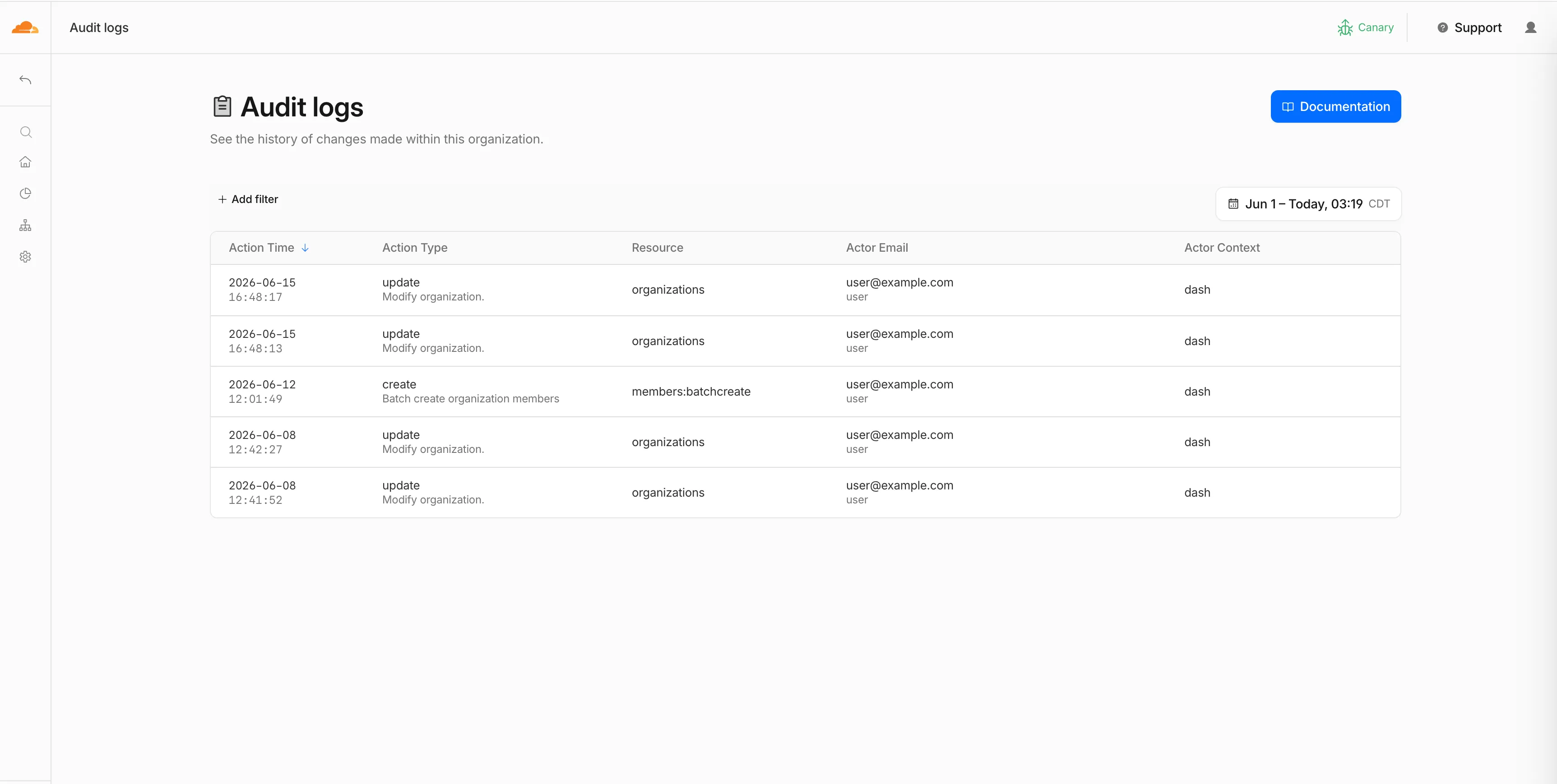
If you are viewing account-level audit logs and the account belongs to an organization where you are an Organization Super Administrator, select View Organization Audit Logs to open the parent organization's audit logs.

To get started, go to Organizations, select your organization, then go to Manage Organization > Audit Logs.
For more information, refer to the Audit Logs documentation.
Cloudflare has updated Logpush datasets:
- WebSocket Analytics: A new dataset with fields including
BytesReceivedClient,BytesReceivedOrigin,BytesSentClient,BytesSentOrigin,ClientASN,ClientIP,ClientRequestHost,ClientRequestPath,ClientRequestUserAgent,ColoCode,ConnectionCloseReason,ConnectionCloseSource,ConnectionID,ConnectionTransportCloseCode,EdgeEndTimestamp,EdgeStartTimestamp, andRayID.
- Firewall events (added):
ZoneName. The Firewall events dataset is now also available for account-scope Logpush, in addition to the existing zone scope. - Email Security Alerts (added):
BCC,DKIMResult,DMARCPolicy,DMARCResult, andSPFResult.
For the complete field definitions for each dataset, refer to Logpush datasets.
- WebSocket Analytics: A new dataset with fields including
The Routes page in the Cloudflare dashboard now shows the routes across all of your connectors — Cloudflare Mesh and Cloudflare Tunnel routes alongside Cloudflare WAN and Magic Transit static routes — in a single table, instead of a separate routes view per product.

From the unified Routes page you can:
- Visualize your network with an interactive map that shows how your destinations flow through to your connectors — including equal-cost multi-path (ECMP) routes where the same prefix is served by several connectors. Select a node to filter the table down to the routes behind it.
- See every route in one table, with its destination, type, connector, priority, and source, and filter or sort to find what you need.
- Create, edit, and delete routes of any supported type without leaving the page. When adding a Cloudflare WAN or Magic Transit static route, you now pick the next hop by connector name instead of typing its IP.
- Manage virtual networks from a dedicated tab.
- Test a route to see which connector and next hop a destination resolves to before you commit a change.
To find it, go to Networking > Routes in the dashboard sidebar.
Go to RoutesYour existing routes, APIs, and configurations are unchanged — this is a dashboard experience that brings them together in one place. Learn how to add routes and manage virtual networks.
Cloudflare's Terraform v5 Provider makes it easy for developers to manage their Cloudflare infrastructure using a configuration as code approach. It releases every 2-3 weeks ↗ to ensure that you can always manage the latest features in the platform. This week, we launched Terraform v5.20.0, which adds 24 new resources, bumps the underlying Go SDK to cloudflare-go v7, and includes a range of bug fixes and state upgraders based on community feedback.
- cloudflare_ai_search_namespace: Manage AI Search namespaces
- cloudflare_custom_csr: Manage custom certificate signing requests
- cloudflare_dls_prefix_binding: Manage DLS regional service prefix bindings
- cloudflare_flagship_app: Manage Flagship feature flag apps
- cloudflare_flagship_flag: Manage Flagship feature flags
- cloudflare_google_tag_gateway: Manage Google Tag Gateway
- cloudflare_load_balancer_monitor_group: Manage load balancer monitor groups
- cloudflare_oauth_client: Manage IAM OAuth clients
- cloudflare_origin_cloud_region: Manage origin cloud regions (v2 endpoints)
- cloudflare_secrets_store: Manage Secrets Store instances
- cloudflare_secrets_store_secret: Manage Secrets Store secrets
- cloudflare_share: Manage resource shares
- cloudflare_share_recipient: Manage share recipients
- cloudflare_share_resource: Manage shared resources
- cloudflare_zero_trust_device_deployment_groups: Manage Zero Trust device deployment groups
- cloudflare_zero_trust_dlp_data_class: Manage DLP data classes
- cloudflare_zero_trust_dlp_data_tag: Manage DLP data tags
- cloudflare_zero_trust_dlp_data_tag_category: Manage DLP data tag categories
- cloudflare_zero_trust_dlp_sensitivity_group: Manage DLP sensitivity groups
- cloudflare_zero_trust_dlp_sensitivity_level: Manage DLP sensitivity levels
- cloudflare_zero_trust_dlp_sensitivity_level_order: Manage DLP sensitivity level ordering
- cloudflare_zero_trust_resource_library_application: Manage Zero Trust resource library applications
- cloudflare_zero_trust_resource_library_category: Manage Zero Trust resource library categories
- cloudflare_zero_trust_tunnel_warp_connector_config: Manage WARP connector tunnel configurations
- cache: add create (POST) method for smart_tiered_cache
- cache: update OPCR config to v2 endpoints
- dlp: promote classification Stainless config to main
- dlp: add custom prompt topics endpoint
- email_security_block_sender: state upgrader for v4 to v5 migration
- email_security_impersonation_registry: state upgrader for v4 to v5 migration
- email_security_trusted_domains: state upgrader for v4 to v5 migration
- snippets: add Terraform
id_propertyannotations for snippet and snippet_rules - bump Go SDK to cloudflare-go v7
- account_member: missing upgrade path from v5.0–v5.15
- authenticated_origin_pulls_settings: nil pointer panic
- bot_management: restore
content_bots_protectionhandling in model.go - dns_record: prevent FQDN normalization from swallowing name shortening changes
- list: nullify empty nested objects to prevent inconsistent result after apply
- load_balancer_pool: accept early-v5 object-shape state at schema_version=0
- load_balancer_pool: add
UseStateForUnknownforload_sheddingattribute to prevent drift - r2_custom_domain: restore degraded-response handling in resource.go
- regional_hostname: update cloudflare-go imports from v6 to v7
- secrets_store: fix model/schema parity and guard acceptance tests
- spectrum_application: accept early-v5 object-shape state at schema_version=0
- worker: preserve
observability.traces.propagation_policyacross reads - worker: add
propagation_policyto observability defaults - worker_version: restore handwritten D1
database_idhandling - workers_custom_domain: missing
CertIdfield in state migration - workers_script: restore annotations Read workaround stripped by codegen
- zero_trust_access_identity_provider: change
read_onlyfrom computed to optional - zero_trust_access_identity_provider: add
UseStateForUnknownto SAML-only config fields - zero_trust_access_identity_provider: use
UseNonNullStateForUnknownon scim_config fields - zero_trust_access_policy: populate
account_idwhen migrating zone-scoped v4 state - zero_trust_access_policy: missing
common_namestransform in migration - gracefully handle nil pointer dereference when config has
attributes_flatduring migration - set initial schema version to 500 for all new resources
Extracted
MoveStatenil guard into shared helper
Pay-as-you-go customers can now view billable usage and create budget alerts directly from the product overview pages for Workers & Pages, D1, R2, Workers KV, Queues, Vectorize, Durable Objects, and Containers. A new sidebar widget shows current-period spend and the billing cycle date range, alongside a button to create a budget alert.
The widget pulls from the same data as the Billable Usage dashboard and aligns to your billing cycle (or the current day on Free plans), so the numbers match your invoice. Enterprise contract accounts are not yet supported.
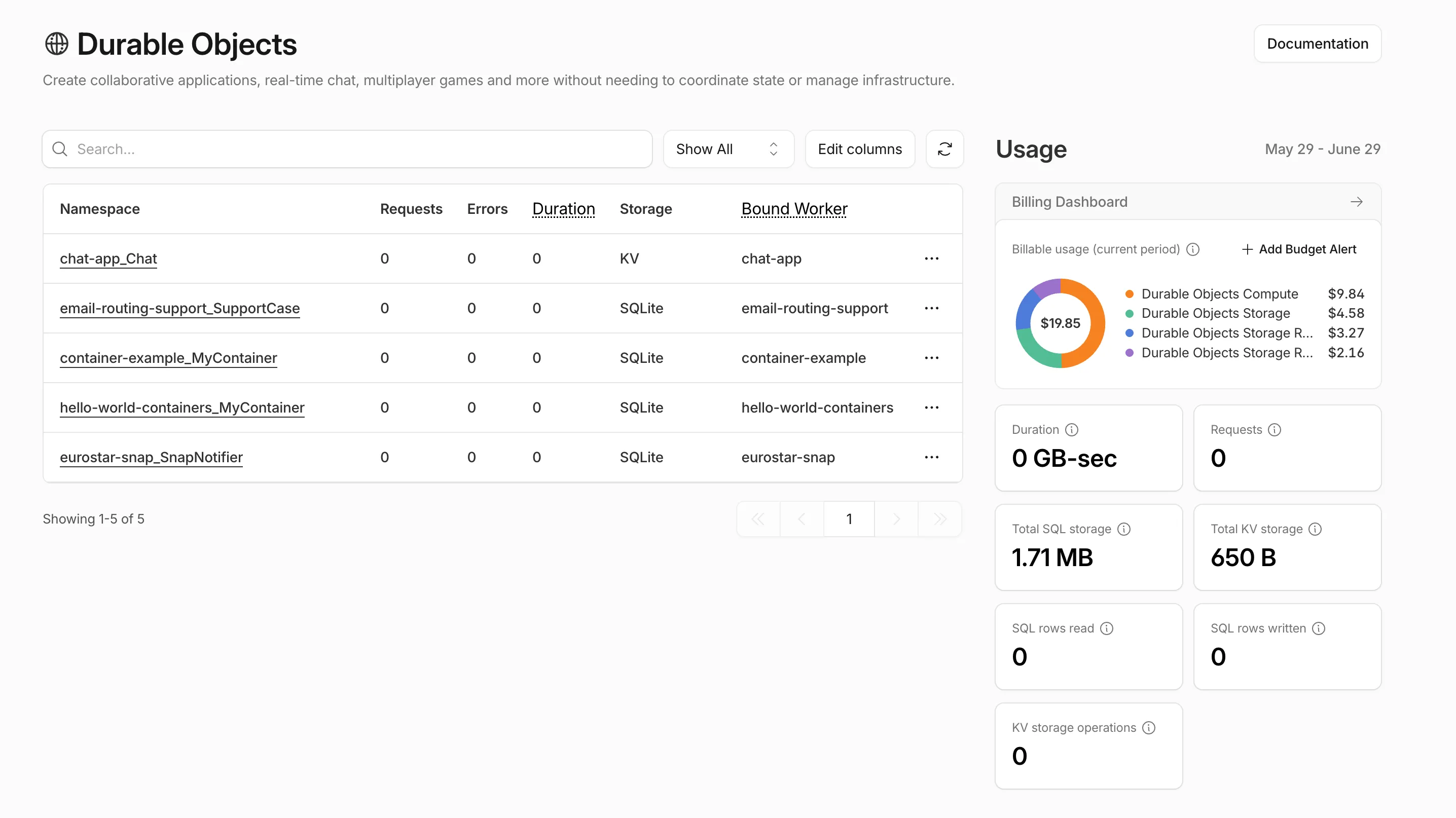
Selecting Create budget alert opens the budget alert flow inline so you can set a dollar threshold in the same place you are reviewing usage. Budget alerts apply to your total account-level spend across all products, not just the product page you create them from.
For more information, refer to the Usage-based billing documentation.
Today we are launching self-managed OAuth, enabling developers to build third-party applications that integrate with Cloudflare via OAuth. This provides a more secure, user-friendly, and manageable alternative to API tokens.
OAuth lets third-party applications act on behalf of a user to access their Cloudflare account. For example, after a user grants consent, Wrangler can deploy Workers into that account.
Cloudflare Developers can now create and manage their own OAuth applications to integrate with Cloudflare.
To create an application, go to Manage account > OAuth clients in your account on the Cloudflare dashboard.
Go to OAuth clientsIf you have used an API token to call Cloudflare APIs, OAuth client scopes will look familiar. Select only the scopes your application needs during application creation, and include that scope list when sending users to Cloudflare for consent.
Users can review the requested scopes before they consent.
Applications start with
privatevisibility. Private applications can only be used by members of the account where the application was created.To make an application available to any Cloudflare user, complete the prerequisites for
publicvisibility.For more information, refer to client visibility.
Before an application can be made public, you must verify the client domain. Domain verification helps users confirm that the application owner controls the domain shown on the consent page.
After verification, users see a verified badge on the consent page.
For more information, refer to domain verification.
For more information, refer to OAuth clients.
Cloudflare has updated Logpush datasets:
- Turnstile Events: A new dataset with fields including
ASN,Action,BrowserMajor,BrowserName,ClientIP,CountryCode,EventType,Hostname,OSMajor,OSName,Sitekey,Timestamp, andUserAgent.
For the complete field definitions for each dataset, refer to Logpush datasets.
- Turnstile Events: A new dataset with fields including
Cloudflare has updated Logpush datasets:
- DEX Device State Events (added):
DeviceRegistrationProfileID. - Gateway HTTP (added):
AddedHeaders,DeletedHeaders, andSetHeaders. - HTTP requests (added):
MatchedRules.
For the complete field definitions for each dataset, refer to Logpush datasets.
- DEX Device State Events (added):
Starting with
cloudflaredversion 2026.5.2 ↗, Cloudflare Tunnel automates the entire connectivity pre-checks workflow directly inside the binary. Previously, customers had to installdigandnetcatand run those commands by hand to verify their environment. Nowcloudflareddoes it natively at startup — and surfaces actionable remediation when something is blocked.
On every
cloudflared tunnel run(andcloudflared tunnel diag), the binary now natively checks:- DNS resolution —
region1.v2.argotunnel.comandregion2.v2.argotunnel.comresolve to valid Cloudflare IPs. - Transport connectivity — outbound
UDP (QUIC)andTCP (HTTP/2)on port7844. - Management API — outbound
TCP/443toapi.cloudflare.comfor software updates.
Results are printed in a scannable CLI table with three states:
- ✅ Pass — the check succeeded.
- ⚠️ Warn — a non-blocking issue, for example the Management API is unreachable so automatic updates will not work, but the tunnel will still come up.
- ❌ Fail — a blocking issue, with a specific remediation hint (for example,
Allow outbound UDP on port 7844).
If DNS is unresolvable, or both UDP and TCP fail on port 7844,
cloudflaredexits early with the failure rather than looping on opaquefailed to dialerrors.Pre-checks now run automatically on every start, which also catches regressions like overnight firewall policy changes — no need to remember to rerun the troubleshooting guide.
To get the new behavior, upgrade
cloudflaredto version2026.5.2or later. For more details, refer to the Connectivity pre-checks documentation.- DNS resolution —
The Billing Profile now has a modern UI and a single space that unifies billing information, payment method management and an enhanced subscriptions view under a single Subscriptions tab.
The Subscriptions tab brings billing information, payment method management, and your subscriptions together in one place. The payment management and Pay overdue balances flows now use the latest checkout as product purchase flows, so you can pay with Apple Pay, Google Pay, Link, and Instant Bank Payments via Link alongside cards and PayPal.
New cards complete 3D Secure authentication when the issuer requires it — for example, the EU under PSD2 and India under RBI.
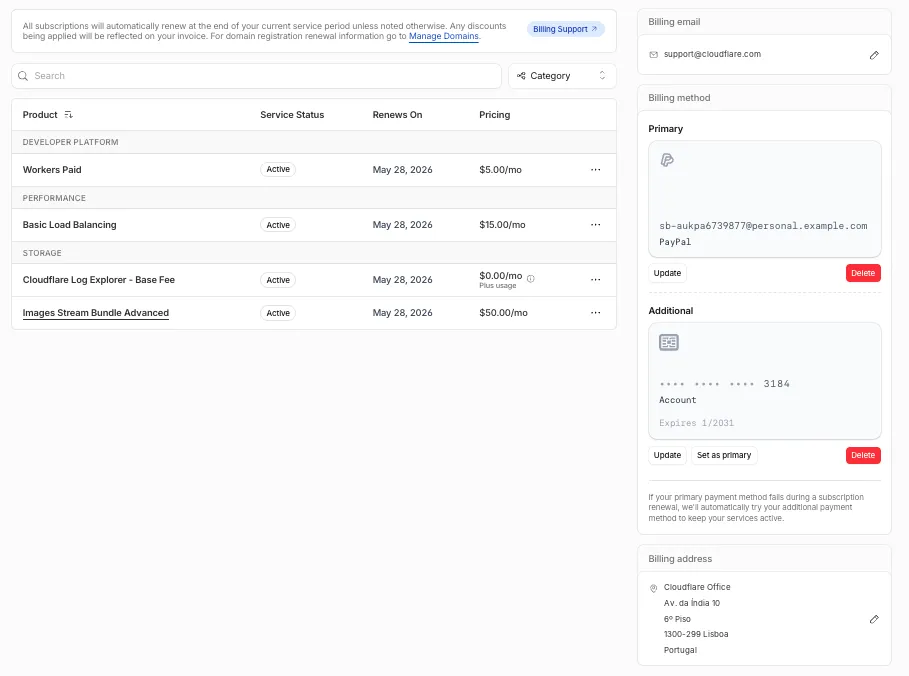
For details, refer to the Billing Home documentation.
You can now scope Cloudflare permissions to individual Cloudflare Tunnel instances and Cloudflare Mesh nodes. Administrators can delegate access to specific Tunnels or Mesh nodes without granting account-wide control over private networking.
When you add a member or create a permission policy, the resource picker now lists Cloudflare Tunnel instances and Cloudflare Mesh nodes as scopable resource types. You can:
- Grant a read-only role on a single Cloudflare Tunnel instance to a support operator for log streaming and diagnostics — without exposing other Tunnels or destructive actions.
- Grant a write role on a specific Cloudflare Mesh node to an application team — without giving them access to the rest of your private network.
- Scope a single policy to one or many Tunnels and Mesh nodes at once.
Granular permissions are a parallel layer to existing account-level roles — they do not replace them.
- Existing account-level roles continue to work. A member with
Cloudflare AccessorCloudflare Zero Trustretains write access to every Tunnel and Mesh node in the account. This ensures backward compatibility for existing automation and tokens. - Granular permissions are additive. For any API request on a specific Tunnel or Mesh node, access is granted if the principal has either the account-level role or a granular permission for that resource.
- Resource enumeration is authorization-aware. Listing endpoints (
GET /accounts/{id}/cfd_tunnel,GET /accounts/{id}/warp_connector) return only the resources the principal has at least read access to.
- Configure granular permissions for Cloudflare Tunnel.
- Configure granular permissions for Cloudflare Tunnel and Cloudflare Mesh in Cloudflare One.
- Review the resource-scoped roles on the Cloudflare role reference.
Cloudflare has updated Logpush datasets:
- Email Security Post-Delivery Events: A new dataset with fields including
AlertID,CompletedAt,Destination,FinalDisposition,Folder,From,FromName,MessageID,MessageTimestamp,MicrosoftTenantID,Operation,PostfixID,Reasons,Recipient,RequestedAt,RequestedBy,RequestedDisposition,Status,Subject,Success, andTo. - Magic Network Monitoring Flow Logs: A new dataset with fields including
AWSVPCFlowJSON,Bits,DestinationAS,DestinationAddress,DestinationPort,DeviceID,EgressBits,EgressPackets,Ethertype,FlowProtocol,FlowTimestamp,NumFlows,PacketID,Packets,Protocol,RuleIDs,SampleRate,SampleRateType,SamplerAddress,SourceAS,SourceAddress,SourcePort,TcpFlags, andTimestamp.
- Firewall events (added):
AISecurityInjectionScore,AISecurityPIICategories,AISecurityTokenCount, andAISecurityUnsafeTopicCategories. - HTTP requests (added):
AISecurityInjectionScore,AISecurityPIICategories,AISecurityTokenCount,AISecurityUnsafeTopicCategories, andSubrequests.
For the complete field definitions for each dataset, refer to Logpush datasets.
- Email Security Post-Delivery Events: A new dataset with fields including
You can now navigate, switch context, and take common actions in the Cloudflare dashboard without leaving your keyboard. Press
?anywhere to see the full list. Keyboard shortcuts can be disabled by visiting your profile settings ↗.Shortcut Action g hGo to Home g aGo to account overview g zGo to zone overview g pGo to your profile g wGo to Workers & Pages g oGo to Zero Trust g bGo to billing g 1–g 5Go to a recent or pinned item (by position in sidebar) t →Move to the next tab t ←Move to the previous tab p →Move to the next page of a table p ←Move to the previous page of a table Shortcut Action /Open quick search ?Show keyboard shortcuts s aSwitch account s zSwitch zone s .Star or unstar the current zone p .Pin or unpin the current page t sToggle the sidebar open or closed t mExpand or collapse all sidebar menus t aToggle Ask AI sidebar d .Toggle dark mode c uCopy the current URL c dCopy a deep link URL
Full Changelog: v6.10.0...v7.0.0 ↗
This is a major version release that includes breaking changes to three packages:
ai_search,email_security, andworkers. These changes reflect upstream API specification updates that improve type correctness and consistency.Please ensure you read through the list of changes below before moving to this version - this will help you understand any down or upstream issues it may cause to your environments.
See the v7.0.0 Migration Guide ↗ for before/after code examples and actions needed for each change.
The
SearchForAgentsnested type has been removed from all instance metadata structs. This field is no longer part of the API specification.Removed Types:
InstanceNewResponseMetadataSearchForAgentsInstanceUpdateResponseMetadataSearchForAgentsInstanceListResponseMetadataSearchForAgentsInstanceDeleteResponseMetadataSearchForAgentsInstanceReadResponseMetadataSearchForAgentsInstanceNewParamsMetadataSearchForAgentsInstanceUpdateParamsMetadataSearchForAgentsNamespaceInstanceNewResponseMetadataSearchForAgentsNamespaceInstanceUpdateResponseMetadataSearchForAgentsNamespaceInstanceListResponseMetadataSearchForAgentsNamespaceInstanceDeleteResponseMetadataSearchForAgentsNamespaceInstanceReadResponseMetadataSearchForAgentsNamespaceInstanceNewParamsMetadataSearchForAgentsNamespaceInstanceUpdateParamsMetadataSearchForAgents
Multiple Email Security settings sub-resources have changed their path parameter types from
int64tostring:AllowPolicies(policyID int64->policyID string)BlockSenders(patternID int64->patternID string)Domains(domainID int64->domainID string)ImpersonationRegistry(displayNameID int64->impersonationRegistryID string)TrustedDomains(trustedDomainID int64->trustedDomainID string)
The
Investigate.Get,Investigate.Move.New, andInvestigate.Reclassify.Newmethods now useinvestigateIDinstead ofpostfixIDas the path parameter name.The
SettingDomainService.BulkDeletemethod and its associated types have been removed:SettingDomainBulkDeleteResponseSettingDomainBulkDeleteParams
SettingTrustedDomainService.Newnow returns*SettingTrustedDomainNewResponseinstead of*SettingTrustedDomainNewResponseUnion.InvestigateMoveService.Newnow returns*pagination.SinglePage[InvestigateMoveNewResponse]instead of*[]InvestigateMoveNewResponse.The observability telemetry filter parameter types have been restructured to support nested filter groups. New discriminated union types replace the previous flat filter arrays:
ObservabilityTelemetryKeysParams.Filtersnow acceptsFiltersObjectFilterUnion(was[]interface\{\})ObservabilityTelemetryQueryParams.Parameters.Filtersnow acceptsFiltersObjectFilterUnionObservabilityTelemetryValuesParams.Filtersnow acceptsFiltersObjectFilterUnion
New types include
FiltersObjectFiltersObject(for group filters withFilterCombination) andFiltersWorkersObservabilityFilterLeaf(for leaf filters with typedOperation,Type, andValuefields).NEW SERVICE: Query organization audit logs with cursor-based pagination.
List()- Retrieve audit logs
client.BrowserRendering.Devtools.Browser.Targets.Close()- Close a specific browser target (tab, page) by ID
client.Queues.GetMetrics()- Retrieve queue metrics for a specific queue
- Added
WaitForCompletionparameter toNamespaceInstanceItemNewOrUpdateParamsandNamespaceInstanceItemSyncParamsfor synchronous indexing confirmation
- Magic Transit:
ConnectorService.Listparameter name corrected fromquerytoparams(non-functional, affects generated documentation only)
None in this release.
Full Changelog: v4.3.1...v5.0.0 ↗
This is a major release of the Cloudflare Python SDK. It drops support for Python 3.8, adds 11 new API services, introduces optional aiohttp backend support for improved async concurrency, and includes hundreds of type and method updates across the entire API surface.
Please review the breaking changes below before upgrading. A migration guide is available at v5.0.0 Migration Guide ↗.
- Python 3.8 is no longer supported. The minimum required version is now Python 3.9.
typing-extensionsminimum version bumped from>=4.10to>=4.14.
The following resources have breaking changes. See the v5.0.0 Migration Guide ↗ for detailed migration instructions.
abusereportsacm.totaltlsapigateway.configurationscloudforceone.threateventsd1.databaseintel.indicatorfeedslogpush.edgeorigintlsclientauth.hostnamesqueues.consumersradar.bgprulesets.rulesschemavalidation.schemassnippetszerotrust.dlpzerotrust.networks
The async client now supports an optional
aiohttpHTTP backend for improved concurrency performance. Install withpip install cloudflare[aiohttp]and useDefaultAioHttpClient()as thehttp_clientparameter.Python 3.13 and 3.14 are now tested and supported.
The following top-level resources are new in this release:
Resource Client Path Description AI Search aisearchAI-powered search capabilities Connectivity connectivityConnectivity testing and diagnostics Email Sending email_sendingEmail send and send_raw endpoints Fraud fraudFraud detection and prevention Google Tag Gateway google_tag_gatewayGoogle Tag Gateway management Organizations organizationsOrganization audit logs and management R2 Data Catalog r2_data_catalogR2 Data Catalog operations Realtime Kit realtime_kitRealtime communication (Calls/TURN) Resource Tagging resource_taggingResource tagging and labeling Token Validation token_validationToken validation configuration and rules Vulnerability Scanner vulnerability_scannerVulnerability scanning, credential sets, and target environments - api_gateway: Labels endpoints
- billing: Billable usage PayGo endpoint
- brand_protection: v2 endpoints
- browser_rendering: DevTools methods
- cache: Origin cloud regions resource
- custom_origin_trust_store: Custom origin trust store
- dns:
dns_records/usageendpoints - email_security: Phishguard reports endpoint
- iam: User groups and user group members resources
- radar: Botnet Threat Feed and Post-Quantum endpoints
- workers: Observability Destinations resources
- zero_trust: Access Users, DEX rules, Device IP Profile, Device Subnet, WARP Connector connections and failover, WARP Subnet, Gateway PAC files
- zones: Zone environments endpoints
- Fixed
polymorphic_serializationparameter inmodel_dumpoverrides - Added
BaseModelbase to responseSchemaFieldStruct/SchemaFieldListstubs in Pipelines - Added missing
model_rebuild/update_forward_refsforSharedEntryCustomEntryclasses in DLP - Made
RunQueryParametersNeedleValueaBaseModelwitharbitrary_types_allowedin Workers - Removed duplicate
notification_urlfield in webhook response types for Stream - Resolved pre-existing codegen type errors
- Fixed
type: ignore[call-arg]placement for mypy compatibility in Radar
Resources with
@deprecatedannotations on some methods include:accounts,addressing,ai-gateway,aisearch,api-gateway,billing,cloudforce-one,dns,email-routing,email-security,filters,firewall,images,intel,kv,logpush,origin-tls-client-auth,pages,pipelines,radar,rate-limits,registrar,rulesets,ssl,user,workers,workers-for-platforms,zero-trust,zones
Full Changelog: v6.0.0-beta.2...v6.0.0 ↗
This is a major version release of the Cloudflare TypeScript SDK. It includes 11 entirely new top-level API resources, new sub-resources and methods across 50+ existing resources, SDK infrastructure improvements, and breaking changes to the generated API surface from the v5.x line.
Please ensure you read through the list of changes below before moving to this version - this will help you understand any down or upstream issues it may cause to your environments.
- Retry-After handling changed: The SDK now respects any server-specified
Retry-Aftervalue for rate-limited requests. Previously, values over 60 seconds were ignored and a default backoff was used instead. - Empty response handling: Responses with
content-length: 0now returnundefinedinstead of attempting to parse the body. - Environment variable reading: Empty string env vars (for example,
CLOUDFLARE_API_TOKEN="") are now treated as unset. - Path query parameter merging: URL search params embedded in endpoint paths are now extracted and merged into the query object.
17 HTTP endpoints were removed from the SDK, affecting
abuse-reports,cloudforce-one,dlp/profiles/predefined,email-security/investigate,email-security/settings, andintel/ip-list.client.ai.toMarkdown.transform(file, \{ ...params \})->client.ai.toMarkdown.transform(\{ ...params \})--filemoved from positional arg into params bodyclient.radar.ai.toMarkdown.create(body, \{ ...params \})->client.radar.ai.toMarkdown.create(\{ ...params \})--bodymoved from positional arg into paramsclient.abuseReports.create(reportType, \{ ...params \})->client.abuseReports.create(reportParam, \{ ...params \})-- positional arg renamedclient.iam.userGroups.members.create(userGroupId, [ ...body ])->client.iam.userGroups.members.create(userGroupId, [ ...members ])-- body array param renamed
client.originTLSClientAuth.hostnames.certificates->client.originTLSClientAuth.zoneCertificatesclient.radar.netflows->client.radar.netFlows(casing change)
- 133 methods now return
nullinstead of a typed response object. This primarily affects delete operations acrossaccounts,cache,d1,filters,firewall,hyperdrive,iam,kv,logpush,logs,r2,stream,workers,zero-trust,zones, and others. - 17 methods changed pagination type (for example,
KeysCursorPaginationAfter->KeysCursorLimitPagination). - 29 methods changed to a different named type (for example,
CloudflaredCreateResponse->CloudflareTunnel).
24 shared types removed from root namespace (
ASN,AuditLog,Member,Permission,Role,Subscription,Token, etc.). 19 response types consolidated or renamed.19 resources were restructured from single files to directories. Public API client paths are unchanged, but deep imports may break.
11 entirely new resources added to the client:
Resource Client Path Methods Description AI Search client.aiSearch46 Instances, namespaces, tokens, and items Connectivity client.connectivity5 Directory service APIs Email Sending client.emailSending7 Send and send_raw endpoints Fraud client.fraud2 Fraud detection API Google Tag Gateway client.googleTagGateway2 Google Tag Gateway management Organizations client.organizations8 Organization profiles and audit logs R2 Data Catalog client.r2DataCatalog11 R2 Data Catalog routes Realtime Kit client.realtimeKit54 Realtime Kit APIs Resource Tagging client.resourceTagging9 Resource tagging routes Token Validation client.tokenValidation13 Token validation rules Vulnerability Scanner client.vulnerabilityScanner21 Vulnerability scanning - browser-rendering:
crawl,devtools- Crawl endpoints and DevTools methods - cache:
origin-cloud-regions- Origin cloud regions resource - dns:
usage- DNS records usage endpoints - d1:
time-travel- Time travel get_bookmark and restore - email-security:
phishguard- Phishguard reports endpoint - pipelines:
sinks,streams- Pipelines restructure - radar:
agent-readiness,geolocations,post-quantum- New analytics endpoints - workers:
observability- Observability destinations - zones:
environments- Zone environments endpoints - api-gateway:
labels- Labels endpoints - brand-protection:
v2- V2 endpoints - alerting:
silences- Alert silencing API - billing:
usage- Billable usage PayGo endpoint - iam:
sso- SSO Connectors resource - queues:
getMetricsmethod - Queues metrics endpoint - registrar:
registration-status,update-status- Registrar API convergence - zero-trust: DLP settings, DEX rules, Access Users, WARP Connector, WARP Subnets, Gateway PAC files, Gateway tenants
- Resolved type errors from codegen overwriting manual fixes
- Fixed
post()usage for to-markdown endpoints to resolve async type error - Added least-privilege permissions to all workflow jobs
- Reverted erroneous removal of rulesets resource methods and types
- Resolved prettier formatting errors in codegen output
The following resources now include
@deprecatedannotations on some methods:accounts,addressing,ai-gateway,aisearch,api-gateway,billing,cloudforce-one,custom-nameservers,dns,email-routing,email-security,filters,firewall,images,intel,keyless-certificates,kv,logpush,origin-tls-client-auth,page-shield,pages,pipelines,radar,rate-limits,registrar,rulesets,ssl,user,workers,workers-for-platforms,zero-trust,zones- Retry-After handling changed: The SDK now respects any server-specified
You can now pay for Cloudflare services directly from your bank account using Instant Bank Payments via Link.
Link ↗ now supports bank account payments in addition to cards. If you have a bank account saved in Link, it appears as a payment option at checkout. If not, you can connect one during the checkout flow.
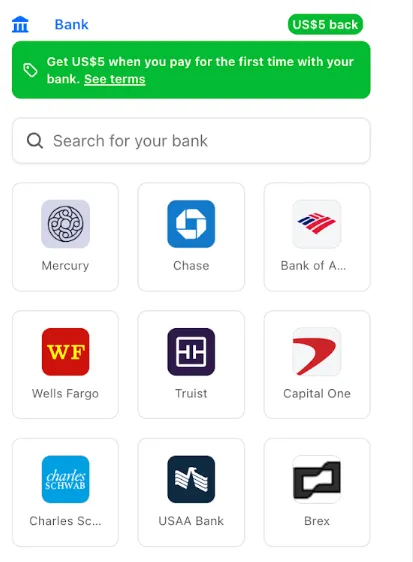
- During checkout, select your bank account from your saved Link payment methods.
- Confirm the payment.
After your first Link authentication, your bank account is available for future purchases without re-entering details.
Instant Bank Payments via Link is available to US-based self-serve accounts across all Cloudflare products. Your existing cards remain available at checkout.
Bank-based Link payments appear in your billing history with the payment method shown as
linkand last four digits as0000. For details, refer to the Instant Bank Payments via Link documentation.
-
The Support button in the dashboard global navigation header now takes you directly to the Cloudflare Support Portal ↗, eliminating the previous dropdown menu.
This change ensures that when you need help, you spend less time navigating the UI and more time getting the answers you need.
- Previous behavior: Selecting ? Support opened a dropdown menu with various links (Help Center, Cloudflare Community, etc.).
- New behavior: Selecting Support immediately redirects your current tab to the Support Portal.
To learn more about the resources available to you, refer to the Cloudflare Support documentation ↗.