
Changelog
New updates and improvements at Cloudflare.
Wrangler CLI now supports auth profiles: named logins that you scope to specific Cloudflare accounts and switch between automatically, based on the directory you are working in.
A profile is a named OAuth login bound to a directory. Commands run in that directory, and its subdirectories, use the matching account — so you can move between accounts without re-running
wrangler login.Use profiles to keep a separate login for each client when working at an agency, or to separate staging and production into different accounts. Pair a profile with an
account_idin your Wrangler configuration file so a command cannot reach the wrong account.Terminal window # Create a profile for each account, choosing which accounts it can reachwrangler auth create client-awrangler auth activate client-a ~/clients/client-awrangler auth create client-bwrangler auth activate client-b ~/clients/client-bUse the
--profileflag to run a single command with a specific profile:Terminal window wrangler deploy --profile personalIn CI and other automated environments,
CLOUDFLARE_API_TOKENstill takes precedence over all profiles.For setup, the resolution order, and the full command reference, refer to Authentication profiles.
Containers now support Google Artifact Registry ↗ images. After you configure credentials, you can use a fully qualified Google Artifact Registry image reference in your Wrangler configuration instead of first pushing the image to Cloudflare Registry.
Provide the service account email with
--gar-emailand pipe the service account JSON key throughstdin:Terminal window cat <PATH_TO_KEY> | npx wrangler containers registries configure <REGION>-docker.pkg.dev --gar-email=<SERVICE_ACCOUNT_EMAIL> --secret-name=<SECRET_NAME>JSONC {"$schema": "./node_modules/wrangler/config-schema.json","containers": [{"image": "<REGION>-docker.pkg.dev/<PROJECT_ID>/<REPOSITORY>/<IMAGE>:<TAG>"}]}TOML # Example: us-central1-docker.pkg.dev/my-project/my-repo/my-image:latest[[containers]]image = "<REGION>-docker.pkg.dev/<PROJECT_ID>/<REPOSITORY>/<IMAGE>:<TAG>"Only
*-docker.pkg.devhosts are supported. To configure credentials, refer to Use private Google Artifact Registry images.For more information, refer to Image management.
The Images binding is now billed per unique transformation, matching the model already used for URL-based transformations. Repeat requests for the same combination of source image and parameters within the same calendar month are counted only once.
Previously, every call to the binding counted as a separate transformation regardless of whether the image or parameters were unique. With this change, you can call the binding on hot paths without paying for each individual request.
Calls to
.info()are no longer billed.For more information, refer to Images pricing and the Images binding documentation.
We have greatly improved the throughput of the Vectorize write-ahead log (WAL) ↗. As a result, we have significantly reduced the end-to-end latency for a vector change to become queryable: median latency has dropped from 2 minutes to under 30 seconds, and p99 latency from 5 minutes to under 2 minutes.
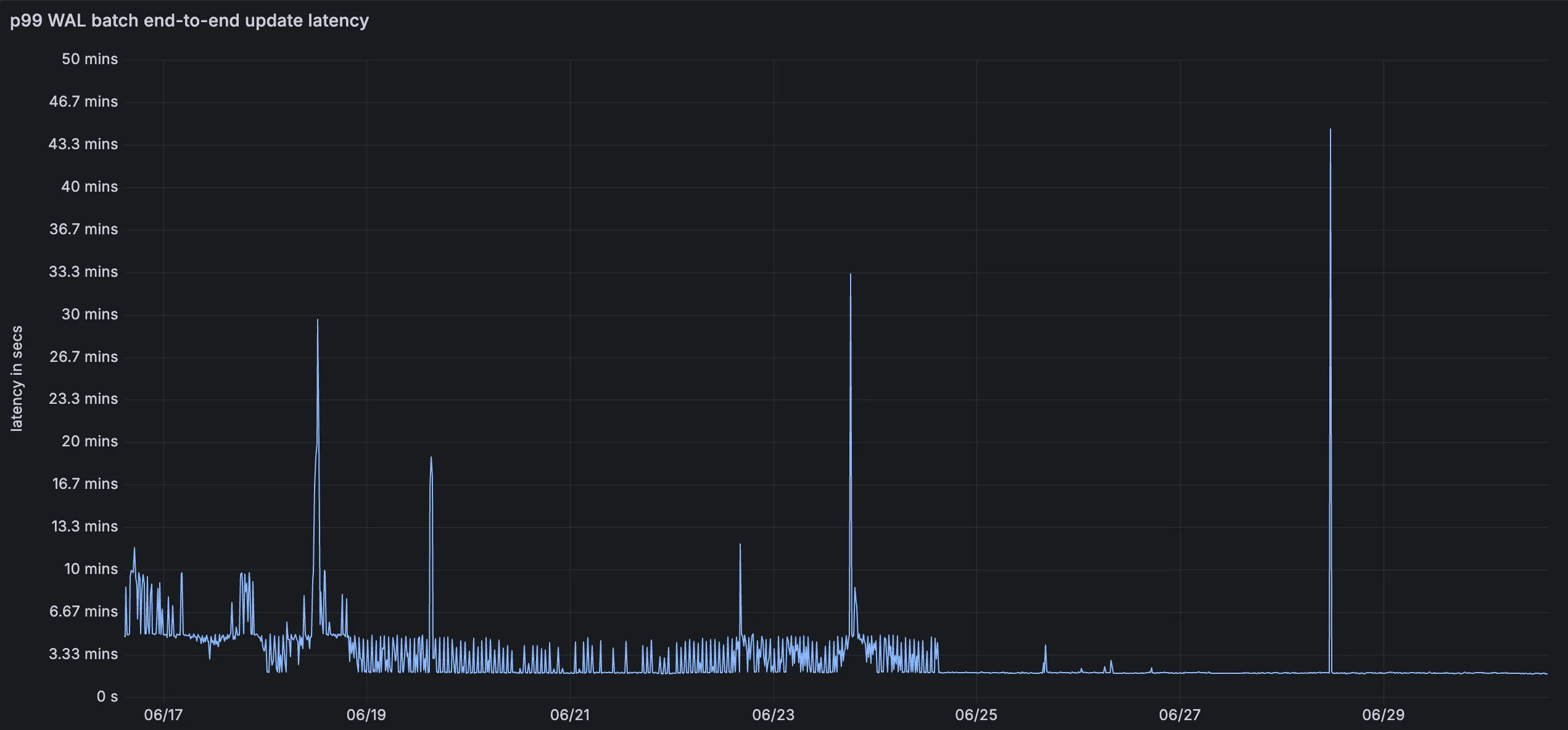
This means inserts, upserts, and deletes are reflected in query results faster, improving the freshness of semantic search, recommendation, and retrieval-augmented generation (RAG) workloads. You do not need to change your code or configuration to benefit from this improvement.
For more information, refer to the Vectorize documentation.
You can now monitor how much memory your Workers and Durable Objects consume across invocations with the new Memory Usage chart in the Workers Metrics tab, broken down by P50, P90, P99, and P999 percentiles.
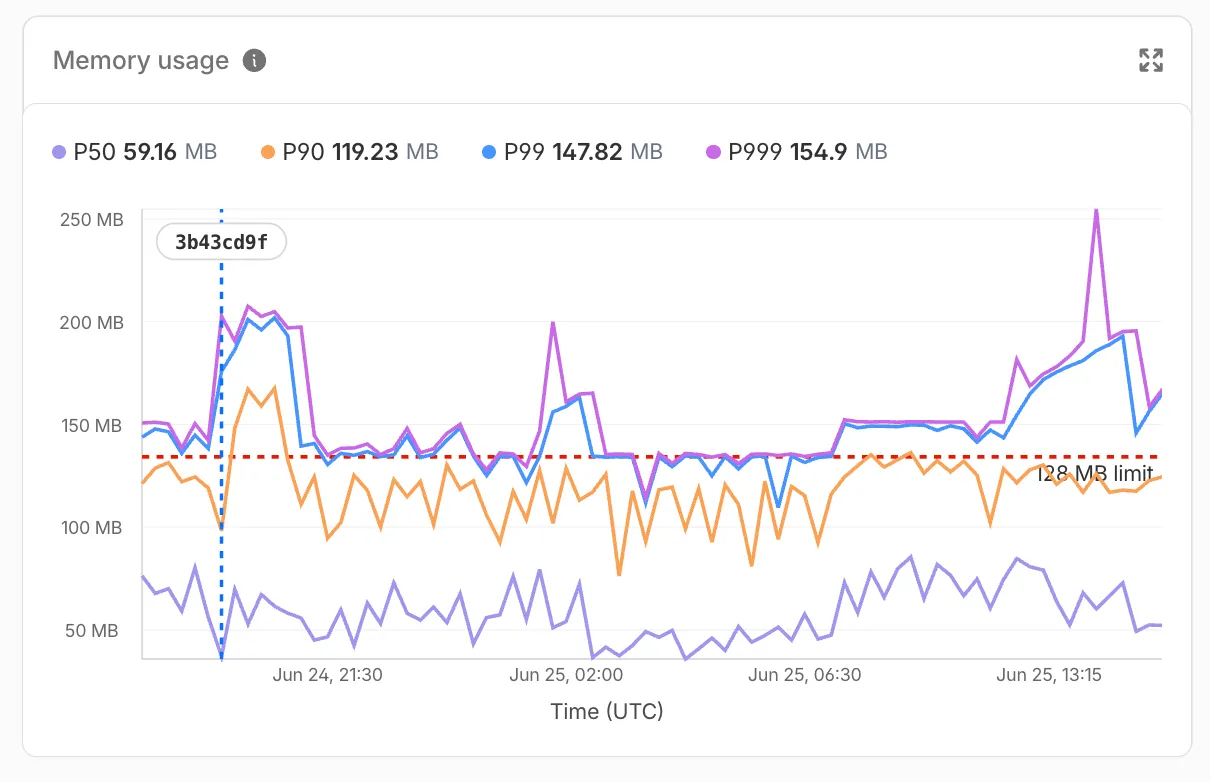
Memory usage measures the V8 isolate memory at the time of each invocation, subject to the 128 MB per-isolate limit — a single isolate can handle many concurrent requests and shares memory across them.
Use the Memory Usage chart to:
- Track memory trends — Spot gradual increases that may indicate a memory leak before they cause
Exceeded Memoryerrors. - Correlate with deployments — Deployment markers on the chart help you identify whether a new version introduced a memory regression.
- Right-size your Worker — Understand your baseline memory footprint and how much headroom you have before hitting the 128 MB limit.
For Durable Objects, memory usage reflects the in-memory state an object holds (class properties, caches, active WebSocket connections), which persists across invocations until the object is hibernated or evicted. This state is not preserved across eviction, hibernation, or a crash, so persist anything important to storage.
To view memory usage, open the Metrics tab for your Worker ↗ or Durable Object namespace ↗. For Durable Objects, you can filter by DO ID or name to drill down into memory usage for a specific object. You can also query memory usage programmatically via the GraphQL Analytics API using the
workersInvocationsAdaptivedataset — thequantiles.memoryUsageBytesP50throughquantiles.memoryUsageBytesP999fields return percentile values in bytes.For local memory debugging, you can also profile memory with DevTools to take heap snapshots and identify specific objects causing high memory usage.
- Track memory trends — Spot gradual increases that may indicate a memory leak before they cause
Workers
fetch()requests now support thecf.varyrequest option. Usecf.varyto control how Cloudflare caches origin responses with aVaryheader for a single subrequest.src/index.js export default {async fetch(request) {return fetch(request, {cf: {vary: {default: { action: "bypass" },headers: {accept: {action: "normalize",media_types: ["text/html", "application/json"],},"accept-language": {action: "normalize",languages: ["en", "fr", "de"],},},},},});},};src/index.ts export default {async fetch(request): Promise<Response> {return fetch(request, {cf: {vary: {default: { action: "bypass" },headers: {accept: {action: "normalize",media_types: ["text/html", "application/json"],},"accept-language": {action: "normalize",languages: ["en", "fr", "de"],},},},},});},} satisfies ExportedHandler;For more information, refer to
cf.vary.
The latest release of the Agents SDK ↗ makes it easier to run long work in the background, drive turns through one entry point, and keep chat agents working through deploys, evictions, and reconnects.
This release adds first-class detached (background) sub-agent runs with live progress and durable milestones, a single
runTurnturn-admission entry point, and a large round of recovery and reliability fixes that continue converging@cloudflare/thinkand@cloudflare/ai-chatonto one model.runAgentToolcan now dispatch a sub-agent without blocking the calling turn. A detached run returns a handle immediately and is owned by a durable, eviction-surviving backbone instead of being abandoned when the dispatching turn ends.JavaScript class OrdersAgent extends Think {async startImport(input) {// Fire-and-forget, or wire a durable completion callback// (by method name, like schedule()):await this.runAgentTool(ImportAgent, {input,detached: { onFinish: "onImportDone", maxBudgetMs: 60 * 60 * 1000 },});}// result.status: "completed" | "error" | "aborted" | "interrupted"async onImportDone(run, result) {}}TypeScript class OrdersAgent extends Think {async startImport(input) {// Fire-and-forget, or wire a durable completion callback// (by method name, like schedule()):await this.runAgentTool(ImportAgent, {input,detached: { onFinish: "onImportDone", maxBudgetMs: 60 * 60 * 1000 },});}// result.status: "completed" | "error" | "aborted" | "interrupted"async onImportDone(run, result) {}}Highlights:
- Durable, exactly-once-on-the-happy-path completion via a warm fast path plus a self-scheduling reconcile backbone that survives eviction and deploys.
- Bounded. An absolute
maxBudgetMsceiling (default 24h) andcancelAgentTool(runId)keep abandoned runs from holding a concurrency slot forever. detached: { notify: true }lets a finished background run inject a message back into the chat so the model reacts to the result — no hand-wiredonFinishneeded.
Sub-agents can also report mid-run progress that rides their own turn stream back to the parent's connected clients:
JavaScript // Inside the child sub-agent:await this.reportProgress({fraction: 0.6,phase: "deploying",message: "Generating menu page…",});TypeScript // Inside the child sub-agent:await this.reportProgress({fraction: 0.6,phase: "deploying",message: "Generating menu page…",});Progress surfaces on
AgentToolRunState.progressviauseAgentToolEvents, so a background-runs tray can render a live bar without drilling in, and the latest snapshot is persisted for inspection after eviction. Naming amilestonepromotes a signal to a durable, replayable row, anddetached: { onMilestones }can surface a milestone as a synthetic chat message ("narrate"for a cheap status line, or"react"to drive a model turn).@cloudflare/thinkadds a publicrunTurn(options)facade that unifies turn admission behind a singlemode:JavaScript await this.runTurn({ mode: "wait", messages }); // saveMessages / continueLastTurnawait this.runTurn({ mode: "submit", messages }); // durable submitMessagesawait this.runTurn({ mode: "stream", messages }); // chat()TypeScript await this.runTurn({ mode: "wait", messages }); // saveMessages / continueLastTurnawait this.runTurn({ mode: "submit", messages }); // durable submitMessagesawait this.runTurn({ mode: "stream", messages }); // chat()streammode accepts array and function inputs to matchwaitmode, and all entry points now route through a shared internal admission path that throws a clear error on nested blocking admissions that previously could deadlock.A large part of this release continues hardening recovery and converging
@cloudflare/thinkand@cloudflare/ai-chatonto one model:- Stream stall watchdog.
AIChatAgentcan detect and recover from a hung model/transport stream via the opt-inchatStreamStallTimeoutMswatchdog. WithchatRecoveryenabled the stall routes into the same bounded-recovery machinery a deploy or eviction uses; otherwise it surfaces as a terminal stream error so the spinner clears. - Interrupted tool-call repair.
AIChatAgentnow repairs a transcript with a dead server-tool call before re-entering inference (parity with@cloudflare/think), so a recovered turn no longer fails withAI_MissingToolResultsError. An overridablerepairInterruptedToolPart(part)hook lets apps customize the repaired shape. - Stuck status after reconnect. Fixed AI SDK
statusgetting stuck when a reconnect races a turn that has been accepted but has not started streaming yet, so the UI now renders the in-flight turn instead of settling onready. - Live "recovering…" on connect.
AIChatAgentnow replays the recovering status to a client that connects mid-recovery, souseAgentChat'sisRecoveringreflects in-progress recovery immediately instead of appearing frozen. - Terminal connection failures. The client stops reconnecting on terminal WebSocket close events and exposes them via
connectionError/onConnectionErroronAgentClient,useAgent, anduseAgentChat. - Agent-tool child recovery. A healthy long-running sub-agent run is no longer abandoned as
interruptedafter a deploy (both@cloudflare/thinkandAIChatAgent). - Workflows from sub-agent facets. Agent Workflows can now start from sub-agent facets, with callbacks and Workflow RPC routed back to the originating facet.
- Plus forward-progress crediting convergence, broadcast-first give-up ordering, an event-driven auto-continuation barrier, and structured row-size compaction in
AIChatAgent.
- Shared chat React core. A new
agents/chat/reactentry exposesuseAgentChat, transport helpers, and shared wire types, withsyncMessagesToServerfor server-authoritative transcript storage.@cloudflare/think/reactand@cloudflare/ai-chat/reactare now thin wrappers over it. - Optional
aipeer. The rootagentsand@cloudflare/codemoderuntimes no longer reference AI SDK types, so they bundle withoutai/zodinstalled; AI-specific entry points still require the peer when imported.just-bashlikewise moves to an optional peer used only by the skills bash runner. - Code Mode. The default
DynamicWorkerExecutortimeout increases from 30s to 60s, executions now dispose the dynamically-loaded Worker and its RPC stub after each run (fixing a flaky isolate-shutdown assertion), connector imports are cleaned up, and the outer MCP tool-call context is passed toopenApiMcpServerrequest callbacks. - Voice. Voice turns now support AI SDK
fullStreamresponses (and warn whentextStreamis used). - MCP.
McpAgentserver-to-client requests can now be sent from callbacks that do not inherit the agent's async context, including callbacks reached through Worker Loader RPC. - Experimental: server actions and channels. This release lays groundwork for guarded server actions (
action()/getActions()with a durable replay ledger and approvals) and a unified channels surface (configureChannels(),deliverNotice()). Both are experimental and their APIs may change, so we don't recommend depending on them yet.
To update to the latest version:
npm i agents@latest @cloudflare/think@latest @cloudflare/ai-chat@latest @cloudflare/codemode@latest @cloudflare/voice@latestyarn add agents@latest @cloudflare/think@latest @cloudflare/ai-chat@latest @cloudflare/codemode@latest @cloudflare/voice@latestpnpm add agents@latest @cloudflare/think@latest @cloudflare/ai-chat@latest @cloudflare/codemode@latest @cloudflare/voice@latestbun add agents@latest @cloudflare/think@latest @cloudflare/ai-chat@latest @cloudflare/codemode@latest @cloudflare/voice@latestRefer to the Think documentation, Code Mode documentation, and Agents documentation for more information.
Durable Objects now supports a
usjurisdiction, letting you create Durable Objects that only run and store data within the United States. Use theusjurisdiction when you need to keep a Durable Object's compute and storage inside the United States to meet data residency requirements.Create a namespace restricted to the
usjurisdiction the same way as any other jurisdiction:JavaScript // Workerexport default {async fetch(request, env) {const usSubnamespace = env.MY_DURABLE_OBJECT.jurisdiction("us");const stub = usSubnamespace.getByName("general");return stub.fetch(request);},};Workers may still access Durable Objects constrained to the
usjurisdiction from anywhere in the world. The jurisdiction constraint only controls where the Durable Object itself runs and persists data.For the full list of supported jurisdictions, refer to Data location — Restrict Durable Objects to a jurisdiction.
The
@cloudflare/vitest-pool-workerspackage now includesevictDurableObjectandevictAllDurableObjectstest helpers, exported fromcloudflare:test.These helpers let you test how a Durable Object behaves across evictions, simulating the production lifecycle where an idle Durable Object can be evicted from memory.
For more context, refer to Lifecycle of a Durable Object.
TypeScript import { evictDurableObject, evictAllDurableObjects } from "cloudflare:test";import { env } from "cloudflare:workers";const id = env.COUNTER.idFromName("my-counter");const stub = env.COUNTER.get(id);// Evict the Durable Object instance pointed to by a specific stubawait evictDurableObject(stub);// Close WebSockets instead of hibernating themawait evictDurableObject(stub, { webSockets: "close" });// Evict all currently-running Durable Objects in evictable namespacesawait evictAllDurableObjects();These helpers are available in
@cloudflare/vitest-pool-workers@0.16.20and later.Learn more in the Test APIs reference and the Testing Durable Objects guide.
AI Search now gives you more control over similarity cache freshness. Similarity cache helps reduce latency and inference cost by reusing responses for semantically similar queries.
With these updates, you can choose how long responses are eligible for reuse and clear cached responses when they may be stale.
Previously, AI Search cached responses for a fixed duration of 30 days. Cached responses now use the instance's
cache_ttlsetting, and the default is 48 hours.You can set
cache_ttlwhen creating or updating an instance to choose a cache duration from 10 minutes to 6 days.Use a shorter TTL when your source content changes frequently and freshness is more important. Use a longer TTL when your content is stable and you want more cache reuse.
For example, set
cache_ttlto518400to retain cached responses for 6 days:{"cache_ttl": 518400}You can also purge all cached responses for an instance on demand. Purging cached responses does not delete indexed content or source files.
It prevents AI Search from reusing previous cached responses, so subsequent similar queries generate fresh answers and repopulate the cache.
Terminal window curl -X POST "https://api.cloudflare.com/client/v4/accounts/$ACCOUNT_ID/ai-search/instances/$INSTANCE_NAME/purge_cache" \-H "Authorization: Bearer $CLOUDFLARE_API_TOKEN"You can also purge cached responses from the instance settings page in the Cloudflare dashboard.
Refer to similarity cache for the full list of supported
cache_ttlvalues and more details about cache behavior.
Workflows makes it easier to build reliable multi-step applications that can recover when downstream systems fail. Rollback handlers now receive the original step context via a
ctxobject for the step being rolled back. This includesctx.step.name,ctx.step.count,ctx.attempt, and the stepconfigwith defaults applied.The step configuration includes the retry and timeout settings used for that step, so you can customize your step recovery logic according to those fields.
TypeScript await step.do("create charge",async () => {const charge = await createCharge();return { chargeId: charge.id };},{rollback: async ({ ctx, output, error }) => {// `output` is the value returned by the step being rolled back.const { chargeId } = output as { chargeId: string };await refundCharge(chargeId, {// `ctx` is the original step context, including step name, count, attempt, and config.reason: `${ctx.step.name}: ${error.message}`,});},rollbackConfig: {// `rollbackConfig` controls retries and timeout for the rollback handler.retries: { limit: 3, delay: "30 seconds", backoff: "linear" },timeout: "5 minutes",},},);Refer to rollback options to learn more.
Regional Services now supports Regionalized IP Bindings, letting you regionalize traffic at the IP layer for prefixes you bring to Cloudflare through Bring Your Own IP (BYOIP).
Where Regional Hostnames regionalize traffic by hostname, Regionalized IP Bindings let you bind a CIDR from one of your prefixes to a region — ideal for address-map deployments and any service you address by IP rather than hostname. Cloudflare then terminates TLS and processes traffic to those addresses only within the data centers in that region.
Regionalized IP Bindings requires the Regional Services and Regional Services for BYOIP entitlements. Contact your account team to enable them.
To get started, refer to Regionalized IP Bindings.
R2 SQL now supports window functions,
SELECT DISTINCT, set operations, and additional aggregates, making it easier to write analytical queries without preprocessing your data elsewhere.R2 SQL is Cloudflare's serverless, distributed SQL engine for querying Apache Iceberg ↗ tables stored in R2 Data Catalog.
- Window functions —
ROW_NUMBER,RANK,DENSE_RANK,PERCENT_RANK,CUME_DIST,NTILE,LAG,LEAD,FIRST_VALUE,LAST_VALUE,NTH_VALUE, and aggregates with anOVER (...)clause, includingPARTITION BYand explicit frames - QUALIFY — filter rows based on a window function result
- DISTINCT —
SELECT DISTINCT,DISTINCT ON (...), and theDISTINCTmodifier on aggregates such asCOUNT(DISTINCT ...) - Set operations —
UNION,UNION ALL,INTERSECT, andEXCEPT - Grouping extensions —
GROUPING SETS,ROLLUP, andCUBE - Exact aggregates —
MEDIAN,PERCENTILE_CONT,ARRAY_AGG, andSTRING_AGG
SELECT customer_id, region,ROW_NUMBER() OVER (PARTITION BY region ORDER BY total_amount DESC) AS rank_in_regionFROM my_namespace.sales_dataSELECT customer_id, region, total_amountFROM my_namespace.sales_dataQUALIFY ROW_NUMBER() OVER (PARTITION BY region ORDER BY total_amount DESC) <= 3SELECT customer_id FROM my_namespace.sales_dataEXCEPTSELECT customer_id FROM my_namespace.archived_salesThe named
WINDOWclause is not supported — inline theOVER (...)specification at each call site. For the full syntax reference, refer to the SQL reference. For supported features and performance guidance, refer to Limitations and best practices.- Window functions —
The Routes page in the Cloudflare dashboard now shows the routes across all of your connectors — Cloudflare Mesh and Cloudflare Tunnel routes alongside Cloudflare WAN and Magic Transit static routes — in a single table, instead of a separate routes view per product.

From the unified Routes page you can:
- Visualize your network with an interactive map that shows how your destinations flow through to your connectors — including equal-cost multi-path (ECMP) routes where the same prefix is served by several connectors. Select a node to filter the table down to the routes behind it.
- See every route in one table, with its destination, type, connector, priority, and source, and filter or sort to find what you need.
- Create, edit, and delete routes of any supported type without leaving the page. When adding a Cloudflare WAN or Magic Transit static route, you now pick the next hop by connector name instead of typing its IP.
- Manage virtual networks from a dedicated tab.
- Test a route to see which connector and next hop a destination resolves to before you commit a change.
To find it, go to Networking > Routes in the dashboard sidebar.
Go to RoutesYour existing routes, APIs, and configurations are unchanged — this is a dashboard experience that brings them together in one place. Learn how to add routes and manage virtual networks.
Durable Objects now supports two new location hints for Asia-Pacific:
apac-ne(Northeast Asia-Pacific) andapac-se(Southeast Asia-Pacific). Useapac-neorapac-sewhen you want finer-grained placement within Asia-Pacific rather than the broaderapachint.Use the new hints the same way as any other
locationHint:JavaScript // Northeast Asia-Pacific (Japan, Korea, etc.)const stubNE = env.MY_DURABLE_OBJECT.get(id, { locationHint: "apac-ne" });// Southeast Asia-Pacific (Singapore, Indonesia, etc.)const stubSE = env.MY_DURABLE_OBJECT.get(id, { locationHint: "apac-se" });If your users are spread across all of Asia-Pacific, the existing
apachint remains the right choice. Only reach forapac-neorapac-sewhen your traffic is clearly concentrated in one sub-region and you want to minimize round-trip time to that audience. The default behavior and what we generally recommended is not adding a location hint unless absolutely needed, this will create the Durable Object as close to the initializing request as possible to reduce latency.As with all location hints, these are best-effort suggestions. Cloudflare will place the Durable Object in a nearby data center, not necessarily the exact hinted location.
For the full list of supported hints, refer to Data location — Provide a location hint.
Durable Objects now remain alive for the duration of active outbound connections created via
connect()or an outbound WebSocket. Previously, a Durable Object would be evicted after 70-140 seconds of no incoming traffic, even if the object had an open outbound connection, which is a common pattern when streaming responses from a large language model (LLM) over TCP or an outbound WebSocket.With this change, each active outbound connection prevents eviction. Once all outbound connections close, the standard 70-140 second inactivity window applies before the Durable Object is evicted.
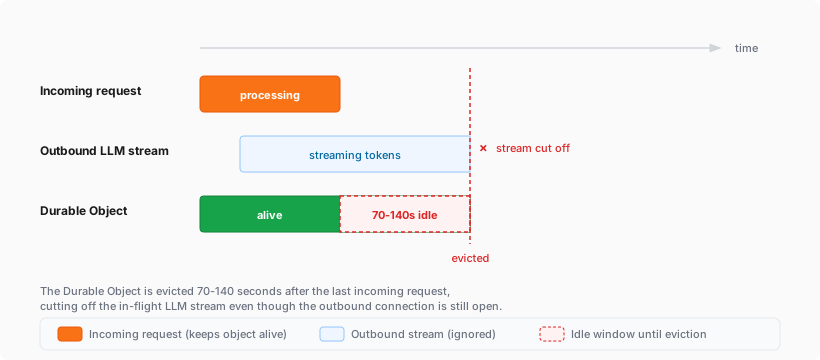
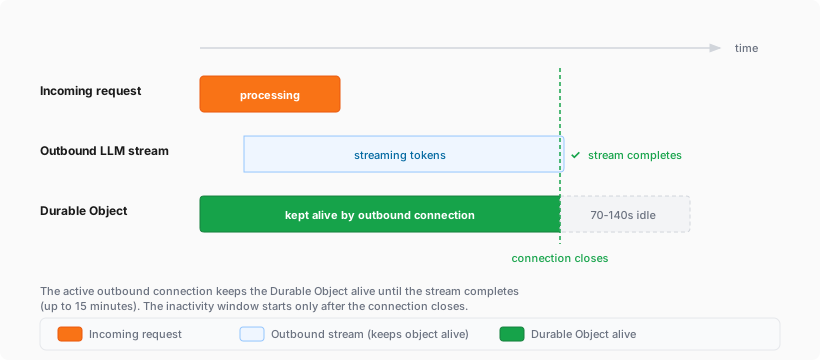
If you are building agents on Cloudflare, this is especially relevant. An agent that streams tokens from an LLM while calling models, or that performs long-running tasks over an outbound connection, now stays alive for the duration of that connection instead of being evicted mid-stream.
Limits:
- Each outbound connection keeps the Durable Object alive for a maximum of 15 minutes. After 15 minutes, the connection stops preventing eviction (the connection itself continues operating), and the standard eviction rules resume.
- The Durable Object's existing per-account instance limits still apply.
For more information, refer to Lifecycle of a Durable Object.
AI agents can now deploy Workers to Cloudflare without first requiring a user to sign up, open a browser-based OAuth flow, click through the dashboard, or create an API token. When an agent tries to deploy without Cloudflare credentials, Wrangler can tell it to rerun with
--temporary, then deploy the Worker to a temporary preview account.To try this with your agent, update to Wrangler 4.102.0 or later, make sure you are logged out (
wrangler logout), and then ask your agent to build something and deploy it to Cloudflare. The agent should follow Wrangler's output and deploy using the--temporaryflag.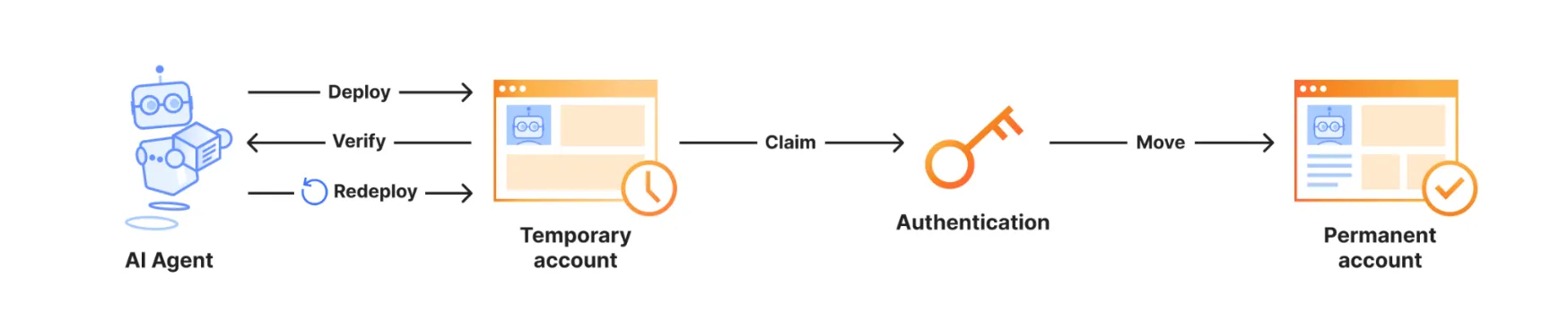
Terminal window wrangler deploy --temporaryThe temporary deployment stays live for 60 minutes. During that window, the agent can verify the Worker, redeploy changes, and return both the live Worker URL and claim URL. Opening the claim URL lets you sign in to or create a Cloudflare account and make the temporary account permanent.
Temporary preview accounts currently support a limited set of products, including Workers, Workers Static Assets, Workers KV, D1, Durable Objects, Hyperdrive, Queues, and SSL/TLS certificates. For supported products, limits, and claim behavior, refer to Claim deployments (temporary accounts).
For more context, refer to Temporary Cloudflare Accounts for Agents ↗.
exec()is now available for Containers. Usethis.ctx.container.exec()to start processes inside a running Container, stream standard input and output, inspect exit codes, and signal each process.Call
exec()from a class extendingContainer, or from another Durable Object throughthis.ctx.container. The associated Container must already be running.This example starts the Container when needed, then reads its Node.js version:
src/index.js import { Container } from "@cloudflare/containers";export class MyContainer extends Container {async readVersion() {if (!this.ctx.container.running) {await this.start();}const process = await this.ctx.container.exec(["node", "--version"]);const output = await process.output();const decoder = new TextDecoder();return {exitCode: output.exitCode,stdout: decoder.decode(output.stdout),stderr: decoder.decode(output.stderr),};}}src/index.ts import { Container } from "@cloudflare/containers";export class MyContainer extends Container {async readVersion() {if (!this.ctx.container.running) {await this.start();}const process = await this.ctx.container.exec(["node", "--version"]);const output = await process.output();const decoder = new TextDecoder();return {exitCode: output.exitCode,stdout: decoder.decode(output.stdout),stderr: decoder.decode(output.stderr),};}}The command array starts an executable directly, without an implicit shell. Invoke a shell explicitly for pipes, redirects, or variable expansion.
One RPC method can coordinate multiple
exec()calls in one caller-to-Durable Object round trip. It can also pass byte-orientedReadableStreaminput or return streamed output with flow control.For options and streaming examples, refer to Execute commands.
You can create PlanetScale Postgres and MySQL databases from Cloudflare and bill PlanetScale database usage through your Cloudflare account as a pay-as-you-go customer. Cloudflare contract customers will be able to add PlanetScale usage to their contract in July so reach out to your Cloudflare account team if interested.
Create a PlanetScale database from the Cloudflare dashboard to check out globally distributed Workers optimized for regional data access.
Go to Create a PlanetScale database
PlanetScale databases created from Cloudflare work with Workers through Hyperdrive. Hyperdrive manages database connection pools and query caching, so you can use PlanetScale as a centralized relational database for Workers applications without changing your database drivers, object-relational mapping (ORM) libraries, or SQL tooling.
PlanetScale usage appears on your Cloudflare invoice each billing period as a dollar total at PlanetScale's standard pricing ↗. You can introspect per-database billing usage via PlanetScale's dashboard ↗.
When you create a PlanetScale database from the Cloudflare dashboard, you receive the same PlanetScale developer experience, including development branches, query insights, and Model Context Protocol (MCP) server support for agents.
To get started, refer to PlanetScale Postgres and MySQL with Hyperdrive.
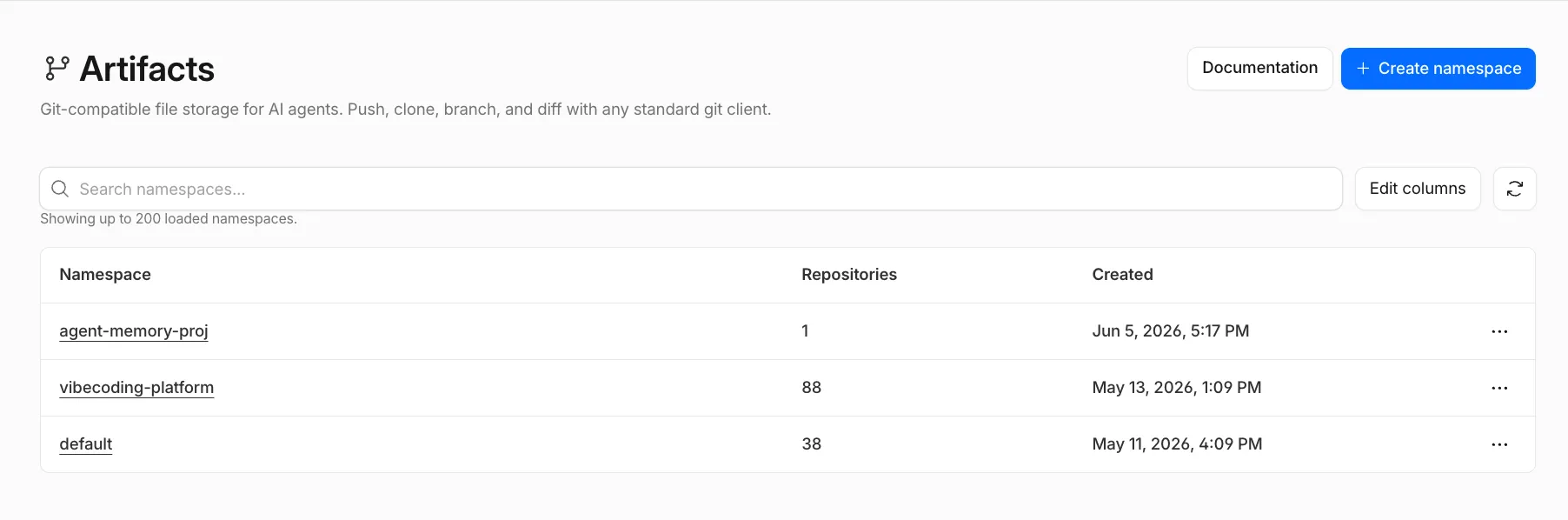
You can now configure Artifacts namespaces, repos, and tokens directly from the Cloudflare dashboard.
Artifacts is Git-compatible storage that lets you store repos on Cloudflare and interact with them using standard Git workflows.
You can view and create namespaces, which are top-level containers for repos:
You can view, create, fork, and search repos within a namespace:
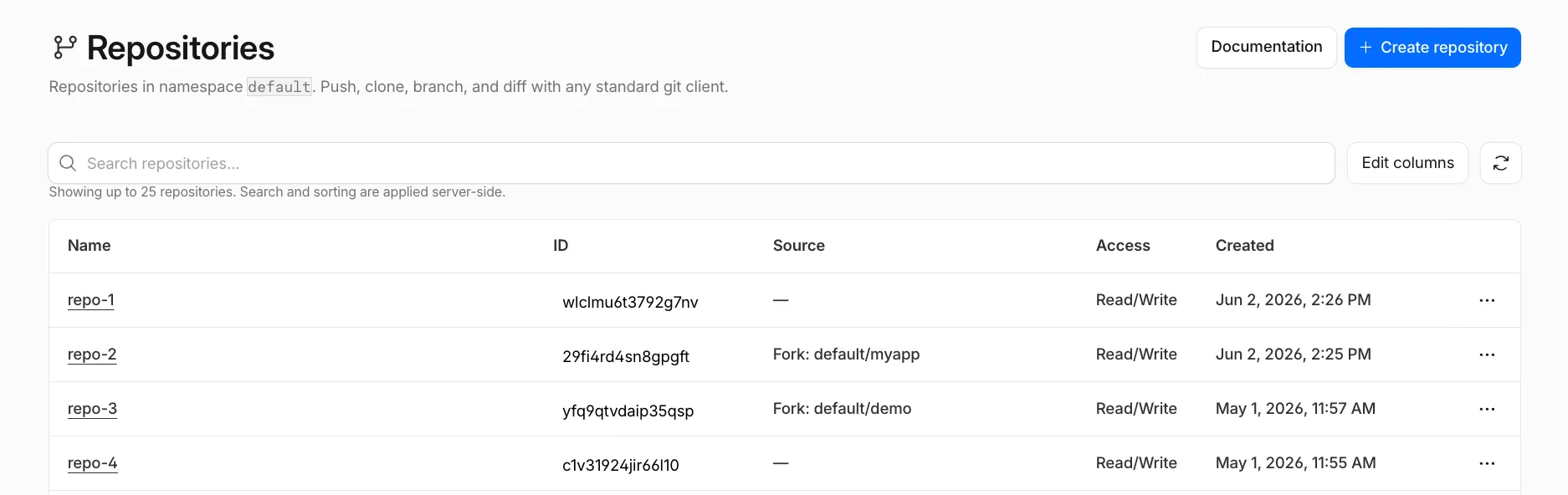
You can open a repo to view its files and copy its Git remote URL.
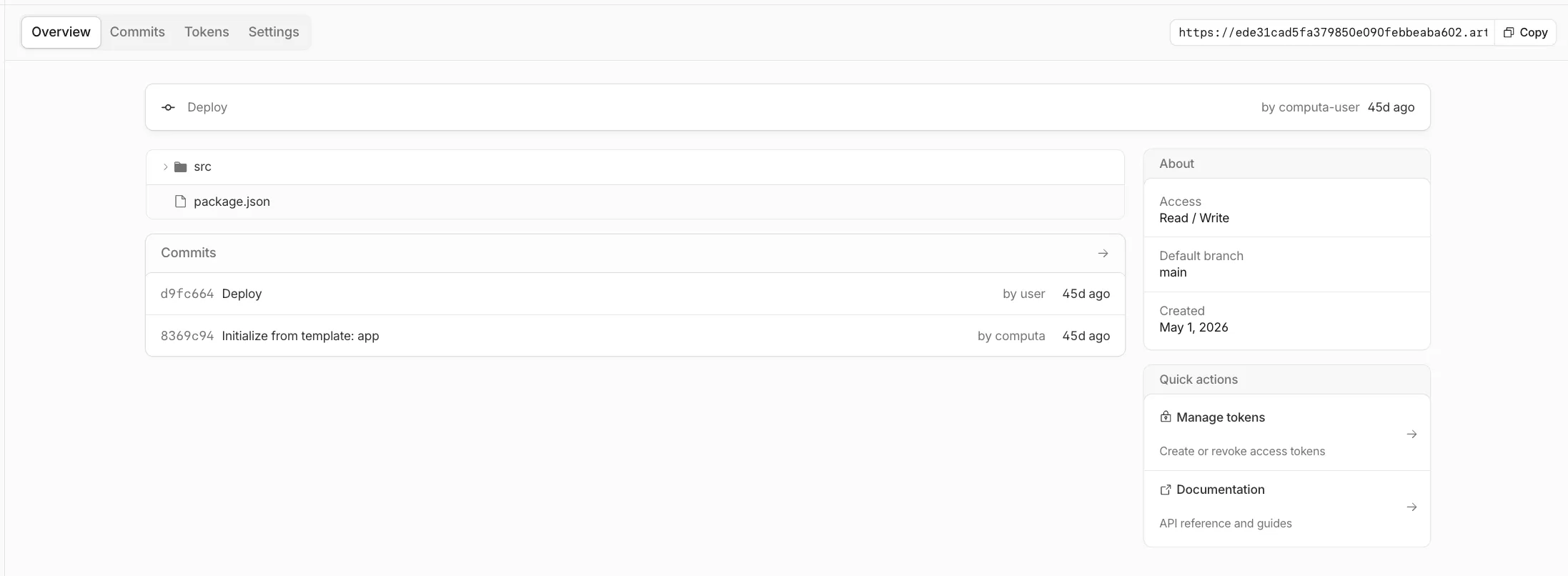
You can also provision tokens directly from the dashboard to scope Git access to a single repo, with read tokens for clone, fetch, and pull workflows, or write tokens when a client needs to push changes.
To get started, go to the Cloudflare dashboard ↗ and select Storage & databases > Artifacts.
If you are enrolled in the Artifacts beta, you can use the dashboard to set up Artifacts. If you would like to join the beta, complete the request form ↗.
The latest release of the Agents SDK ↗ makes it easier to build agents that can safely interact with real systems and keep working through interruptions.
Agents can now browse websites through Browser Run, write code against external tools through Code Mode, use client-provided tools when delegating to Think sub-agents, and recover more reliably from deploys, Durable Object evictions, and connection churn.
Agents can now use Browser Run through a single durable
browser_executetool. Instead of choosing from a fixed list of actions, the model writes code against the Chrome DevTools Protocol (CDP) and can inspect pages, capture screenshots, read rendered content, debug frontend behavior, and interact with live browser sessions.JavaScript const browserTools = createBrowserTools({ctx: this.ctx,browser: this.env.BROWSER,loader: this.env.LOADER,session: { mode: "dynamic" },});TypeScript const browserTools = createBrowserTools({ctx: this.ctx,browser: this.env.BROWSER,loader: this.env.LOADER,session: { mode: "dynamic" },});Browser sessions can be one-time, reused, or promoted from one-time to persistent during a run. This is useful when an agent needs a human to log in, complete MFA, or approve a sensitive action. The run can pause, keep the same tabs and cookies, and resume after approval.
The browser tools also add Live View URLs, optional session recording, and quick actions such as
browser_markdown,browser_extract,browser_links, andbrowser_scrapefor one-shot browsing tasks.Code Mode now uses
createCodemodeRuntime, connectors, and a durable execution log. This lets you give a model onecodemodetool instead of a large prompt full of tool definitions. The model can discover the capabilities it needs, write code against typed globals, and reuse saved snippets.JavaScript const runtime = createCodemodeRuntime({ctx: this.ctx,executor: new DynamicWorkerExecutor({ loader: this.env.LOADER }),connectors: [new GithubConnector(this.ctx, this.env, connection)],});const result = streamText({model,messages,tools: { codemode: runtime.tool() },});TypeScript const runtime = createCodemodeRuntime({ctx: this.ctx,executor: new DynamicWorkerExecutor({ loader: this.env.LOADER }),connectors: [new GithubConnector(this.ctx, this.env, connection)],});const result = streamText({model,messages,tools: { codemode: runtime.tool() },});When the code reaches an approval-gated action, the runtime pauses execution and returns a pending approval. After approval, completed calls replay from the durable log, the approved action runs, and the same code continues. This makes it practical to build agents that create issues, update external systems, or perform other side effects without custom pause-and-resume logic for every tool.
Think sub-agents can now use client-defined tools over the RPC
chat()path. A parent agent can pass tool schemas withclientToolsand resolve tool calls throughonClientToolCall. This lets delegated agents use caller-provided capabilities without requiring a browser WebSocket.JavaScript await child.chat(message, callback, {signal,clientTools: [{name: "get_user_timezone",description: "Get the caller's timezone",parameters: { type: "object" },},],onClientToolCall: async ({ toolName, input }) => {return runClientTool(toolName, input);},});TypeScript await child.chat(message, callback, {signal,clientTools: [{name: "get_user_timezone",description: "Get the caller's timezone",parameters: { type: "object" },},],onClientToolCall: async ({ toolName, input }) => {return runClientTool(toolName, input);},});Think Workflows also improve
step.prompt(). A prompt step now runs a full agentic turn before returning structured output, so the agent can call tools before producing the typed result. This makes Workflow steps more useful for durable triage, research, and approval flows.The unified Think execute tool can also include
cdp.*browser capabilities alongsidestate.*andtools.*when Browser Run is bound.Voice clients can route assistant audio to a specific output device. Use
outputDeviceIdwithuseVoiceAgent, or callclient.setOutputDevice()from the framework-agnostic client.JavaScript const voice = useVoiceAgent({agent: "MyVoiceAgent",outputDeviceId: selectedSpeakerId,});TypeScript const voice = useVoiceAgent({agent: "MyVoiceAgent",outputDeviceId: selectedSpeakerId,});Browsers without speaker-selection support continue playing through the default output device and report a non-fatal
outputDeviceError.This release includes several fixes for production agents:
useAgentandAgentClienthandle WebSocket replacement more reliably during reconnects and configuration changes.- Chat stream replay is more reliable after reconnects, deploys, and provider errors.
- Fiber recovery continues across multi-pass scans and backs off when recovery hooks keep failing.
- Agent teardown continues even when the request that started teardown is canceled.
- Large session histories use byte-budgeted reads to reduce memory pressure during startup.
To update to the latest version:
npm i agents@latest @cloudflare/think@latest @cloudflare/codemode@latest @cloudflare/ai-chat@latest @cloudflare/voice@latestyarn add agents@latest @cloudflare/think@latest @cloudflare/codemode@latest @cloudflare/ai-chat@latest @cloudflare/voice@latestpnpm add agents@latest @cloudflare/think@latest @cloudflare/codemode@latest @cloudflare/ai-chat@latest @cloudflare/voice@latestbun add agents@latest @cloudflare/think@latest @cloudflare/codemode@latest @cloudflare/ai-chat@latest @cloudflare/voice@latestRefer to the Code Mode documentation, Browser tools documentation, Think tools documentation, and Voice documentation for more information.
These updates introduce new features for optimizing and manipulating with Images:
- New
compositeoption: Control how overlays are blended with the base image. - Percentage widths: Set the dimensions of an overlay as a fraction of the dimensions of the base image.
- New
fitmodes: Useaspect-cropto always preserve the target aspect ratio orscale-upto always enlarge images. - New
upscaleparameter: Apply AI upscaling to produce sharper, more detailed results when enlarging images.
- New
We are excited to announce GLM-5.2 on Workers AI, Z.ai's flagship agentic coding model.
@cf/zai-org/glm-5.2is a text generation model built for agentic coding workflows. With function calling and reasoning support, it can handle long codebases, multi-step planning, and tool-augmented agents.Key features and use cases:
- Agentic coding: Designed for autonomous coding tasks, long-horizon planning, and complex software engineering workflows
- Large context window: GLM-5.2 supports up to a 1,048,576 token context window. Workers AI is launching the model with a 262,144 token context window and plans to increase this in the future
- Function calling: Build agents that invoke tools and APIs across multiple conversation turns
- Reasoning: Tackles complex problem-solving and step-by-step reasoning tasks
Use GLM-5.2 through the Workers AI binding (
env.AI.run()), the REST API at/runor/v1/chat/completions, or AI Gateway.Pricing is available on the model page or pricing page.
VPC Network bindings now support the
connect()Socket API for raw TCP connections to private destinations, in addition to HTTP traffic viafetch().This means Workers can now open TCP sockets to any private service reachable through the bound Cloudflare Tunnel, Cloudflare Mesh, or Cloudflare WAN on-ramp — Redis, Memcached, MQTT, custom binary protocols, or any other TCP-based service.
JSONC {"$schema": "./node_modules/wrangler/config-schema.json","vpc_networks": [{"binding": "PRIVATE_NETWORK","network_id": "cf1:network","remote": true}]}TOML [[vpc_networks]]binding = "PRIVATE_NETWORK"network_id = "cf1:network"remote = trueAt runtime, use
connect()on the binding to open a TCP socket to a private destination:TypeScript export default {async fetch(request: Request, env: Env) {// Open a TCP connection to a private Redis instanceconst socket = await env.PRIVATE_NETWORK.connect("10.0.1.50:6379");// Write a Redis PING commandconst writer = socket.writable.getWriter();await writer.write(new TextEncoder().encode("PING\r\n"));await writer.close();return new Response(socket.readable);},};For more details, refer to VPC Networks and the Workers Binding API.
You can now create custom trace spans in your Workers code using
tracing.enterSpan(). Custom spans appear alongside the automatic platform instrumentation (fetch calls, KV reads, D1 queries, and other platform operations) in your traces and OpenTelemetry exports, with correct parent-child nesting.The API is available via
import { tracing } from "cloudflare:workers"or through the handler context asctx.tracing:TypeScript import { tracing } from "cloudflare:workers";export default {async fetch(request, env, ctx) {return tracing.enterSpan("handleRequest", async (span) => {span.setAttribute("url.path", new URL(request.url).pathname);const data = await env.MY_KV.get("key");return new Response(data);});},};Spans nest automatically based on the JavaScript async context, and are auto-ended when the callback returns or its returned promise settles. The
Spanobject providessetAttribute(key, value)for attaching metadata and anisTracedproperty to check whether the current request is being sampled.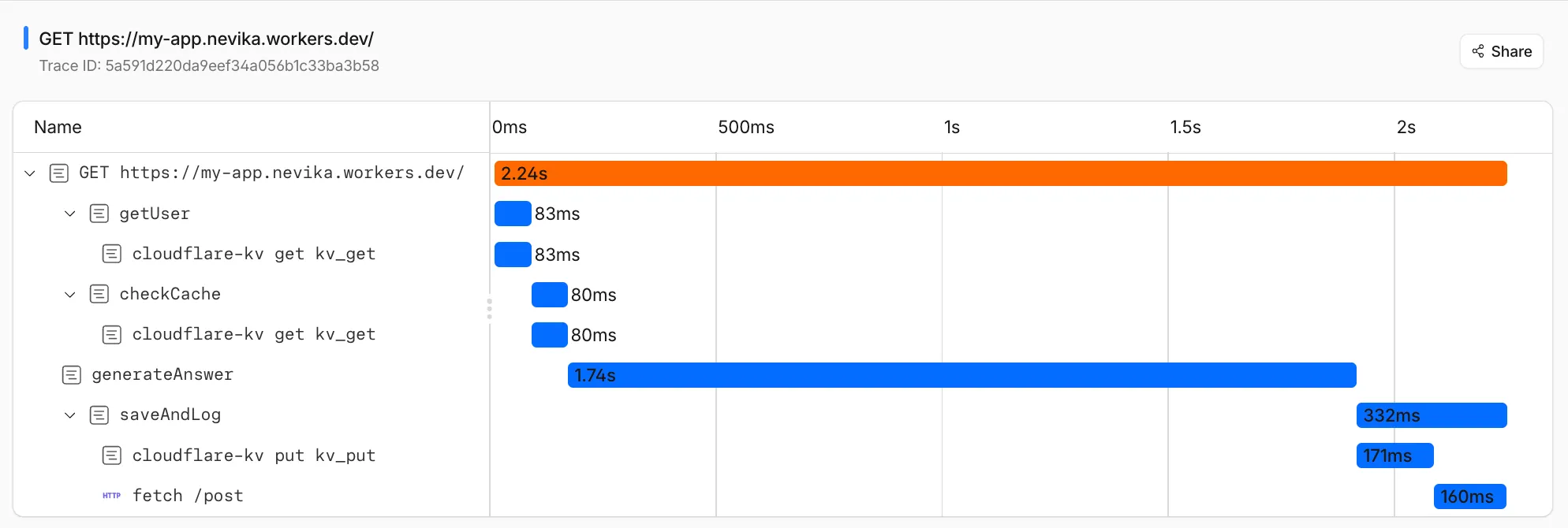
Tracing must be enabled in your Wrangler configuration for spans to be recorded.
For full API details and examples, refer to Custom spans.