
Changelog
New updates and improvements at Cloudflare.

Cloudflare WAN now displays your Anycast IP addresses directly in the dashboard when you configure IPsec or GRE tunnels.
Previously, customers received their Anycast IPs during onboarding or had to retrieve them with an API call. The dashboard now pre-loads these addresses, reducing setup friction and preventing configuration errors.
No action is required. All Cloudflare WAN customers can see their Anycast IPs in the tunnel configuration form automatically.
For more information, refer to Configure tunnel endpoints.
Cloudflare One Appliance version 2026.2.0 adds post-quantum encryption support using hybrid ML-KEM (Module-Lattice-Based Key-Encapsulation Mechanism).
The appliance now uses TLS 1.3 with hybrid ML-KEM for its connection to the Cloudflare edge. During the TLS handshake, the appliance and the edge share a symmetric secret over the TLS connection and inject it into the ESP layer of IPsec. This protects IPsec data plane traffic against harvest-now, decrypt-later attacks.
This upgrade deploys automatically to all appliances during their configured interrupt windows with no manual action required.
For more information, refer to Cloudflare One Appliance.
Magic WAN and Magic Transit customers can use the Cloudflare dashboard to configure and manage BGP peering between their networks and their Magic routing table when using IPsec and GRE tunnel on-ramps (beta).
Using BGP peering allows customers to:
- Automate the process of adding or removing networks and subnets.
- Take advantage of failure detection and session recovery features.
With this functionality, customers can:
- Establish an eBGP session between their devices and the Magic WAN / Magic Transit service when connected via IPsec and GRE tunnel on-ramps.
- Secure the session by MD5 authentication to prevent misconfigurations.
- Exchange routes dynamically between their devices and their Magic routing table.
For configuration details, refer to:
Cloudflare source IPs are the IP addresses used by Cloudflare services (such as Load Balancing, Gateway, and Browser Isolation) when sending traffic to your private networks.
For customers using legacy mode routing, traffic to private networks is sourced from public Cloudflare IPs, which may cause IP conflicts. For customers using Unified Routing mode (beta), traffic to private networks is sourced from dedicated, non-Internet-routable private IPv4 range to ensure:
- Symmetric routing over private network connections
- Proper firewall state preservation
- Private traffic stays on secure paths
Key details:
- IPv4: Sourced from
100.64.0.0/12by default, configurable to any/12CIDR - IPv6: Sourced from
2606:4700:cf1:5000::/64(not configurable) - Affected connectors: GRE, IPsec, CNI, WARP Connector, and WARP Client (Cloudflare Tunnel is not affected)
Configuring Cloudflare source IPs requires Unified Routing (beta) and the
Cloudflare One Networks Writepermission.For configuration details, refer to Configure Cloudflare source IPs.
You can now control how Cloudflare buffers HTTP request and response bodies using two new settings in Configuration Rules.
Controls how Cloudflare buffers HTTP request bodies before forwarding them to your origin server:
Mode Behavior Standard (default) Cloudflare can inspect a prefix of the request body for enabled functionality such as WAF and Bot Management. Full Buffers the entire request body before sending to origin. None No buffering — the request body streams directly to origin without inspection. Controls how Cloudflare buffers HTTP response bodies before forwarding them to the client:
Mode Behavior Standard (default) Cloudflare can inspect a prefix of the response body for enabled functionality. None No buffering — the response body streams directly to the client without inspection. {"action": "set_config","action_parameters": {"request_body_buffering": "standard","response_body_buffering": "none"}}For more information, refer to Configuration Rules.
Cloudflare Rulesets now includes
encode_base64()andsha256()functions, enabling you to generate signed request headers directly in rule expressions. These functions support common patterns like constructing a canonical string from request attributes, computing a SHA256 digest, and Base64-encoding the result.
Function Description Availability encode_base64(input, flags)Encodes a string to Base64 format. Optional flagsparameter:ufor URL-safe encoding,pfor padding (adds=characters to make the output length a multiple of 4, as required by some systems). By default, output is standard Base64 without padding.All plans (in header transform rules) sha256(input)Computes a SHA256 hash of the input string. Requires enablement
Encode a string to Base64 format:
encode_base64("hello world")Returns:
aGVsbG8gd29ybGQEncode a string to Base64 format with padding:
encode_base64("hello world", "p")Returns:
aGVsbG8gd29ybGQ=Perform a URL-safe Base64 encoding of a string:
encode_base64("hello world", "u")Returns:
aGVsbG8gd29ybGQCompute the SHA256 hash of a secret token:
sha256("my-token")Returns a hash that your origin can validate to authenticate requests.
Compute the SHA256 hash of a string and encode the result to Base64 format:
encode_base64(sha256("my-token"))Combines hashing and encoding for systems that expect Base64-encoded signatures.
For more information, refer to the Functions reference.
-
Cloudflare Rulesets now include new functions that enable advanced expression logic for evaluating arrays and maps. These functions allow you to build rules that match against lists of values in request or response headers, enabling use cases like country-based blocking using custom headers.
Function Description split(source, delimiter)Splits a string into an array of strings using the specified delimiter. join(array, delimiter)Joins an array of strings into a single string using the specified delimiter. has_key(map, key)Returns trueif the specified key exists in the map.has_value(map, value)Returns trueif the specified value exists in the map.
Check if a country code exists in a header list:
has_value(split(http.response.headers["x-allow-country"][0], ","), ip.src.country)Check if a specific header key exists:
has_key(http.request.headers, "x-custom-header")Join array values for logging or comparison:
join(http.request.headers.names, ", ")For more information, refer to the Functions reference.
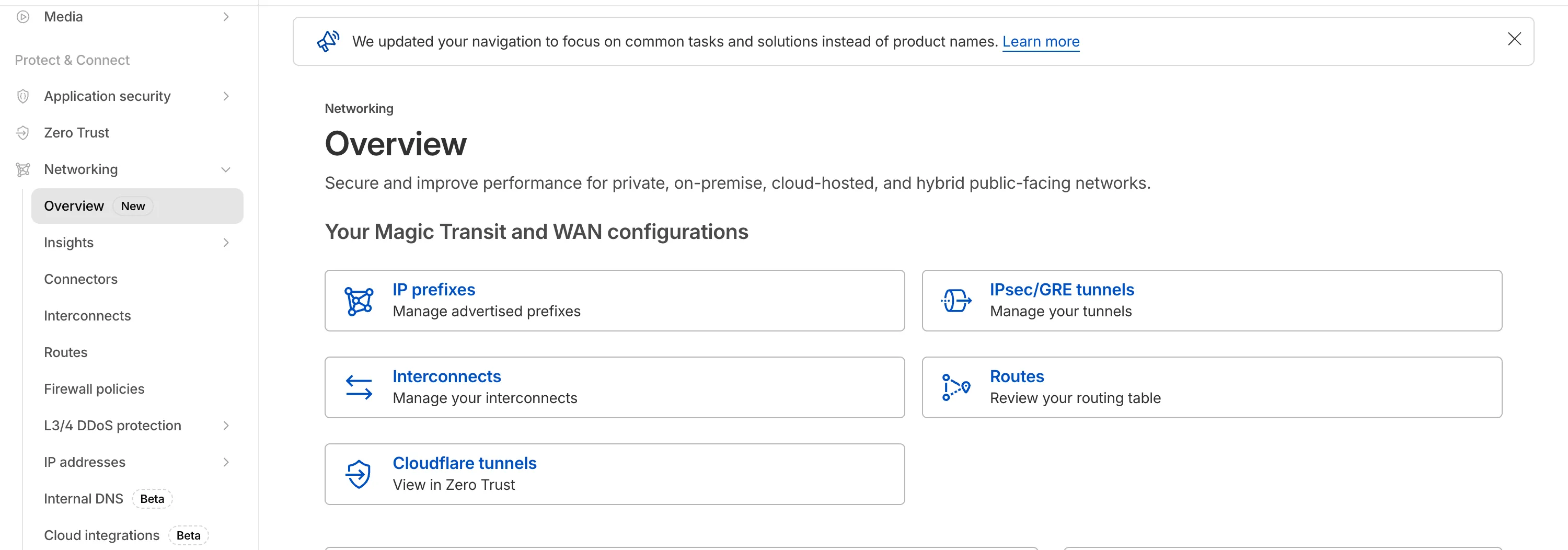
The Network Services menu structure in Cloudflare's dashboard has been updated to reflect solutions and capabilities instead of product names. This will make it easier for you to find what you need and better reflects how our services work together.
Your existing configurations will remain the same, and you will have access to all of the same features and functionality.
The changes visible in your dashboard may vary based on the products you use. Overall, changes relate to Magic Transit ↗, Magic WAN ↗, and Magic Firewall ↗.
Summary of changes:
- A new Overview page provides access to the most common tasks across Magic Transit and Magic WAN.
- Product names have been removed from top-level navigation.
- Magic Transit and Magic WAN configuration is now organized under Routes and Connectors. For example, you will find IP Prefixes under Routes, and your GRE/IPsec Tunnels under Connectors.
- Magic Firewall policies are now called Firewall Policies.
- Magic WAN Connectors and Connector On-Ramps are now referenced in the dashboard as Appliances and Appliance profiles. They can be found under Connectors > Appliances.
- Network analytics, network health, and real-time analytics are now available under Insights.
- Packet Captures are found under Insights > Diagnostics.
- You can manage your Sites from Insights > Network health.
- You can find Magic Network Monitoring under Insights > Network flow.
If you would like to provide feedback, complete this form ↗. You can also find these details in the January 7, 2026 email titled [FYI] Upcoming Network Services Dashboard Navigation Update.
We have made it easier to validate connectivity when deploying WARP Connector as part of your software-defined private network.
You can now
pingthe WARP Connector host directly on its LAN IP address immediately after installation. This provides a fast, familiar way to confirm that the Connector is online and reachable within your network before testing access to downstream services.Starting with version 2025.10.186.0, WARP Connector responds to traffic addressed to its own LAN IP, giving you immediate visibility into Connector reachability.
Learn more about deploying WARP Connector and building private network connectivity with Cloudflare One.
The
ip.src.metro_codefield in the Ruleset Engine is now populated with DMA (Designated Market Area) data.You can use this field to build rules that target traffic based on geographic market areas, enabling more granular location-based policies for your applications.
Field Type Description ip.src.metro_codeString | null The metro code (DMA) of the incoming request's IP address. Returns the designated market area code for the client's location. Example filter expression:
ip.src.metro_code eq "501"For more information, refer to the Fields reference.
Magic WAN Connector now exports NetFlow data for breakout traffic to Magic Network Monitoring (MNM), providing visibility into traffic that bypasses Cloudflare's security filtering.
This feature allows you to:
- Monitor breakout traffic statistics in the Cloudflare dashboard.
- View traffic patterns for applications configured to bypass Cloudflare.
- Maintain visibility across all traffic passing through your Magic WAN Connector.
For more information, refer to NetFlow statistics.
Starting February 2, 2026, the
cloudflared proxy-dnscommand will be removed from all newcloudflaredreleases.This change is being made to enhance security and address a potential vulnerability in an underlying DNS library. This vulnerability is specific to the
proxy-dnscommand and does not affect any othercloudflaredfeatures, such as the core Cloudflare Tunnel service.The
proxy-dnscommand, which runs a client-side DNS-over-HTTPS (DoH) proxy, has been an officially undocumented feature for several years. This functionality is fully and securely supported by our actively developed products.Versions of
cloudflaredreleased before this date will not be affected and will continue to operate. However, note that our official support policy for anycloudflaredrelease is one year from its release date.We strongly advise users of this undocumented feature to migrate to one of the following officially supported solutions before February 2, 2026, to continue benefiting from secure DNS-over-HTTPS.
The preferred method for enabling DNS-over-HTTPS on user devices is the Cloudflare WARP client. The WARP client automatically secures and proxies all DNS traffic from your device, integrating it with your organization's Zero Trust policies and posture checks.
For scenarios where installing a client on every device is not possible (such as servers, routers, or IoT devices), we recommend using the WARP Connector.
Instead of running
cloudflared proxy-dnson a machine, you can install the WARP Connector on a single Linux host within your private network. This connector will act as a gateway, securely routing all DNS and network traffic from your entire subnet to Cloudflare for filtering and logging.
Magic WAN now supports Automatic Return Routing (ARR), allowing customers to configure Magic on-ramps (IPsec/GRE/CNI) to learn the return path for traffic flows without requiring static routes.
Key benefits:
- Route-less mode: Static or dynamic routes are optional when using ARR.
- Overlapping IP space support: Traffic originating from customer sites can use overlapping private IP ranges.
- Symmetric routing: Return traffic is guaranteed to use the same connection as the original on-ramp.
This feature is currently in beta and requires the new Unified Routing mode (beta).
For configuration details, refer to Configure Automatic Return Routing.
Magic WAN Connector now allows you to designate a specific WAN port for breakout traffic, giving you deterministic control over the egress path for latency-sensitive applications.
With this feature, you can:
- Pin breakout traffic for specific applications to a preferred WAN port.
- Ensure critical traffic (such as Zoom or Teams) always uses your fastest or most reliable connection.
- Benefit from automatic failover to standard WAN port priority if the preferred port goes down.
This is useful for organizations with multiple ISP uplinks who need predictable egress behavior for performance-sensitive traffic.
For configuration details, refer to Designate WAN ports for breakout apps.
-
Cloudflare now provides two new request fields in the Ruleset engine that let you make decisions based on whether a request used TCP and the measured TCP round-trip time between the client and Cloudflare. These fields help you understand protocol usage across your traffic and build policies that respond to network performance. For example, you can distinguish TCP from QUIC traffic or route high latency requests to alternative origins when needed.
Field Type Description cf.edge.client_tcpBoolean Indicates whether the request used TCP. A value of true means the client connected using TCP instead of QUIC. cf.timings.client_tcp_rtt_msecNumber Reports the smoothed TCP round-trip time between the client and Cloudflare in milliseconds. For example, a value of 20 indicates roughly twenty milliseconds of RTT. Example filter expression:
cf.edge.client_tcp && cf.timings.client_tcp_rtt_msec < 100More information can be found in the Rules language fields reference.
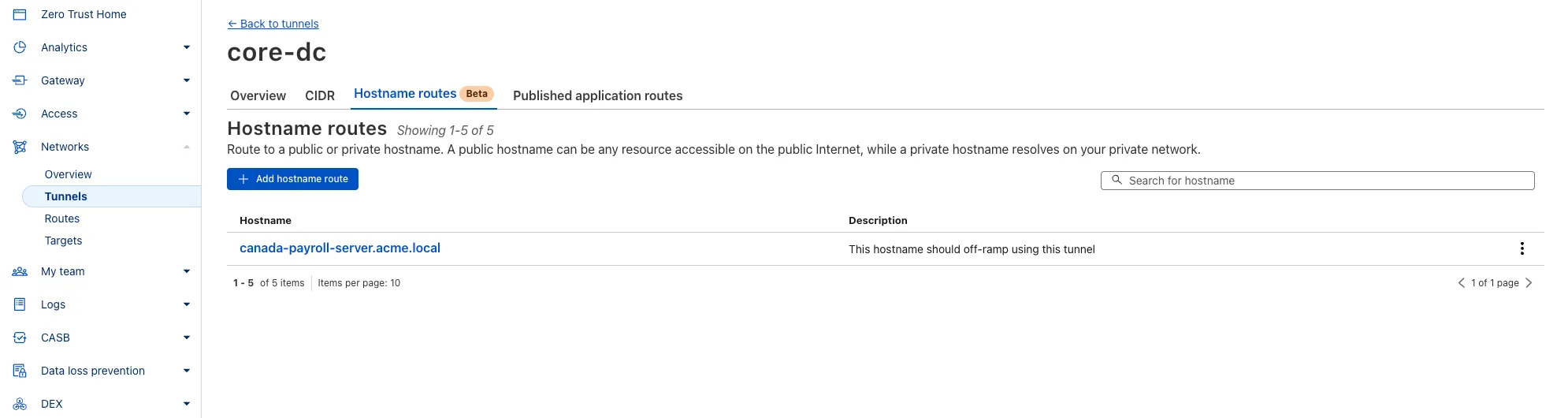
You can now route private traffic to Cloudflare Tunnel based on a hostname or domain, moving beyond the limitations of IP-based routing. This new capability is free for all Cloudflare One customers.
Previously, Tunnel routes could only be defined by IP address or CIDR range. This created a challenge for modern applications with dynamic or ephemeral IP addresses, often forcing administrators to maintain complex and brittle IP lists.
What’s new:
- Hostname & Domain Routing: Create routes for individual hostnames (e.g.,
payroll.acme.local) or entire domains (e.g.,*.acme.local) and direct their traffic to a specific Tunnel. - Simplified Zero Trust Policies: Build resilient policies in Cloudflare Access and Gateway using stable hostnames, making it dramatically easier to apply per-resource authorization for your private applications.
- Precise Egress Control: Route traffic for public hostnames (e.g.,
bank.example.com) through a specific Tunnel to enforce a dedicated source IP, solving the IP allowlist problem for third-party services. - No More IP Lists: This feature makes the workaround of maintaining dynamic IP Lists for Tunnel connections obsolete.
Get started in the Tunnels section of the Zero Trust dashboard with your first private hostname or public hostname route.
Learn more in our blog post ↗.
- Hostname & Domain Routing: Create routes for individual hostnames (e.g.,
Magic WAN and WARP Connector users can now securely route their DNS traffic to the Gateway resolver without exposing traffic to the public Internet.
Routing DNS traffic to the Gateway resolver allows DNS resolution and filtering for traffic coming from private networks while preserving source internal IP visibility. This ensures Magic WAN users have full integration with our Cloudflare One features, including Internal DNS and hostname-based policies.
To configure DNS filtering, change your Magic WAN or WARP Connector DNS settings to use Cloudflare's shared resolver IPs,
172.64.36.1and172.64.36.2. Once you configure DNS resolution and filtering, you can use Source Internal IP as a traffic selector in your resolver policies for routing private DNS traffic to your Internal DNS.
Now, Magic WAN customers can configure a custom IKE ID for their IPsec tunnels. Customers that are using Magic WAN and a VeloCloud SD-WAN device together can utilize this new feature to create a high availability configuration.
This feature is available via API only. Customers can read the Magic WAN documentation to learn more about the Custom IKE ID feature and the API call to configure it.
All bidirectional tunnel health check return packets are accepted by any Magic on-ramp.
Previously, when a Magic tunnel had a bidirectional health check configured, the bidirectional health check would pass when the return packets came back to Cloudflare over the same tunnel that was traversed by the forward packets.
There are SD-WAN devices, like VeloCloud, that do not offer controls to steer traffic over one tunnel versus another in a high availability tunnel configuration.
Now, when a Magic tunnel has a bidirectional health check configured, the bidirectional health check will pass when the return packet traverses over any tunnel in a high availability configuration.
Starting December 1, 2025, list endpoints for the Cloudflare Tunnel API and Zero Trust Networks API will no longer return deleted tunnels, routes, subnets and virtual networks by default. This change makes the API behavior more intuitive by only returning active resources unless otherwise specified.
No action is required if you already explicitly set
is_deleted=falseor if you only need to list active resources.This change affects the following API endpoints:
- List all tunnels:
GET /accounts/{account_id}/tunnels - List Cloudflare Tunnels:
GET /accounts/{account_id}/cfd_tunnel - List WARP Connector tunnels:
GET /accounts/{account_id}/warp_connector - List tunnel routes:
GET /accounts/{account_id}/teamnet/routes - List subnets:
GET /accounts/{account_id}/zerotrust/subnets - List virtual networks:
GET /accounts/{account_id}/teamnet/virtual_networks
The default behavior of the
is_deletedquery parameter will be updated.Scenario Previous behavior (before December 1, 2025) New behavior (from December 1, 2025) is_deletedparameter is omittedReturns active & deleted tunnels, routes, subnets and virtual networks Returns only active tunnels, routes, subnets and virtual networks If you need to retrieve deleted (or all) resources, please update your API calls to explicitly include the
is_deletedparameter before December 1, 2025.To get a list of only deleted resources, you must now explicitly add the
is_deleted=truequery parameter to your request:Terminal window # Example: Get ONLY deleted Tunnelscurl "https://api.cloudflare.com/client/v4/accounts/$ACCOUNT_ID/tunnels?is_deleted=true" \-H "Authorization: Bearer $API_TOKEN"# Example: Get ONLY deleted Virtual Networkscurl "https://api.cloudflare.com/client/v4/accounts/$ACCOUNT_ID/teamnet/virtual_networks?is_deleted=true" \-H "Authorization: Bearer $API_TOKEN"Following this change, retrieving a complete list of both active and deleted resources will require two separate API calls: one to get active items (by omitting the parameter or using
is_deleted=false) and one to get deleted items (is_deleted=true).This update is based on user feedback and aims to:
- Create a more intuitive default: Aligning with common API design principles where list operations return only active resources by default.
- Reduce unexpected results: Prevents users from accidentally operating on deleted resources that were returned unexpectedly.
- Improve performance: For most users, the default query result will now be smaller and more relevant.
To learn more, please visit the Cloudflare Tunnel API and Zero Trust Networks API documentation.
- List all tunnels:
The Cloudflare Terraform provider resources for Cloudflare WAN tunnels and routes now support Terraform provider version 5. Customers using infrastructure-as-code workflows can manage their tunnel and route configuration with the latest provider version.
For more information, refer to the Cloudflare Terraform provider documentation ↗.
Today, we are excited to announce that all Magic Transit and Magic WAN customers with CMB EU (Customer Metadata Boundary - Europe) enabled in their account will be able to access GRE, IPsec, and CNI health check and traffic volume data in the Cloudflare dashboard and via API.
This ensures that all Magic Transit and Magic WAN customers with CMB EU enabled will be able to access all Magic Transit and Magic WAN features.
Specifically, these two GraphQL endpoints are now compatible with CMB EU:
magicTransitTunnelHealthChecksAdaptiveGroupsmagicTransitTunnelTrafficAdaptiveGroups
The KVM-based virtual Cloudflare One Appliance is now in open beta with official support for Proxmox VE.
Customers can deploy the virtual appliance on KVM hypervisors to connect branch or data center networks to Cloudflare WAN without dedicated hardware.
For setup instructions, refer to Configure a virtual Cloudflare One Appliance.
Your real-time applications running over Cloudflare Tunnel are now faster and more reliable. We've completely re-architected the way
cloudflaredproxies UDP traffic in order to isolate it from other traffic, ensuring latency-sensitive applications like private DNS are no longer slowed down by heavy TCP traffic (like file transfers) on the same Tunnel.This is a foundational improvement to Cloudflare Tunnel, delivered automatically to all customers. There are no settings to configure — your UDP traffic is already flowing faster and more reliably.
What’s new:
- Faster UDP performance: We've significantly reduced the latency for establishing new UDP sessions, making applications like private DNS much more responsive.
- Greater reliability for mixed traffic: UDP packets are no longer affected by heavy TCP traffic, preventing timeouts and connection drops for your real-time services.
Learn more about running TCP or UDP applications and private networks through Cloudflare Tunnel.
Magic Transit customers can now configure AS prepending on their BYOIP prefixes advertised at the Cloudflare edge. This allows for smoother traffic migration and minimizes packet loss when changing providers.
AS prepending makes the Cloudflare route less preferred by increasing the AS path length. You can use this to gradually shift traffic away from Cloudflare before withdrawing a prefix, avoiding abrupt routing changes.
Prepending can be configured via the API or through BGP community values when peering with the Magic Transit routing table. For more information, refer to Advertise prefixes.