
Changelog
New updates and improvements at Cloudflare.

If your account does not already have a key-value (KV) backed Durable Object namespace, you can no longer create new ones. New Durable Object namespaces must use the SQLite storage backend, which has been recommended for all new Durable Objects since it became generally available ↗ in 2024.
Create a new class with a
new_sqlite_classesmigration:JSONC {"$schema": "./node_modules/wrangler/config-schema.json","migrations": [{"tag": "v1","new_sqlite_classes": ["MyDurableObject"]}]}TOML [[migrations]]tag = "v1"new_sqlite_classes = ["MyDurableObject"]SQLite-backed Durable Objects have feature parity with the key-value backend — including the key-value storage API — and additionally support relational SQL queries and point-in-time recovery to restore an object's storage to any point in the past 30 days.
If you attempt to create a new key-value backed namespace (a
new_classesmigration) on an affected account, the deployment fails with the following error:Creating new key-value backed Durable Object namespaces is no longer supported on this account. Please create a namespace using a `new_sqlite_classes` migration instead.This change only affects accounts that are not already using the key-value storage backend. Accounts with at least one existing key-value backed namespace can still create new ones for now, and the Workers Free plan has only ever supported SQLite-backed Durable Objects. It is part of a broader move toward SQLite as the single storage backend for Durable Objects, ahead of a future migration path for existing key-value backed objects.
For more information, refer to Durable Objects migrations.
A new declarative
exportsfield in your Wrangler configuration file replaces the imperativemigrationsarray for managing Durable Object class lifecycle. Instead of writing an ordered list of migration steps with unique tags, you declare each Durable Object class your Worker exports and Cloudflare compares that against what's already deployed to determine what Durable Object state needs to be created, renamed, or deleted.With legacy migrations, renaming
ChatRoomtoRoomrequires retaining both tagged steps:Before — legacy migrations {"migrations": [{ "tag": "v1", "new_sqlite_classes": ["ChatRoom"] },{"tag": "v2","renamed_classes": [{ "from": "ChatRoom", "to": "Room" }],},],}With
exports, you instead declareRoomas the current class and markChatRoomas renamed:After — declarative exports {"exports": {"ChatRoom": {"type": "durable-object","state": "renamed","renamed_to": "Room",},"Room": { "type": "durable-object", "storage": "sqlite" },},}Each entry is keyed by class name. The
statefield carries the lifecycle (createdby default — a live class — plus tombstone statesdeleted,renamed, andtransferred, and theexpecting-transferreceiving state for cross-Worker transfers).Key improvements over the legacy
migrationsarray:- No migration tags. The current
exportsmap is the source of truth — there is no historical chain ofv1,v2,v3entries to maintain. - Structured deployment output. Wrangler reports when it creates, updates, deletes, renames, or transfers Durable Object classes. It also identifies stale configuration entries that are safe to remove. Deployments with no changes or notices do not print this output.
- Zero-downtime rename and transfer patterns are first-class. Tombstones may coexist with the source class still in code, enabling a three-deploy rename and a four-deploy cross-Worker transfer without runtime errors during the rollout window.
- Cross-Worker safety. When you delete or rename a class, Cloudflare lists every other Worker in your account whose bindings still reference the namespace, so you can redeploy them before the change goes live.
Existing Workers using the legacy
migrationsarray continue to work unchanged. To move toexports, refer to the migration guide.exportsandmigrationsare mutually exclusive within a single Worker.For the full reference, refer to Durable Object class exports.
- No migration tags. The current
You can now monitor how much memory your Workers and Durable Objects consume across invocations with the new Memory Usage chart in the Workers Metrics tab, broken down by P50, P90, P99, and P999 percentiles.
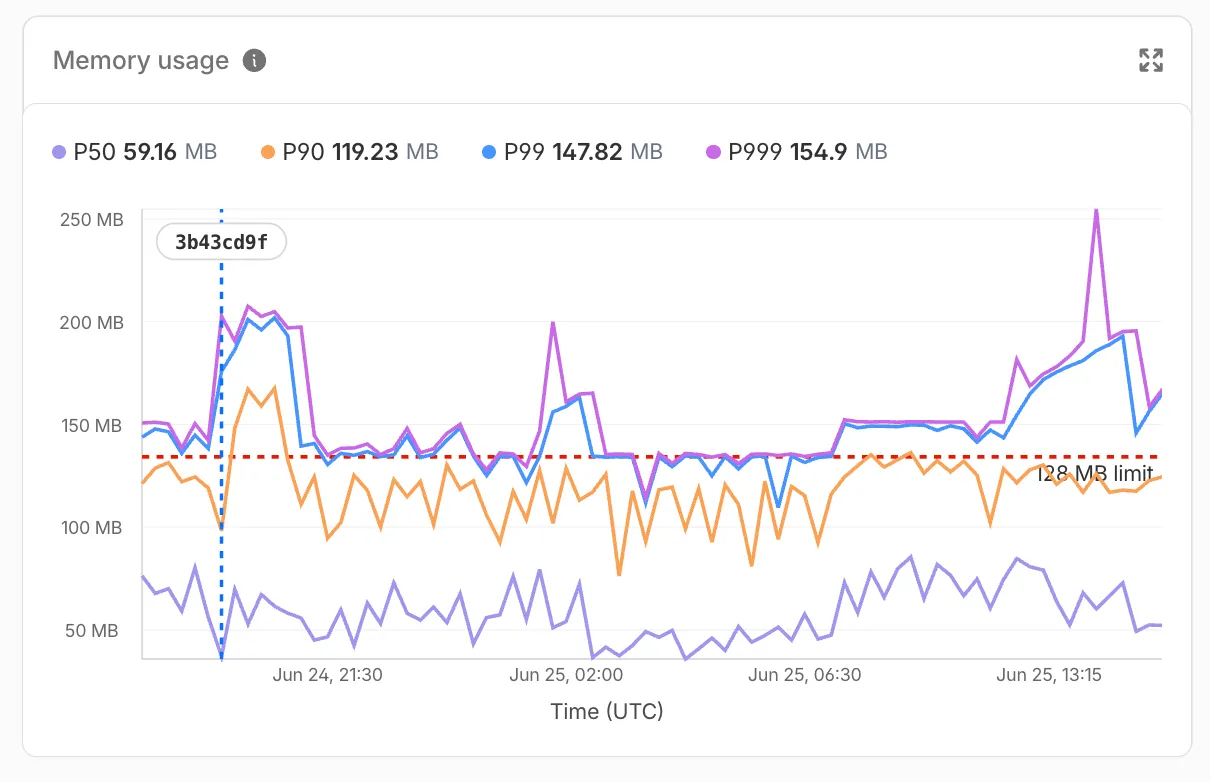
Memory usage measures the V8 isolate memory at the time of each invocation, subject to the 128 MB per-isolate limit — a single isolate can handle many concurrent requests and shares memory across them.
Use the Memory Usage chart to:
- Track memory trends — Spot gradual increases that may indicate a memory leak before they cause
Exceeded Memoryerrors. - Correlate with deployments — Deployment markers on the chart help you identify whether a new version introduced a memory regression.
- Right-size your Worker — Understand your baseline memory footprint and how much headroom you have before hitting the 128 MB limit.
For Durable Objects, memory usage reflects the in-memory state an object holds (class properties, caches, active WebSocket connections), which persists across invocations until the object is hibernated or evicted. This state is not preserved across eviction, hibernation, or a crash, so persist anything important to storage.
To view memory usage, open the Metrics tab for your Worker ↗ or Durable Object namespace ↗. For Durable Objects, you can filter by DO ID or name to drill down into memory usage for a specific object. You can also query memory usage programmatically via the GraphQL Analytics API using the
workersInvocationsAdaptivedataset — thequantiles.memoryUsageBytesP50throughquantiles.memoryUsageBytesP999fields return percentile values in bytes.For local memory debugging, you can also profile memory with DevTools to take heap snapshots and identify specific objects causing high memory usage.
- Track memory trends — Spot gradual increases that may indicate a memory leak before they cause
Durable Objects now supports a
usjurisdiction, letting you create Durable Objects that only run and store data within the United States. Use theusjurisdiction when you need to keep a Durable Object's compute and storage inside the United States to meet data residency requirements.Create a namespace restricted to the
usjurisdiction the same way as any other jurisdiction:JavaScript // Workerexport default {async fetch(request, env) {const usSubnamespace = env.MY_DURABLE_OBJECT.jurisdiction("us");const stub = usSubnamespace.getByName("general");return stub.fetch(request);},};Workers may still access Durable Objects constrained to the
usjurisdiction from anywhere in the world. The jurisdiction constraint only controls where the Durable Object itself runs and persists data.For the full list of supported jurisdictions, refer to Data location — Restrict Durable Objects to a jurisdiction.
The
@cloudflare/vitest-pool-workerspackage now includesevictDurableObjectandevictAllDurableObjectstest helpers, exported fromcloudflare:test.These helpers let you test how a Durable Object behaves across evictions, simulating the production lifecycle where an idle Durable Object can be evicted from memory.
For more context, refer to Lifecycle of a Durable Object.
TypeScript import { evictDurableObject, evictAllDurableObjects } from "cloudflare:test";import { env } from "cloudflare:workers";const id = env.COUNTER.idFromName("my-counter");const stub = env.COUNTER.get(id);// Evict the Durable Object instance pointed to by a specific stubawait evictDurableObject(stub);// Close WebSockets instead of hibernating themawait evictDurableObject(stub, { webSockets: "close" });// Evict all currently-running Durable Objects in evictable namespacesawait evictAllDurableObjects();These helpers are available in
@cloudflare/vitest-pool-workers@0.16.20and later.Learn more in the Test APIs reference and the Testing Durable Objects guide.
Durable Objects now supports two new location hints for Asia-Pacific:
apac-ne(Northeast Asia-Pacific) andapac-se(Southeast Asia-Pacific). Useapac-neorapac-sewhen you want finer-grained placement within Asia-Pacific rather than the broaderapachint.Use the new hints the same way as any other
locationHint:JavaScript // Northeast Asia-Pacific (Japan, Korea, etc.)const stubNE = env.MY_DURABLE_OBJECT.get(id, { locationHint: "apac-ne" });// Southeast Asia-Pacific (Singapore, Indonesia, etc.)const stubSE = env.MY_DURABLE_OBJECT.get(id, { locationHint: "apac-se" });If your users are spread across all of Asia-Pacific, the existing
apachint remains the right choice. Only reach forapac-neorapac-sewhen your traffic is clearly concentrated in one sub-region and you want to minimize round-trip time to that audience. The default behavior and what we generally recommended is not adding a location hint unless absolutely needed, this will create the Durable Object as close to the initializing request as possible to reduce latency.As with all location hints, these are best-effort suggestions. Cloudflare will place the Durable Object in a nearby data center, not necessarily the exact hinted location.
For the full list of supported hints, refer to Data location — Provide a location hint.
Durable Objects now remain alive for the duration of active outbound connections created via
connect()or an outbound WebSocket. Previously, a Durable Object would be evicted after 70-140 seconds of no incoming traffic, even if the object had an open outbound connection, which is a common pattern when streaming responses from a large language model (LLM) over TCP or an outbound WebSocket.With this change, each active outbound connection prevents eviction. Once all outbound connections close, the standard 70-140 second inactivity window applies before the Durable Object is evicted.
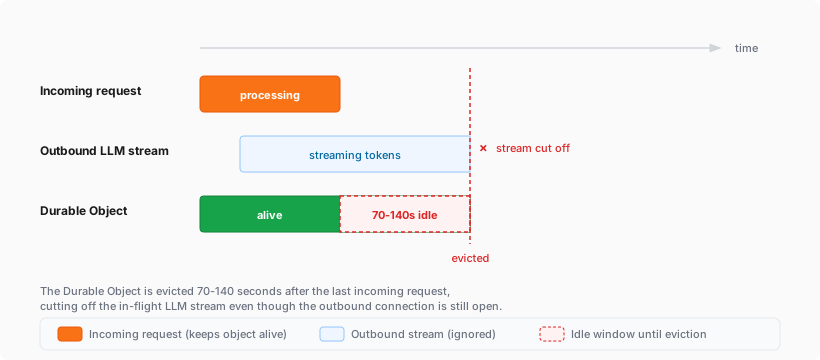
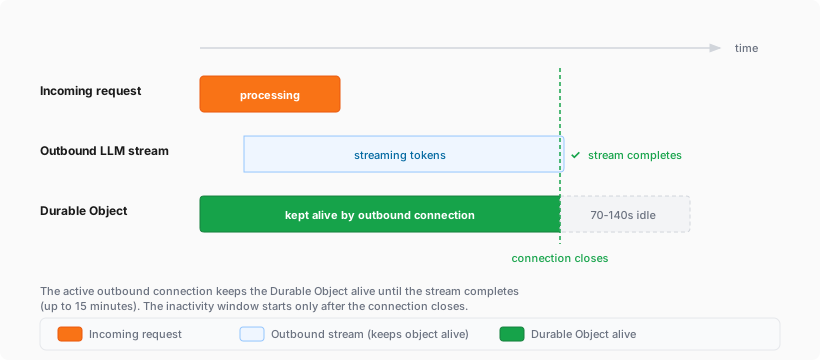
If you are building agents on Cloudflare, this is especially relevant. An agent that streams tokens from an LLM while calling models, or that performs long-running tasks over an outbound connection, now stays alive for the duration of that connection instead of being evicted mid-stream.
Limits:
- Each outbound connection keeps the Durable Object alive for a maximum of 15 minutes. After 15 minutes, the connection stops preventing eviction (the connection itself continues operating), and the standard eviction rules resume.
- The Durable Object's existing per-account instance limits still apply.
For more information, refer to Lifecycle of a Durable Object.
You can now filter the Metrics tab for a Durable Objects namespace by an individual Durable Object's ID or name in the Cloudflare dashboard. Previously, metrics charts only showed aggregate, namespace-level data, making it difficult to isolate the behavior of a specific object.
Go to Durable Objects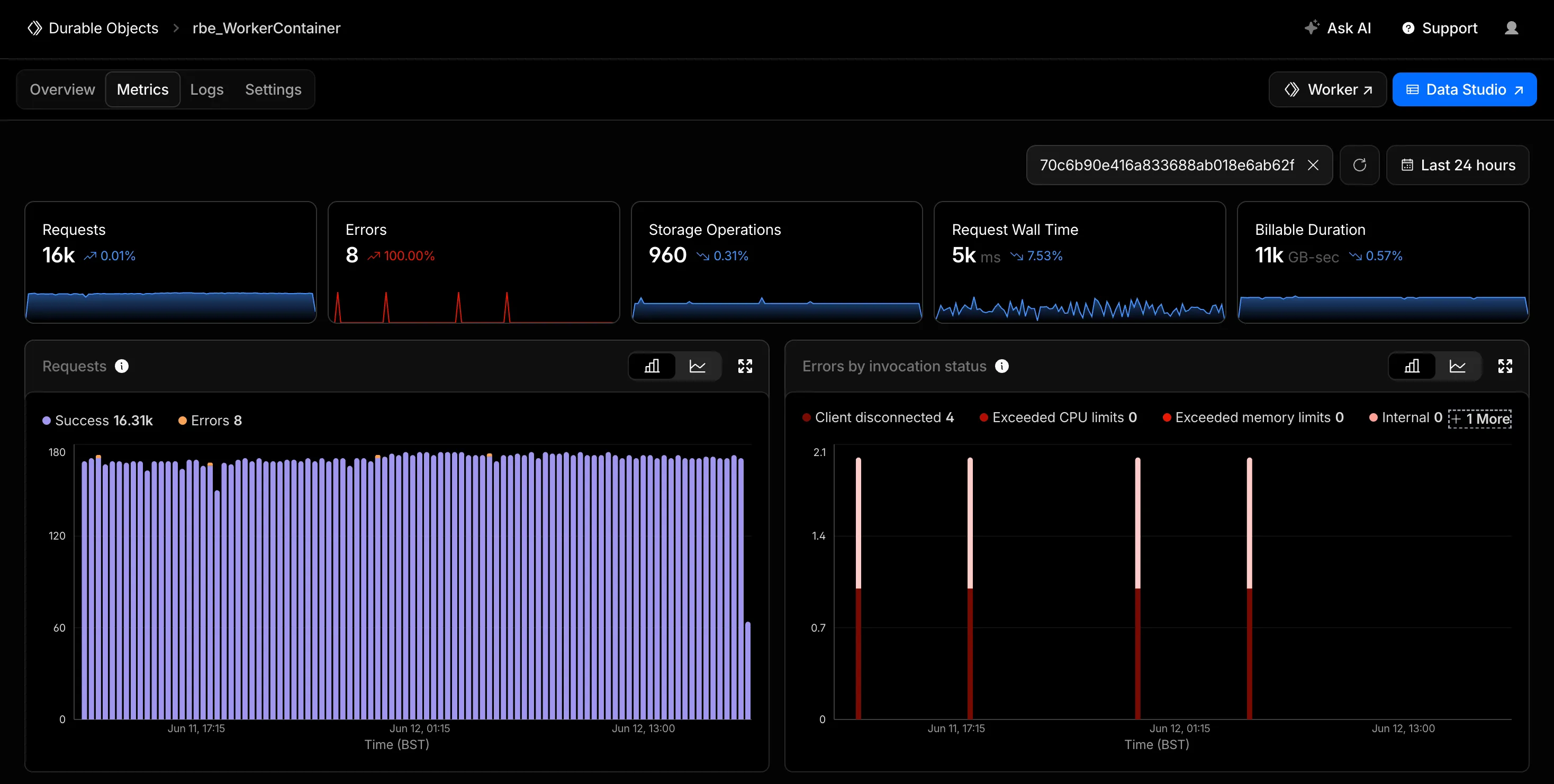
Start typing an ID or name into the filter and select a match from the autocomplete dropdown. The autocomplete only shows objects with invocations during the selected time range, so an object that does not appear has not been invoked in that window. This does not necessarily mean the object has been deleted. Every chart on the page updates to reflect only the selected object. This makes it easier to identify and investigate a single Durable Object when debugging a high-traffic object, an error spike, or unexpected storage usage. Clear the filter to return to namespace-level metrics.
Metrics are powered by the GraphQL Analytics API, so standard analytics behavior such as ingestion delay and sampling applies.
For more information, refer to Metrics and analytics.
Pay-as-you-go customers can now view billable usage and create budget alerts directly from the product overview pages for Workers & Pages, D1, R2, Workers KV, Queues, Vectorize, Durable Objects, and Containers. A new sidebar widget shows current-period spend and the billing cycle date range, alongside a button to create a budget alert.
The widget pulls from the same data as the Billable Usage dashboard and aligns to your billing cycle (or the current day on Free plans), so the numbers match your invoice. Enterprise contract accounts are not yet supported.
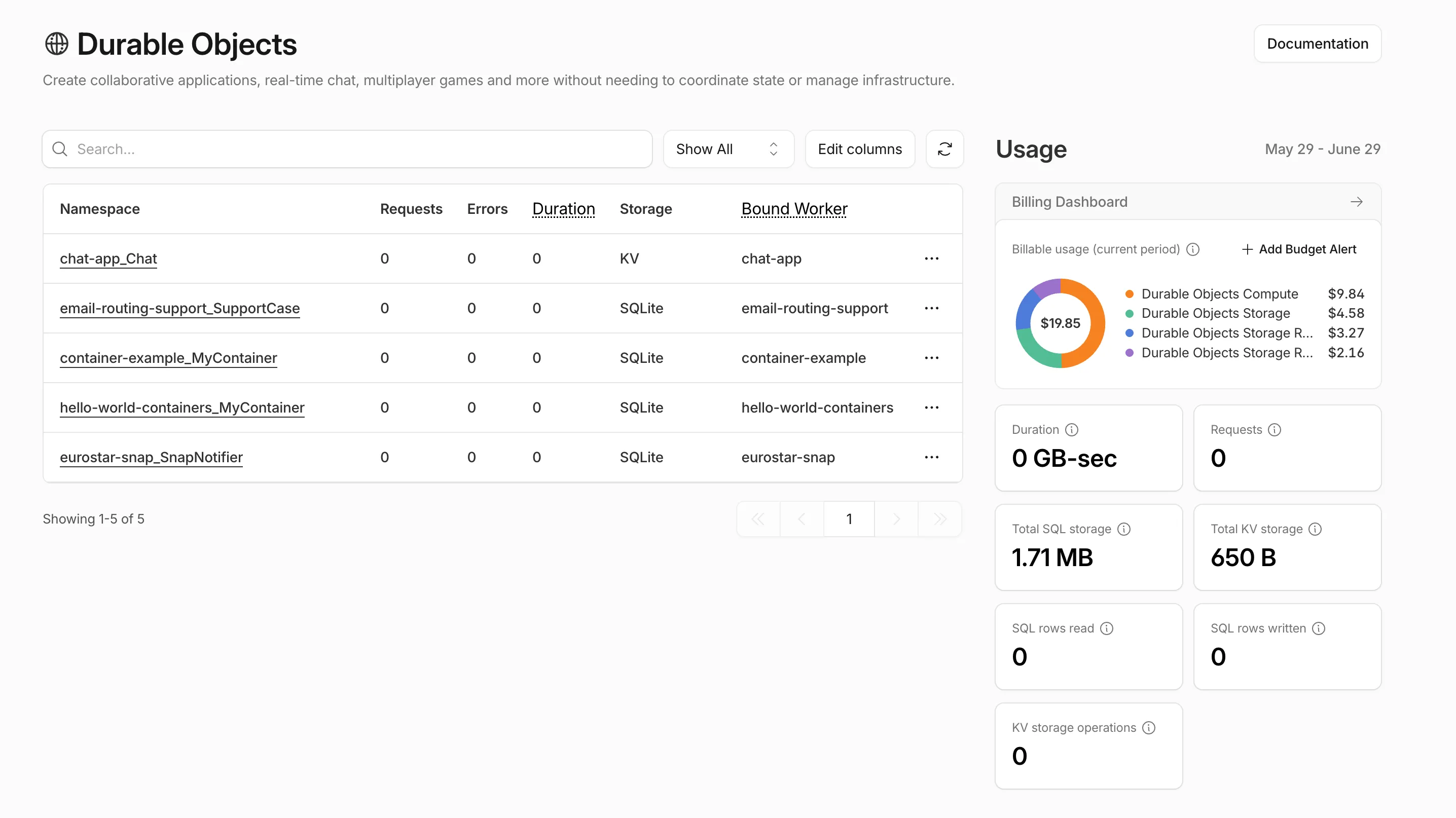
Selecting Create budget alert opens the budget alert flow inline so you can set a dollar threshold in the same place you are reviewing usage. Budget alerts apply to your total account-level spend across all products, not just the product page you create them from.
For more information, refer to the Usage-based billing documentation.
ctx.id.jurisdictioninside a Durable Object now reports the jurisdiction the object was created in — for example"eu"when accessed throughenv.MY_DURABLE_OBJECT.jurisdiction("eu")— so you can make region-aware decisions without passing the jurisdiction through method arguments or persisting it in storage. For the full list of ID-construction paths that preservejurisdiction, refer to the Durable Object ID documentation.JavaScript export class RegionalRoom extends DurableObject {async fetch(request) {// "eu" when accessed through env.MY_DURABLE_OBJECT.jurisdiction("eu")const region = this.ctx.id.jurisdiction;return new Response(`Hello from ${region ?? "the default region"}!`);}}// Workerexport default {async fetch(request, env) {const stub = env.MY_DURABLE_OBJECT.jurisdiction("eu").getByName("general");return stub.fetch(request);},};ctx.id.jurisdictionisundefinedfor Durable Objects that were not created in a jurisdiction-restricted namespace. Alarms scheduled before 2026-03-15 also do not havejurisdictionstored; to backfill the value, reschedule the alarm from afetch()or RPC handler.
When your Worker accesses a Durable Object via
idFromName()orgetByName(), the same name is now available onctx.id.nameinside the object — no need to pass it through method arguments or persist it in storage. This brings the runtime behavior in line with the Workers runtime types.This is especially useful for alarms, where there is no calling client to pass the name as an argument. When an alarm handler runs,
ctx.id.namewill hold the same name the object was originally accessed with.JavaScript import { DurableObject } from "cloudflare:workers";export class ChatRoom extends DurableObject {async getRoomName() {// ctx.id.name returns the name passed to getByName() or idFromName()return this.ctx.id.name;}}// Workerexport default {async fetch(request, env) {const stub = env.CHAT_ROOM.getByName("general");const roomName = await stub.getRoomName();return new Response(`Welcome to ${roomName}!`);},};ctx.id.nameisundefinedin the following cases:- For Durable Objects created with
newUniqueId(). - When accessed via
idFromString(), even if the ID was originally created from a name. - For names longer than 1,024 bytes.
This works the same way in local development with
wrangler devas it does in production. Runnpm update wranglerto ensure you are on a version with this support.For more information, refer to the Durable Object ID documentation.
- For Durable Objects created with
deleteAll()now deletes a Durable Object alarm in addition to stored data for Workers with a compatibility date of2026-02-24or later. This change simplifies clearing a Durable Object's storage with a single API call.Previously,
deleteAll()only deleted user-stored data for an object. Alarm usage stores metadata in an object's storage, which required a separatedeleteAlarm()call to fully clean up all storage for an object. ThedeleteAll()change applies to both KV-backed and SQLite-backed Durable Objects.JavaScript // Before: two API calls required to clear all storageawait this.ctx.storage.deleteAlarm();await this.ctx.storage.deleteAll();// Now: a single call clears both data and the alarmawait this.ctx.storage.deleteAll();For more information, refer to the Storage API documentation.
A new Rules of Durable Objects guide is now available, providing opinionated best practices for building effective Durable Objects applications. This guide covers design patterns, storage strategies, concurrency, and common anti-patterns to avoid.
Key guidance includes:
- Design around your "atom" of coordination — Create one Durable Object per logical unit (chat room, game session, user) instead of a global singleton that becomes a bottleneck.
- Use SQLite storage with RPC methods — SQLite-backed Durable Objects with typed RPC methods provide the best developer experience and performance.
- Understand input and output gates — Learn how Cloudflare's runtime prevents data races by default, how write coalescing works, and when to use
blockConcurrencyWhile(). - Leverage Hibernatable WebSockets — Reduce costs for real-time applications by allowing Durable Objects to sleep while maintaining WebSocket connections.
The testing documentation has also been updated with modern patterns using
@cloudflare/vitest-pool-workers, including examples for testing SQLite storage, alarms, and direct instance access:test/counter.test.js import { env, runDurableObjectAlarm } from "cloudflare:test";import { it, expect } from "vitest";it("can test Durable Objects with isolated storage", async () => {const stub = env.COUNTER.getByName("test");// Call RPC methods directly on the stubawait stub.increment();expect(await stub.getCount()).toBe(1);// Trigger alarms immediately without waitingawait runDurableObjectAlarm(stub);});test/counter.test.ts import { env, runDurableObjectAlarm } from "cloudflare:test";import { it, expect } from "vitest";it("can test Durable Objects with isolated storage", async () => {const stub = env.COUNTER.getByName("test");// Call RPC methods directly on the stubawait stub.increment();expect(await stub.getCount()).toBe(1);// Trigger alarms immediately without waitingawait runDurableObjectAlarm(stub);});
Storage billing for SQLite-backed Durable Objects will be enabled in January 2026, with a target date of January 7, 2026 (no earlier).
To view your SQLite storage usage, go to the Durable Objects page
Go to Durable ObjectsIf you do not want to incur costs, please take action such as optimizing queries or deleting unnecessary stored data in order to reduce your SQLite storage usage ahead of the January 7th target. Only usage on and after the billing target date will incur charges.
Developers on the Workers Paid plan with Durable Object's SQLite storage usage beyond included limits will incur charges according to SQLite storage pricing announced in September 2024 with the public beta ↗. Developers on the Workers Free plan will not be charged.
Compute billing for SQLite-backed Durable Objects has been enabled since the initial public beta. SQLite-backed Durable Objects currently incur charges for requests and duration, and no changes are being made to compute billing.
For more information about SQLite storage pricing and limits, refer to the Durable Objects pricing documentation.
Workers, including those using Durable Objects and Browser Rendering, may now process WebSocket messages up to 32 MiB in size. Previously, this limit was 1 MiB.
This change allows Workers to handle use cases requiring large message sizes, such as processing Chrome Devtools Protocol messages.
For more information, please see the Durable Objects startup limits.
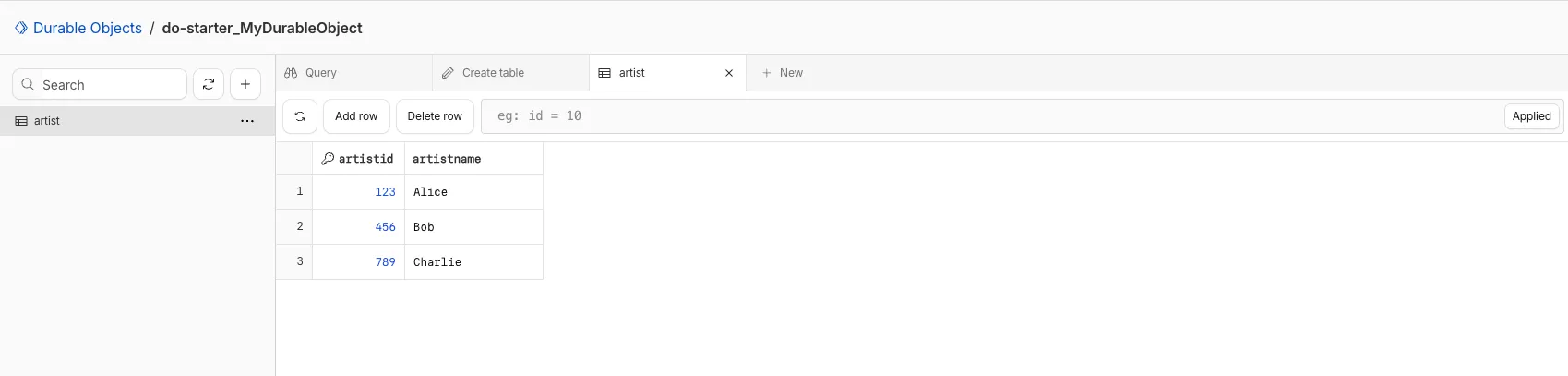
You can now view and write to each Durable Object's storage using a UI editor on the Cloudflare dashboard. Only Durable Objects using SQLite storage can use Data Studio.
Go to Durable ObjectsData Studio unlocks easier data access with Durable Objects for prototyping application data models to debugging production storage usage. Before, querying your Durable Objects data required deploying a Worker.
To access a Durable Object, you can provide an object's unique name or ID generated by Cloudflare. Data Studio requires you to have at least the
Workers Platform Adminrole, and all queries are captured with audit logging for your security and compliance needs. Queries executed by Data Studio send requests to your remote, deployed objects and incur normal usage billing.To learn more, visit the Data Studio documentation. If you have feedback or suggestions for the new Data Studio, please share your experience on Discord ↗
You can now create a client (a Durable Object stub) to a Durable Object with the new
getByNamemethod, removing the need to convert Durable Object names to IDs and then create a stub.JavaScript // Before: (1) translate name to ID then (2) get a clientconst objectId = env.MY_DURABLE_OBJECT.idFromName("foo"); // or .newUniqueId()const stub = env.MY_DURABLE_OBJECT.get(objectId);// Now: retrieve client to Durable Object directly via its nameconst stub = env.MY_DURABLE_OBJECT.getByName("foo");// Use client to send request to the remote Durable Objectconst rpcResponse = await stub.sayHello();Each Durable Object has a globally-unique name, which allows you to send requests to a specific object from anywhere in the world. Thus, a Durable Object can be used to coordinate between multiple clients who need to work together. You can have billions of Durable Objects, providing isolation between application tenants.
To learn more, visit the Durable Objects API Documentation or the getting started guide.
The new @cloudflare/actors ↗ library is now in beta!
The
@cloudflare/actorslibrary is a new SDK for Durable Objects and provides a powerful set of abstractions for building real-time, interactive, and multiplayer applications on top of Durable Objects. With beta usage and feedback,@cloudflare/actorswill become the recommended way to build on Durable Objects and draws upon Cloudflare's experience building products/features on Durable Objects.The name "actors" originates from the actor programming model, which closely ties to how Durable Objects are modelled.
The
@cloudflare/actorslibrary includes:- Storage helpers for querying embeddeded, per-object SQLite storage
- Storage helpers for managing SQL schema migrations
- Alarm helpers for scheduling multiple alarms provided a date, delay in seconds, or cron expression
Actorclass for using Durable Objects with a defined pattern- Durable Objects Workers API ↗ is always available for your application as needed
Storage and alarm helper methods can be combined with any Javascript class ↗ that defines your Durable Object, i.e, ones that extend
DurableObjectincluding theActorclass.JavaScript import { Storage } from "@cloudflare/actors/storage";export class ChatRoom extends DurableObject<Env> {storage: Storage;constructor(ctx: DurableObjectState, env: Env) {super(ctx, env)this.storage = new Storage(ctx.storage);this.storage.migrations = [{idMonotonicInc: 1,description: "Create users table",sql: "CREATE TABLE IF NOT EXISTS users (id INTEGER PRIMARY KEY)"}]}async fetch(request: Request): Promise<Response> {// Run migrations before executing SQL queryawait this.storage.runMigrations();// Query with SQL templatelet userId = new URL(request.url).searchParams.get("userId");const query = this.storage.sql`SELECT * FROM users WHERE id = ${userId};`return new Response(`${JSON.stringify(query)}`);}}@cloudflare/actorslibrary introduces theActorclass pattern.Actorlets you access Durable Objects without writing the Worker that communicates with your Durable Object (the Worker is created for you). By default, requests are routed to a Durable Object named "default".JavaScript export class MyActor extends Actor<Env> {async fetch(request: Request): Promise<Response> {return new Response('Hello, World!')}}export default handler(MyActor);You can route to different Durable Objects by name within your
Actorclass usingnameFromRequest↗.JavaScript export class MyActor extends Actor<Env> {static nameFromRequest(request: Request): string {let url = new URL(request.url);return url.searchParams.get("userId") ?? "foo";}async fetch(request: Request): Promise<Response> {return new Response(`Actor identifier (Durable Object name): ${this.identifier}`);}}export default handler(MyActor);For more examples, check out the library README ↗.
@cloudflare/actorslibrary is a place for more helpers and built-in patterns, like retry handling and Websocket-based applications, to reduce development overhead for common Durable Objects functionality. Please share feedback and what more you would like to see on our Discord channel ↗.
You can now create Durable Objects using Python Workers. A Durable Object is a special kind of Cloudflare Worker which uniquely combines compute with storage, enabling stateful long-running applications which run close to your users. For more info see here.
You can define a Durable Object in Python in a similar way to JavaScript:
Python from workers import DurableObject, Response, WorkerEntrypointfrom urllib.parse import urlparseclass MyDurableObject(DurableObject):def __init__(self, ctx, env):self.ctx = ctxself.env = envdef fetch(self, request):result = self.ctx.storage.sql.exec("SELECT 'Hello, World!' as greeting").one()return Response(result.greeting)class Default(WorkerEntrypoint):async def fetch(self, request):url = urlparse(request.url)id = env.MY_DURABLE_OBJECT.idFromName(url.path)stub = env.MY_DURABLE_OBJECT.get(id)greeting = await stub.fetch(request.url)return greetingDefine the Durable Object in your Wrangler configuration file:
JSONC {"durable_objects": {"bindings": [{"name": "MY_DURABLE_OBJECT","class_name": "MyDurableObject"}]}}TOML [[durable_objects.bindings]]name = "MY_DURABLE_OBJECT"class_name = "MyDurableObject"Then define the storage backend for your Durable Object:
JSONC {"migrations": [{"tag": "v1", // Should be unique for each entry"new_sqlite_classes": [ // Array of new classes"MyDurableObject"]}]}TOML [[migrations]]tag = "v1"new_sqlite_classes = [ "MyDurableObject" ]Then test your new Durable Object locally by running
wrangler dev:Terminal window npx wrangler devConsult the Durable Objects documentation for more details.
Durable Objects can now be used with zero commitment on the Workers Free plan allowing you to build AI agents with Agents SDK, collaboration tools, and real-time applications like chat or multiplayer games.
Durable Objects let you build stateful, serverless applications with millions of tiny coordination instances that run your application code alongside (in the same thread!) your durable storage. Each Durable Object can access its own SQLite database through a Storage API. A Durable Object class is defined in a Worker script encapsulating the Durable Object's behavior when accessed from a Worker. To try the code below, click the button:
JavaScript import { DurableObject } from "cloudflare:workers";// Durable Objectexport class MyDurableObject extends DurableObject {...async sayHello(name) {return `Hello, ${name}!`;}}// Workerexport default {async fetch(request, env) {// Every unique ID refers to an individual instance of the Durable Object classconst id = env.MY_DURABLE_OBJECT.idFromName("foo");// A stub is a client used to invoke methods on the Durable Objectconst stub = env.MY_DURABLE_OBJECT.get(id);// Methods on the Durable Object are invoked via the stubconst response = await stub.sayHello("world");return response;},};Free plan limits apply to Durable Objects compute and storage usage. Limits allow developers to build real-world applications, with every Worker request able to call a Durable Object on the free plan.
For more information, checkout:
SQLite in Durable Objects is now generally available (GA) with 10GB SQLite database per Durable Object. Since the public beta ↗ in September 2024, we've added feature parity and robustness for the SQLite storage backend compared to the preexisting key-value (KV) storage backend for Durable Objects.
SQLite-backed Durable Objects are recommended for all new Durable Object classes, using
new_sqlite_classesWrangler configuration. Only SQLite-backed Durable Objects have access to Storage API's SQL and point-in-time recovery methods, which provide relational data modeling, SQL querying, and better data management.JavaScript export class MyDurableObject extends DurableObject {sql: SqlStorageconstructor(ctx: DurableObjectState, env: Env) {super(ctx, env);this.sql = ctx.storage.sql;}async sayHello() {let result = this.sql.exec("SELECT 'Hello, World!' AS greeting").one();return result.greeting;}}KV-backed Durable Objects remain for backwards compatibility, and a migration path from key-value storage to SQL storage for existing Durable Object classes will be offered in the future.
For more details on SQLite storage, checkout Zero-latency SQLite storage in every Durable Object blog ↗.