

You can now preview the content of sent emails directly from the Email Service Activity log. Expand a sent email and open the new Preview section to inspect the message as it was sent, across tabs for the rendered HTML body, the Text body, the Headers, the Attachments, and the full Raw RFC 5322 ↗ source.
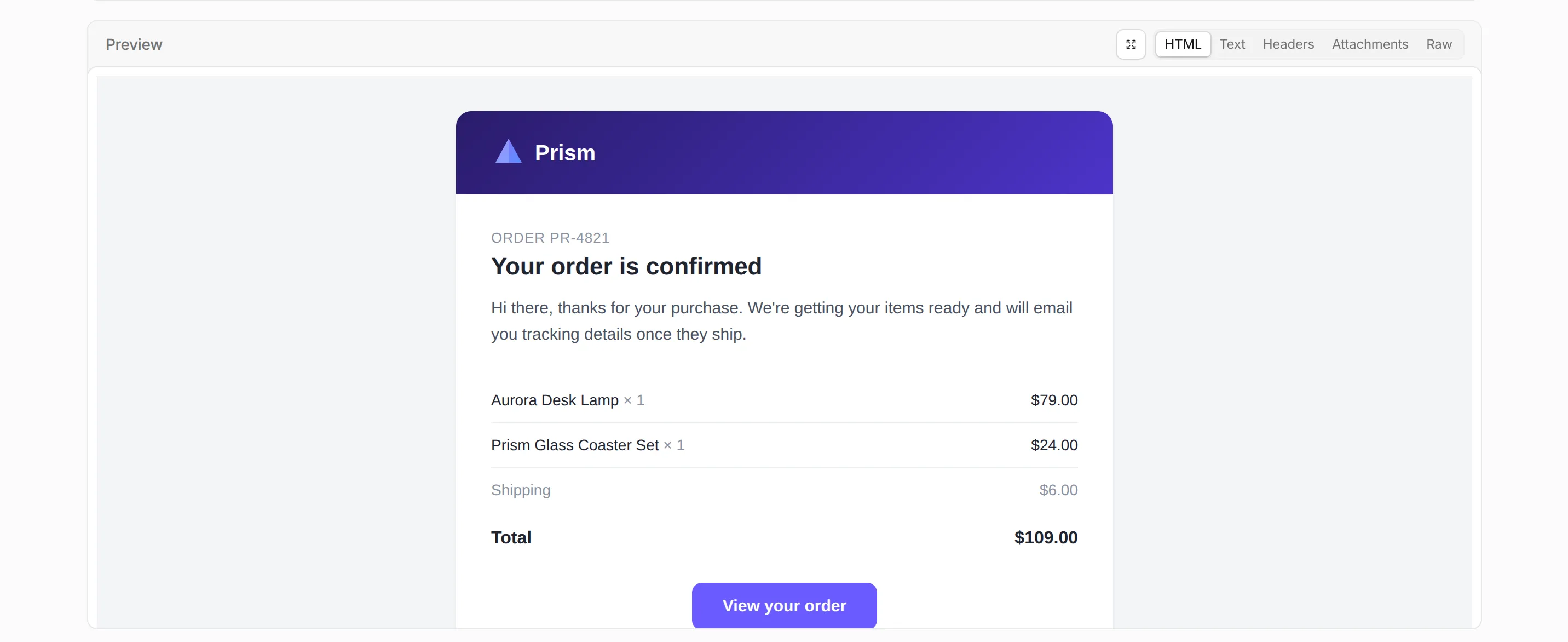
Previously, the Activity log surfaced delivery and authentication metadata but not the message content, making rendering and content issues harder to debug. Message preview closes that gap.
To make messages previewable, turn on Email preview in your sending domain's settings. Previews cover messages sent while the setting is turned on and are retained for about seven days. Sending domains onboarded on or after 2026-07-02 have Email preview turned on automatically.

Refer to Email logs for more information.
You can now subscribe to Email Sending events through Queues event subscriptions and receive outbound transactional email lifecycle events on a queue. Each subscription is scoped to one sending domain — either the zone apex, such as
example.com, or a verified sending subdomain, such assend.example.com.Six event types are published:
message.delivered,message.deferred,message.bounced,message.failed,message.rejected, andmessage.complained. Use them to track deliverability, react to bounces and complaints, and drive suppression or retry logic. Email Routing events are not published on this source.Each event includes the message details, delivery status, and SMTP response:
{"type": "cf.email.sending.message.delivered","source": {"type": "email.sending","zoneId": "023e105f4ecef8ad9ca31a8372d0c353","domain": "example.com"},"payload": {"messageId": "0101018f7d0c4d9a-msg-deadbeef","recipient": "user@example.net","terminal": true,"delivery": {"status": "delivered","smtpStatusCode": "250"}}}Refer to Event subscriptions to see all event types and example payloads.
You can now send emails through Cloudflare Email Service using authenticated SMTP submission on
smtp.mx.cloudflare.net:465. SMTP joins the REST API and the Workers binding as a third way to send transactional email — useful for existing applications that already speak SMTP and language-native SMTP libraries (Nodemailer,smtplib, PHPMailer, JavaMail).Setting Value Host smtp.mx.cloudflare.netPort 465(implicit TLS)AUTH PLAINorLOGINUsername api_tokenPassword A Cloudflare API token (account-owned or user-owned) with Email Sending: Edit Submissions enter the same delivery pipeline as the REST API and Workers binding: identical limits, automatic DKIM and ARC signing, and shared dashboard logs.
Send your first email with a single command:
Terminal window curl --ssl-reqd \--url "smtps://smtp.mx.cloudflare.net:465" \--user "api_token:<API_TOKEN>" \--mail-from "welcome@yourdomain.com" \--mail-rcpt "user@example.com" \--upload-file mail.txtRefer to the SMTP reference for authentication details, response codes, and language-specific examples.
You can now send emails with display names on recipient addresses in addition to the existing
fromsupport. Pass an object withemailand an optionalnamefield forto,cc,bcc,replyTo, orfrom:src/index.js export default {async fetch(request, env) {const response = await env.EMAIL.send({from: { email: "support@example.com", name: "Support Team" },to: { email: "jane@example.com", name: "Jane Doe" },cc: ["manager@company.com",{ email: "team@company.com", name: "Engineering Team" },],subject: "Welcome!",html: "<h1>Thanks for joining!</h1>",text: "Thanks for joining!",});return Response.json({ messageId: response.messageId });},};src/index.ts export default {async fetch(request, env): Promise<Response> {const response = await env.EMAIL.send({from: { email: "support@example.com", name: "Support Team" },to: { email: "jane@example.com", name: "Jane Doe" },cc: ["manager@company.com",{ email: "team@company.com", name: "Engineering Team" },],subject: "Welcome!",html: "<h1>Thanks for joining!</h1>",text: "Thanks for joining!",});return Response.json({ messageId: response.messageId });},} satisfies ExportedHandler<Env>;Plain strings remain fully supported for backward compatibility, and you can mix strings and named objects in the same array.
Refer to the Workers API and REST API documentation for full request examples.
Email Sending is now in public beta. Send transactional emails directly from Workers (
env.EMAIL.send()) or the REST API, with support for HTML, plain text, attachments, inline images, and custom headers. Email Sending joins Email Routing ↗ under the new Cloudflare Email Service — a single service for sending and receiving email on the Cloudflare developer platform.Send an email from a Worker in a few lines of code:
src/index.js export default {async fetch(request, env) {const response = await env.EMAIL.send({from: "notifications@yourdomain.com",to: "user@example.com",subject: "Order confirmed",html: "<h1>Your order has been confirmed</h1>",text: "Your order has been confirmed.",});return Response.json({ messageId: response.messageId });},};src/index.ts export default {async fetch(request, env): Promise<Response> {const response = await env.EMAIL.send({from: "notifications@yourdomain.com",to: "user@example.com",subject: "Order confirmed",html: "<h1>Your order has been confirmed</h1>",text: "Your order has been confirmed.",});return Response.json({ messageId: response.messageId });},} satisfies ExportedHandler<Env>;Email Service also integrates with the Agents SDK, giving your agents a native
onEmailhook to receive, process, and reply to emails. Combined with the new Email MCP server ↗ and Wrangler CLI email commands, any agent can send email regardless of where it runs.Start sending and receiving emails from Workers and agents today. Email Sending is available on the Workers paid plan. Refer to the Email Service documentation to get started.
Subaddressing, as defined in RFC 5233 ↗, also known as plus addressing, is now supported in Email Routing. This enables using the "+" separator to augment your custom addresses with arbitrary detail information.
Now you can send an email to
user+detail@example.comand it will be captured by theuser@example.comcustom address. The+detailpart is ignored by Email Routing, but it can be captured next in the processing chain in the logs, an Email Worker or an Agent application ↗.Customers can use this feature to dynamically add context to their emails, such as tracking the source of an email or categorizing emails without needing to create multiple custom addresses.
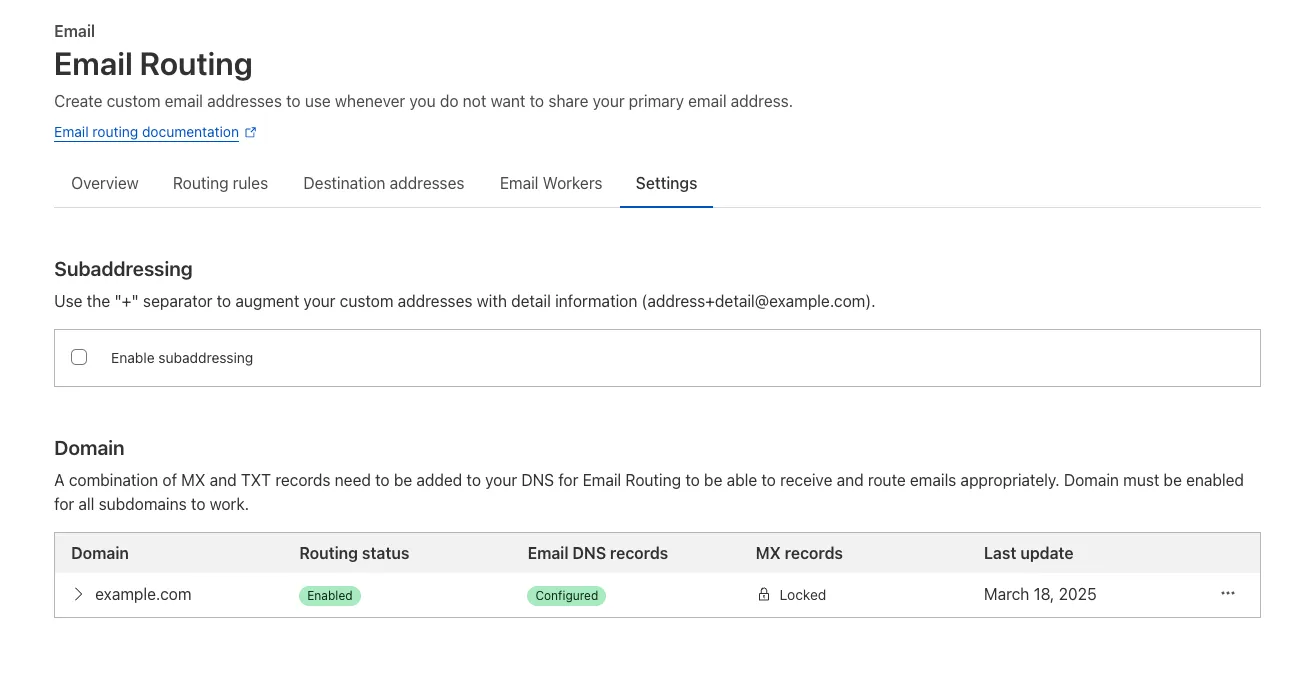
Check our Developer Docs to learn how to enable subaddressing in Email Routing.
The Email Routing platform supports SPF ↗ records and DKIM (DomainKeys Identified Mail) ↗ signatures and honors these protocols when the sending domain has them configured. However, if the sending domain doesn't implement them, we still forward the emails to upstream mailbox providers.
Starting on July 3, 2025, we will require all emails to be authenticated using at least one of the protocols, SPF or DKIM, to forward them. We also strongly recommend that all senders implement the DMARC protocol.
If you are using a Worker with an Email trigger to receive email messages and forward them upstream, you will need to handle the case where the forward action may fail due to missing authentication on the incoming email.
SPAM has been a long-standing issue with email. By enforcing mail authentication, we will increase the efficiency of identifying abusive senders and blocking bad emails. If you're an email server delivering emails to large mailbox providers, it's likely you already use these protocols; otherwise, please ensure you have them properly configured.
Email Workers enables developers to programmatically take action on anything that hits their email inbox. If you're building with Email Workers, you can now test the behavior of an Email Worker script, receiving, replying and sending emails in your local environment using
wrangler dev.Below is an example that shows you how you can receive messages using the
email()handler and parse them using postal-mime ↗:TypeScript import * as PostalMime from "postal-mime";export default {async email(message, env, ctx) {const parser = new PostalMime.default();const rawEmail = new Response(message.raw);const email = await parser.parse(await rawEmail.arrayBuffer());console.log(email);},};Now when you run
npx wrangler dev, wrangler will expose a local/cdn-cgi/handler/emailendpoint that you canPOSTemail messages to and trigger your Worker'semail()handler:Terminal window curl -X POST 'http://localhost:8787/cdn-cgi/handler/email' \--url-query 'from=sender@example.com' \--url-query 'to=recipient@example.com' \--header 'Content-Type: application/json' \--data-raw 'Received: from smtp.example.com (127.0.0.1)by cloudflare-email.com (unknown) id 4fwwffRXOpyRfor <recipient@example.com>; Tue, 27 Aug 2024 15:50:20 +0000From: "John" <sender@example.com>Reply-To: sender@example.comTo: recipient@example.comSubject: Testing Email Workers Local DevContent-Type: text/html; charset="windows-1252"X-Mailer: CurlDate: Tue, 27 Aug 2024 08:49:44 -0700Message-ID: <6114391943504294873000@ZSH-GHOSTTY>Hi there'This is what you get in the console:
{"headers": [{"key": "received","value": "from smtp.example.com (127.0.0.1) by cloudflare-email.com (unknown) id 4fwwffRXOpyR for <recipient@example.com>; Tue, 27 Aug 2024 15:50:20 +0000"},{ "key": "from", "value": "\"John\" <sender@example.com>" },{ "key": "reply-to", "value": "sender@example.com" },{ "key": "to", "value": "recipient@example.com" },{ "key": "subject", "value": "Testing Email Workers Local Dev" },{ "key": "content-type", "value": "text/html; charset=\"windows-1252\"" },{ "key": "x-mailer", "value": "Curl" },{ "key": "date", "value": "Tue, 27 Aug 2024 08:49:44 -0700" },{"key": "message-id","value": "<6114391943504294873000@ZSH-GHOSTTY>"}],"from": { "address": "sender@example.com", "name": "John" },"to": [{ "address": "recipient@example.com", "name": "" }],"replyTo": [{ "address": "sender@example.com", "name": "" }],"subject": "Testing Email Workers Local Dev","messageId": "<6114391943504294873000@ZSH-GHOSTTY>","date": "2024-08-27T15:49:44.000Z","html": "Hi there\n","attachments": []}Local development is a critical part of the development flow, and also works for sending, replying and forwarding emails. See our documentation for more information.
We’re removing some of the restrictions in Email Routing so that AI Agents and task automation can better handle email workflows, including how Workers can reply to incoming emails.
It's now possible to keep a threaded email conversation with an Email Worker script as long as:
- The incoming email has to have valid DMARC ↗.
- The email can only be replied to once in the same
EmailMessageevent. - The recipient in the reply must match the incoming sender.
- The outgoing sender domain must match the same domain that received the email.
- Every time an email passes through Email Routing or another MTA, an entry is added to the
Referenceslist. We stop accepting replies to emails with more than 100Referencesentries to prevent abuse or accidental loops.
Here's an example of a Worker responding to Emails using a Workers AI model:
AI model responding to emails import PostalMime from "postal-mime";import { createMimeMessage } from "mimetext";import { EmailMessage } from "cloudflare:email";export default {async email(message, env, ctx) {const email = await PostalMime.parse(message.raw);const res = await env.AI.run("@cf/meta/llama-2-7b-chat-fp16", {messages: [{role: "user",content: email.text ?? "",},],});// message-id is generated by mimetextconst response = createMimeMessage();response.setHeader("In-Reply-To", message.headers.get("Message-ID")!);response.setSender("agent@example.com");response.setRecipient(message.from);response.setSubject("Llama response");response.addMessage({contentType: "text/plain",data:res instanceof ReadableStream? await new Response(res).text(): res.response!,});const replyMessage = new EmailMessage("<email>",message.from,response.asRaw(),);await message.reply(replyMessage);},} satisfies ExportedHandler<Env>;See Reply to emails from Workers for more information.