
Gateway can now apply HTTP filtering to all proxied HTTP requests, not just traffic on standard HTTP (
80) and HTTPS (443) ports. This means all requests can now be filtered by A/V scanning, file sandboxing, Data Loss Prevention (DLP), and more.You can turn this setting on by going to Settings > Network > Firewall and choosing Inspect on all ports.
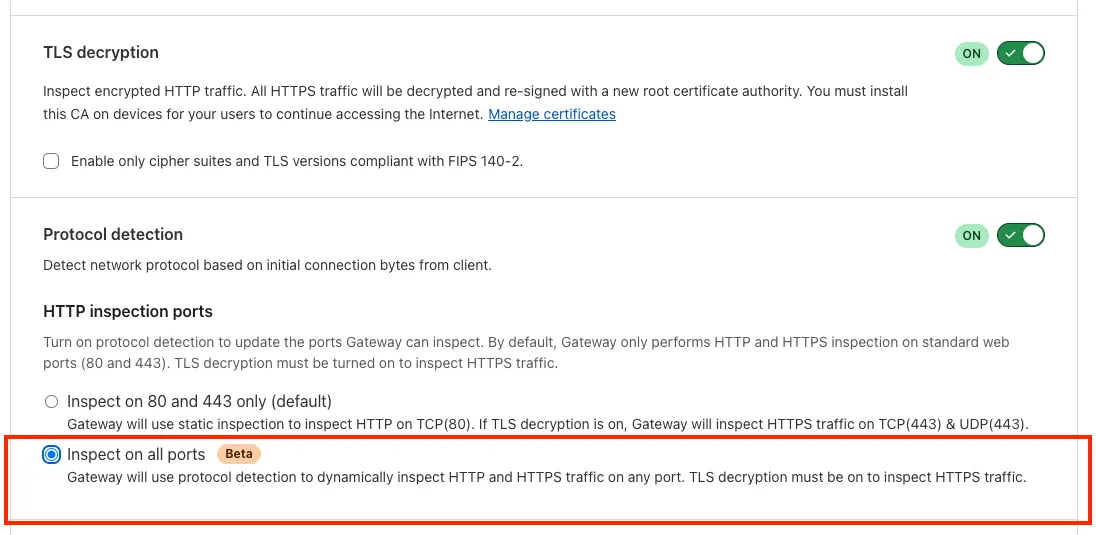
To learn more, refer to Inspect on all ports (Beta).
The Google Bard application (ID: 1198) has been deprecated and fully removed from the system. It has been replaced by the Gemini application (ID: 1340). Any existing Gateway policies that reference the old Google Bard application will no longer function. To ensure your policies continue to work as intended, you should update them to use the new Gemini application. We recommend replacing all instances of the deprecated Bard application with the new Gemini application in your Gateway policies. For more information about application policies, please see the Cloudflare Gateway documentation.
Gateway will now evaluate Network (Layer 4) policies before HTTP (Layer 7) policies. This change preserves your existing security posture and does not affect which traffic is filtered — but it may impact how notifications are displayed to end users.
This change will roll out progressively between July 14–18, 2025. If you use HTTP policies, we recommend reviewing your configuration ahead of rollout to ensure the user experience remains consistent.
Previous order:
- DNS policies
- HTTP policies
- Network policies
New order:
- DNS policies
- Network policies
- HTTP policies
This change may affect block notifications. For example:
- You have an HTTP policy to block
example.comand display a block page. - You also have a Network policy to block
example.comsilently (no client notification).
With the new order, the Network policy will trigger first — and the user will no longer see the HTTP block page.
To ensure users still receive a block notification, you can:
- Add a client notification to your Network policy, or
- Use only the HTTP policy for that domain.
This update is based on user feedback and aims to:
- Create a more intuitive model by evaluating network-level policies before application-level policies.
- Minimize 526 connection errors by verifying the network path to an origin before attempting to establish a decrypted TLS connection.
To learn more, visit the Gateway order of enforcement documentation.
Users can now access significant enhancements to Cloudflare Gateway analytics, providing you with unprecedented visibility into your organization's DNS queries, HTTP requests, and Network sessions. These powerful new dashboards enable you to go beyond raw logs and gain actionable insights into how your users are interacting with the Internet and your protected resources.
You can now visualize and explore:
- Patterns Over Time: Understand trends in traffic volume and blocked requests, helping you identify anomalies and plan for future capacity.
- Top Users & Destinations: Quickly pinpoint the most active users, enabling better policy enforcement and resource allocation.
- Actions Taken: See a clear breakdown of security actions applied by Gateway policies, such as blocks and allows, offering a comprehensive view of your security posture.
- Geographic Regions: Gain insight into the global distribution of your traffic.
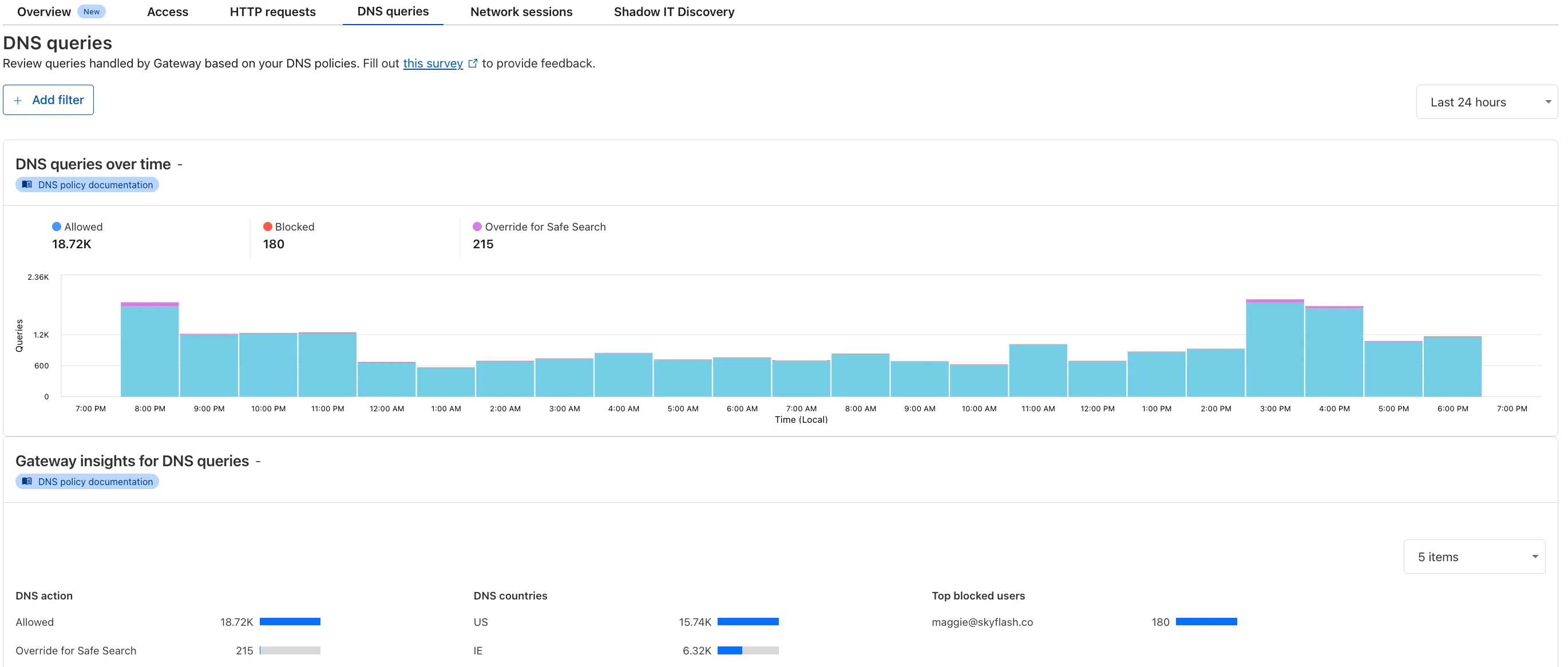
To access the new overview, log in to your Cloudflare Zero Trust dashboard ↗ and go to Analytics in the side navigation bar.
All Cloudflare One Gateway users can now use Protocol detection logging and filtering, including those on Pay-as-you-go and Free plans.
With Protocol Detection, admins can identify and enforce policies on traffic proxied through Gateway based on the underlying network protocol (for example, HTTP, TLS, or SSH), enabling more granular traffic control and security visibility no matter your plan tier.
This feature is available to enable in your account network settings for all accounts. For more information on using Protocol Detection, refer to the Protocol detection documentation.
New categories added
Parent ID Parent Name Category ID Category Name 1 Ads 66 Advertisements 3 Business & Economy 185 Personal Finance 3 Business & Economy 186 Brokerage & Investing 21 Security Threats 187 Compromised Domain 21 Security Threats 188 Potentially Unwanted Software 6 Education 189 Reference 9 Government & Politics 190 Charity and Non-profit Changes to existing categories
Original Name New Name Religion Religion & Spirituality Government Government/Legal Redirect URL Alias/Redirect Refer to Gateway domain categories to learn more.
You can now create DNS policies to manage outbound traffic for an expanded list of applications. This update adds support for 273 new applications, giving you more control over your organization's outbound traffic.
With this update, you can:
- Create DNS policies for a wider range of applications
- Manage outbound traffic more effectively
- Improve your organization's security and compliance posture
For more information on creating DNS policies, see our DNS policy documentation.
Cloudflare One administrators can now control which egress IP is used based on a destination's fully qualified domain name (FDQN) within Gateway Egress policies.
- Host, Domain, Content Categories, and Application selectors are now available in the Gateway Egress policy builder in beta.
- During the beta period, you can use these selectors with traffic on-ramped to Gateway with the WARP client, proxy endpoints (commonly deployed with PAC files), or Cloudflare Browser Isolation.
- For WARP client support, additional configuration is required. For more information, refer to the WARP client configuration documentation.
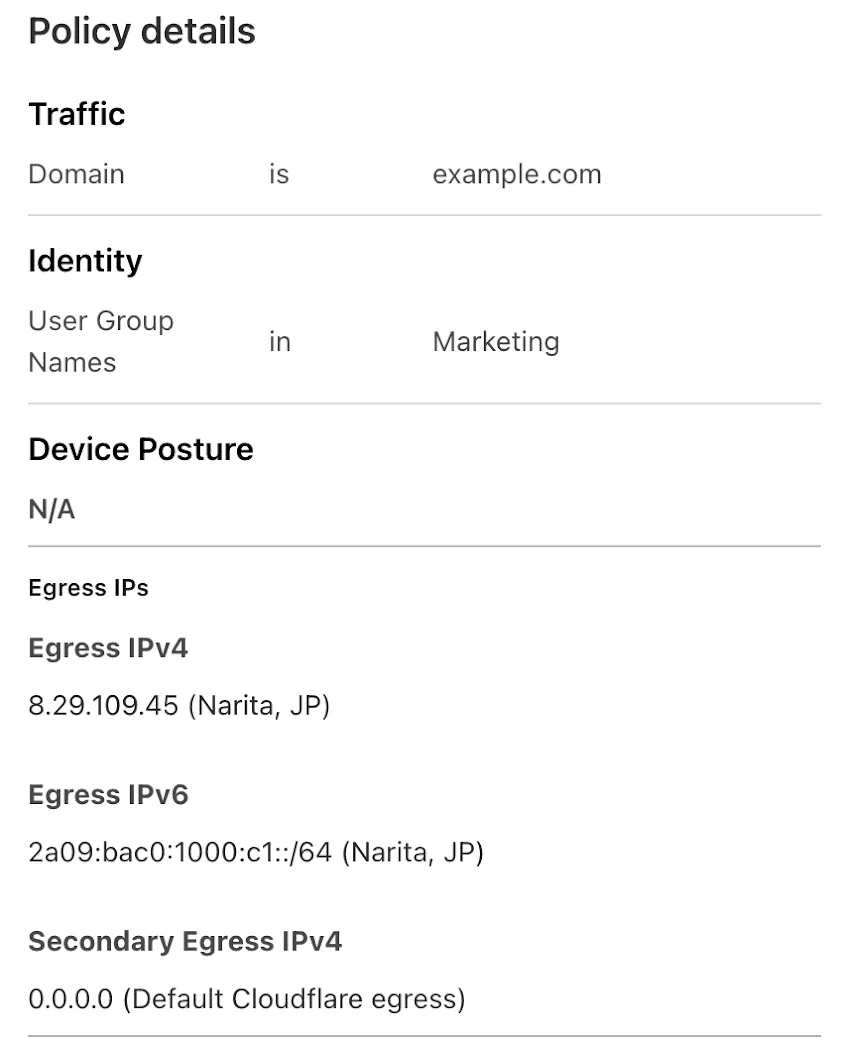
This will help apply egress IPs to your users' traffic when an upstream application or network requires it, while the rest of their traffic can take the most performant egress path.
You can now use more flexible redirect capabilities in Cloudflare One with Gateway.
- A new Redirect action is available in the HTTP policy builder, allowing admins to redirect users to any URL when their request matches a policy. You can choose to preserve the original URL and query string, and optionally include policy context via query parameters.
- For Block actions, admins can now configure a custom URL to display when access is denied. This block page redirect is set at the account level and can be overridden in DNS or HTTP policies. Policy context can also be passed along in the URL.
Learn more in our documentation for HTTP Redirect and Block page redirect.
We're excited to introduce the Cloudflare Zero Trust Secure DNS Locations Write role, designed to provide DNS filtering customers with granular control over third-party access when configuring their Protective DNS (PDNS) solutions.
Many DNS filtering customers rely on external service partners to manage their DNS location endpoints. This role allows you to grant access to external parties to administer DNS locations without overprovisioning their permissions.
Secure DNS Location Requirements:
-
Mandate usage of Bring your own DNS resolver IP addresses ↗ if available on the account.
-
Require source network filtering for IPv4/IPv6/DoT endpoints; token authentication or source network filtering for the DoH endpoint.
You can assign the new role via Cloudflare Dashboard (
Manage Accounts > Members) or via API. For more information, refer to the Secure DNS Locations documentation ↗.-
Gateway HTTP policies can now block files that are password-protected, compressed, or otherwise unscannable.
These unscannable files are now matched with the Download and Upload File Types traffic selectors for HTTP policies:
- Password-protected Microsoft Office document
- Password-protected PDF
- Password-protected ZIP archive
- Unscannable ZIP archive
To get started inspecting and modifying behavior based on these and other rules, refer to HTTP filtering.
Welcome to your new home for product updates on Cloudflare One.
Our new changelog lets you read about changes in much more depth, offering in-depth examples, images, code samples, and even gifs.
If you are looking for older product updates, refer to the following locations.