---
title: Data Localization Suite
description: Control where your data is inspected, processed, and stored with the Data Localization Suite.
image: https://edgetunnel-b2h.pages.dev/zt-preview.png
---
> Documentation Index
> Fetch the complete documentation index at: https://edgetunnel-b2h.pages.dev/data-localization/llms.txt
> Use this file to discover all available pages before exploring further.
[Skip to content](#%5Ftop)
# Data Localization Suite
Enterprise-only paid add-on
The Data Localization Suite (DLS) is a collection of tools that enable customers to choose the location where Cloudflare inspects and stores data, while maintaining the security and performance benefits of our global network. Organizations subject to data residency regulations such as [GDPR ↗](https://www.cloudflare.com/trust-hub/gdpr/) can use DLS to control where their encryption keys are stored, where traffic metadata and logs are kept, and where HTTPS traffic is decrypted and processed.
---
## Features
### Geo Key Manager
Control where your private encryption keys are stored, ensuring compliance with data sovereignty requirements.
[ Use Geo Key Manager ](https://edgetunnel-b2h.pages.dev/data-localization/geo-key-manager/)
### Customer Metadata Boundary
Ensure that any traffic metadata — logs and analytics that could identify your end users — stays in the region you selected.
[ Use Customer Metadata Boundary ](https://edgetunnel-b2h.pages.dev/data-localization/metadata-boundary/)
### Regional Services
Comply with regional restrictions by choosing which Cloudflare data centers are allowed to decrypt and process your HTTPS traffic.
[ Use Regional Services ](https://edgetunnel-b2h.pages.dev/data-localization/regional-services/)
---
## Related products
**[SSL/TLS](https://edgetunnel-b2h.pages.dev/ssl/)**
Cloudflare SSL/TLS encrypts your web traffic to prevent data theft and other tampering.
**[DNS](https://edgetunnel-b2h.pages.dev/dns/)**
Cloudflare's global DNS platform provides speed and resilience. DNS customers also benefit from free DNSSEC, and protection against route leaks and hijacking.
---
## More resources
[Resource hub](https://www.cloudflare.com/resource-hub/?topic=Privacy)
Refer to our latest resources to learn more about privacy.
[Cloudflare blog](https://blog.cloudflare.com/tag/data-localization-suite)
Read articles about the latest updates to the Data Localization Suite.
```json
{"@context":"https://schema.org","@type":"WebPage","@id":"https://edgetunnel-b2h.pages.dev/data-localization/#page","headline":"Data Localization Suite · Cloudflare Data Localization Suite docs","description":"Control where your data is inspected, processed, and stored with the Data Localization Suite.","url":"https://edgetunnel-b2h.pages.dev/data-localization/","inLanguage":"en","image":"https://edgetunnel-b2h.pages.dev/zt-preview.png","dateModified":"2026-05-05","publisher":{"@type":"Organization","name":"Cloudflare","url":"https://www.cloudflare.com/"},"isPartOf":{"@type":"WebSite","@id":"https://edgetunnel-b2h.pages.dev/#website","name":"Cloudflare Docs","url":"https://edgetunnel-b2h.pages.dev/"},"keywords":["Compliance"]}
{"@context":"https://schema.org","@type":"BreadcrumbList","itemListElement":[{"@type":"ListItem","position":1,"item":{"@id":"/directory/","name":"Directory"}},{"@type":"ListItem","position":2,"item":{"@id":"/data-localization/","name":"Data Localization Suite"}}]}
```
---
---
title: Region support
description: Supported regions for Geo Key Manager, Regional Services, and Customer Metadata Boundary.
image: https://edgetunnel-b2h.pages.dev/zt-preview.png
---
> Documentation Index
> Fetch the complete documentation index at: https://edgetunnel-b2h.pages.dev/data-localization/llms.txt
> Use this file to discover all available pages before exploring further.
[Skip to content](#%5Ftop)
# Region support
The Data Localization Suite allows you to restrict where your data is processed and stored. The table below shows which regions are available for each DLS feature:
* **Geo Key Manager** — restricts where your TLS private keys are stored.
* **Regional Services** — restricts which Cloudflare data centers can decrypt and inspect your HTTPS traffic.
* **Customer Metadata Boundary (CMB)** — restricts where your logs and analytics data are stored.
## Region types
Regional Services regions come in two types:
* **Managed regions** — predefined regions that Cloudflare maintains, identified by a region key (for example, `eu` or `us`). These are the regions listed in the tables below. They are available to all accounts, though some may require specific entitlements. Most customers use a managed region.
* **Custom regions** — regions tailored to your account that restrict processing to a specific set of data centers, for when the managed regions do not meet your compliance requirements. Custom regions are set up through your account team. They are available for [Regionalized Spectrum Applications](https://edgetunnel-b2h.pages.dev/data-localization/regional-services/spectrum-applications/) and [Regionalized IP Bindings](https://edgetunnel-b2h.pages.dev/data-localization/regional-services/ip-bindings/), but not for [Regional Hostnames](https://edgetunnel-b2h.pages.dev/data-localization/regional-services/regional-hostnames/).
Managed and custom regions apply to **Regional Services**. The other Data Localization Suite features use their own region settings:
* **Customer Metadata Boundary** can be set to the **United States** or the **European Union**. By default no boundary is applied. FedRAMP customers set it to the United States.
* **Geo Key Manager** controls where TLS private keys are stored using its own set of locations.
The tables below show which managed regions each product supports.
## Available regions
Some regions are defined by geography (for example, "Germany"), while others are defined by compliance frameworks:
* **FedRAMP Moderate** — the US Federal Risk and Authorization Management Program, a government security certification standard. "Domestic" means only US-based certified data centers. "International" includes certified data centers outside the US.
* **IRAP Protected** — the Australian government's Information Security Registered Assessors Program. This region includes IRAP-assessed data centers, which may be located outside Australia.
* **ISO 27001 Certified European Union** — restricts traffic to EU data centers that hold ISO 27001 certification, an international standard for information security management.
* **Cloudflare Green Energy** — restricts traffic to data centers powered by renewable energy sources. This is an energy-sourcing constraint, not a geographic one.
"Exclusive of" regions work in reverse — they exclude specific countries rather than restricting to them. For example, "Exclusive of Russia and Belarus" means Cloudflare will use any data center worldwide except those in Russia and Belarus.
Support by product and region is summarized in the following table. In the **Customer Metadata Boundary** column:
* ✅ — the region corresponds to a metadata boundary you can select. CMB supports the **United States** and the **European Union** only; FedRAMP regions use the United States boundary.
* "Can use EU metadata boundary." — the country is within the European Union, so the EU boundary applies.
* ✘ — Customer Metadata Boundary is not available for this region.
| Region | Geo Key Manager | Regional Services | Customer Metadata Boundary |
| ---------------------------------------------------------------------------------------- | ------------------------- | ----------------- | ----------------------------- |
| Australia | ✅ [1](#user-content-fn-1) | ✅ | ✘ |
| Austria | ✘ | ✅ | Can use EU metadata boundary. |
| Brazil | ✘ | ✅ | ✘ |
| Canada | ✅ [1](#user-content-fn-1) | ✅ | ✘ |
| Cloudflare Green Energy | ✘ | ✅ | ✘ |
| European Union | ✅ | ✅ | ✅ |
| Exclusive of Hong Kong and Macau | ✘ | ✅ | ✘ |
| Exclusive of Russia and Belarus | ✘ | ✅ | ✘ |
| FedRAMP Moderate Compliant (Domestic) | ✅ [1](#user-content-fn-1) | ✅ | ✅ |
| FedRAMP Moderate Compliant (International) | ✘ | ✅ | ✅ |
| France | ✘ | ✅ | Can use EU metadata boundary. |
| Germany | ✅ [1](#user-content-fn-1) | ✅ | Can use EU metadata boundary. |
| Hong Kong | ✘ | ✅ | ✘ |
| India | ✅ [1](#user-content-fn-1) | ✅ | ✘ |
| [IRAP ↗](https://www.cloudflare.com/cloudflare-for-government/australia/irap/) Protected | ✘ | ✅ | ✘ |
| ISO 27001 Certified European Union | ✘ | ✅ | Can use EU metadata boundary. |
| Italy | ✘ | ✅ | Can use EU metadata boundary. |
| Japan | ✅ [1](#user-content-fn-1) | ✅ | ✘ |
| NATO | ✘ | ✅ | ✘ |
| Netherlands | ✘ | ✅ | Can use EU metadata boundary. |
| Russia | ✘ | ✅ | ✘ |
| Saudi Arabia | ✘ | ✅ | ✘ |
| Singapore | ✅ [1](#user-content-fn-1) | ✅ | ✘ |
| South Africa | ✘ | ✅ | ✘ |
| South Korea | ✅ [1](#user-content-fn-1) | ✅ | ✘ |
| Spain | ✘ | ✅ | Can use EU metadata boundary. |
| Switzerland | ✘ | ✅ | ✘ |
| Taiwan | ✘ | ✅ | ✘ |
| Turkey | ✘ | ✅ | ✘ |
| United Arab Emirates | ✘ | ✅ | ✘ |
| United Kingdom | ✅ [1](#user-content-fn-1) | ✅ | Can use EU metadata boundary. |
| United States of America | ✅ | ✅ | ✅ |
| US State of California | ✘ | ✅ | ✘ |
| US State of Florida | ✘ | ✅ | ✘ |
| US State of Texas | ✘ | ✅ | ✘ |
Refer to the table below for the complete list of available regions and their definitions.
| Region | Definition |
| ------------------------------------------ | ------------------------------------------------------------------------------------------------------------------------------------------------------------------------------------------------------------------------------------------------------ |
| Australia | Cloudflare will only use data centers that are physically located within Australia to decrypt and service HTTPS traffic. |
| Austria | Cloudflare will only use data centers that are physically located within Austria to decrypt and service HTTPS traffic. |
| Brazil | Cloudflare will only use data centers that are physically located within Brazil to decrypt and service HTTPS traffic. |
| Canada | Cloudflare will only use data centers that are physically located within Canada to decrypt and service HTTPS traffic. |
| Cloudflare Green Energy | Cloudflare will only use data centers that are committed to powering their operations with [renewable energy ↗](https://www.cloudflare.com/impact/). |
| European Union | Cloudflare will only use data centers that are physically located within the European Union. For more details, refer to the [list of European Union countries ↗](https://european-union.europa.eu/principles-countries-history/country-profiles%5Fen). |
| Exclusive of Hong Kong and Macau | Cloudflare will only use data centers that are NOT physically located within Hong Kong and Macau to decrypt and service HTTPS traffic. |
| Exclusive of Russia and Belarus | Cloudflare will only use data centers that are NOT physically located within Russia and Belarus to decrypt and service HTTPS traffic. |
| FedRAMP Moderate Compliant (Domestic) | Cloudflare will only use data centers that are FedRAMP Moderate certified and located within the United States. |
| FedRAMP Moderate Compliant (International) | Cloudflare will only use data centers that are FedRAMP Moderate certified, including certified locations outside the United States. |
| France | Cloudflare will only use data centers that are physically located within Metropolitan France (the European territory of France) to decrypt and service HTTPS traffic. |
| Germany | Cloudflare will only use data centers that are physically located within Germany to decrypt and service HTTPS traffic. |
| Hong Kong | Cloudflare will only use data centers that are physically located within Hong Kong to decrypt and service HTTPS traffic. |
| India | Cloudflare will only use data centers that are physically located within India to decrypt and service HTTPS traffic. |
| ISO 27001 Certified European Union | Cloudflare will only use data centers that are physically located within the [European Union ↗](https://european-union.europa.eu/principles-countries-history/country-profiles%5Fen) and that adhere to the ISO 27001 certification. |
| IRAP Protected | Cloudflare will only use data centers that are IRAP protected, including certified locations outside Australia. |
| Italy | Cloudflare will only use data centers that are physically located within Italy to decrypt and service HTTPS traffic. |
| Japan | Cloudflare will only use data centers that are physically located within Japan to decrypt and service HTTPS traffic. |
| NATO | Cloudflare will only use data centers that are physically located within North Atlantic Treaty Organization (NATO) countries. For more details, refer to the [list of NATO countries ↗](https://www.nato.int/nato-welcome/). |
| Netherlands | Cloudflare will only use data centers that are physically located within the Netherlands to decrypt and service HTTPS traffic. |
| Russia | Cloudflare will only use data centers that are physically located within Russia to decrypt and service HTTPS traffic. |
| Saudi Arabia | Cloudflare will only use data centers that are physically located within Saudi Arabia to decrypt and service HTTPS traffic. |
| Singapore | Cloudflare will only use data centers that are physically located within Singapore to decrypt and service HTTPS traffic. |
| South Africa | Cloudflare will only use data centers that are physically located within South Africa to decrypt and service HTTPS traffic. |
| South Korea | Cloudflare will only use data centers that are physically located within South Korea to decrypt and service HTTPS traffic. |
| Spain | Cloudflare will only use data centers that are physically located within Spain to decrypt and service HTTPS traffic. |
| Switzerland | Cloudflare will only use data centers that are physically located within Switzerland to decrypt and service HTTPS traffic. |
| Taiwan | Cloudflare will only use data centers that are physically located within Taiwan to decrypt and service HTTPS traffic. |
| Turkey | Cloudflare will only use data centers that are physically located within Turkey to decrypt and service HTTPS traffic. |
| United Arab Emirates | Cloudflare will only use data centers that are physically located within United Arab Emirates to decrypt and service HTTPS traffic. |
| United Kingdom | Cloudflare will only use data centers that are physically located within the United Kingdom to decrypt and service HTTPS traffic. |
| United States of America | Cloudflare will only use data centers that are physically located within the United States of America to decrypt and service HTTPS traffic. |
| US State of California | Cloudflare will only use data centers that are physically located within the US State of California to decrypt and service HTTPS traffic. |
| US State of Florida | Cloudflare will only use data centers that are physically located within the US State of Florida to decrypt and service HTTPS traffic. |
| US State of Texas | Cloudflare will only use data centers that are physically located within the US State of Texas to decrypt and service HTTPS traffic. |
## Footnotes
1. Only supported in [Geo Key Manager v2](https://edgetunnel-b2h.pages.dev/ssl/edge-certificates/geokey-manager/), the current version with expanded region support. [↩](#user-content-fnref-1) [↩2](#user-content-fnref-1-2) [↩3](#user-content-fnref-1-3) [↩4](#user-content-fnref-1-4) [↩5](#user-content-fnref-1-5) [↩6](#user-content-fnref-1-6) [↩7](#user-content-fnref-1-7) [↩8](#user-content-fnref-1-8) [↩9](#user-content-fnref-1-9)
```json
{"@context":"https://schema.org","@type":"TechArticle","@id":"https://edgetunnel-b2h.pages.dev/data-localization/region-support/#page","headline":"Region support · Cloudflare Data Localization Suite docs","description":"Supported regions for Geo Key Manager, Regional Services, and Customer Metadata Boundary.","url":"https://edgetunnel-b2h.pages.dev/data-localization/region-support/","inLanguage":"en","image":"https://edgetunnel-b2h.pages.dev/zt-preview.png","dateModified":"2026-07-01","publisher":{"@type":"Organization","name":"Cloudflare","url":"https://www.cloudflare.com/"},"isPartOf":{"@type":"WebSite","@id":"https://edgetunnel-b2h.pages.dev/#website","name":"Cloudflare Docs","url":"https://edgetunnel-b2h.pages.dev/"},"keywords":["Compliance"]}
{"@context":"https://schema.org","@type":"BreadcrumbList","itemListElement":[{"@type":"ListItem","position":1,"item":{"@id":"/directory/","name":"Directory"}},{"@type":"ListItem","position":2,"item":{"@id":"/data-localization/","name":"Data Localization Suite"}},{"@type":"ListItem","position":3,"item":{"@id":"/data-localization/region-support/","name":"Region support"}}]}
```
---
---
title: Product compatibility
description: Compatibility of Cloudflare products with Data Localization Suite features.
image: https://edgetunnel-b2h.pages.dev/zt-preview.png
---
> Documentation Index
> Fetch the complete documentation index at: https://edgetunnel-b2h.pages.dev/data-localization/llms.txt
> Use this file to discover all available pages before exploring further.
[Skip to content](#%5Ftop)
# Product compatibility
The Data Localization Suite (DLS) has three features, each controlling a different aspect of where your data is handled:
* **Geo Key Manager**: Controls where your private TLS keys are stored.
* **Regional Services**: Controls which Cloudflare data centers can decrypt and process your HTTPS traffic.
* **Customer Metadata Boundary (CMB)**: Controls which region stores your logs and analytics data.
The tables below show whether each Cloudflare product is compatible with each DLS feature. If you see 🚧, check the footnote number for specific restrictions.
✅ Fully compatible — no restrictions
🚧 Compatible with caveats — check the footnote for details
✘ Not compatible — this product cannot be used with this DLS feature
⚫️ Not applicable — this product does not interact with this DLS feature
## Application Performance
| Product | Geo Key Manager | Regional Services | Customer Metadata Boundary |
| ------------------------------------------ | --------------- | --------------------------- | --------------------------- |
| Caching/CDN | ✅ | ✅ | ✅ |
| Cache Reserve | ⚫️ | 🚧 | ✅ [1](#user-content-fn-29) |
| DNS | ⚫️ | 🚧 [2](#user-content-fn-33) | ✅ |
| HTTP/3 (with QUIC) | ⚫️ | ✘ | ⚫️ |
| Image Resizing | ✅ | ✅ [3](#user-content-fn-6) | 🚧 [4](#user-content-fn-1) |
| Load Balancing | ✅ | ✅ | 🚧 [4](#user-content-fn-1) |
| Network Error Logging (NEL) | ⚫️ | ⚫️ | ✘ |
| Onion Routing | ✘ | ✘ | ✘ |
| O2O | ✘ | ✘ | ✘ |
| Stream Delivery | ✅ | ✅ | ✅ |
| Tiered Caching | ✅ | 🚧 [5](#user-content-fn-2) | 🚧 [6](#user-content-fn-30) |
| Trace | ✘ | ✘ | ✘ |
| Waiting Room | ⚫️ | ✅ | ✅ |
| Web Analytics / Real User Monitoring (RUM) | ⚫️ | ⚫️ | ✘ [7](#user-content-fn-43) |
| Zaraz | ✅ | ✅ | ✅ |
---
## Application Security
| Product | Geo Key Manager | Regional Services | Customer Metadata Boundary |
| ------------------------------------------- | --------------- | ----------------- | --------------------------- |
| Advanced Certificate Manager | ⚫️ | ⚫️ | ⚫️ |
| Advanced DDoS Protection | ✅ | ✅ | 🚧 [8](#user-content-fn-3) |
| API Shield | ✅ | ✅ | 🚧 [9](#user-content-fn-4) |
| Bot Management | ✅ | ✅ | ✅ |
| Client-side security (formerly Page Shield) | ✅ | ✅ | ✅ |
| DNS Firewall | ⚫️ | ⚫️ | ✅ |
| Rate Limiting | ✅ | ✅ | ✅ [10](#user-content-fn-37) |
| SSL | ✅ | ✅ | ✅ |
| Cloudflare for SaaS | ✘ | ✅ | ✅ |
| Turnstile | ⚫️ | ✘ | ✅ [11](#user-content-fn-38) |
| WAF/L7 Firewall | ✅ | ✅ | ✅ |
| DMARC Management | ⚫️ | ⚫️ | ✅ |
---
## Developer Platform
| Product | Geo Key Manager | Regional Services | Customer Metadata Boundary |
| ------------------------------ | --------------------------- | --------------------------- | ---------------------------- |
| Cloudflare Images | ⚫️ | ✅ [12](#user-content-fn-36) | 🚧 [13](#user-content-fn-35) |
| AI Gateway | ✘ | ✘ | 🚧 [14](#user-content-fn-39) |
| AI Search | ✘ [15](#user-content-fn-46) | ✘ [16](#user-content-fn-47) | 🚧 [17](#user-content-fn-48) |
| AI Security for Apps | ✘ | ✘ | ✘ |
| Cloudflare Pages | ✅ [18](#user-content-fn-11) | ✅ [18](#user-content-fn-11) | 🚧 [4](#user-content-fn-1) |
| Cloudflare D1 | ⚫️ | ⚫️ | 🚧 [19](#user-content-fn-40) |
| Durable Objects | ⚫️ | ✅ [20](#user-content-fn-7) | 🚧 [4](#user-content-fn-1) |
| Email Routing | ⚫️ | ⚫️ | ✅ |
| Remote MCP Server | ✅ [21](#user-content-fn-44) | ✅ [22](#user-content-fn-45) | 🚧 [4](#user-content-fn-1) |
| R2 | ✅ [23](#user-content-fn-27) | ✅ [24](#user-content-fn-8) | ✅ [25](#user-content-fn-28) |
| Smart Placement | ⚫️ | ✘ | ✘ |
| Stream | ⚫️ | ✘ | 🚧 [4](#user-content-fn-1) |
| Vectorize | ⚫️ | ✘ | ✘ |
| Workers (deployed on a Zone) | ✅ | ✅ | 🚧 [26](#user-content-fn-41) |
| Workers AI | ⚫️ | ✘ | ✅ |
| Workers KV | ⚫️ | ✘ | ✅ [27](#user-content-fn-34) |
| Workers.dev | ✘ | ✘ | ✘ |
| Workers Analytics Engine (WAE) | ⚫️ | ⚫️ | 🚧 [4](#user-content-fn-1) |
---
## Network Services
| Product | Geo Key Manager | Regional Services | Customer Metadata Boundary |
| --------------------------- | --------------- | --------------------------- | --------------------------- |
| Argo Smart Routing | ✅ | ✘ [28](#user-content-fn-9) | ✘ [29](#user-content-fn-10) |
| Static IP/BYOIP | ⚫️ | ✅ [30](#user-content-fn-26) | ⚫️ |
| Cloudflare Network Firewall | ⚫️ | ⚫️ | ✅ |
| Network Flow | ⚫️ | ⚫️ | 🚧 [4](#user-content-fn-1) |
| Magic Transit | ⚫️ | ⚫️ | ✅ [8](#user-content-fn-3) |
| Cloudflare WAN | ⚫️ | ⚫️ | ✅ |
| Spectrum | ✅ | ✅ [31](#user-content-fn-42) | ✅ |
---
## Platform
| Product | Geo Key Manager | Regional Services | Customer Metadata Boundary |
| ------------ | --------------- | ----------------- | ---------------------------- |
| Logpull | ⚫️ | ⚫️ | 🚧 [32](#user-content-fn-12) |
| Logpush | ⚫️ | ✅ | 🚧 [33](#user-content-fn-13) |
| Log Explorer | ⚫️ | ⚫️ | ✘ [34](#user-content-fn-23) |
---
## Zero Trust
| Product | Geo Key Manager | Regional Services | Customer Metadata Boundary |
| --------------------- | ---------------------------- | ---------------------------- | ---------------------------- |
| Access | 🚧 [35](#user-content-fn-14) | 🚧 [36](#user-content-fn-15) | ✅ [37](#user-content-fn-16) |
| Browser Isolation | ⚫️ | 🚧 [38](#user-content-fn-17) | ✅ |
| CASB | ⚫️ | ⚫️ | ✘ |
| Cloudflare Tunnel | ⚫️ | 🚧 [39](#user-content-fn-18) | ⚫️ |
| Digital Experience | ⚫️ | ⚫️ | 🚧 [40](#user-content-fn-49) |
| DLP | ⚫️ [41](#user-content-fn-19) | ⚫️ [41](#user-content-fn-19) | 🚧 [42](#user-content-fn-31) |
| Gateway | 🚧 [43](#user-content-fn-20) | 🚧 [44](#user-content-fn-21) | 🚧 [45](#user-content-fn-22) |
| Cloudflare One Client | ⚫️ | ⚫️ | 🚧 [4](#user-content-fn-1) |
## Footnotes
1. You cannot yet specify region location for object storage itself. [↩](#user-content-fnref-29)
2. If you use [outgoing zone transfers](https://edgetunnel-b2h.pages.dev/dns/zone-setups/zone-transfers/cloudflare-as-primary/) (where Cloudflare sends your DNS records to non-Cloudflare nameservers), those transfers will include global Cloudflare IP addresses rather than region-specific ones. This means Regional Services will not function correctly when end users receive DNS answers from non-Cloudflare nameservers. [↩](#user-content-fnref-33)
3. Only when using a Custom Domain set to a region, either through Workers or [Transform Rules](https://edgetunnel-b2h.pages.dev/images/optimization/transformations/rewrite-rules/) within the same zone. [↩](#user-content-fnref-6)
4. Logs / Analytics not available outside US region when using Customer Metadata Boundary. [↩](#user-content-fnref-1) [↩2](#user-content-fnref-1-2) [↩3](#user-content-fnref-1-3) [↩4](#user-content-fnref-1-4) [↩5](#user-content-fnref-1-5) [↩6](#user-content-fnref-1-6) [↩7](#user-content-fnref-1-7) [↩8](#user-content-fnref-1-8) [↩9](#user-content-fnref-1-9)
5. Regular and Custom Tiered Cache (where you define the caching hierarchy) work with Regional Services. Smart Tiered Caching (where Cloudflare automatically selects intermediate cache data centers) is not available with Regional Services. [↩](#user-content-fnref-2)
6. Regular/Generic and Custom Tiered Cache work with Customer Metadata Boundary (CMB). Smart Tiered Caching (where Cloudflare automatically selects intermediate cache data centers) does not work with CMB.
With CMB set to EU, the Zone Dashboard **Caching** \> **Tiered Cache** \> **Smart Tiered Caching** option will not populate the Dashboard Analytics. [↩](#user-content-fnref-30)
7. Web Analytics collects the [minimum amount of information](https://edgetunnel-b2h.pages.dev/web-analytics/data-metrics/data-origin-and-collection/). Alternatively, you can [exclude EU Visitors from RUM](https://edgetunnel-b2h.pages.dev/speed/observatory/rum-beacon/#rum-excluding-eeaeu). [↩](#user-content-fnref-43)
8. [Adaptive DDoS Protection](https://edgetunnel-b2h.pages.dev/ddos-protection/managed-rulesets/adaptive-protection/) (which automatically adjusts DDoS rules based on your traffic patterns) is only supported when Customer Metadata Boundary is set to the US. All other DDoS protection features work with any CMB region. [↩](#user-content-fnref-3) [↩2](#user-content-fnref-3-2)
9. The following API Shield sub-features do not work when CMB is set to EU: API Discovery (automatic detection of your API endpoints), Volumetric Abuse Detection (identifying unusually high API call volumes), and [Sequence Analytics and Mitigation](https://edgetunnel-b2h.pages.dev/api-shield/security/sequence-analytics/) (tracking the order of API calls to detect misuse). All other API Shield features work with any CMB region. [↩](#user-content-fnref-4)
10. Legacy Zone Analytics & Logs section not available outside US region when using CMB. Use [Security Analytics](https://edgetunnel-b2h.pages.dev/waf/analytics/security-analytics/) instead. [↩](#user-content-fnref-37)
11. [Turnstile Analytics](https://edgetunnel-b2h.pages.dev/turnstile/turnstile-analytics/) are available. However, there are no regionalization guarantees for the Siteverify API yet. [↩](#user-content-fnref-38)
12. Only when using a [Custom Domain](https://edgetunnel-b2h.pages.dev/images/optimization/hosted-images/serve-from-custom-domains/) set to a region. [↩](#user-content-fnref-36)
13. Logs / Analytics not supported for CMB = EU. Jurisdictional Restrictions ([storage](https://edgetunnel-b2h.pages.dev/images/storage/upload-images/methods/)) options are not supported today. All other features are available to all CMB regions. Note that beta or future features may not be in scope and could be subject to change. [↩](#user-content-fnref-35)
14. Jurisdictional Restrictions (storage) options for [Logs](https://edgetunnel-b2h.pages.dev/ai-gateway/observability/logging/) are not supported today. All other features are available to all CMB regions. [↩](#user-content-fnref-39)
15. Only R2 Custom Domains and Custom Certificate are supported. [↩](#user-content-fnref-46)
16. Only R2 Custom Domains are supported. [↩](#user-content-fnref-47)
17. The following are exceptions and are supported: AI Gateway Analytics (GraphQL Analytics datasets) and Logs (Logpush), R2 Dashboard Metrics & Analytics, Workers AI GraphQL Analytics datasets like aiInferenceAdaptive. [↩](#user-content-fnref-48)
18. Only when using [Custom Domain](https://edgetunnel-b2h.pages.dev/pages/configuration/custom-domains/) set to a region. [↩](#user-content-fnref-11) [↩2](#user-content-fnref-11-2)
19. Jurisdictional Restrictions ([data location](https://edgetunnel-b2h.pages.dev/d1/configuration/data-location/) / storage) options are not supported today. All other features are available to all CMB regions. Note that beta or future features may not be in scope and could be subject to change. [↩](#user-content-fnref-40)
20. [Jurisdiction restrictions for Durable Objects](https://edgetunnel-b2h.pages.dev/durable-objects/reference/data-location/#restrict-durable-objects-to-a-jurisdiction). [↩](#user-content-fnref-7)
21. Only when using Workers Routes & Domains and Custom Certificate. [↩](#user-content-fnref-44)
22. Only when using Workers Routes & Domains. [↩](#user-content-fnref-45)
23. Only when using a Custom Domain and a [Custom Certificate](https://edgetunnel-b2h.pages.dev/r2/reference/data-security/#encryption-in-transit) or [Keyless SSL](https://edgetunnel-b2h.pages.dev/ssl/keyless-ssl/). [↩](#user-content-fnref-27)
24. Only when using a [Custom Domain](https://edgetunnel-b2h.pages.dev/r2/buckets/public-buckets/#connect-a-bucket-to-a-custom-domain) set to a region and using [jurisdictions with the S3 API](https://edgetunnel-b2h.pages.dev/r2/reference/data-location/#using-jurisdictions-with-the-s3-api). [↩](#user-content-fnref-8)
25. R2 Dashboard [Metrics and Analytics](https://edgetunnel-b2h.pages.dev/r2/platform/metrics-analytics/) are populated. [Jurisdictional Restrictions](https://edgetunnel-b2h.pages.dev/r2/reference/data-location/#jurisdictional-restrictions) guarantee objects in a bucket are stored within a specific jurisdiction. [↩](#user-content-fnref-28)
26. Logs / Analytics not available outside US region when using Customer Metadata Boundary. Use Logpush instead. [↩](#user-content-fnref-41)
27. Jurisdictional Restrictions (storage) for Workers KV pairs is not supported today. [↩](#user-content-fnref-34)
28. Argo cannot be used with Regional Services. [↩](#user-content-fnref-9)
29. Argo cannot be used with Customer Metadata Boundary. [↩](#user-content-fnref-10)
30. You can use Static IP/BYOIP with Regionalized Spectrum Applications. You can also regionalize BYOIP prefixes at the IP layer with [Regionalized IP Bindings](https://edgetunnel-b2h.pages.dev/data-localization/regional-services/ip-bindings/). [↩](#user-content-fnref-26)
31. Only applies to HTTP/S Spectrum applications. Spectrum applications use a separate regionalization mechanism from the Regional Hostnames API. Configuring a regional hostname does not regionalize a Spectrum application on the same hostname. Contact your [Account Team](https://edgetunnel-b2h.pages.dev/support/contacting-cloudflare-support/) for Spectrum-specific regionalization. [↩](#user-content-fnref-42)
32. Logpull available when using CMB = US only. Logpull is a legacy feature, consider using [Logpush](https://edgetunnel-b2h.pages.dev/data-localization/metadata-boundary/logpush-datasets/) or [Log Explorer](https://edgetunnel-b2h.pages.dev/log-explorer/) instead. [↩](#user-content-fnref-12)
33. Logpush available with Customer Metadata Boundary for [these datasets](https://edgetunnel-b2h.pages.dev/data-localization/metadata-boundary/logpush-datasets/). Contact your account team if you need another dataset. [↩](#user-content-fnref-13)
34. Currently, customers do not have the ability to choose the location of the Cloudflare-managed R2 bucket for Log Explorer. [↩](#user-content-fnref-23)
35. Access App SSL keys can use Geo Key Manager. [Access JWT](https://edgetunnel-b2h.pages.dev/cloudflare-one/access-controls/applications/http-apps/authorization-cookie/validating-json/) is not yet localized. [↩](#user-content-fnref-14)
36. Can be localized to US FedRAMP Moderate Domestic region only. [↩](#user-content-fnref-15)
37. Customer Metadata Boundary can be used to limit data transfer outside region, but Access User Logs will not be available outside US region. EU customers must use Logpush to retain logs. [↩](#user-content-fnref-16)
38. Currently may only be used with US FedRAMP region. [↩](#user-content-fnref-17)
39. When Cloudflare Tunnel (a secure outbound connection from your network to Cloudflare) connects to Cloudflare, it can use either the Global Region (default, any data center worldwide) or the [US FedRAMP Moderate Domestic region](https://edgetunnel-b2h.pages.dev/cloudflare-one/networks/connectors/cloudflare-tunnel/configure-tunnels/run-parameters/#region) (data centers that meet the US government's FedRAMP security standard). For incoming web requests, Regional Services only applies when you have [published applications](https://edgetunnel-b2h.pages.dev/cloudflare-one/networks/connectors/cloudflare-tunnel/routing-to-tunnel/) (services exposed to users through the tunnel). In that case, the region associated with the DNS record will apply. [↩](#user-content-fnref-18)
40. Dashboard Analytics are empty when using CMB outside the US region. Use [Logpush](https://edgetunnel-b2h.pages.dev/logs/logpush/) instead. [↩](#user-content-fnref-49)
41. Uses Gateway HTTP and CASB. [↩](#user-content-fnref-19) [↩2](#user-content-fnref-19-2)
42. DLP is part of Gateway HTTP, however, [DLP detection entries](https://edgetunnel-b2h.pages.dev/cloudflare-one/data-loss-prevention/detection-entries/configure-detection-entries/) are not available outside US region when using Customer Metadata Boundary. [↩](#user-content-fnref-31)
43. You can [bring your own certificate ↗](https://blog.cloudflare.com/bring-your-certificates-cloudflare-gateway/) to Gateway but these cannot yet be restricted to a specific region. [↩](#user-content-fnref-20)
44. Gateway HTTP (web traffic filtering) supports Regional Services. Gateway DNS (domain name filtering) does not yet support regionalization.
ICMP proxy (forwarding network diagnostic traffic like ping) and Mesh proxy are not available to Regional Services users. [File Sandboxing](https://edgetunnel-b2h.pages.dev/cloudflare-one/traffic-policies/http-policies/file-sandboxing/) (an add-on that quarantines and scans suspicious files in an isolated environment) is incompatible with DLS. [↩](#user-content-fnref-21)
45. Dashboard Analytics and Logs are empty when using CMB outside the US region. Use Logpush instead. [↩](#user-content-fnref-22)
```json
{"@context":"https://schema.org","@type":"TechArticle","@id":"https://edgetunnel-b2h.pages.dev/data-localization/compatibility/#page","headline":"Cloudflare product compatibility · Cloudflare Data Localization Suite docs","description":"Compatibility of Cloudflare products with Data Localization Suite features.","url":"https://edgetunnel-b2h.pages.dev/data-localization/compatibility/","inLanguage":"en","image":"https://edgetunnel-b2h.pages.dev/zt-preview.png","dateModified":"2026-07-01","publisher":{"@type":"Organization","name":"Cloudflare","url":"https://www.cloudflare.com/"},"isPartOf":{"@type":"WebSite","@id":"https://edgetunnel-b2h.pages.dev/#website","name":"Cloudflare Docs","url":"https://edgetunnel-b2h.pages.dev/"}}
{"@context":"https://schema.org","@type":"BreadcrumbList","itemListElement":[{"@type":"ListItem","position":1,"item":{"@id":"/directory/","name":"Directory"}},{"@type":"ListItem","position":2,"item":{"@id":"/data-localization/","name":"Data Localization Suite"}},{"@type":"ListItem","position":3,"item":{"@id":"/data-localization/compatibility/","name":"Product compatibility"}}]}
```
---
---
title: Geo Key Manager
description: Control the geographic storage location of your private SSL/TLS keys.
image: https://edgetunnel-b2h.pages.dev/zt-preview.png
---
> Documentation Index
> Fetch the complete documentation index at: https://edgetunnel-b2h.pages.dev/data-localization/llms.txt
> Use this file to discover all available pages before exploring further.
[Skip to content](#%5Ftop)
# Geo Key Manager
Geo Key Manager offers enhanced control over the storage location of your private SSL/TLS keys — the cryptographic keys that Cloudflare uses to decrypt your HTTPS traffic. By restricting where these keys are stored, you can ensure compliance with regional data regulations and security requirements.
## Customize key storage
By default, your private keys are encrypted and securely distributed to each Cloudflare data center, where they are used for local TLS termination (the process of decrypting incoming HTTPS traffic). Geo Key Manager allows you to choose where you want to store your private keys.
Geo Key Manager was restricted to the US, EU, and high-security data centers, but with the new version of Geo Key Manager, available in [Closed Beta ↗](https://blog.cloudflare.com/configurable-and-scalable-geo-key-manager-closed-beta/), you can now create `allowlists` and `blocklists` of countries in which your private keys will be stored. That means that you will be able define specific geographic locations where to store keys, for instance you can store your private keys exclusively in Australia or limit private keys storage to the EU and the UK.
Geo Key Manager uses its own country-based storage model, separate from [Regional Services regions](https://edgetunnel-b2h.pages.dev/data-localization/region-support/#region-types). For the regions supported by each Data Localization Suite feature, refer to [Region support](https://edgetunnel-b2h.pages.dev/data-localization/region-support/).
## Cloudflare data center flow example
The following diagram shows what happens when an end user connects to a Cloudflare data center that does not hold your private key. Because TLS termination requires the private key, the local data center must request a temporary session key (a short-lived symmetric encryption key) from a data center in an authorized region. Once the session key is established, the local data center can decrypt traffic for the remainder of the connection without contacting the key-holding data center again. This extra step adds latency on the first request, which can be as much as a second if the key-holding data center is geographically distant.
sequenceDiagram
participant User as End user
participant CloudflarePoP as Closest data center without TLS Key
participant CloudflarePoPwTLS as Data center with TLS Key
User->>CloudflarePoP: Initial request
Note right of CloudflarePoP: Closest data center cannot decrypt
CloudflarePoP-->>CloudflarePoPwTLS: Requests TLS Signature
CloudflarePoPwTLS-->>CloudflarePoP: Sends TLS Signature in order to establish Session Key
Note right of CloudflarePoP: Decrypts and performs business logic (for example, WAF, Configuration Rules, Load Balancing)
CloudflarePoP-->>User: Subsequent requests use the Session Key
User-->>CloudflarePoP: Subsequent requests use the Session Key
For detailed information on setup and supported options, refer to [Geo Key Manager documentation](https://edgetunnel-b2h.pages.dev/ssl/edge-certificates/geokey-manager/).
```json
{"@context":"https://schema.org","@type":"TechArticle","@id":"https://edgetunnel-b2h.pages.dev/data-localization/geo-key-manager/#page","headline":"Geo Key Manager · Cloudflare Data Localization Suite docs","description":"Control the geographic storage location of your private SSL/TLS keys.","url":"https://edgetunnel-b2h.pages.dev/data-localization/geo-key-manager/","inLanguage":"en","image":"https://edgetunnel-b2h.pages.dev/zt-preview.png","dateModified":"2026-07-01","publisher":{"@type":"Organization","name":"Cloudflare","url":"https://www.cloudflare.com/"},"isPartOf":{"@type":"WebSite","@id":"https://edgetunnel-b2h.pages.dev/#website","name":"Cloudflare Docs","url":"https://edgetunnel-b2h.pages.dev/"},"keywords":["TLS","Compliance"]}
{"@context":"https://schema.org","@type":"BreadcrumbList","itemListElement":[{"@type":"ListItem","position":1,"item":{"@id":"/directory/","name":"Directory"}},{"@type":"ListItem","position":2,"item":{"@id":"/data-localization/","name":"Data Localization Suite"}},{"@type":"ListItem","position":3,"item":{"@id":"/data-localization/geo-key-manager/","name":"Geo Key Manager"}}]}
```
---
---
title: Customer Metadata Boundary
description: Restrict where customer traffic metadata and logs are stored by region.
image: https://edgetunnel-b2h.pages.dev/zt-preview.png
---
> Documentation Index
> Fetch the complete documentation index at: https://edgetunnel-b2h.pages.dev/data-localization/llms.txt
> Use this file to discover all available pages before exploring further.
[Skip to content](#%5Ftop)
# Customer Metadata Boundary
As part of the Data Localization Suite, the Customer Metadata Boundary (CMB) ensures that Customer Logs stay in the region you select.
Customer Logs are traffic metadata — information generated when visitors access your site, such as request URLs, timestamps, and firewall events — that could identify your end users. These logs are tagged with your [Account ID](https://edgetunnel-b2h.pages.dev/fundamentals/account/find-account-and-zone-ids/) and will be stored exclusively in the European Union (`eu`) or the United States (`us`), depending on the region you configure. Customer Metadata Boundary supports these two regions only; by default no boundary is applied and logs may be stored in Cloudflare's core data centers globally. CMB uses its own region setting, separate from [Regional Services regions](https://edgetunnel-b2h.pages.dev/data-localization/region-support/#region-types). For example, if you select the `eu` Customer Metadata Boundary, metadata will **only** be sent to Cloudflare's core data center (the centralized processing facility, as distinct from the globally distributed edge data centers) located in the European Union.
An exception is made if "Allow out-of-region access" is enabled. When enabled, Customer Logs will still be stored in the configured regions but will be accessible to authorized users on your account, regardless of physical location. Refer to [Out of region access](https://edgetunnel-b2h.pages.dev/data-localization/metadata-boundary/out-of-region-access/) for more details.
## Customer traffic metadata flow
The following diagram shows how metadata about your traffic is generated at a Cloudflare edge data center and forwarded exclusively to the core data center in the configured region (EU in this example). Authorized users access logs and analytics from that core data center.
sequenceDiagram
participant UserEU as End user
participant CloudflarePoP as Closest data center
participant EUCoreDC as Core data center in EU
participant CloudflareSuperAdmin as Admin
UserEU->>CloudflarePoP: Connects
Note right of CloudflarePoP: Customer Logs generated
(for example, HTTP requests and Firewall events)
CloudflarePoP-->>EUCoreDC: Forwards encrypted Customer Logs
Note right of EUCoreDC: Authorized users can view Logs & Analytics
on the UI or via API
CloudflareSuperAdmin->>EUCoreDC: Authenticated access
EUCoreDC->>CloudflareSuperAdmin: Logs & Analytics
CloudflarePoP->>UserEU: Response
## Log management
Additionally, you can configure [Logpush](https://edgetunnel-b2h.pages.dev/logs/logpush/) (Cloudflare's log export service) to push Customer Logs to your own storage services, SIEMs (Security Information and Event Management systems), and log management providers.
## Product specific-behavior
For detailed information about product-specific behavior regarding Metadata Boundary, refer to the [Cloudflare product compatibility](https://edgetunnel-b2h.pages.dev/data-localization/compatibility/) page.
```json
{"@context":"https://schema.org","@type":"TechArticle","@id":"https://edgetunnel-b2h.pages.dev/data-localization/metadata-boundary/#page","headline":"Customer Metadata Boundary · Cloudflare Data Localization Suite docs","description":"Restrict where customer traffic metadata and logs are stored by region.","url":"https://edgetunnel-b2h.pages.dev/data-localization/metadata-boundary/","inLanguage":"en","image":"https://edgetunnel-b2h.pages.dev/zt-preview.png","dateModified":"2026-07-01","publisher":{"@type":"Organization","name":"Cloudflare","url":"https://www.cloudflare.com/"},"isPartOf":{"@type":"WebSite","@id":"https://edgetunnel-b2h.pages.dev/#website","name":"Cloudflare Docs","url":"https://edgetunnel-b2h.pages.dev/"},"keywords":["Compliance","Privacy"]}
{"@context":"https://schema.org","@type":"BreadcrumbList","itemListElement":[{"@type":"ListItem","position":1,"item":{"@id":"/directory/","name":"Directory"}},{"@type":"ListItem","position":2,"item":{"@id":"/data-localization/","name":"Data Localization Suite"}},{"@type":"ListItem","position":3,"item":{"@id":"/data-localization/metadata-boundary/","name":"Customer Metadata Boundary"}}]}
```
---
---
title: FAQs
description: Commonly asked questions about Cloudflare's Customer Metadata Boundary.
image: https://edgetunnel-b2h.pages.dev/zt-preview.png
---
> Documentation Index
> Fetch the complete documentation index at: https://edgetunnel-b2h.pages.dev/data-localization/llms.txt
> Use this file to discover all available pages before exploring further.
[Skip to content](#%5Ftop)
# FAQs
## What data is covered by the Customer Metadata Boundary?
Nearly all end user metadata is covered by the Customer Metadata Boundary. This includes all of the end user data for which Cloudflare is a processor, as defined in the [Cloudflare Privacy Policy ↗](https://www.cloudflare.com/privacypolicy/). Cloudflare is a data processor of Customer Logs, which are defined as end user logs that we make available to our customers via the dashboard or other online interfaces. End users are those who access or use our customers' domains, networks, websites, application programming interfaces, and applications.
Specific examples of this data include all of the analytics in our dashboard and APIs on requests, responses, and security products associated and all of the logs received through Logpush.
## What data is not covered by the Customer Metadata Boundary?
Some of the data for which Cloudflare is a controller, as defined in the [Cloudflare Privacy Policy ↗](https://www.cloudflare.com/privacypolicy/).
Some examples:
* Customer account data (for example, name and billing information).
* Customer configuration data (for example, the content of WAF custom rules).
* Metadata that is "operational" in nature — data needed for Cloudflare to properly operate our network. This includes metadata such as:
* System data generated for debugging (for example, internal application logs, core dumps).
* Networking flow data (for example, sFlow samples from routers), including data on DDoS attacks.
## Who can use the Customer Metadata Boundary?
Currently, this is available for Enterprise customers as part of the Data Localization Suite.
The Customer Metadata Boundary is for customers who want to limit personal data transfer outside the EU or the US (depending on the selected region). These customers should already be using Regional Services, which ensures that traffic content is only ever decrypted within the geographic region specified by the customer.
## What are the analytics products available for Metadata Boundary?
HTTP and Firewall analytics are available.
At the moment, there are no analytics available for Workers, DNS, and Load Balancing. Additionally, there are no dashboard logs or analytics for [Gateway](https://edgetunnel-b2h.pages.dev/cloudflare-one/insights/logs/dashboard-logs/gateway-logs/#limitations). Enterprise users can still export Gateway logs via [Logpush](https://edgetunnel-b2h.pages.dev/cloudflare-one/insights/logs/logpush/).
```json
{"@context":"https://schema.org","@type":"TechArticle","@id":"https://edgetunnel-b2h.pages.dev/data-localization/metadata-boundary/faq/#page","headline":"FAQs · Cloudflare Data Localization Suite docs","description":"Commonly asked questions about Cloudflare's Customer Metadata Boundary.","url":"https://edgetunnel-b2h.pages.dev/data-localization/metadata-boundary/faq/","inLanguage":"en","image":"https://edgetunnel-b2h.pages.dev/zt-preview.png","dateModified":"2026-05-05","publisher":{"@type":"Organization","name":"Cloudflare","url":"https://www.cloudflare.com/"},"isPartOf":{"@type":"WebSite","@id":"https://edgetunnel-b2h.pages.dev/#website","name":"Cloudflare Docs","url":"https://edgetunnel-b2h.pages.dev/"},"keywords":["Compliance","Privacy"]}
{"@context":"https://schema.org","@type":"BreadcrumbList","itemListElement":[{"@type":"ListItem","position":1,"item":{"@id":"/directory/","name":"Directory"}},{"@type":"ListItem","position":2,"item":{"@id":"/data-localization/","name":"Data Localization Suite"}},{"@type":"ListItem","position":3,"item":{"@id":"/data-localization/metadata-boundary/","name":"Customer Metadata Boundary"}},{"@type":"ListItem","position":4,"item":{"@id":"/data-localization/metadata-boundary/faq/","name":"FAQs"}}]}
```
---
---
title: Get started
description: Configure Customer Metadata Boundary to select the region for your logs and analytics.
image: https://edgetunnel-b2h.pages.dev/zt-preview.png
---
> Documentation Index
> Fetch the complete documentation index at: https://edgetunnel-b2h.pages.dev/data-localization/llms.txt
> Use this file to discover all available pages before exploring further.
[Skip to content](#%5Ftop)
# Get started
You can configure the Customer Metadata Boundary to select the region where your logs and analytics are stored. This setting controls where Cloudflare stores traffic metadata that could identify your end users. You can configure it via API or the dashboard.
Currently, this can only be applied at the account-level. If you only want the Metadata Boundary to be applied on a portion of zones beneath the same account, you will have to [move the rest of zones to a new account](https://edgetunnel-b2h.pages.dev/fundamentals/manage-domains/move-domain/).
## Configure Customer Metadata Boundary in the dashboard
To configure Customer Metadata Boundary in the dashboard:
1. In the Cloudflare dashboard, go to the **Settings** page.
[ Go to **Configurations** ](https://dash.cloudflare.com/?to=/:account/configurations)
2. In **Customer Metadata Boundary**, select the region you want to use: `eu` or `us`. Selecting `Global` applies no metadata boundary — the default — meaning Customer Logs may be stored in Cloudflare's core data centers globally.
## Configure Customer Metadata Boundary via API
You can also configure Customer Metadata Boundary via API.
Currently, only SuperAdmins and Admin roles can edit DLS configurations. Use the **Account-level Logs:Read/Write** API permissions for the `/logs/control/cmb` endpoint to read/write Customer Metadata Boundary configurations.
These are some examples of API requests.
Get current regions
Here is an example request using cURL to get current regions (if any):
Required API token permissions
At least one of the following [token permissions](https://edgetunnel-b2h.pages.dev/fundamentals/api/reference/permissions/) is required:
* `Logs Write`
* `Logs Read`
**Get CMB config**
```bash
curl "https://api.cloudflare.com/client/v4/accounts/$ACCOUNT_ID/logs/control/cmb/config" \
--request GET \
--header "Authorization: Bearer $CLOUDFLARE_API_TOKEN"
```
Setting regions
Here is an example request using cURL to set regions:
Required API token permissions
At least one of the following [token permissions](https://edgetunnel-b2h.pages.dev/fundamentals/api/reference/permissions/) is required:
* `Logs Write`
**Update CMB config**
```bash
curl "https://api.cloudflare.com/client/v4/accounts/$ACCOUNT_ID/logs/control/cmb/config" \
--request POST \
--header "Authorization: Bearer $CLOUDFLARE_API_TOKEN" \
--json '{
"regions": "eu",
"allow_out_of_region_access": false
}'
```
This will overwrite any previous regions. Change will be in effect after several minutes.
Delete regions
Here is an example request using cURL to delete regions:
Required API token permissions
At least one of the following [token permissions](https://edgetunnel-b2h.pages.dev/fundamentals/api/reference/permissions/) is required:
* `Logs Write`
**Delete CMB config**
```bash
curl "https://api.cloudflare.com/client/v4/accounts/$ACCOUNT_ID/logs/control/cmb/config" \
--request DELETE \
--header "Authorization: Bearer $CLOUDFLARE_API_TOKEN"
```
## View or change settings
To view or change your Customer Metadata Boundary setting:
1. In the Cloudflare dashboard, go to the **Settings** page.
[ Go to **Configurations** ](https://dash.cloudflare.com/?to=/:account/configurations)
2. Go to **Preferences**.
3. Locate the **Customer Metadata Boundary** section.
```json
{"@context":"https://schema.org","@type":"TechArticle","@id":"https://edgetunnel-b2h.pages.dev/data-localization/metadata-boundary/get-started/#page","headline":"Get started · Cloudflare Data Localization Suite docs","description":"Configure Customer Metadata Boundary to select the region for your logs and analytics.","url":"https://edgetunnel-b2h.pages.dev/data-localization/metadata-boundary/get-started/","inLanguage":"en","image":"https://edgetunnel-b2h.pages.dev/zt-preview.png","dateModified":"2026-07-01","publisher":{"@type":"Organization","name":"Cloudflare","url":"https://www.cloudflare.com/"},"isPartOf":{"@type":"WebSite","@id":"https://edgetunnel-b2h.pages.dev/#website","name":"Cloudflare Docs","url":"https://edgetunnel-b2h.pages.dev/"},"keywords":["Privacy"]}
{"@context":"https://schema.org","@type":"BreadcrumbList","itemListElement":[{"@type":"ListItem","position":1,"item":{"@id":"/directory/","name":"Directory"}},{"@type":"ListItem","position":2,"item":{"@id":"/data-localization/","name":"Data Localization Suite"}},{"@type":"ListItem","position":3,"item":{"@id":"/data-localization/metadata-boundary/","name":"Customer Metadata Boundary"}},{"@type":"ListItem","position":4,"item":{"@id":"/data-localization/metadata-boundary/get-started/","name":"Get started"}}]}
```
---
---
title: GraphQL datasets
description: GraphQL Analytics API fields that respect Customer Metadata Boundary configuration.
image: https://edgetunnel-b2h.pages.dev/zt-preview.png
---
> Documentation Index
> Fetch the complete documentation index at: https://edgetunnel-b2h.pages.dev/data-localization/llms.txt
> Use this file to discover all available pages before exploring further.
[Skip to content](#%5Ftop)
# GraphQL datasets
The [GraphQL Analytics API](https://edgetunnel-b2h.pages.dev/analytics/graphql-api/) allows you to programmatically query your Cloudflare analytics data (such as request counts, security events, and performance metrics). When Customer Metadata Boundary (CMB) is enabled, not all analytics data fields are available in every region.
The table below shows a non-exhaustive list of GraphQL Analytics API fields that respect CMB configuration. Fields marked "US and EU" return data regardless of your CMB region. Fields marked "US only" return data only when CMB is set to US — if your CMB is set to EU, queries for these fields will return empty results.
| Suite/Category | Product | GraphQL Analytics API Field(s) supported in |
| ------------------------------------------- | -------------------------------------------------------------------- | -------------------------------------------------------------------------------------------------------------------------------------------------------------------------------------------------------------------------------------------------------------------------------------------------------------------------------------------------------------------------------------------------------------------------------------------------------------------------------------------------------------------------------------------------------------------------------------------------------------------------------------------------------------------------- |
| Application Performance | Caching/CDN | US and EU httpRequestsAdaptive httpRequestsAdaptiveGroups httpRequestsOverviewAdaptiveGroups httpRequests1mGroups httpRequests1hGroups httpRequests1dGroups |
| Cache Reserve | | US and EU cacheReserveOperationsAdaptiveGroups cacheReserveRequestsAdaptiveGroups cacheReserveStorageAdaptiveGroups |
| DNS | | US and EU dnsAnalyticsAdaptive dnsAnalyticsAdaptiveGroups |
| Image Resizing | | US only imageResizingRequests1mGroups imagesRequestsAdaptiveGroups imagesUniqueTransformations |
| Load Balancing | | US only [loadBalancingRequestsAdaptive](https://edgetunnel-b2h.pages.dev/load-balancing/reference/load-balancing-analytics/#graphql-analytics) [loadBalancingRequestsAdaptiveGroups](https://edgetunnel-b2h.pages.dev/load-balancing/reference/load-balancing-analytics/#graphql-analytics) healthCheckEventsAdaptive healthCheckEventsAdaptiveGroups |
| Stream Delivery | Same as Caching/CDN | |
| Tiered Caching | | US and EU Only the field upperTierColoName part of httpRequestsAdaptive and httpRequestsAdaptiveGroups |
| Secondary DNS | Same as DNS | |
| Waiting Room | | US and EU [waitingRoomAnalyticsAdaptive](https://edgetunnel-b2h.pages.dev/waiting-room/waiting-room-analytics/#graphql-analytics) [waitingRoomAnalyticsAdaptiveGroups](https://edgetunnel-b2h.pages.dev/waiting-room/waiting-room-analytics/#graphql-analytics) |
| Web Analytics / Real User Monitoring (RUM) | | US only rumWebVitalsEventsAdaptive rumWebVitalsEventsAdaptiveGroups rumPerformanceEventsAdaptiveGroups rumPageloadEventsAdaptiveGroups |
| Zaraz | | US and EU zarazActionsAdaptiveGroups zarazTrackAdaptiveGroups zarazTriggersAdaptiveGroups |
| Application Security | Advanced Certificate Manager | US and EU Only the fields clientSSLProtocol and ja3Hash part of httpRequestsAdaptive and httpRequestsAdaptiveGroups |
| Advanced DDoS Protection | | US and EU [dosdAttackAnalyticsGroups](https://edgetunnel-b2h.pages.dev/analytics/graphql-api/migration-guides/network-analytics-v2/node-reference/) [dosdNetworkAnalyticsAdaptiveGroups](https://edgetunnel-b2h.pages.dev/analytics/graphql-api/migration-guides/network-analytics-v2/node-reference/) [flowtrackdNetworkAnalyticsAdaptiveGroups](https://edgetunnel-b2h.pages.dev/analytics/graphql-api/migration-guides/network-analytics-v2/node-reference/) advancedTcpProtectionNetworkAnalyticsAdaptiveGroups advancedDnsProtectionNetworkAnalyticsAdaptiveGroups programmableFlowProtectionNetworkAnalyticsAdaptiveGroups |
| API Shield | | US and EU [apiGatewayGraphqlQueryAnalyticsGroups](https://edgetunnel-b2h.pages.dev/api-shield/security/graphql-protection/api/#gather-graphql-statistics) apiGatewayMatchedSessionIDsAdaptiveGroups US only apiRequestSequencesGroups |
| Bot Management | | US and EU httpRequestsAdaptive [httpRequestsAdaptiveGroups](https://edgetunnel-b2h.pages.dev/analytics/graphql-api/migration-guides/graphql-api-analytics/) [firewallEventsAdaptive](https://edgetunnel-b2h.pages.dev/analytics/graphql-api/tutorials/querying-firewall-events/) [firewallEventsAdaptiveGroups ↗](https://blog.cloudflare.com/how-we-used-our-new-graphql-api-to-build-firewall-analytics/) |
| DNS Firewall | Same as DNS | |
| DMARC Management | | US and EU dmarcReportsAdaptive dmarcReportsSourcesAdaptiveGroups |
| Client-side security (formerly Page Shield) | | US and EU [pageShieldReportsAdaptiveGroups](https://edgetunnel-b2h.pages.dev/client-side-security/rules/violations/#get-rule-violations-via-graphql-api) |
| SSL | | US and EU Only the fields clientSSLProtocol and ja3Hash part of httpRequestsAdaptive and httpRequestsAdaptiveGroups |
| SSL 4 SaaS | | US and EU [clientRequestHTTPHost](https://edgetunnel-b2h.pages.dev/cloudflare-for-platforms/cloudflare-for-saas/hostname-analytics/#explore-customer-usage) Refer to [GraphQL Tutorial on querying HTTP events by hostname](https://edgetunnel-b2h.pages.dev/analytics/graphql-api/tutorials/end-customer-analytics/) |
| Turnstile | | US and EU [turnstileAdaptiveGroups](https://edgetunnel-b2h.pages.dev/turnstile/turnstile-analytics/) |
| WAF/L7 Firewall | | US and EU [firewallEventsAdaptive](https://edgetunnel-b2h.pages.dev/analytics/graphql-api/tutorials/querying-firewall-events/) [firewallEventsAdaptiveGroups ↗](https://blog.cloudflare.com/how-we-used-our-new-graphql-api-to-build-firewall-analytics/) firewallEventsAdaptiveByTimeGroups |
| Developer Platform | Cloudflare Images | US only imagesRequestsAdaptiveGroups |
| Cloudflare Pages | | US only pagesFunctionsInvocationsAdaptiveGroups |
| Durable Objects | | US only [durableObjectsInvocationsAdaptiveGroups](https://edgetunnel-b2h.pages.dev/durable-objects/observability/metrics-and-analytics/) [durableObjectsPeriodicGroups](https://edgetunnel-b2h.pages.dev/durable-objects/observability/metrics-and-analytics/) [durableObjectsStorageGroups](https://edgetunnel-b2h.pages.dev/durable-objects/observability/metrics-and-analytics/) [durableObjectsSubrequestsAdaptiveGroups](https://edgetunnel-b2h.pages.dev/durable-objects/observability/metrics-and-analytics/) |
| Email Routing | | US and EU emailRoutingAdaptive emailRoutingAdaptiveGroups |
| R2 | | US and EU r2OperationsAdaptiveGroups r2StorageAdaptiveGroups |
| Stream | | US only [streamMinutesViewedAdaptiveGroups](https://edgetunnel-b2h.pages.dev/stream/getting-analytics/fetching-bulk-analytics/) [videoPlaybackEventsAdaptiveGroups](https://edgetunnel-b2h.pages.dev/stream/getting-analytics/fetching-bulk-analytics/) [videoBufferEventsAdaptiveGroups](https://edgetunnel-b2h.pages.dev/stream/getting-analytics/fetching-bulk-analytics/) [videoQualityEventsAdaptiveGroups](https://edgetunnel-b2h.pages.dev/stream/getting-analytics/fetching-bulk-analytics/) |
| Workers (deployed on a Zone) | | US and EU workerPlacementAdaptiveGroups workersAnalyticsEngineAdaptiveGroups US only workersZoneInvocationsAdaptiveGroups workersZoneSubrequestsAdaptiveGroups workersOverviewRequestsAdaptiveGroups workersOverviewDataAdaptiveGroups [workersInvocationsAdaptive](https://edgetunnel-b2h.pages.dev/analytics/graphql-api/tutorials/querying-workers-metrics/) workersInvocationsScheduled workersSubrequestsAdaptiveGroups |
| Network Services | Network Error Logging (NEL) / Edge Reachability / Last Mile Insights | US only nelReportsAdaptiveGroups |
| Cloudflare Network Firewall | | US and EU [magicFirewallSamplesAdaptiveGroups](https://edgetunnel-b2h.pages.dev/cloudflare-network-firewall/tutorials/graphql-analytics/) [magicFirewallNetworkAnalyticsAdaptiveGroups](https://edgetunnel-b2h.pages.dev/cloudflare-network-firewall/tutorials/graphql-analytics/#example-queries-for-cloudflare-network-firewall) |
| Network Flow | | US only [mnmFlowDataAdaptiveGroups](https://edgetunnel-b2h.pages.dev/network-flow/tutorials/graphql-analytics/) |
| Magic Transit | | US and EU [magicTransitNetworkAnalyticsAdaptiveGroups](https://edgetunnel-b2h.pages.dev/analytics/graphql-api/migration-guides/network-analytics-v2/node-reference/) [flowtrackdNetworkAnalyticsAdaptiveGroups](https://edgetunnel-b2h.pages.dev/analytics/graphql-api/migration-guides/network-analytics-v2/node-reference/) magicTransitTunnelHealthCheckSLOsAdaptiveGroups [magicTransitTunnelHealthChecksAdaptiveGroups](https://edgetunnel-b2h.pages.dev/analytics/graphql-api/tutorials/querying-magic-transit-tunnel-healthcheck-results/) [magicTransitTunnelTrafficAdaptiveGroups](https://edgetunnel-b2h.pages.dev/magic-transit/analytics/query-bandwidth/) |
| Cloudflare WAN | | US and EU MagicWANConnectorMetricsAdaptiveGroups |
| Spectrum | | US and EU [spectrumNetworkAnalyticsAdaptiveGroups](https://edgetunnel-b2h.pages.dev/analytics/graphql-api/migration-guides/network-analytics-v2/node-reference/) |
| Platform | GraphQL Analytics API | US and EU [All GraphQL Analytics API datasets](https://edgetunnel-b2h.pages.dev/analytics/graphql-api/features/discovery/introspection/) |
| Logpush | | US and EU [logpushHealthAdaptiveGroups](https://edgetunnel-b2h.pages.dev/logs/logpush/alerts-and-analytics/#enable-logpush-health-analytics) |
| Zero Trust | Access | US and EU [accessLoginRequestsAdaptiveGroups](https://edgetunnel-b2h.pages.dev/analytics/graphql-api/tutorials/querying-access-login-events/) |
| Browser Isolation | | US and EU Only the field isIsolated part of gatewayL7RequestsAdaptiveGroups |
| DLP | Part of Gateway HTTP / Gateway L7 | |
| Gateway | | US and EU gatewayL7RequestsAdaptiveGroups gatewayL4SessionsAdaptiveGroups gatewayResolverQueriesAdaptiveGroups gatewayResolverByCategoryAdaptiveGroups gatewayResolverByRuleExecutionPerformanceAdaptiveGroups US only gatewayL4DownstreamSessionsAdaptiveGroups gatewayL4UpstreamSessionsAdaptiveGroups |
| WARP | | US and EU warpDeviceAdaptiveGroups |
```json
{"@context":"https://schema.org","@type":"TechArticle","@id":"https://edgetunnel-b2h.pages.dev/data-localization/metadata-boundary/graphql-datasets/#page","headline":"GraphQL datasets · Cloudflare Data Localization Suite docs","description":"GraphQL Analytics API fields that respect Customer Metadata Boundary configuration.","url":"https://edgetunnel-b2h.pages.dev/data-localization/metadata-boundary/graphql-datasets/","inLanguage":"en","image":"https://edgetunnel-b2h.pages.dev/zt-preview.png","dateModified":"2026-05-05","publisher":{"@type":"Organization","name":"Cloudflare","url":"https://www.cloudflare.com/"},"isPartOf":{"@type":"WebSite","@id":"https://edgetunnel-b2h.pages.dev/#website","name":"Cloudflare Docs","url":"https://edgetunnel-b2h.pages.dev/"},"keywords":["GraphQL","Analytics"]}
{"@context":"https://schema.org","@type":"BreadcrumbList","itemListElement":[{"@type":"ListItem","position":1,"item":{"@id":"/directory/","name":"Directory"}},{"@type":"ListItem","position":2,"item":{"@id":"/data-localization/","name":"Data Localization Suite"}},{"@type":"ListItem","position":3,"item":{"@id":"/data-localization/metadata-boundary/","name":"Customer Metadata Boundary"}},{"@type":"ListItem","position":4,"item":{"@id":"/data-localization/metadata-boundary/graphql-datasets/","name":"GraphQL datasets"}}]}
```
---
---
title: Logpush datasets
description: Logpush datasets that support Customer Metadata Boundary by region.
image: https://edgetunnel-b2h.pages.dev/zt-preview.png
---
> Documentation Index
> Fetch the complete documentation index at: https://edgetunnel-b2h.pages.dev/data-localization/llms.txt
> Use this file to discover all available pages before exploring further.
[Skip to content](#%5Ftop)
# Logpush datasets
[Logpush](https://edgetunnel-b2h.pages.dev/logs/logpush/) is a service that automatically streams your Cloudflare log data to a storage destination you control (such as a cloud storage bucket or SIEM).
The table below lists the Logpush [datasets](https://edgetunnel-b2h.pages.dev/logs/logpush/logpush-job/datasets/) (categories of log data) that support zones or accounts with Customer Metadata Boundary (CMB) enabled.
* **Level** — Whether this log type is collected per-zone (a single domain on your account) or per-account (across all domains).
* **Respects CMB** — Whether enabling CMB causes this dataset's logs to be stored only in your selected region. If ✅, logs are localized. If ✘, this dataset is not affected by CMB and may be stored outside your selected region.
* **Available with US/EU CMB region** — Whether you can receive this dataset when CMB is set to US or EU.
Warning
If you enable CMB for a region where a dataset is not available (marked ✘ in the US or EU column), Logpush will not deliver any data for that dataset — there is no error notification.
| Dataset name | Level | Respects CMB | Available with US CMB region | Available with EU CMB region |
| ------------------------------------------- | ------- | -------------------------- | ---------------------------- | ---------------------------- |
| Access Requests | Account | ✅ | ✅ | ✅ |
| AI Gateway Events | Account | ✅ | ✅ | ✅ |
| Audit Logs | Account | ✘ | ✅ | ✘ |
| Browser Isolation User Actions | Account | ✅ | ✅ | ✅ |
| CASB Findings | Account | ✘ | ✅ | ✘ |
| Client-side security (formerly Page Shield) | Zone | ✅ | ✅ | ✅ |
| DEX Application Tests | Account | ✅ | ✘ | ✅ |
| DEX Device State Events | Account | ✅ | ✘ | ✅ |
| Device Posture Results | Account | ✘ | ✅ | ✘ |
| DLP Forensic Copies | Account | N/A[1](#user-content-fn-1) | ✘ | ✘ |
| DNS Firewall logs | Account | ✅ | ✅ | ✅ |
| DNS logs | Zone | ✅ | ✅ | ✅ |
| Email security Alerts | Account | ✅ | ✅ | ✅ |
| Firewall events | Zone | ✅ | ✅ | ✅ |
| Gateway DNS | Account | ✅ | ✅ | ✅ |
| Gateway HTTP | Account | ✅ | ✅ | ✅ |
| Gateway Network | Account | ✅ | ✅ | ✅ |
| HTTP requests | Zone | ✅ | ✅ | ✅ |
| IPSec Logs | Account | ✅ | ✅ | ✅ |
| Magic IDS Detections | Account | ✅ | ✅ | ✅ |
| NEL reports | Zone | ✘ | ✅ | ✘ |
| Network Analytics Logs | Account | ✅ | ✅ | ✅ |
| Sinkhole Events | Account | ✅ | ✅ | ✅ |
| Spectrum events | Zone | ✅ | ✅ | ✅ |
| WARP Config Changes | Account | ✅ | ✘ | ✅ |
| WARP Toggle Changes | Account | ✅ | ✘ | ✅ |
| Workers Trace Events | Account | ✅ | ✅ | ✅ |
| Zaraz Events | Zone | ✅ | ✅ | ✅ |
| Zero Trust Sessions | Account | ✅ | ✅ | ✅ |
## Footnotes
1. Customer Metadata Boundary does not apply in this case, as these logs are sent directly from the processing location to your configured destination. [↩](#user-content-fnref-1)
```json
{"@context":"https://schema.org","@type":"TechArticle","@id":"https://edgetunnel-b2h.pages.dev/data-localization/metadata-boundary/logpush-datasets/#page","headline":"Logpush datasets · Cloudflare Data Localization Suite docs","description":"Logpush datasets that support Customer Metadata Boundary by region.","url":"https://edgetunnel-b2h.pages.dev/data-localization/metadata-boundary/logpush-datasets/","inLanguage":"en","image":"https://edgetunnel-b2h.pages.dev/zt-preview.png","dateModified":"2026-05-05","publisher":{"@type":"Organization","name":"Cloudflare","url":"https://www.cloudflare.com/"},"isPartOf":{"@type":"WebSite","@id":"https://edgetunnel-b2h.pages.dev/#website","name":"Cloudflare Docs","url":"https://edgetunnel-b2h.pages.dev/"},"keywords":["Logging"]}
{"@context":"https://schema.org","@type":"BreadcrumbList","itemListElement":[{"@type":"ListItem","position":1,"item":{"@id":"/directory/","name":"Directory"}},{"@type":"ListItem","position":2,"item":{"@id":"/data-localization/","name":"Data Localization Suite"}},{"@type":"ListItem","position":3,"item":{"@id":"/data-localization/metadata-boundary/","name":"Customer Metadata Boundary"}},{"@type":"ListItem","position":4,"item":{"@id":"/data-localization/metadata-boundary/logpush-datasets/","name":"Logpush datasets"}}]}
```
---
---
title: Out of region access
description: Allow authorized users to access logs and analytics stored outside their physical region.
image: https://edgetunnel-b2h.pages.dev/zt-preview.png
---
> Documentation Index
> Fetch the complete documentation index at: https://edgetunnel-b2h.pages.dev/data-localization/llms.txt
> Use this file to discover all available pages before exploring further.
[Skip to content](#%5Ftop)
# Out of region access
With the default configuration for Customer Metadata Boundary, users who are physically located outside the configured storage region will not have access to view analytics on the dashboard or retrieve data through the standard API endpoint. When **Allow out-of-region access** is enabled, Customer Logs will still be stored exclusively within the configured region but will be made available to authorized users on your account regardless of their physical location.
This is useful when your operations, security, or engineering teams are distributed across multiple regions and need visibility into traffic analytics without relocating the underlying data.
For example, when **Allow out-of-region access** is **disabled** on an account configured for Customer Metadata Boundary in the US, users in Europe will not be able to see any analytics or Customer Logs on the dashboard.
When **Allow out-of-region access** is enabled on an account configured for Customer Metadata Boundary in the US, users in both Europe and the US will be able to see analytics on the dashboard even though the Customer Logs are stored exclusively in the US.
```json
{"@context":"https://schema.org","@type":"TechArticle","@id":"https://edgetunnel-b2h.pages.dev/data-localization/metadata-boundary/out-of-region-access/#page","headline":"Out of region access · Cloudflare Data Localization Suite docs","description":"Allow authorized users to access logs and analytics stored outside their physical region.","url":"https://edgetunnel-b2h.pages.dev/data-localization/metadata-boundary/out-of-region-access/","inLanguage":"en","image":"https://edgetunnel-b2h.pages.dev/zt-preview.png","dateModified":"2026-05-07","publisher":{"@type":"Organization","name":"Cloudflare","url":"https://www.cloudflare.com/"},"isPartOf":{"@type":"WebSite","@id":"https://edgetunnel-b2h.pages.dev/#website","name":"Cloudflare Docs","url":"https://edgetunnel-b2h.pages.dev/"},"keywords":["Privacy"]}
{"@context":"https://schema.org","@type":"BreadcrumbList","itemListElement":[{"@type":"ListItem","position":1,"item":{"@id":"/directory/","name":"Directory"}},{"@type":"ListItem","position":2,"item":{"@id":"/data-localization/","name":"Data Localization Suite"}},{"@type":"ListItem","position":3,"item":{"@id":"/data-localization/metadata-boundary/","name":"Customer Metadata Boundary"}},{"@type":"ListItem","position":4,"item":{"@id":"/data-localization/metadata-boundary/out-of-region-access/","name":"Out of region access"}}]}
```
---
---
title: Regional Services
description: Choose which data centers decrypt and service HTTPS traffic for your hostnames.
image: https://edgetunnel-b2h.pages.dev/zt-preview.png
---
> Documentation Index
> Fetch the complete documentation index at: https://edgetunnel-b2h.pages.dev/data-localization/llms.txt
> Use this file to discover all available pages before exploring further.
[Skip to content](#%5Ftop)
# Regional Services
Regional Services gives you the ability to accommodate regional restrictions by choosing which subset of data centers decrypt and service HTTPS traffic.
Regional Services receives and processes traffic within designated regions for customers who need to meet regional compliance requirements or have preferences for maintaining regional control over their data. Examples of use cases include accommodating regional restrictions like [GDPR ↗](https://www.cloudflare.com/trust-hub/gdpr/) (General Data Protection Regulation), or fulfilling contractual agreements with customers that include geographic restrictions on data flows or data processing.
With Regional Services, TLS termination — the point at which encrypted HTTPS traffic is decrypted so Cloudflare can inspect and apply your security rules — only occurs inside the configured region. For example, if a hostname is configured to regionalize to the European Union (EU), any HTTPS request from the United States (US) will be forwarded in encrypted form to an EU data center before being decrypted.
## Global traffic management
Regional Services accepts traffic at any Cloudflare data center worldwide and applies [L3/L4 DDoS mitigations](https://edgetunnel-b2h.pages.dev/ddos-protection/about/attack-coverage/) — network-layer and transport-layer protections that block volumetric attacks without needing to decrypt traffic content. Meanwhile, security, performance, and reliability functions that require access to decrypted traffic are applied only at in-region Cloudflare locations.
Regional Services ensures that all of the following application-layer services (among others) operate within the selected region:
* Storing and retrieving content from Cache.
* Blocking malicious HTTP payloads with the Web Application Firewall (WAF).
* Detecting and blocking suspicious activity with Bot Management.
* Running Cloudflare Workers scripts.
* Load Balancing traffic to the best origin servers (or other endpoints).
## Request flow example
The following diagram is a high-level example of the flow of a request coming from an end user located within the US connecting to a website using Cloudflare Regional Services set to EU.
sequenceDiagram
participant User in US as End user in US
participant CloudflarePoPNYC as Closest data center
in US
participant CloudflarePoPDUB as Data center in EU
participant EUOriginServer as Origin Server
User in US->>CloudflarePoPNYC: TCP connection
Note right of User in US: TLS encryption
Note left of CloudflarePoPNYC: TCP connection
(no TLS unwrapping)
Note right of CloudflarePoPNYC: L3 DDoS protection
CloudflarePoPNYC-->>CloudflarePoPDUB: Forwards
encrypted request
Note right of CloudflarePoPDUB: TLS termination (decryption)
Note right of CloudflarePoPDUB: Applies security
and performance features
(for example, WAF, Configuration Rules,
Load Balancing)
Note right of CloudflarePoPDUB: TLS encryption
CloudflarePoPDUB-->>EUOriginServer: Requests content
EUOriginServer-->>CloudflarePoPDUB: Response content
Note right of CloudflarePoPDUB: TLS termination (decryption)
Note right of CloudflarePoPDUB: Caches eligible static content
(on encrypted disks)
Note right of CloudflarePoPDUB: TLS encryption
CloudflarePoPDUB->>User in US: Forwards response with content
## Ways to use Regional Services
Regional Services regionalizes traffic through several mechanisms, depending on how your traffic reaches Cloudflare. Most customers use only one of these:
* **Regional Hostnames** — Regionalize proxied hostnames. You assign a region to a hostname through the [Regional Hostnames API](https://edgetunnel-b2h.pages.dev/data-localization/regional-services/regional-hostnames/) or the dashboard, and Cloudflare steers traffic for that hostname to in-region data centers. This is the most common option and is generally available. To set it up, refer to [Regional Hostnames](https://edgetunnel-b2h.pages.dev/data-localization/regional-services/regional-hostnames/).
* **Regionalized Spectrum Applications** — Regionalize [Spectrum](https://edgetunnel-b2h.pages.dev/spectrum/) HTTP/S applications. Spectrum applications use a separate regionalization mechanism from the Regional Hostnames API, and work with both [Spectrum Static IPs](https://edgetunnel-b2h.pages.dev/spectrum/about/static-ip/) and [Bring Your Own IP (BYOIP)](https://edgetunnel-b2h.pages.dev/byoip/). To set it up, refer to [Regionalized Spectrum Applications](https://edgetunnel-b2h.pages.dev/data-localization/regional-services/spectrum-applications/).
* **Regionalized IP Bindings** — Bind a [BYOIP](https://edgetunnel-b2h.pages.dev/byoip/) prefix to a region so that traffic destined for those IP addresses is processed in-region. Because bindings are managed through the API as address maps, this option is well suited to broad configurations (whole prefixes, zones, or accounts) and is fully self-serve once entitlements are enabled. This option requires the Regional Services and Regional Services for BYOIP entitlements. To set it up, refer to [Regionalized IP Bindings](https://edgetunnel-b2h.pages.dev/data-localization/regional-services/ip-bindings/).
The following table compares the three options to help you choose:
| Offering | How traffic is addressed | Granularity | Static IP / BYOIP | API | Availability | Best for |
| ---------------------------------------------------------------------------------------------------------------------------------- | ----------------------------- | ----------------------------------------------- | -------------------- | --------------------------- | ------------ | ---------------------------------------------------------- |
| [Regional Hostnames](https://edgetunnel-b2h.pages.dev/data-localization/regional-services/regional-hostnames/) | Cloudflare shared IPs | Per hostname | Not supported | Regional Hostnames API | GA | Most deployments; regionalizing specific proxied hostnames |
| [Regionalized Spectrum Applications](https://edgetunnel-b2h.pages.dev/data-localization/regional-services/spectrum-applications/) | Dedicated IP via Spectrum app | Per zone (all Spectrum HTTP/S apps) | Static IPs and BYOIP | Spectrum API | GA | Traffic addressed by IP that needs Static IPs or BYOIP |
| [Regionalized IP Bindings](https://edgetunnel-b2h.pages.dev/data-localization/regional-services/ip-bindings/) | BYOIP prefix at the IP layer | Per CIDR / IP prefix (scales to whole prefixes) | BYOIP only | Data Localization Suite API | GA | Broad, self-serve regionalization managed via address maps |
All three options support [managed regions](https://edgetunnel-b2h.pages.dev/data-localization/region-support/#region-types). [Custom regions](https://edgetunnel-b2h.pages.dev/data-localization/region-support/#region-types) are available for Regionalized Spectrum Applications and Regionalized IP Bindings, but not for Regional Hostnames.
A note on naming
These options were previously labeled with version numbers (Regional Services v1 and v2). Cloudflare is moving away from those labels: the version numbers implied that each option superseded the last, when in fact each is a distinct approach with its own tradeoffs. None is strictly better than the others — the right choice depends on how your traffic reaches Cloudflare and which use case you need to support. The current names describe what each option does so you can choose accordingly.
The following table maps the current names to terms you might have seen elsewhere:
| Current name | Previously known as | Availability |
| ---------------------------------- | ------------------------------------------------------ | ------------ |
| Regional Hostnames | Regional Services v2 (RSv2) | GA |
| Regionalized Spectrum Applications | Regional Services v1 (RSv1) | GA |
| Regionalized IP Bindings | Regional Services for BYOIP, regionalized address maps | GA |
## Get started
Setting up Regional Services follows the same path regardless of which option you choose:
1. **Confirm your entitlements.** Regional Services is an Enterprise add-on. Contact your account team to confirm your account has the required entitlements. Some options have additional requirements — Regionalized Spectrum Applications also need [Spectrum](https://edgetunnel-b2h.pages.dev/spectrum/), and Regionalized IP Bindings also need the Regional Services for BYOIP entitlement.
2. **Choose the option that matches how your traffic reaches Cloudflare.** Use the [comparison table](#ways-to-use-regional-services) to decide between the three options.
3. **Follow the setup guide for your option.**
* [Regional Hostnames](https://edgetunnel-b2h.pages.dev/data-localization/regional-services/regional-hostnames/)
* [Regionalized Spectrum Applications](https://edgetunnel-b2h.pages.dev/data-localization/regional-services/spectrum-applications/)
* [Regionalized IP Bindings](https://edgetunnel-b2h.pages.dev/data-localization/regional-services/ip-bindings/)
4. **Verify regionalization.** Confirm that traffic is processed in your configured region. Refer to [Verify Regional Services behavior](https://edgetunnel-b2h.pages.dev/data-localization/how-to/#verify-regional-services-behavior).
## Additional information
For more details about the products that are compatible with Regional Services, refer to the [Cloudflare product compatibility](https://edgetunnel-b2h.pages.dev/data-localization/compatibility/) page. If you have purchased these products as part of your Enterprise subscription plan, Cloudflare will only terminate TLS connections for these products in the geographic region you have configured for Regional Services.
```json
{"@context":"https://schema.org","@type":"TechArticle","@id":"https://edgetunnel-b2h.pages.dev/data-localization/regional-services/#page","headline":"Regional Services · Cloudflare Data Localization Suite docs","description":"Choose which data centers decrypt and service HTTPS traffic for your hostnames.","url":"https://edgetunnel-b2h.pages.dev/data-localization/regional-services/","inLanguage":"en","image":"https://edgetunnel-b2h.pages.dev/zt-preview.png","dateModified":"2026-07-01","publisher":{"@type":"Organization","name":"Cloudflare","url":"https://www.cloudflare.com/"},"isPartOf":{"@type":"WebSite","@id":"https://edgetunnel-b2h.pages.dev/#website","name":"Cloudflare Docs","url":"https://edgetunnel-b2h.pages.dev/"},"keywords":["Compliance"]}
{"@context":"https://schema.org","@type":"BreadcrumbList","itemListElement":[{"@type":"ListItem","position":1,"item":{"@id":"/directory/","name":"Directory"}},{"@type":"ListItem","position":2,"item":{"@id":"/data-localization/","name":"Data Localization Suite"}},{"@type":"ListItem","position":3,"item":{"@id":"/data-localization/regional-services/","name":"Regional Services"}}]}
```
---
---
title: Default HTTP Privacy
description: How Cloudflare encrypts and processes HTTP requests across its global network.
image: https://edgetunnel-b2h.pages.dev/zt-preview.png
---
> Documentation Index
> Fetch the complete documentation index at: https://edgetunnel-b2h.pages.dev/data-localization/llms.txt
> Use this file to discover all available pages before exploring further.
[Skip to content](#%5Ftop)
# Default HTTP Privacy
Cloudflare runs one of the largest global anycast networks in the world — a network architecture where traffic is automatically routed to the nearest available data center. All current data center locations are accessible on the [network map ↗](https://www.cloudflare.com/network/).
Within Cloudflare data centers, and between the Cloudflare network and your origin server, traffic is encrypted during transit. You can select which [encryption mode](https://edgetunnel-b2h.pages.dev/ssl/origin-configuration/ssl-modes/) (controlling how strictly Cloudflare validates your server's certificate) and which [cipher suites](https://edgetunnel-b2h.pages.dev/ssl/edge-certificates/additional-options/cipher-suites/) (the specific encryption algorithms used for the connection) to use.
Additionally, all request and response processing within a Cloudflare data center occurs in memory — traffic content is handled by automated systems and is not written to disk, except for eligible content for caching or Cache Rules you have configured. Automated controls prevent Cloudflare personnel from accessing traffic content in the processing pipeline. All cache disks are encrypted at rest (meaning data is encrypted when stored on disk, in addition to being encrypted during transmission).
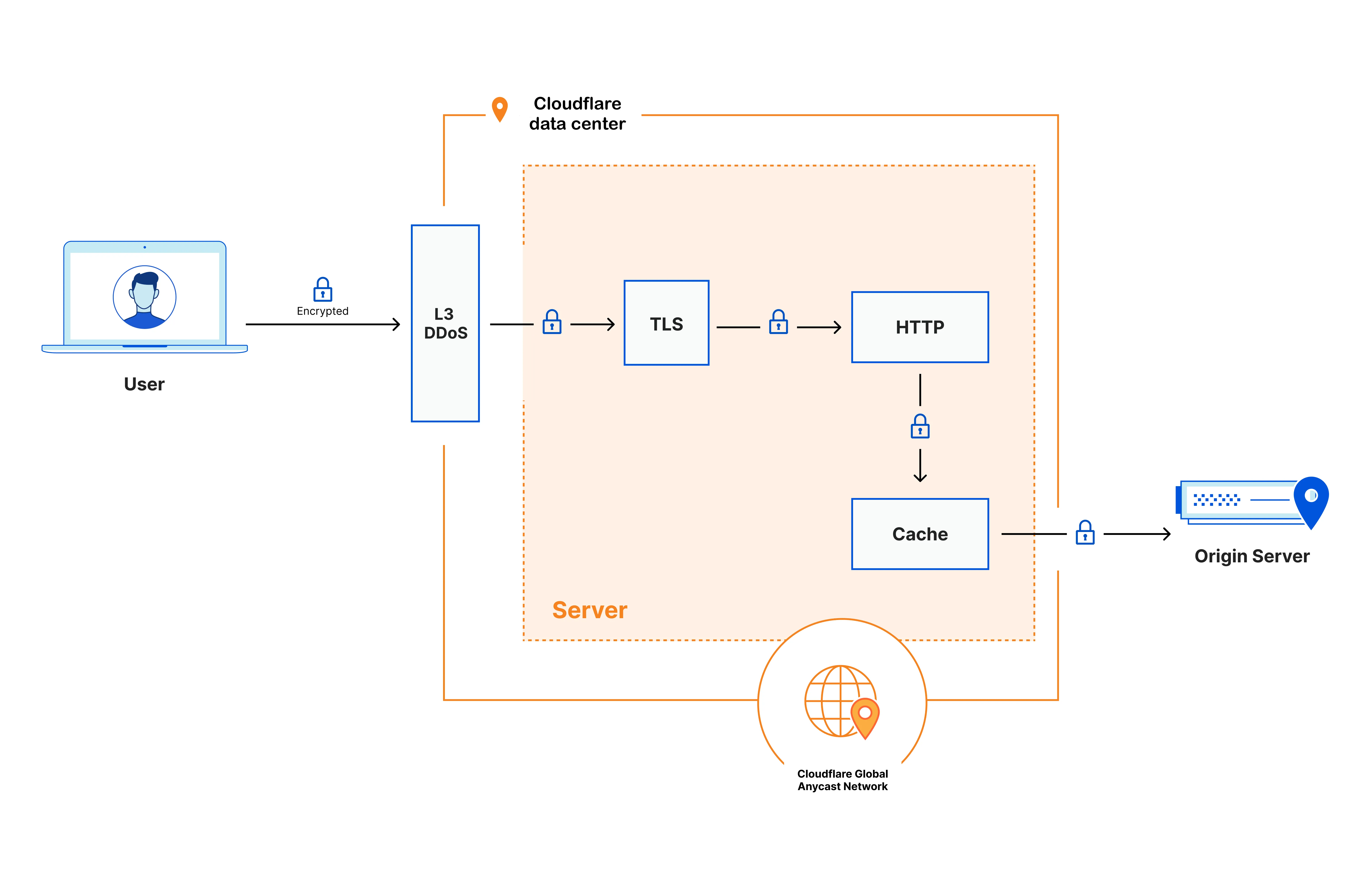
At a high level, when an end user's device connects to any Cloudflare data center, the request is processed in the following way:
1. Certain types of requests that can be used for cyber attacks are immediately dropped based on the addressing information (layer 3 / network layer).
2. Next, the encrypted request is decrypted (TLS termination) and inspected by the Cloudflare security and performance products you have configured — for example, Configuration Rules, WAF Custom Rules, and Rate Limiting Rules — applied in the order defined by the [traffic sequence ↗](https://blog.cloudflare.com/traffic-sequence-which-product-runs-first/). This process enables the detection and prevention of a variety of cyber attacks, including application-layer (layer 7) DDoS attacks, automated bot traffic, credential stuffing (attackers using stolen username/password combinations), and SQL injection (attackers inserting malicious database commands into web requests), among others.
3. The inspected request is then passed to the caching layer. If a cached copy of the requested content is available, it is served directly to the user. If not, the request is forwarded to your origin server. Traffic between the Cloudflare data center and your origin server is encrypted, unless you have configured a different encryption mode.
4. When the response arrives from your origin server, any static and eligible content is cached onto encrypted disks. The response then passes back through your configured security and performance products before being returned to the user.
By default, Cloudflare performs TLS termination (decryption of HTTPS traffic) in every data center globally — wherever the end user connects to a website or application behind Cloudflare. Customers who need to restrict where decryption occurs can configure [Regional Services](https://edgetunnel-b2h.pages.dev/data-localization/regional-services/) to specify which regions handle TLS termination and traffic processing.
```json
{"@context":"https://schema.org","@type":"TechArticle","@id":"https://edgetunnel-b2h.pages.dev/data-localization/regional-services/http-requests/#page","headline":"Default HTTP Privacy · Cloudflare Data Localization Suite docs","description":"How Cloudflare encrypts and processes HTTP requests across its global network.","url":"https://edgetunnel-b2h.pages.dev/data-localization/regional-services/http-requests/","inLanguage":"en","image":"https://edgetunnel-b2h.pages.dev/zt-preview.png","dateModified":"2026-05-05","publisher":{"@type":"Organization","name":"Cloudflare","url":"https://www.cloudflare.com/"},"isPartOf":{"@type":"WebSite","@id":"https://edgetunnel-b2h.pages.dev/#website","name":"Cloudflare Docs","url":"https://edgetunnel-b2h.pages.dev/"},"keywords":["TLS","Privacy"]}
{"@context":"https://schema.org","@type":"BreadcrumbList","itemListElement":[{"@type":"ListItem","position":1,"item":{"@id":"/directory/","name":"Directory"}},{"@type":"ListItem","position":2,"item":{"@id":"/data-localization/","name":"Data Localization Suite"}},{"@type":"ListItem","position":3,"item":{"@id":"/data-localization/regional-services/","name":"Regional Services"}},{"@type":"ListItem","position":4,"item":{"@id":"/data-localization/regional-services/http-requests/","name":"Default HTTP Privacy"}}]}
```
---
---
title: Regionalized IP Bindings
description: Bind a BYOIP prefix to a region so traffic to those IP addresses is processed in-region.
image: https://edgetunnel-b2h.pages.dev/zt-preview.png
---
> Documentation Index
> Fetch the complete documentation index at: https://edgetunnel-b2h.pages.dev/data-localization/llms.txt
> Use this file to discover all available pages before exploring further.
[Skip to content](#%5Ftop)
# Regionalized IP Bindings
Note
Regionalized IP Bindings requires the Regional Services and Regional Services for BYOIP entitlements. Contact your account team to enable them.
Regionalized IP Bindings let you regionalize traffic at the IP layer for prefixes you bring to Cloudflare through [Bring Your Own IP (BYOIP)](https://edgetunnel-b2h.pages.dev/byoip/). You bind a CIDR from one of your prefixes to a region, and Cloudflare processes traffic destined for those IP addresses only within the data centers in that region.
This complements the other ways to use [Regional Services](https://edgetunnel-b2h.pages.dev/data-localization/regional-services/): where [Regional Hostnames](https://edgetunnel-b2h.pages.dev/data-localization/regional-services/regional-hostnames/) regionalize traffic by hostname, Regionalized IP Bindings regionalize traffic by IP prefix — ideal for address-map deployments and any service you address by IP rather than hostname. Because bindings are managed entirely through the API, you can regionalize broad configurations yourself once your entitlements are enabled, without per-zone setup from your account team.
## How it works
A prefix binding maps a CIDR (within a BYOIP prefix you own) to a [region key](#list-available-regions) (for example, `us` or `eu`). After Cloudflare provisions the binding, traffic to addresses in that CIDR terminates TLS and is processed only inside the configured region, following the same in-region processing model described in [Regional Services](https://edgetunnel-b2h.pages.dev/data-localization/regional-services/).
Bindings are managed through the Data Localization Suite API under `/accounts/{account_id}/dls/`.
## Choose which CIDR to bind
A binding covers a range of addresses within a prefix, not just a single address — you do **not** need to create one binding per IP address. The `cidr` you bind must:
* Fall within the prefix identified by `prefix_id`.
* Be **more specific than the prefix itself** — a sub-range within it. For example, within a `/24` prefix you can bind any range from a `/25` down to a single address (a `/32` for IPv4, or a `/128` for IPv6). Binding the entire prefix (the full `/24`) is rejected with a [conflict error](#handle-a-conflict-error), because the whole prefix range is already in use once Cloudflare advertises it.
How you choose the CIDR depends on how you want to split the prefix across regions:
* **One region for the whole prefix** — cover the prefix with sub-ranges that all point to the same region. For example, bind both `203.0.113.0/25` and `203.0.113.128/25` to `eu` to regionalize every address in a `/24`.
* **Different regions for different addresses** — bind each range to the region you want (for example, `203.0.113.0/25` to `eu` and `203.0.113.128/25` to `us`). Cloudflare applies the most specific binding that matches a given address, so a narrower binding takes precedence over a broader one that overlaps it.
Each CIDR can have only one binding. If you try to create a second binding for a CIDR that is already bound, the API returns a [conflict error](#handle-a-conflict-error). To change the region for an existing binding, [update it](#update-the-region-for-a-binding) instead of creating a new one.
## Prerequisites
Before you create a binding, make sure that:
* Your account has both the **Regional Services** and **Regional Services for BYOIP** entitlements enabled. Contact your account team to enable them.
* You have [onboarded a BYOIP prefix](https://edgetunnel-b2h.pages.dev/byoip/) to Cloudflare and know its prefix ID.
* The region you want to use exists for your account. Refer to [List available regions](#list-available-regions).
* Your [API token](https://edgetunnel-b2h.pages.dev/fundamentals/api/get-started/create-token/) has the required permissions. Refer to [Required API token permissions](#required-api-token-permissions).
## Required API token permissions
These endpoints are authorized at the account level. The permissions you need depend on the operation:
| Operation | Required token permissions |
| ------------------------------------------------ | ------------------------------------------- |
| List regions, get a region, list or get bindings | **DLS: Read** |
| Create, update, or delete a prefix binding | **DLS: Write** _and_ **IP Prefixes: Write** |
Write operations require **IP Prefixes: Write** in addition to **DLS: Write** because the binding is created against a BYOIP prefix that you own in [Addressing](https://edgetunnel-b2h.pages.dev/byoip/) — Cloudflare verifies that you have permission to modify that prefix. A token with only **DLS: Write** can read regions and bindings but will be rejected when it tries to create or change a binding.
The **Super Administrator** and **Administrator** roles include all of these permissions. A custom role works as long as it includes the permission groups above.
## List available regions
Each binding references a region by its `region_key` (for example, `us` or `eu`). List the regions available to your account to find a valid key.
```bash
curl "https://api.cloudflare.com/client/v4/accounts/%7Baccount_id%7D/dls/regions" \
--request GET \
--header "Authorization: Bearer $CLOUDFLARE_API_TOKEN"
```
**Response**
```json
{
"success": true,
"errors": [],
"messages": [],
"result": [
{
"id": "a1b2c3d4-e5f6-7890-abcd-ef1234567890",
"name": "Europe",
"region_key": "eu",
"created_on": "2026-01-13T23:59:45.276558Z",
"modified_on": "2026-01-13T23:59:45.276558Z",
"version": 1,
"version_created_on": "2026-01-13T23:59:45.276558Z"
}
],
"result_info": {
"count": 1,
"per_page": 25,
"cursor": ""
}
}
```
Use the `type` query parameter (`managed` or `custom`) to filter the results by [region type](https://edgetunnel-b2h.pages.dev/data-localization/region-support/#region-types). Results are paginated — pass the `cursor` value from a response to fetch the next page.
Get a single region
Retrieve a region by its `region_key` or ID.
```bash
curl "https://api.cloudflare.com/client/v4/accounts/%7Baccount_id%7D/dls/regions/eu" \
--request GET \
--header "Authorization: Bearer $CLOUDFLARE_API_TOKEN"
```
## Create a prefix binding
Bind a CIDR from one of your BYOIP prefixes to a region. The `cidr` must fall within the prefix identified by `prefix_id` and be [more specific than the prefix itself](#choose-which-cidr-to-bind).
```bash
curl "https://api.cloudflare.com/client/v4/accounts/%7Baccount_id%7D/dls/regional_services/prefix_bindings" \
--request POST \
--header "Authorization: Bearer $CLOUDFLARE_API_TOKEN" \
--json '{
"prefix_id": "a1b2c3d4-e5f6-7890-abcd-ef1234567890",
"cidr": "203.0.113.0/25",
"region_key": "eu"
}'
```
**Response**
```json
{
"success": true,
"errors": [],
"messages": [],
"result": {
"id": "f0e1d2c3-b4a5-6789-0abc-def123456789",
"prefix_id": "a1b2c3d4-e5f6-7890-abcd-ef1234567890",
"cidr": "203.0.113.0/25",
"region_key": "eu"
}
}
```
Note
After you create or change a binding, it can take a few hours for the change to propagate across Cloudflare's network before traffic is regionalized at the edge.
Connectivity to these addresses is not interrupted while the binding propagates — existing traffic continues to be served. However, a binding must finish propagating and become **active** before you can add its addresses to an [address map](https://edgetunnel-b2h.pages.dev/byoip/address-maps/) (including creating a new address map that contains them). Until the binding is active, those operations are rejected.
For this reason, create the binding **first** and allow it to finish propagating before you configure address maps for the affected addresses.
### Handle a conflict error
Because [each CIDR can have only one binding](#choose-which-cidr-to-bind), a create request for a CIDR that is already bound fails with an HTTP `409` conflict:
**Response**
```json
{
"result": null,
"success": false,
"errors": [
{
"code": 1108,
"message": "conflict: binding already exists for CIDR 203.0.113.0/24"
}
],
"messages": []
}
```
You get this error in two cases:
* **You tried to bind the entire prefix.** The full prefix range (for example, the whole `/24`) is already in use once Cloudflare advertises your prefix, so it cannot be bound to a region directly. Bind a more specific range within the prefix instead — a `/25` down to a single `/32` — and cover the prefix with several sub-ranges if you need to regionalize all of its addresses.
* **The CIDR is already bound.** A binding for that exact range already exists, for example from an earlier request that succeeded.
To resolve it:
* [List your existing bindings](#list-prefix-bindings) to see what is already configured.
* To move an existing binding to a different region, [update it](#update-the-region-for-a-binding) rather than creating a new one.
* To bind a different range, choose a CIDR that is not already bound. To replace an existing binding with a different CIDR, [delete it](#delete-a-binding) first, then create the new one.
## List prefix bindings
```bash
curl "https://api.cloudflare.com/client/v4/accounts/%7Baccount_id%7D/dls/regional_services/prefix_bindings" \
--request GET \
--header "Authorization: Bearer $CLOUDFLARE_API_TOKEN"
```
**Response**
```json
{
"success": true,
"errors": [],
"messages": [],
"result": [
{
"id": "f0e1d2c3-b4a5-6789-0abc-def123456789",
"prefix_id": "a1b2c3d4-e5f6-7890-abcd-ef1234567890",
"cidr": "203.0.113.0/25",
"region_key": "eu"
}
],
"result_info": {
"count": 1,
"per_page": 25,
"cursor": ""
}
}
```
Get a single binding
```bash
curl "https://api.cloudflare.com/client/v4/accounts/%7Baccount_id%7D/dls/regional_services/prefix_bindings/%7Bbinding_id%7D" \
--request GET \
--header "Authorization: Bearer $CLOUDFLARE_API_TOKEN"
```
## Update the region for a binding
Change the region a binding points to. Only the `region_key` can be updated. To change the CIDR, delete the binding and create a new one.
```bash
curl "https://api.cloudflare.com/client/v4/accounts/%7Baccount_id%7D/dls/regional_services/prefix_bindings/%7Bbinding_id%7D" \
--request PATCH \
--header "Authorization: Bearer $CLOUDFLARE_API_TOKEN" \
--json '{
"region_key": "us"
}'
```
**Response**
```json
{
"success": true,
"errors": [],
"messages": [],
"result": {
"id": "f0e1d2c3-b4a5-6789-0abc-def123456789",
"prefix_id": "a1b2c3d4-e5f6-7890-abcd-ef1234567890",
"cidr": "203.0.113.0/25",
"region_key": "us"
}
}
```
## Delete a binding
Remove a binding to stop regionalizing traffic for its CIDR.
```bash
curl "https://api.cloudflare.com/client/v4/accounts/%7Baccount_id%7D/dls/regional_services/prefix_bindings/%7Bbinding_id%7D" \
--request DELETE \
--header "Authorization: Bearer $CLOUDFLARE_API_TOKEN"
```
**Response**
```json
{
"success": true,
"errors": [],
"messages": [],
"result": null
}
```
## Related resources
* [Regional Services](https://edgetunnel-b2h.pages.dev/data-localization/regional-services/) — overview and in-region processing model.
* [Available regions and product support](https://edgetunnel-b2h.pages.dev/data-localization/region-support/) — the full list of regions and their definitions.
* [Bring Your Own IP (BYOIP)](https://edgetunnel-b2h.pages.dev/byoip/) — onboard your own IP prefixes to Cloudflare.
```json
{"@context":"https://schema.org","@type":"TechArticle","@id":"https://edgetunnel-b2h.pages.dev/data-localization/regional-services/ip-bindings/#page","headline":"Regionalized IP Bindings · Cloudflare Data Localization Suite docs","description":"Bind a BYOIP prefix to a region so traffic to those IP addresses is processed in-region.","url":"https://edgetunnel-b2h.pages.dev/data-localization/regional-services/ip-bindings/","inLanguage":"en","image":"https://edgetunnel-b2h.pages.dev/zt-preview.png","dateModified":"2026-07-17","publisher":{"@type":"Organization","name":"Cloudflare","url":"https://www.cloudflare.com/"},"isPartOf":{"@type":"WebSite","@id":"https://edgetunnel-b2h.pages.dev/#website","name":"Cloudflare Docs","url":"https://edgetunnel-b2h.pages.dev/"}}
{"@context":"https://schema.org","@type":"BreadcrumbList","itemListElement":[{"@type":"ListItem","position":1,"item":{"@id":"/directory/","name":"Directory"}},{"@type":"ListItem","position":2,"item":{"@id":"/data-localization/","name":"Data Localization Suite"}},{"@type":"ListItem","position":3,"item":{"@id":"/data-localization/regional-services/","name":"Regional Services"}},{"@type":"ListItem","position":4,"item":{"@id":"/data-localization/regional-services/ip-bindings/","name":"Regionalized IP Bindings"}}]}
```
---
---
title: Regional Hostnames
description: Regionalize proxied hostnames by assigning a region through the dashboard or Regional Hostnames API.
image: https://edgetunnel-b2h.pages.dev/zt-preview.png
---
> Documentation Index
> Fetch the complete documentation index at: https://edgetunnel-b2h.pages.dev/data-localization/llms.txt
> Use this file to discover all available pages before exploring further.
[Skip to content](#%5Ftop)
# Regional Hostnames
Note
Interested customers need to contact their account team to enable DNS Regionalisation.
Regional Hostnames are the most common way to use [Regional Services](https://edgetunnel-b2h.pages.dev/data-localization/regional-services/): you assign a region to a proxied hostname, and Cloudflare steers traffic for that hostname — using its shared anycast IP addresses — to in-region data centers for TLS termination and processing. For other ways to regionalize traffic, refer to [Ways to use Regional Services](https://edgetunnel-b2h.pages.dev/data-localization/regional-services/#ways-to-use-regional-services).
Regional Hostnames support [managed regions](https://edgetunnel-b2h.pages.dev/data-localization/region-support/#region-types). If you need a custom region, use [Regionalized Spectrum Applications](https://edgetunnel-b2h.pages.dev/data-localization/regional-services/spectrum-applications/) or [Regionalized IP Bindings](https://edgetunnel-b2h.pages.dev/data-localization/regional-services/ip-bindings/) instead.
You can configure Regional Hostnames through the dashboard or via API.
## Configure Regional Services in the dashboard
To use Regional Services, you need to first create a DNS record in the dashboard:
1. In the Cloudflare dashboard, go to the **Records** page.
[ Go to **Records** ](https://dash.cloudflare.com/?to=/:account/:zone/dns/records)
2. Follow these steps to [create a DNS record](https://edgetunnel-b2h.pages.dev/dns/manage-dns-records/how-to/create-dns-records/).
3. From the **Region** dropdown, select the region you would like to use on your domain. This value will be applied to all DNS records on the same hostname. This means that if you have two DNS records of the same hostname and change the region for one of them, both records will have the same region.
Note
Some regions may not appear on the dropdown because newly announced regions mentioned in the [blog post ↗](https://blog.cloudflare.com/expanding-regional-services-configuration-flexibility-for-customers) are subject to approval by Cloudflare's internal team. For more information and entitlement reach out to your account team.
Refer to the table on [Available regions and product support](https://edgetunnel-b2h.pages.dev/data-localization/region-support/) for the complete list of available regions, their definitions and product support
## Configure Regional Services via API
You can also use Regional Services via API.
Currently, only SuperAdmins and Admin roles can edit DLS configurations. Use the Zone-level **DNS: Read/Write** API permission for the `/addressing/` endpoint to read or write Regional Services configurations.
These are some examples of API requests.
List all the available regions
Required API token permissions
At least one of the following [token permissions](https://edgetunnel-b2h.pages.dev/fundamentals/api/reference/permissions/) is required:
* `DNS Read`
* `DNS Write`
**List Regions**
```bash
curl "https://api.cloudflare.com/client/v4/accounts/$ACCOUNT_ID/addressing/regional_hostnames/regions" \
--request GET \
--header "Authorization: Bearer $CLOUDFLARE_API_TOKEN"
```
**Response**
```json
{
"success": true,
"errors": [],
"result": [
{
"key": "ca",
"label": "Canada"
},
{
"key": "eu",
"label": "Europe"
}
],
"messages": []
}
```
Create a new regional hostname entry
Required API token permissions
At least one of the following [token permissions](https://edgetunnel-b2h.pages.dev/fundamentals/api/reference/permissions/) is required:
* `DNS Write`
**Create Regional Hostname**
```bash
curl "https://api.cloudflare.com/client/v4/zones/$ZONE_ID/addressing/regional_hostnames" \
--request POST \
--header "Authorization: Bearer $CLOUDFLARE_API_TOKEN" \
--json '{
"hostname": "ca.regional.ipam.rocks",
"region_key": "ca"
}'
```
**Response**
```json
{
"success": true,
"errors": [],
"result": {
"hostname": "ca.regional.ipam.rocks",
"region_key": "ca",
"created_on": "2023-01-13T23:59:45.276558Z"
},
"messages": []
}
```
List all regional hostnames for a zone or get a specific one
Required API token permissions
At least one of the following [token permissions](https://edgetunnel-b2h.pages.dev/fundamentals/api/reference/permissions/) is required:
* `DNS Read`
* `DNS Write`
**List Regional Hostnames**
```bash
curl "https://api.cloudflare.com/client/v4/zones/$ZONE_ID/addressing/regional_hostnames" \
--request GET \
--header "Authorization: Bearer $CLOUDFLARE_API_TOKEN"
```
**Response**
```json
{
"success": true,
"errors": [],
"result": [
{
"hostname": "ca.regional.ipam.rocks",
"region_key": "ca",
"created_on": "2023-01-14T00:47:57.060267Z"
}
],
"messages": []
}
```
List all regional hostnames for a specific zone
Required API token permissions
At least one of the following [token permissions](https://edgetunnel-b2h.pages.dev/fundamentals/api/reference/permissions/) is required:
* `DNS Read`
* `DNS Write`
**Fetch Regional Hostname**
```bash
curl "https://api.cloudflare.com/client/v4/zones/$ZONE_ID/addressing/regional_hostnames/$HOSTNAME" \
--request GET \
--header "Authorization: Bearer $CLOUDFLARE_API_TOKEN"
```
**Response**
```json
{
"success": true,
"errors": [],
"result": {
"hostname": "ca.regional.ipam.rocks",
"region_key": "ca",
"created_on": "2023-01-13T23:59:45.276558Z"
},
"messages": []
}
```
Patch the region for a specific hostname
Required API token permissions
At least one of the following [token permissions](https://edgetunnel-b2h.pages.dev/fundamentals/api/reference/permissions/) is required:
* `DNS Write`
**Update Regional Hostname**
```bash
curl "https://api.cloudflare.com/client/v4/zones/$ZONE_ID/addressing/regional_hostnames/$HOSTNAME" \
--request PATCH \
--header "Authorization: Bearer $CLOUDFLARE_API_TOKEN" \
--json '{
"region_key": "eu"
}'
```
**Response**
```json
{
"success": true,
"errors": [],
"result": {
"hostname": "ca.regional.ipam.rocks",
"region_key": "eu",
"created_on": "2023-01-13T23:59:45.276558Z"
},
"messages": []
}
```
Delete the region configuration
Required API token permissions
At least one of the following [token permissions](https://edgetunnel-b2h.pages.dev/fundamentals/api/reference/permissions/) is required:
* `DNS Write`
**Delete Regional Hostname**
```bash
curl "https://api.cloudflare.com/client/v4/zones/$ZONE_ID/addressing/regional_hostnames/$HOSTNAME" \
--request DELETE \
--header "Authorization: Bearer $CLOUDFLARE_API_TOKEN"
```
**Response**
```json
{
"success": true,
"errors": [],
"result": null,
"messages": []
}
```
## Verify regional map for Zero Trust
To verify that your regional map is being applied correctly, check the `IngressColoName` field in your [Zero Trust Network Session logs](https://edgetunnel-b2h.pages.dev/logs/logpush/logpush-job/datasets/account/zero%5Ftrust%5Fnetwork%5Fsessions/#ingresscoloname). This field shows the name of the Cloudflare data center where traffic ingressed. Since regionalization is applied upstream from Gateway, the ingress data center will be located within your configured regional map, confirming that traffic is being processed in the correct region.
## Terraform support
You can also configure Regional Services using Terraform. For more details, refer to the [cloudflare\_regional\_hostname resource ↗](https://registry.terraform.io/providers/cloudflare/cloudflare/latest/docs/resources/regional%5Fhostname) in the Terraform documentation.
```json
{"@context":"https://schema.org","@type":"TechArticle","@id":"https://edgetunnel-b2h.pages.dev/data-localization/regional-services/regional-hostnames/#page","headline":"Regional Hostnames · Cloudflare Data Localization Suite docs","description":"Regionalize proxied hostnames by assigning a region through the dashboard or Regional Hostnames API.","url":"https://edgetunnel-b2h.pages.dev/data-localization/regional-services/regional-hostnames/","inLanguage":"en","image":"https://edgetunnel-b2h.pages.dev/zt-preview.png","dateModified":"2026-07-01","publisher":{"@type":"Organization","name":"Cloudflare","url":"https://www.cloudflare.com/"},"isPartOf":{"@type":"WebSite","@id":"https://edgetunnel-b2h.pages.dev/#website","name":"Cloudflare Docs","url":"https://edgetunnel-b2h.pages.dev/"},"keywords":["Terraform"]}
{"@context":"https://schema.org","@type":"BreadcrumbList","itemListElement":[{"@type":"ListItem","position":1,"item":{"@id":"/directory/","name":"Directory"}},{"@type":"ListItem","position":2,"item":{"@id":"/data-localization/","name":"Data Localization Suite"}},{"@type":"ListItem","position":3,"item":{"@id":"/data-localization/regional-services/","name":"Regional Services"}},{"@type":"ListItem","position":4,"item":{"@id":"/data-localization/regional-services/regional-hostnames/","name":"Regional Hostnames"}}]}
```
---
---
title: Regionalized Spectrum Applications
description: Regionalize Spectrum HTTP/S applications, with support for Static IPs and BYOIP.
image: https://edgetunnel-b2h.pages.dev/zt-preview.png
---
> Documentation Index
> Fetch the complete documentation index at: https://edgetunnel-b2h.pages.dev/data-localization/llms.txt
> Use this file to discover all available pages before exploring further.
[Skip to content](#%5Ftop)
# Regionalized Spectrum Applications
Note
Regionalized Spectrum Applications are configured with the help of your account team. Contact your account team to enable Regional Services and Spectrum for your account.
Regionalized Spectrum Applications regionalize HTTP/S traffic using [Spectrum](https://edgetunnel-b2h.pages.dev/spectrum/), Cloudflare's Layer 4 proxy. Unlike [Regional Hostnames](https://edgetunnel-b2h.pages.dev/data-localization/regional-services/regional-hostnames/) — which steer proxied hostnames using Cloudflare's shared anycast IP addresses — a Regionalized Spectrum Application assigns a dedicated IP to your hostname, and that IP signals that all traffic to it must be processed in a specific region.
Choose this option when you need to regionalize traffic that is addressed by IP, or when you need to combine Regional Services with [Spectrum Static IPs](https://edgetunnel-b2h.pages.dev/spectrum/about/static-ip/) or [Bring Your Own IP (BYOIP)](https://edgetunnel-b2h.pages.dev/byoip/).
## How it works
You create a Spectrum HTTP/S application for each hostname you want to regionalize. Cloudflare assigns a single processing region to the zone, and that region applies to **all** Spectrum HTTP/S applications in that zone — you configure one region per zone, not one per application. From then on, traffic to each application's IP terminates TLS and is processed only within the configured region, following the same in-region processing model described in [Regional Services](https://edgetunnel-b2h.pages.dev/data-localization/regional-services/).
## Prerequisites
* [Spectrum](https://edgetunnel-b2h.pages.dev/spectrum/) is included in your Enterprise contract. Spectrum is an add-on, so it must be part of your contract before it can be enabled.
* Your account has the **Regional Services** and **Spectrum** entitlements enabled. Contact your account team to enable them.
* You have a hostname proxied through Cloudflare that you want to regionalize.
* If you want to use your own addresses, you have onboarded [Spectrum Static IPs](https://edgetunnel-b2h.pages.dev/spectrum/about/static-ip/) or a [BYOIP](https://edgetunnel-b2h.pages.dev/byoip/) prefix.
## Set up a Regionalized Spectrum Application
1. **Enable the required products.** Work with your account team to enable Regional Services and Spectrum on your account.
2. **Create a Spectrum application for each hostname.** Create an [HTTP/HTTPS Spectrum application](https://edgetunnel-b2h.pages.dev/spectrum/get-started/) for each hostname you want to regionalize. Set the [application type](https://edgetunnel-b2h.pages.dev/spectrum/reference/configuration-options/#application-type) to _HTTP/HTTPS_ so that traffic is routed through Cloudflare's application-layer pipeline. You can create multiple Spectrum applications in a zone; they all share the single region assigned to that zone.
To use your own addresses, create the application via the API and set `edge_ips` (with `type: "static"`) to your [Static IP](https://edgetunnel-b2h.pages.dev/spectrum/about/static-ip/) or [BYOIP](https://edgetunnel-b2h.pages.dev/spectrum/about/byoip/) addresses. The `origin_direct` field still points to your origin server.
Spectrum hostname limits and workarounds
By default, a zone is limited to **10 unique Spectrum hostnames** (each backed by a dedicated IPv4 address). If you need to regionalize more hostnames than this, you can:
* **Use [BYOIP](https://edgetunnel-b2h.pages.dev/spectrum/about/byoip/)** — bring your own IP space so Spectrum applications are not constrained by the default shared-IPv4 allocation.
* **Use IPv6-only Spectrum applications** — IPv6 addresses are not subject to the same scarcity as IPv4, so IPv6-only applications do not count against the IPv4 hostname limit.
* **CNAME multiple subdomains to a single Spectrum application** — point several DNS-only (gray-clouded) `CNAME` records at one Spectrum app hostname. This works only when those hostnames share the same origin (one origin per application).
* **Use [Cloudflare for SaaS](https://edgetunnel-b2h.pages.dev/cloudflare-for-platforms/cloudflare-for-saas/)** — configure the Spectrum application as the target (fallback origin) for Custom Hostnames.
These are Spectrum-wide limits, not specific to Regional Services. Contact your account team if you expect to exceed them.
3. **Configure the processing region.** The region is assigned by Cloudflare, so communicate and work with your account team to confirm which [region](https://edgetunnel-b2h.pages.dev/data-localization/region-support/) should apply to your zone and to verify it has been configured. You can use any [managed region](https://edgetunnel-b2h.pages.dev/data-localization/region-support/#region-types), or request a [custom region](#custom-regions) if your compliance requirements are not met by the managed regions.
4. **Verify regionalization.** Confirm that traffic is processed in the expected region. Refer to [Verify the configuration](#verify-the-configuration).
## Verify the configuration
You can confirm regionalization using the same method as any other Regional Services configuration — refer to [Verify Regional Services behavior](https://edgetunnel-b2h.pages.dev/data-localization/how-to/#verify-regional-services-behavior) for the general guidance.
Every Cloudflare HTTP response includes a `CF-RAY` header that ends with a three-letter [IATA airport code ↗](https://en.wikipedia.org/wiki/IATA%5Fairport%5Fcode) identifying the data center where TLS termination occurred. Send a request to your regionalized hostname and check that the code corresponds to a data center inside your configured region:
```bash
curl --head https://www.example.com 2>&1 | grep -i cf-ray
```
```txt
cf-ray: 80cc9e64fd8a1519-MUC
```
In this example, `MUC` (Munich) confirms that the request was processed in the European Union. A request sent from outside the region returns a code for an in-region data center, because out-of-region traffic is forwarded to the configured region for processing.
## Custom regions
If the [managed regions](https://edgetunnel-b2h.pages.dev/data-localization/region-support/#region-types) do not match your compliance requirements, you can request a custom region that restricts processing to a specific set of data centers. Custom regions are set up through your account team. To learn more about how custom regions work, refer to the [Custom regions blog post ↗](https://blog.cloudflare.com/custom-regions/).
## Related resources
* [Regional Services](https://edgetunnel-b2h.pages.dev/data-localization/regional-services/) — overview and in-region processing model.
* [Available regions and product support](https://edgetunnel-b2h.pages.dev/data-localization/region-support/) — the full list of regions and their definitions.
* [Spectrum](https://edgetunnel-b2h.pages.dev/spectrum/) — Cloudflare's Layer 4 proxy.
```json
{"@context":"https://schema.org","@type":"TechArticle","@id":"https://edgetunnel-b2h.pages.dev/data-localization/regional-services/spectrum-applications/#page","headline":"Regionalized Spectrum Applications · Cloudflare Data Localization Suite docs","description":"Regionalize Spectrum HTTP/S applications, with support for Static IPs and BYOIP.","url":"https://edgetunnel-b2h.pages.dev/data-localization/regional-services/spectrum-applications/","inLanguage":"en","image":"https://edgetunnel-b2h.pages.dev/zt-preview.png","dateModified":"2026-07-01","publisher":{"@type":"Organization","name":"Cloudflare","url":"https://www.cloudflare.com/"},"isPartOf":{"@type":"WebSite","@id":"https://edgetunnel-b2h.pages.dev/#website","name":"Cloudflare Docs","url":"https://edgetunnel-b2h.pages.dev/"}}
{"@context":"https://schema.org","@type":"BreadcrumbList","itemListElement":[{"@type":"ListItem","position":1,"item":{"@id":"/directory/","name":"Directory"}},{"@type":"ListItem","position":2,"item":{"@id":"/data-localization/","name":"Data Localization Suite"}},{"@type":"ListItem","position":3,"item":{"@id":"/data-localization/regional-services/","name":"Regional Services"}},{"@type":"ListItem","position":4,"item":{"@id":"/data-localization/regional-services/spectrum-applications/","name":"Regionalized Spectrum Applications"}}]}
```
---
---
title: Configuration guides
description: Configure Cloudflare products with Regional Services and Customer Metadata Boundary.
image: https://edgetunnel-b2h.pages.dev/zt-preview.png
---
> Documentation Index
> Fetch the complete documentation index at: https://edgetunnel-b2h.pages.dev/data-localization/llms.txt
> Use this file to discover all available pages before exploring further.
[Skip to content](#%5Ftop)
# Configuration guides
Learn how to configure Cloudflare products with the Data Localization Suite, including Regional Services (which controls where traffic is decrypted and processed) and Customer Metadata Boundary (which controls where logs are stored).
* [ Zero Trust ](https://edgetunnel-b2h.pages.dev/data-localization/how-to/zero-trust/)
* [ Pages ](https://edgetunnel-b2h.pages.dev/data-localization/how-to/pages/)
* [ Cache ](https://edgetunnel-b2h.pages.dev/data-localization/how-to/cache/)
* [ Load Balancing ](https://edgetunnel-b2h.pages.dev/data-localization/how-to/load-balancing/)
* [ Cloudflare for SaaS ](https://edgetunnel-b2h.pages.dev/data-localization/how-to/cloudflare-for-saas/)
* [ R2 Object Storage ](https://edgetunnel-b2h.pages.dev/data-localization/how-to/r2/)
* [ Durable Objects ](https://edgetunnel-b2h.pages.dev/data-localization/how-to/durable-objects/)
* [ Workers ](https://edgetunnel-b2h.pages.dev/data-localization/how-to/workers/)
## Verify Regional Services behavior
In order to verify that Regional Services is working, customers can confirm the behavior by executing one of the following `curl` commands on a regionalized hostname:
```bash
curl -X GET -I https:/// 2>&1 | grep cf-ray
```
```bash
curl -s https:///cdn-cgi/trace | grep "colo="
```
The first command will return a three-letter IATA code (an airport identifier that corresponds to the nearest Cloudflare data center) in the [Cf-Ray](https://edgetunnel-b2h.pages.dev/fundamentals/reference/http-headers/#cf-ray) header, indicating the Cloudflare data center location of processing and/or TLS termination (traffic decryption). The second command will directly return the three-letter IATA code.
For example, when a hostname is configured to use the region European Union (EU), the three-letter IATA code will always return a data center inside of the EU.
```json
{"@context":"https://schema.org","@type":"WebPage","@id":"https://edgetunnel-b2h.pages.dev/data-localization/how-to/#page","headline":"Configuration guides · Cloudflare Data Localization Suite docs","description":"Configure Cloudflare products with Regional Services and Customer Metadata Boundary.","url":"https://edgetunnel-b2h.pages.dev/data-localization/how-to/","inLanguage":"en","image":"https://edgetunnel-b2h.pages.dev/zt-preview.png","dateModified":"2026-04-30","publisher":{"@type":"Organization","name":"Cloudflare","url":"https://www.cloudflare.com/"},"isPartOf":{"@type":"WebSite","@id":"https://edgetunnel-b2h.pages.dev/#website","name":"Cloudflare Docs","url":"https://edgetunnel-b2h.pages.dev/"}}
{"@context":"https://schema.org","@type":"BreadcrumbList","itemListElement":[{"@type":"ListItem","position":1,"item":{"@id":"/directory/","name":"Directory"}},{"@type":"ListItem","position":2,"item":{"@id":"/data-localization/","name":"Data Localization Suite"}},{"@type":"ListItem","position":3,"item":{"@id":"/data-localization/how-to/","name":"Configuration guides"}}]}
```
---
---
title: Cache
description: Configure Cache with Regional Services and Customer Metadata Boundary.
image: https://edgetunnel-b2h.pages.dev/zt-preview.png
---
> Documentation Index
> Fetch the complete documentation index at: https://edgetunnel-b2h.pages.dev/data-localization/llms.txt
> Use this file to discover all available pages before exploring further.
[Skip to content](#%5Ftop)
# Cache
The following sections describe how to configure Cache with Regional Services and Customer Metadata Boundary to control where cached content is stored and served from.
## Regional Services
To configure Regional Services for hostnames [proxied](https://edgetunnel-b2h.pages.dev/dns/proxy-status/) (meaning traffic routes through Cloudflare) through Cloudflare and ensure that [eligible assets](https://edgetunnel-b2h.pages.dev/cache/concepts/default-cache-behavior/) are cached only in-region, follow these steps for the dashboard or API configuration:
* [ Dashboard ](#tab-panel-8738)
* [ API ](#tab-panel-8739)
1. In the Cloudflare dashboard, go to the **Records** page.
[ Go to **Records** ](https://dash.cloudflare.com/?to=/:account/:zone/dns/records)
2. Follow these steps to [create a DNS record](https://edgetunnel-b2h.pages.dev/dns/manage-dns-records/how-to/create-dns-records/).
3. From the **Region** dropdown, select the region you would like to use on your domain.
4. Select **Save**.
1. To create records with the API, use the [API POST](https://edgetunnel-b2h.pages.dev/api/resources/dns/subresources/records/methods/create/) command.
2. Run the [API POST](https://edgetunnel-b2h.pages.dev/data-localization/regional-services/regional-hostnames/#configure-regional-services-via-api) command on the hostname to create a `regional_hostnames` with a specific region.
Note
Take into consideration that only [Generic Global Tiered Cache](https://edgetunnel-b2h.pages.dev/cache/how-to/tiered-cache/#generic-global-tiered-cache) and [Custom Tiered Cache](https://edgetunnel-b2h.pages.dev/cache/how-to/tiered-cache/#custom-tiered-cache) respect Regional Services. [Smart Tiered Cache](https://edgetunnel-b2h.pages.dev/cache/how-to/tiered-cache/#smart-tiered-cache) is incompatible with Regional Services.
## Customer Metadata Boundary
[Cache Analytics](https://edgetunnel-b2h.pages.dev/cache/performance-review/cache-analytics/), Generic Global Tiered Cache and Custom Tiered Cache are compatible with Customer Metadata Boundary. With Customer Metadata Boundary set to EU, the **Caching** \> **Tiered Cache** tab in the zone dashboard will not be populated.
For more information on CDN and caching, refer to the [Cache documentation](https://edgetunnel-b2h.pages.dev/cache/).
```json
{"@context":"https://schema.org","@type":"TechArticle","@id":"https://edgetunnel-b2h.pages.dev/data-localization/how-to/cache/#page","headline":"Cache · Cloudflare Data Localization Suite docs","description":"Configure Cache with Regional Services and Customer Metadata Boundary.","url":"https://edgetunnel-b2h.pages.dev/data-localization/how-to/cache/","inLanguage":"en","image":"https://edgetunnel-b2h.pages.dev/zt-preview.png","dateModified":"2026-07-01","publisher":{"@type":"Organization","name":"Cloudflare","url":"https://www.cloudflare.com/"},"isPartOf":{"@type":"WebSite","@id":"https://edgetunnel-b2h.pages.dev/#website","name":"Cloudflare Docs","url":"https://edgetunnel-b2h.pages.dev/"},"keywords":["Caching"]}
{"@context":"https://schema.org","@type":"BreadcrumbList","itemListElement":[{"@type":"ListItem","position":1,"item":{"@id":"/directory/","name":"Directory"}},{"@type":"ListItem","position":2,"item":{"@id":"/data-localization/","name":"Data Localization Suite"}},{"@type":"ListItem","position":3,"item":{"@id":"/data-localization/how-to/","name":"Configuration guides"}},{"@type":"ListItem","position":4,"item":{"@id":"/data-localization/how-to/cache/","name":"Cache"}}]}
```
---
---
title: Cloudflare for SaaS
description: Configure Cloudflare for SaaS with Regional Services and Customer Metadata Boundary.
image: https://edgetunnel-b2h.pages.dev/zt-preview.png
---
> Documentation Index
> Fetch the complete documentation index at: https://edgetunnel-b2h.pages.dev/data-localization/llms.txt
> Use this file to discover all available pages before exploring further.
[Skip to content](#%5Ftop)
# Cloudflare for SaaS
The following sections describe how to configure Cloudflare for SaaS with Regional Services and Customer Metadata Boundary to control where your custom hostnames are processed and where logs are stored.
## Regional Services
To configure Regional Services for both hostnames [proxied](https://edgetunnel-b2h.pages.dev/dns/proxy-status/) (meaning traffic routes through Cloudflare) through Cloudflare and the fallback origin, follow these steps for the dashboard or API configuration:
* [ Dashboard ](#tab-panel-8740)
* [ API ](#tab-panel-8741)
1. In the Cloudflare dashboard, go to the **Custom Hostnames** page.
[ Go to **Custom Hostnames** ](https://dash.cloudflare.com/?to=/:account/:zone/ssl-tls/custom-hostnames)
2. Follow these steps to [configure Cloudflare for SaaS](https://edgetunnel-b2h.pages.dev/cloudflare-for-platforms/cloudflare-for-saas/start/getting-started/).
1. Set the [fallback record](https://edgetunnel-b2h.pages.dev/api/resources/custom%5Fhostnames/subresources/fallback%5Forigin/methods/update/).
2. Create a [Custom Hostname](https://edgetunnel-b2h.pages.dev/api/resources/custom%5Fhostnames/methods/create/).
3. Run the [API POST](https://edgetunnel-b2h.pages.dev/data-localization/regional-services/regional-hostnames/#configure-regional-services-via-api) command on the Custom Hostname to create a `regional_hostnames` with a specific region.
The Regional Services functionality can be extended to Custom Hostnames and this is dependent on the target of the alias.
Consider the following example.
Note
As a SaaS provider, I might want all of my customers to connect to the nearest data center to them and for all the processing and Cloudflare features to be applied there; however, I might have a few exceptions where I want the processing to only be done in the US.
In this case, I can just keep my fallback record with `Earth` as the processing region and have all my Custom Hostnames create a CNAME record and use the fallback record as the CNAME target. For any Custom Hostnames that need to be processed in the US, I will create a DNS record for example, `us.saasprovider.com` and set the processing region to `United States of America`. In order for the US processing region to be applied, my customers must create a CNAME record and use the `us.saasprovider.com` as the CNAME target. The origin associated with the Custom Hostname is not used to set the processing region, but instead to route the traffic to the right server.
Below you can find a breakdown of the different ways that you might configure Cloudflare for SaaS and the corresponding processing regions:
* No processing region: `fallback.saasprovider.com`
* Processing region is the `US`: `us.saasprovider.com`
* User location: `UK` (closest datacenter: `LHR`)
| Test | Custom Hostname | Target | Origin | Location |
| ---- | -------------------------------------- | ------------------------- | ---------------------------- | -------- |
| 1 | regionalservices-default.example.com | fallback.saasprovider.com | default (fallback) | LHR |
| 2 | regionalservices-default2.example.com | us.saasprovider.com | default (fallback) | EWR |
| 3 | regionalservices-custom.example.com | fallback.saasprovider.com | us.saasprovider.com (custom) | LHR |
| 4 | regionalservices-custom2.example.com | us.saasprovider.com | us.saasprovider.com (custom) | EWR |
* In order to set a processing region for the fallback record to any of the available regions for Regional Services, create a new regional hostname entry for the fallback via a [POST](https://edgetunnel-b2h.pages.dev/data-localization/regional-services/regional-hostnames/#configure-regional-services-via-api) request.
* To update the existing region (for example, from `EU` to `US`), make a [PATCH](https://edgetunnel-b2h.pages.dev/data-localization/regional-services/regional-hostnames/#configure-regional-services-via-api) request for the fallback to update the processing region accordingly.
* To remove the regional services processing region and set it back to `Earth`, make a [DELETE](https://edgetunnel-b2h.pages.dev/data-localization/regional-services/regional-hostnames/#configure-regional-services-via-api) request to delete the region configuration.
## Customer Metadata Boundary
Cloudflare for SaaS [Analytics](https://edgetunnel-b2h.pages.dev/cloudflare-for-platforms/cloudflare-for-saas/hostname-analytics/) based on [HTTP requests](https://edgetunnel-b2h.pages.dev/logs/logpush/logpush-job/datasets/zone/http%5Frequests/) are fully supported by Customer Metadata Boundary.
Refer to [Cloudflare for SaaS documentation](https://edgetunnel-b2h.pages.dev/cloudflare-for-platforms/cloudflare-for-saas/) for more information.
```json
{"@context":"https://schema.org","@type":"TechArticle","@id":"https://edgetunnel-b2h.pages.dev/data-localization/how-to/cloudflare-for-saas/#page","headline":"Cloudflare for SaaS · Cloudflare Data Localization Suite docs","description":"Configure Cloudflare for SaaS with Regional Services and Customer Metadata Boundary.","url":"https://edgetunnel-b2h.pages.dev/data-localization/how-to/cloudflare-for-saas/","inLanguage":"en","image":"https://edgetunnel-b2h.pages.dev/zt-preview.png","dateModified":"2026-07-01","publisher":{"@type":"Organization","name":"Cloudflare","url":"https://www.cloudflare.com/"},"isPartOf":{"@type":"WebSite","@id":"https://edgetunnel-b2h.pages.dev/#website","name":"Cloudflare Docs","url":"https://edgetunnel-b2h.pages.dev/"}}
{"@context":"https://schema.org","@type":"BreadcrumbList","itemListElement":[{"@type":"ListItem","position":1,"item":{"@id":"/directory/","name":"Directory"}},{"@type":"ListItem","position":2,"item":{"@id":"/data-localization/","name":"Data Localization Suite"}},{"@type":"ListItem","position":3,"item":{"@id":"/data-localization/how-to/","name":"Configuration guides"}},{"@type":"ListItem","position":4,"item":{"@id":"/data-localization/how-to/cloudflare-for-saas/","name":"Cloudflare for SaaS"}}]}
```
---
---
title: Durable Objects
description: Configure Durable Objects with Regional Services and Customer Metadata Boundary.
image: https://edgetunnel-b2h.pages.dev/zt-preview.png
---
> Documentation Index
> Fetch the complete documentation index at: https://edgetunnel-b2h.pages.dev/data-localization/llms.txt
> Use this file to discover all available pages before exploring further.
[Skip to content](#%5Ftop)
# Durable Objects
The following sections describe how to configure Durable Objects with Regional Services and Customer Metadata Boundary to control where your Durable Objects run, persist data, and where logs are stored.
## Regional Services
To configure Regional Services for hostnames [proxied](https://edgetunnel-b2h.pages.dev/dns/proxy-status/) (meaning traffic routes through Cloudflare) through Cloudflare and ensure that processing of a Durable Object (DO) occurs only in-region, follow these steps:
1. Follow the steps in the Durable Objects [Get Started](https://edgetunnel-b2h.pages.dev/durable-objects/get-started/) guide.
2. [Restrict Durable Objects to a jurisdiction](https://edgetunnel-b2h.pages.dev/durable-objects/reference/data-location/#restrict-durable-objects-to-a-jurisdiction), in order to control where the DO itself runs and persists data, by creating a jurisidictional subnamespace in your Worker’s code.
3. Follow the [Workers guide](https://edgetunnel-b2h.pages.dev/data-localization/how-to/workers/#regional-services) to configure a custom domain with Regional Services, in order to control the regions from which Cloudflare responds to requests.
## Customer Metadata Boundary
DO Logs and Analytics are not available outside the US region when using Customer Metadata Boundary. With Customer Metadata Boundary set to `EU`, **Workers & Pages** \> **Workers** \> **Metrics** tab related to DO in the zone dashboard will not be populated.
Refer to the [Durable Objects documentation](https://edgetunnel-b2h.pages.dev/durable-objects/) for more information.
```json
{"@context":"https://schema.org","@type":"TechArticle","@id":"https://edgetunnel-b2h.pages.dev/data-localization/how-to/durable-objects/#page","headline":"Durable Objects · Cloudflare Data Localization Suite docs","description":"Configure Durable Objects with Regional Services and Customer Metadata Boundary.","url":"https://edgetunnel-b2h.pages.dev/data-localization/how-to/durable-objects/","inLanguage":"en","image":"https://edgetunnel-b2h.pages.dev/zt-preview.png","dateModified":"2026-04-30","publisher":{"@type":"Organization","name":"Cloudflare","url":"https://www.cloudflare.com/"},"isPartOf":{"@type":"WebSite","@id":"https://edgetunnel-b2h.pages.dev/#website","name":"Cloudflare Docs","url":"https://edgetunnel-b2h.pages.dev/"}}
{"@context":"https://schema.org","@type":"BreadcrumbList","itemListElement":[{"@type":"ListItem","position":1,"item":{"@id":"/directory/","name":"Directory"}},{"@type":"ListItem","position":2,"item":{"@id":"/data-localization/","name":"Data Localization Suite"}},{"@type":"ListItem","position":3,"item":{"@id":"/data-localization/how-to/","name":"Configuration guides"}},{"@type":"ListItem","position":4,"item":{"@id":"/data-localization/how-to/durable-objects/","name":"Durable Objects"}}]}
```
---
---
title: Load Balancing
description: Configure Load Balancing with Regional Services and Customer Metadata Boundary.
image: https://edgetunnel-b2h.pages.dev/zt-preview.png
---
> Documentation Index
> Fetch the complete documentation index at: https://edgetunnel-b2h.pages.dev/data-localization/llms.txt
> Use this file to discover all available pages before exploring further.
[Skip to content](#%5Ftop)
# Load Balancing
The following sections describe how to configure Load Balancing with Regional Services and Customer Metadata Boundary to control where load balancing decisions and traffic processing occur.
## Regional Services
You can load balance traffic at different levels of the networking stack depending on the [proxy mode](https://edgetunnel-b2h.pages.dev/load-balancing/understand-basics/proxy-modes/): Layer 7 (`HTTP/S`) and Layer 4 (`TCP`) are supported; however, `DNS-only` is not supported, as it is not [proxied](https://edgetunnel-b2h.pages.dev/dns/proxy-status/).
To configure Regional Services for hostnames [proxied](https://edgetunnel-b2h.pages.dev/dns/proxy-status/) (meaning traffic routes through Cloudflare) through Cloudflare and ensure that the Load Balancer is available only in-region, follow these steps for the dashboard or API configuration:
* [ Dashboard ](#tab-panel-8742)
* [ API ](#tab-panel-8743)
1. In the Cloudflare dashboard, go to the **Load balancing** page.
[ Go to **Load Balancing** ](https://dash.cloudflare.com/?to=/:account/:zone/traffic/load-balancing)
2. Follow the steps to [create a load balancer](https://edgetunnel-b2h.pages.dev/load-balancing/load-balancers/create-load-balancer/#create-a-load-balancer).
3. From the **Data Localization** dropdown, select the region you would like to use on your domain.
4. Select **Next** and continue with the regular setup.
5. Select **Save**.
1. Follow the instructions outlined to [create a load balancer](https://edgetunnel-b2h.pages.dev/load-balancing/load-balancers/create-load-balancer/#create-a-load-balancer) via API.
2. Run the [API POST](https://edgetunnel-b2h.pages.dev/data-localization/regional-services/regional-hostnames/#configure-regional-services-via-api) command on the Load Balancer hostname to create a `regional_hostnames` with a specific region.
## Customer Metadata Boundary
[Load Balancing Analytics](https://edgetunnel-b2h.pages.dev/load-balancing/reference/load-balancing-analytics/) are not available outside the US region when using Customer Metadata Boundary.
With Customer Metadata Boundary set to `EU`, **Traffic** \> **Load Balancing Analytics** \> **Overview and Latency** tab in the zone dashboard will not be populated.
Refer to the [Load Balancing documentation](https://edgetunnel-b2h.pages.dev/load-balancing/) for more information.
```json
{"@context":"https://schema.org","@type":"TechArticle","@id":"https://edgetunnel-b2h.pages.dev/data-localization/how-to/load-balancing/#page","headline":"Load Balancing · Cloudflare Data Localization Suite docs","description":"Configure Load Balancing with Regional Services and Customer Metadata Boundary.","url":"https://edgetunnel-b2h.pages.dev/data-localization/how-to/load-balancing/","inLanguage":"en","image":"https://edgetunnel-b2h.pages.dev/zt-preview.png","dateModified":"2026-07-01","publisher":{"@type":"Organization","name":"Cloudflare","url":"https://www.cloudflare.com/"},"isPartOf":{"@type":"WebSite","@id":"https://edgetunnel-b2h.pages.dev/#website","name":"Cloudflare Docs","url":"https://edgetunnel-b2h.pages.dev/"}}
{"@context":"https://schema.org","@type":"BreadcrumbList","itemListElement":[{"@type":"ListItem","position":1,"item":{"@id":"/directory/","name":"Directory"}},{"@type":"ListItem","position":2,"item":{"@id":"/data-localization/","name":"Data Localization Suite"}},{"@type":"ListItem","position":3,"item":{"@id":"/data-localization/how-to/","name":"Configuration guides"}},{"@type":"ListItem","position":4,"item":{"@id":"/data-localization/how-to/load-balancing/","name":"Load Balancing"}}]}
```
---
---
title: Pages
description: Configure Pages with Regional Services and Customer Metadata Boundary.
image: https://edgetunnel-b2h.pages.dev/zt-preview.png
---
> Documentation Index
> Fetch the complete documentation index at: https://edgetunnel-b2h.pages.dev/data-localization/llms.txt
> Use this file to discover all available pages before exploring further.
[Skip to content](#%5Ftop)
# Pages
The following sections describe how to configure Cloudflare Pages with Regional Services and Customer Metadata Boundary to control where your Pages project is processed and where logs are stored.
## Regional Services
To configure Regional Services for hostnames [proxied](https://edgetunnel-b2h.pages.dev/dns/proxy-status/) (meaning traffic routes through Cloudflare) through Cloudflare and ensure that processing of a Pages project occurs only in-region, follow these steps for the dashboard or API configuration:
* [ Dashboard ](#tab-panel-8744)
* [ API ](#tab-panel-8745)
1. In the Cloudflare dashboard, go to the **Workers & Pages** page.
[ Go to **Workers & Pages** ](https://dash.cloudflare.com/?to=/:account/workers-and-pages)
2. Select your Pages project.
3. Follow these steps to [create a Custom Domain](https://edgetunnel-b2h.pages.dev/pages/configuration/custom-domains/).
4. Go to the **DNS** of the zone you configured the Custom Domain for.
5. From the **Region** dropdown, select the region you would like to use on your domain.
6. Select **Save**.
1. Use the [API POST](https://edgetunnel-b2h.pages.dev/api/resources/pages/subresources/projects/subresources/domains/methods/create/) command to add a Custom Domain to a Pages project.
2. Run the [API POST](https://edgetunnel-b2h.pages.dev/data-localization/regional-services/regional-hostnames/#configure-regional-services-via-api) command on the Pages Custom Domain to create a `regional_hostnames` with a specific Region.
Note
Regional Services only applies to the Custom Domain configured for a Pages project.
## Customer Metadata Boundary
Customer Metadata Boundary applies to the Custom Domain configured, as well as the [\*.pages.dev](https://edgetunnel-b2h.pages.dev/pages/configuration/preview-deployments/) subdomain. You also have the option to disable access to the [.dev domain](https://edgetunnel-b2h.pages.dev/pages/configuration/custom-domains/#disable-access-to-pagesdev-subdomain).
For information on available Analytics and Metrics, review the [Cloudflare product compatibility](https://edgetunnel-b2h.pages.dev/data-localization/compatibility/) page.
It is recommended not to store any Personally Identifiable Information (PII) in the Pages project's static assets.
Note
Page [Functions](https://edgetunnel-b2h.pages.dev/pages/functions/) are implemented as Cloudflare Workers. Refer to the Workers section for more information.
Refer to the [Pages documentation](https://edgetunnel-b2h.pages.dev/pages) for more information.
```json
{"@context":"https://schema.org","@type":"TechArticle","@id":"https://edgetunnel-b2h.pages.dev/data-localization/how-to/pages/#page","headline":"Pages · Cloudflare Data Localization Suite docs","description":"Configure Pages with Regional Services and Customer Metadata Boundary.","url":"https://edgetunnel-b2h.pages.dev/data-localization/how-to/pages/","inLanguage":"en","image":"https://edgetunnel-b2h.pages.dev/zt-preview.png","dateModified":"2026-07-01","publisher":{"@type":"Organization","name":"Cloudflare","url":"https://www.cloudflare.com/"},"isPartOf":{"@type":"WebSite","@id":"https://edgetunnel-b2h.pages.dev/#website","name":"Cloudflare Docs","url":"https://edgetunnel-b2h.pages.dev/"}}
{"@context":"https://schema.org","@type":"BreadcrumbList","itemListElement":[{"@type":"ListItem","position":1,"item":{"@id":"/directory/","name":"Directory"}},{"@type":"ListItem","position":2,"item":{"@id":"/data-localization/","name":"Data Localization Suite"}},{"@type":"ListItem","position":3,"item":{"@id":"/data-localization/how-to/","name":"Configuration guides"}},{"@type":"ListItem","position":4,"item":{"@id":"/data-localization/how-to/pages/","name":"Pages"}}]}
```
---
---
title: R2 Object Storage
description: Configure R2 Object Storage with Regional Services and Customer Metadata Boundary.
image: https://edgetunnel-b2h.pages.dev/zt-preview.png
---
> Documentation Index
> Fetch the complete documentation index at: https://edgetunnel-b2h.pages.dev/data-localization/llms.txt
> Use this file to discover all available pages before exploring further.
[Skip to content](#%5Ftop)
# R2 Object Storage
The following sections describe how to configure R2 Object Storage with Regional Services and Customer Metadata Boundary to control where object requests are processed and where logs are stored.
## Regional Services
To configure Regional Services for hostnames [proxied](https://edgetunnel-b2h.pages.dev/dns/proxy-status/) (meaning traffic routes through Cloudflare) through Cloudflare and ensure that processing of requests to an [R2 Bucket](https://edgetunnel-b2h.pages.dev/r2/buckets/) occurs only in-region, follow these steps:
1. In the Cloudflare dashboard, go to the **R2** page.
[ Go to **Overview** ](https://dash.cloudflare.com/?to=/:account/r2/overview)
2. Follow the steps to [create a Bucket](https://edgetunnel-b2h.pages.dev/r2/buckets/create-buckets/).
3. [Connect a bucket to a custom domain](https://edgetunnel-b2h.pages.dev/r2/buckets/public-buckets/#connect-a-bucket-to-a-custom-domain).
4. Run the [API POST](https://edgetunnel-b2h.pages.dev/data-localization/regional-services/regional-hostnames/#configure-regional-services-via-api) command on the configured bucket custom domain to create a `regional_hostnames` with a specific region.
Regional Services only applies to the custom domain configured for an R2 Bucket.
### Send logs to R2 via S3-Compatible endpoint
The following instructions will show you how to set up a Logpush job using an S3-compatible endpoint to store logs in an R2 bucket in the jurisdiction of your choice.
1. Create an [R2 bucket](https://edgetunnel-b2h.pages.dev/r2/get-started/) in your Cloudflare account and select the [jurisdiction](https://edgetunnel-b2h.pages.dev/r2/reference/data-location/#set-jurisdiction-via-the-cloudflare-dashboard) you would like to use.
2. Generate an API token for your R2 bucket. You have the following two options:
Generate a token for a specific bucket (recommended)
Go to the R2 section of your Cloudflare dashboard and select **Manage R2 API Tokens** to generate a token directly tied to your specific bucket. You can follow the instructions in the [Authentication](https://edgetunnel-b2h.pages.dev/r2/api/tokens/) section.
Generate a token for all buckets
You can generate a API token in **Manage Account** \> **Account API Tokens** or you can create a user-specific token:
1. Go to **My Profile** \> **API Tokens**
2. Select **Create Token** \> **Create Custom Token**
3. Choose **Account** \> **Workers R2 Storage** \> **Edit** to set permissions.
4. To test your token, copy the `curl` command and paste it into a terminal.
```bash
curl "https://api.cloudflare.com/client/v4/user/tokens/verify" \
--header "Authorization: Bearer "
```
The result:
```json
{
"result": {
"id": "325xxxxcd",
"status": "active"
},
"success": true,
"errors": [],
"messages": [
{
"code": 10000,
"message": "This API Token is valid and active",
"type": null
}
]
}
```
1. Generate a SHA-256 hash of the token:
```bash
echo -n "" | shasum -a 256
```
This command will output a hash similar to `dxxxx391b`.
1. Set up a Logpush destination using [S3-compatible endpoint](https://edgetunnel-b2h.pages.dev/logs/logpush/logpush-job/enable-destinations/s3-compatible-endpoints/) and fill in the following fields:
* **Bucket**: Enter the name of the R2 bucket you created with the jurisdiction you would like to use.
* **Path** (optional): If you want, you can specify a folder path to organize your logs.
* **Endpoint URL**: Provide the S3 API endpoint for your bucket in the format `.eu.r2.cloudflarestorage.com`. Do not include the bucket name, as it was set in the first field.
* **Bucket Region**: For instance, use `WEUR` to specify the EU region.
* **Access Key ID**: Enter the Token ID created previously (`325xxxxcd`).
* **Secret Access Key**: Use the SHA-256 hash of the token (`dxxxx391b`).
Complete the configuration by selecting the fields you want to push to your R2 bucket.
## Customer Metadata Boundary
With Customer Metadata Boundary set to `EU`, **R2** \> **Bucket** \> [**Metrics**](https://edgetunnel-b2h.pages.dev/r2/platform/metrics-analytics/) tab in the account dashboard will be populated.
Note
Additionally, customers can create R2 buckets with [jurisdictional restrictions set to EU](https://edgetunnel-b2h.pages.dev/r2/reference/data-location/#jurisdictional-restrictions). In this case, we recommend [using jurisdictions with the S3 API](https://edgetunnel-b2h.pages.dev/r2/reference/data-location/#using-jurisdictions-with-the-s3-api).
Refer to the [R2 documentation](https://edgetunnel-b2h.pages.dev/r2/) for more information.
```json
{"@context":"https://schema.org","@type":"TechArticle","@id":"https://edgetunnel-b2h.pages.dev/data-localization/how-to/r2/#page","headline":"R2 Object Storage · Cloudflare Data Localization Suite docs","description":"Configure R2 Object Storage with Regional Services and Customer Metadata Boundary.","url":"https://edgetunnel-b2h.pages.dev/data-localization/how-to/r2/","inLanguage":"en","image":"https://edgetunnel-b2h.pages.dev/zt-preview.png","dateModified":"2026-07-01","publisher":{"@type":"Organization","name":"Cloudflare","url":"https://www.cloudflare.com/"},"isPartOf":{"@type":"WebSite","@id":"https://edgetunnel-b2h.pages.dev/#website","name":"Cloudflare Docs","url":"https://edgetunnel-b2h.pages.dev/"},"keywords":["S3","Logging"]}
{"@context":"https://schema.org","@type":"BreadcrumbList","itemListElement":[{"@type":"ListItem","position":1,"item":{"@id":"/directory/","name":"Directory"}},{"@type":"ListItem","position":2,"item":{"@id":"/data-localization/","name":"Data Localization Suite"}},{"@type":"ListItem","position":3,"item":{"@id":"/data-localization/how-to/","name":"Configuration guides"}},{"@type":"ListItem","position":4,"item":{"@id":"/data-localization/how-to/r2/","name":"R2 Object Storage"}}]}
```
---
---
title: Workers
description: Configure Workers with Regional Services and Customer Metadata Boundary.
image: https://edgetunnel-b2h.pages.dev/zt-preview.png
---
> Documentation Index
> Fetch the complete documentation index at: https://edgetunnel-b2h.pages.dev/data-localization/llms.txt
> Use this file to discover all available pages before exploring further.
[Skip to content](#%5Ftop)
# Workers
To ensure that your Cloudflare Workers code runs only within a specific geographic region, configure Regional Services on the Workers custom domain. This restricts where TLS termination (traffic decryption) and code execution occur.
## Regional Services
To configure Regional Services for hostnames [proxied](https://edgetunnel-b2h.pages.dev/dns/proxy-status/) (meaning traffic routes through Cloudflare rather than directly to your origin server) through Cloudflare and ensure that processing of a Workers project occurs only in-region, follow these steps:
1. In the Cloudflare dashboard, go to the **Workers & Pages** page.
[ Go to **Workers & Pages** ](https://dash.cloudflare.com/?to=/:account/workers-and-pages)
2. Select your Workers project.
3. Follow the steps to [create a custom domain](https://edgetunnel-b2h.pages.dev/workers/configuration/routing/custom-domains/).
4. Run the [API POST](https://edgetunnel-b2h.pages.dev/data-localization/regional-services/regional-hostnames/#configure-regional-services-via-api) command on the configured Workers Custom Domain to create a `regional_hostnames` with a specific region.
### Caveats
Regional Services only applies to the custom domain configured for a Workers project. Therefore, it will run only in-region Cloudflare locations.
Regional Services does not apply to [subrequests](https://edgetunnel-b2h.pages.dev/workers/platform/limits/#subrequests) (secondary HTTP requests that Workers make to other services).
Regional Services does not apply to other Worker triggers, like [Queues](https://edgetunnel-b2h.pages.dev/queues/) or [Cron Triggers](https://edgetunnel-b2h.pages.dev/workers/configuration/cron-triggers/).
## Customer Metadata Boundary
Customer Metadata Boundary applies to the custom domain configured, as well as the [\*.workers.dev](https://edgetunnel-b2h.pages.dev/workers/configuration/routing/workers-dev/) subdomain.
Workers [Metrics and Analytics](https://edgetunnel-b2h.pages.dev/workers/observability/metrics-and-analytics/) are not available outside the US region when using Customer Metadata Boundary.
With Customer Metadata Boundary set to `EU`, **Workers & Pages** \> **Workers** \> **Metrics** tab the zone dashboard will not be populated.
Note
It is recommended to not store any Personally Identifiable Information (PII) in the Workers code. If sensitive information needs to be used, it is recommended to use [Secrets](https://edgetunnel-b2h.pages.dev/workers/configuration/secrets/).
Refer to the [Workers documentation](https://edgetunnel-b2h.pages.dev/workers/) for more information.
```json
{"@context":"https://schema.org","@type":"TechArticle","@id":"https://edgetunnel-b2h.pages.dev/data-localization/how-to/workers/#page","headline":"Workers · Cloudflare Data Localization Suite docs","description":"Configure Workers with Regional Services and Customer Metadata Boundary.","url":"https://edgetunnel-b2h.pages.dev/data-localization/how-to/workers/","inLanguage":"en","image":"https://edgetunnel-b2h.pages.dev/zt-preview.png","dateModified":"2026-07-01","publisher":{"@type":"Organization","name":"Cloudflare","url":"https://www.cloudflare.com/"},"isPartOf":{"@type":"WebSite","@id":"https://edgetunnel-b2h.pages.dev/#website","name":"Cloudflare Docs","url":"https://edgetunnel-b2h.pages.dev/"}}
{"@context":"https://schema.org","@type":"BreadcrumbList","itemListElement":[{"@type":"ListItem","position":1,"item":{"@id":"/directory/","name":"Directory"}},{"@type":"ListItem","position":2,"item":{"@id":"/data-localization/","name":"Data Localization Suite"}},{"@type":"ListItem","position":3,"item":{"@id":"/data-localization/how-to/","name":"Configuration guides"}},{"@type":"ListItem","position":4,"item":{"@id":"/data-localization/how-to/workers/","name":"Workers"}}]}
```
---
---
title: Zero Trust
description: Use Zero Trust products with the Data Localization Suite, including Gateway and CASB.
image: https://edgetunnel-b2h.pages.dev/zt-preview.png
---
> Documentation Index
> Fetch the complete documentation index at: https://edgetunnel-b2h.pages.dev/data-localization/llms.txt
> Use this file to discover all available pages before exploring further.
[Skip to content](#%5Ftop)
# Zero Trust
The following sections describe how to configure Zero Trust products with the Data Localization Suite, including which features support Regional Services and Customer Metadata Boundary.
## Gateway
Regional Services can be used with Gateway in all [supported regions](https://edgetunnel-b2h.pages.dev/data-localization/region-support/). Be aware that Regional Services only apply when using the Cloudflare One Client in Traffic and DNS mode.
### Egress policies
Enterprise customers can purchase a [dedicated egress IP](https://edgetunnel-b2h.pages.dev/cloudflare-one/traffic-policies/egress-policies/dedicated-egress-ips/) (IPv4 and IPv6) or range of IPs geolocated to one or more Cloudflare network locations. This allows your egress traffic to geolocate to the city selected in your [egress policies](https://edgetunnel-b2h.pages.dev/cloudflare-one/traffic-policies/egress-policies/).
### HTTP policies
As part of Regional Services, Cloudflare Gateway will only perform [TLS decryption](https://edgetunnel-b2h.pages.dev/cloudflare-one/traffic-policies/http-policies/tls-decryption/) when using the [Cloudflare One Client](https://edgetunnel-b2h.pages.dev/cloudflare-one/team-and-resources/devices/cloudflare-one-client/) (in default [Traffic and DNS mode](https://edgetunnel-b2h.pages.dev/cloudflare-one/team-and-resources/devices/cloudflare-one-client/configure/modes/)).
#### Data Loss Prevention (DLP)
You are able to [log the payload of matched DLP rules](https://edgetunnel-b2h.pages.dev/cloudflare-one/data-loss-prevention/dlp-policies/logging-options/#log-the-payload-of-matched-rules) and encrypt them with your public key so that only you can examine them later.
[Cloudflare cannot decrypt encrypted payloads](https://edgetunnel-b2h.pages.dev/cloudflare-one/data-loss-prevention/dlp-policies/logging-options/#data-privacy).
### Network policies
You are able to [configure SSH proxy and command logs](https://edgetunnel-b2h.pages.dev/cloudflare-one/traffic-policies/network-policies/ssh-logging/). Generate a Hybrid Public Key Encryption (HPKE) key pair and upload the public key `sshkey.pub` to your dashboard. All proxied SSH commands are immediately encrypted using this public key. The matching private key – which is in your possession – is required to view logs.
### DNS policies
Regional Services controls where Cloudflare decrypts traffic. Because most DNS traffic is not encrypted, Gateway DNS (domain name filtering) cannot be regionalized using Regional Services.
Refer to the [Cloudflare One Client settings](https://edgetunnel-b2h.pages.dev/data-localization/how-to/zero-trust/#cloudflare-one-client-settings) section below for more information.
### Custom certificates
You can [bring your own certificate](https://edgetunnel-b2h.pages.dev/cloudflare-one/team-and-resources/devices/user-side-certificates/custom-certificate/) to Gateway but these cannot yet be restricted to a specific region.
### Logs and Analytics
By default, Cloudflare will store and deliver logs from data centers across our global network. To maintain regional control over your data, you can use [Customer Metadata Boundary](https://edgetunnel-b2h.pages.dev/data-localization/metadata-boundary/) and restrict data storage to a specific geographic region. For more information refer to the section about [Logpush datasets supported](https://edgetunnel-b2h.pages.dev/data-localization/metadata-boundary/logpush-datasets/).
Customers also have the option to reduce the logs that Cloudflare stores:
* You can [exclude PII from logs](https://edgetunnel-b2h.pages.dev/cloudflare-one/insights/logs/dashboard-logs/gateway-logs/manage-pii/)
* You can [disable logging, or only log blocked requests](https://edgetunnel-b2h.pages.dev/cloudflare-one/insights/logs/dashboard-logs/gateway-logs/#selective-logging).
#### Verify regional map application
To verify that your regional map is being applied correctly, check the `IngressColoName` field in your [Zero Trust Network Session logs](https://edgetunnel-b2h.pages.dev/logs/logpush/logpush-job/datasets/account/zero%5Ftrust%5Fnetwork%5Fsessions/#ingresscoloname). This field shows the name of the Cloudflare data center where traffic ingressed. Since regionalization is applied upstream from Gateway, the ingress data center will be located within your configured regional map, confirming that traffic is being processed in the correct region.
## Access
To ensure that all reverse proxy requests for applications protected by Cloudflare Access will only occur in FedRAMP-compliant data centers, you should use [Regional Services](https://edgetunnel-b2h.pages.dev/data-localization/regional-services/regional-hostnames/) with the region set to FedRAMP.
## Cloudflare Tunnel
You can [configure Cloudflare Tunnel](https://edgetunnel-b2h.pages.dev/cloudflare-one/networks/connectors/cloudflare-tunnel/configure-tunnels/run-parameters/#region) to only connect to data centers within the United States, regardless of where the software was deployed.
## Cloudflare One Client settings
### Local Domain Fallback
You can use the WARP setting [Local Domain Fallback](https://edgetunnel-b2h.pages.dev/cloudflare-one/team-and-resources/devices/cloudflare-one-client/configure/route-traffic/local-domains/) in order to use a private DNS resolver, which you can manage yourself.
### Split Tunnels
[Split Tunnels](https://edgetunnel-b2h.pages.dev/cloudflare-one/team-and-resources/devices/cloudflare-one-client/configure/route-traffic/split-tunnels/) allow you to decide which IP addresses/ranges and/or domains are routed through or excluded from Cloudflare.
Warning
Gateway policies will not apply for excluded traffic.
```json
{"@context":"https://schema.org","@type":"TechArticle","@id":"https://edgetunnel-b2h.pages.dev/data-localization/how-to/zero-trust/#page","headline":"Zero Trust · Cloudflare Data Localization Suite docs","description":"Use Zero Trust products with the Data Localization Suite, including Gateway and CASB.","url":"https://edgetunnel-b2h.pages.dev/data-localization/how-to/zero-trust/","inLanguage":"en","image":"https://edgetunnel-b2h.pages.dev/zt-preview.png","dateModified":"2026-07-01","publisher":{"@type":"Organization","name":"Cloudflare","url":"https://www.cloudflare.com/"},"isPartOf":{"@type":"WebSite","@id":"https://edgetunnel-b2h.pages.dev/#website","name":"Cloudflare Docs","url":"https://edgetunnel-b2h.pages.dev/"},"keywords":["Logging","SSH"]}
{"@context":"https://schema.org","@type":"BreadcrumbList","itemListElement":[{"@type":"ListItem","position":1,"item":{"@id":"/directory/","name":"Directory"}},{"@type":"ListItem","position":2,"item":{"@id":"/data-localization/","name":"Data Localization Suite"}},{"@type":"ListItem","position":3,"item":{"@id":"/data-localization/how-to/","name":"Configuration guides"}},{"@type":"ListItem","position":4,"item":{"@id":"/data-localization/how-to/zero-trust/","name":"Zero Trust"}}]}
```
---
---
title: Limitations
description: Caveats and limitations when deploying Data Localization Suite features.
image: https://edgetunnel-b2h.pages.dev/zt-preview.png
---
> Documentation Index
> Fetch the complete documentation index at: https://edgetunnel-b2h.pages.dev/data-localization/llms.txt
> Use this file to discover all available pages before exploring further.
[Skip to content](#%5Ftop)
# Limitations
There are some caveats and limitations when deploying Data Localization Suite features.
Cloudflare is working hard to improve this offering and fill the gaps. If you have a specific feature request, please contact your [Account Team](https://edgetunnel-b2h.pages.dev/support/contacting-cloudflare-support/).
## Key Management
When using Geo Key Manager or Keyless SSL (a service where your private key stays on your own infrastructure), some caveats may apply.
When a visitor first connects to your site, Cloudflare must complete a TLS handshake (the initial negotiation that establishes an encrypted connection). If the data center handling the connection does not hold your private key, it must contact a key server in an authorized region. This extra step adds latency corresponding to the round-trip time between the two locations, which can be as much as a second if the key server is on the other side of the world. Once the handshake is complete, the key server is not involved. Furthermore, if the visitor reconnects within the TLS Session Resumption window (a mechanism that reuses previous connection parameters), the private key is not required. Hence, latency is only added for the initial connection establishment.
Learn more about how it works in our [blog post ↗](https://blog.cloudflare.com/geo-key-manager-how-it-works/).
## Regional Services
When using Regional Services, some caveats and limitations may apply.
For product-specific caveats, refer to [Cloudflare product compatibility](https://edgetunnel-b2h.pages.dev/data-localization/compatibility/) page.
The following features and protocols are not supported by Regional Services and will not work on regionalized hostnames:
* [ICMP ↗](https://www.cloudflare.com/learning/ddos/glossary/internet-control-message-protocol-icmp/) — Internet Control Message Protocol, used for network diagnostics like `ping`
* [Encrypted Client Hello (ECH)](https://edgetunnel-b2h.pages.dev/ssl/edge-certificates/ech/) — a privacy feature that encrypts the initial part of a TLS connection
* [O2O](https://edgetunnel-b2h.pages.dev/cloudflare-for-platforms/cloudflare-for-saas/saas-customers/how-it-works/) — origin-to-origin, a Cloudflare for SaaS setup
* [Onion Routing (Tor)](https://edgetunnel-b2h.pages.dev/network/onion-routing/)
Since Regional Services leverages Spectrum (Cloudflare's Layer 4 proxy service) in the background, [Spectrum limitations](https://edgetunnel-b2h.pages.dev/spectrum/reference/limitations/) apply.
### Regional hostnames and Spectrum applications
Regional hostnames configured through the dashboard or the Regional Hostnames API only apply to hostnames [proxied](https://edgetunnel-b2h.pages.dev/dns/proxy-status/) through Cloudflare. They do not regionalize [Spectrum](https://edgetunnel-b2h.pages.dev/spectrum/) applications.
If a hostname has both a regional hostname configuration and an active Spectrum application, these are independent systems. The Spectrum application may override the regional hostname's IP steering with its own IP assignment. As a result, traffic may not be processed in the region configured via the Regional Hostnames API. If you need to regionalize a Spectrum application, contact your [Account Team](https://edgetunnel-b2h.pages.dev/support/contacting-cloudflare-support/) about Spectrum-specific regionalization options. Spectrum-specific regionalization only applies to HTTP and HTTPS [application types](https://edgetunnel-b2h.pages.dev/spectrum/reference/configuration-options/#application-type).
Regional Services does not apply to [subrequests](https://edgetunnel-b2h.pages.dev/workers/platform/limits/#subrequests) (secondary HTTP requests that your Cloudflare Workers make to other services). Regional Services operates on your hostname's IPs. We recommend using [DNSSEC](https://edgetunnel-b2h.pages.dev/learning-paths/application-security/default-traffic-security/dnssec/) (which cryptographically signs DNS records to prevent tampering) and/or [DNS over HTTPS](https://edgetunnel-b2h.pages.dev/1.1.1.1/encryption/dns-over-https/) (which encrypts DNS queries) to ensure that DNS responses are secure and correct.
## Customer Metadata Boundary
There are certain limitations and caveats when using Customer Metadata Boundary.
When you configure Customer Metadata Boundary to EU, most of the analytics and logging sections in the Cloudflare dashboard will show no data. To view your data, use [Security Analytics](https://edgetunnel-b2h.pages.dev/waf/analytics/security-analytics/) (which respects CMB) or set up [Logpush](https://edgetunnel-b2h.pages.dev/logs/logpush/) to export [HTTP request](https://edgetunnel-b2h.pages.dev/logs/logpush/logpush-job/datasets/zone/http%5Frequests/) logs to a storage destination you control.
To configure Customer Metadata Boundary to EU, you must disable Log Retention for all zones within your account. Log Retention is a legacy feature of [Logpull](https://edgetunnel-b2h.pages.dev/logs/logpull/) (an older API for downloading logs, now superseded by Logpush).
For product-specific caveats, refer to [Cloudflare product compatibility](https://edgetunnel-b2h.pages.dev/data-localization/compatibility/) page.
### Data unavailability
If you encounter a message on the dashboard indicating that your data is unavailable due to your account's Metadata Boundary configuration, this is because you are trying to access data that is not stored in your region (that is, you are in the US and trying to access data that is only stored in the EU, or vice versa). If you receive this error message while being in the region where your data is stored, there are two potential reasons why you might get this message:
* Your account has Customer Metadata Boundary (CMB) enabled, and your request is being directed to an incorrect region. For example, if you are in the EU and CMB is configured to store your data in the US.
* If you are trying to access your data from the correct region, such as being in the EU with CMB configured to save your data in the EU, the issue may be caused by network congestion. Typically, this problem resolves within a few minutes.
### Dashboard UI Analytics
In some cases, when using Customer Metadata Boundary set to the EU, some Dashboard UI Analytics might show up empty.
```json
{"@context":"https://schema.org","@type":"TechArticle","@id":"https://edgetunnel-b2h.pages.dev/data-localization/limitations/#page","headline":"Limitations · Cloudflare Data Localization Suite docs","description":"Caveats and limitations when deploying Data Localization Suite features.","url":"https://edgetunnel-b2h.pages.dev/data-localization/limitations/","inLanguage":"en","image":"https://edgetunnel-b2h.pages.dev/zt-preview.png","dateModified":"2026-05-04","publisher":{"@type":"Organization","name":"Cloudflare","url":"https://www.cloudflare.com/"},"isPartOf":{"@type":"WebSite","@id":"https://edgetunnel-b2h.pages.dev/#website","name":"Cloudflare Docs","url":"https://edgetunnel-b2h.pages.dev/"}}
{"@context":"https://schema.org","@type":"BreadcrumbList","itemListElement":[{"@type":"ListItem","position":1,"item":{"@id":"/directory/","name":"Directory"}},{"@type":"ListItem","position":2,"item":{"@id":"/data-localization/","name":"Data Localization Suite"}},{"@type":"ListItem","position":3,"item":{"@id":"/data-localization/limitations/","name":"Limitations"}}]}
```
---
---
title: FAQs
description: Answers to common questions about the Data Localization Suite and GDPR compliance.
image: https://edgetunnel-b2h.pages.dev/zt-preview.png
---
> Documentation Index
> Fetch the complete documentation index at: https://edgetunnel-b2h.pages.dev/data-localization/llms.txt
> Use this file to discover all available pages before exploring further.
[Skip to content](#%5Ftop)
# FAQs
## Are DLP and DLS the same?
No, they are not. DLP stands for [Data Loss Prevention](https://edgetunnel-b2h.pages.dev/cloudflare-one/data-loss-prevention/), and it is part of Cloudflare's Zero Trust offering (requiring Gateway, Cloudflare's secure web gateway for filtering outbound internet traffic). DLP allows you to scan web traffic and SaaS applications for sensitive data like secret keys, financial information (credit card numbers), and other keywords.
[Data Localization Suite](https://edgetunnel-b2h.pages.dev/data-localization/) (DLS) is a separate suite of features that allows you to control where your data is processed and stored to meet data residency requirements.
## Are Cloudflare's services GDPR compliant?
Yes, even without DLS, Cloudflare services are designed to satisfy the requirements of the GDPR (General Data Protection Regulation). Cloudflare services are also verified compliant with the EU Cloud Code of Conduct (EU Cloud CoC), Verification-ID: 2023LVL02SCOPE4316\. For further information, visit EU Cloud CoC [public register ↗](https://eucoc.cloud/en/public-register).
## How can I use DLS?
Once you have purchased DLS, your account team will enable DLS on your account, and you will be able to configure all features via the dashboard or API. You can find more specific information under the [Configuration guides](https://edgetunnel-b2h.pages.dev/data-localization/how-to/) section.
## Does Regional Services work with HTTP/3 / QUIC?
Not yet. HTTP/3 uses the QUIC transport protocol, which is not currently compatible with Regional Services.
## Can I apply Regional Services to only part of my traffic?
Yes. [Regional Services](https://edgetunnel-b2h.pages.dev/data-localization/regional-services/) is not all-or-nothing. You choose which hostnames or zones are regionalized by assigning a region to each one, and all other traffic continues to be served from Cloudflare's global network as usual. For example, you can regionalize `eu.example.com` to the European Union while `www.example.com` keeps using the global network. Different hostnames can also use different regions.
This also lets you keep latency-sensitive, non-sensitive content global. For instance, you can serve static CDN content that does not normally contain PII — such as product images on a global `assets.example.com` hostname — from Cloudflare's global network for best performance, while regionalizing only the hostnames that handle personal data.
The granularity depends on which [Regional Services option](https://edgetunnel-b2h.pages.dev/data-localization/regional-services/#ways-to-use-regional-services) you use. With Regional Hostnames, you assign a region per hostname. With Regionalized Spectrum Applications, the region is assigned per zone and applies to all Spectrum HTTP/S applications in that zone.
## How is traffic from users outside the configured region handled?
Regional Services accepts connections at any Cloudflare data center worldwide. When a request arrives outside the configured region, Cloudflare forwards it — still encrypted — to a data center inside the region, where TLS termination (decryption) and all Layer 7 processing take place. As a result, requests from users far from the configured region experience additional latency corresponding to the round trip to the in-region data center.
If you want users inside a region to benefit from local processing while still serving a global audience, consider using a regionalized hostname for in-region users (for example, `eu.example.com`) alongside a non-regionalized hostname for everyone else (for example, `www.example.com`).
## Which Regional Services option works with Static IPs or BYOIP?
* [Spectrum Static IPs](https://edgetunnel-b2h.pages.dev/spectrum/about/static-ip/) are supported only by Regionalized Spectrum Applications.
* [BYOIP](https://edgetunnel-b2h.pages.dev/byoip/) is supported by both Regionalized Spectrum Applications and [Regionalized IP Bindings](https://edgetunnel-b2h.pages.dev/data-localization/regional-services/ip-bindings/).
* Regional Hostnames use Cloudflare's shared anycast IP addresses and do not support Static IPs.
For an overview of each option, refer to [Ways to use Regional Services](https://edgetunnel-b2h.pages.dev/data-localization/regional-services/#ways-to-use-regional-services).
## What is the difference between managed and custom regions?
In short, **managed regions** are predefined regions that Cloudflare maintains and are available to all accounts, while **custom regions** are tailored to your account when the managed regions do not meet your compliance requirements. For full details on both region types and which Regional Services options support them, refer to [Region types](https://edgetunnel-b2h.pages.dev/data-localization/region-support/#region-types).
## Are there other options if I prefer not to have Cloudflare handle TLS termination (decryption)?
Yes, you have these options available:
* [Spectrum TCP/UDP Apps](https://edgetunnel-b2h.pages.dev/spectrum/) (without TLS termination)
* [Magic Transit](https://edgetunnel-b2h.pages.dev/magic-transit/)
* [Privacy Gateway](https://edgetunnel-b2h.pages.dev/privacy-gateway/)
These options only offer L3/L4 DDoS protection (network-layer and transport-layer protections). Using them means that no application-layer (L7) security or performance services can be applied, because Cloudflare does not decrypt the traffic.
## I have configured [Customer Metadata Boundary](https://edgetunnel-b2h.pages.dev/data-localization/metadata-boundary/) for EU region, I am accessing the Cloudflare Dashboard from Europe, why am I getting an error `Data not available due to your account's Customer Metadata Boundary configuration`?
This is typically caused by dynamic network routing. Based on Internet conditions that vary over time, your connection may be routed to a data center that is physically outside your configured region. This can be based on a variety of factors, including latency and network congestion. Enabling [Out of region access](https://edgetunnel-b2h.pages.dev/data-localization/metadata-boundary/out-of-region-access/) allows requests arriving in the United States to pull Customer Logs from the European Union and vice-versa. The analytics are still exclusively stored in the CMB configured region.
```json
{"@context":"https://schema.org","@type":"TechArticle","@id":"https://edgetunnel-b2h.pages.dev/data-localization/faq/#page","headline":"FAQs · Cloudflare Data Localization Suite docs","description":"Answers to common questions about the Data Localization Suite and GDPR compliance.","url":"https://edgetunnel-b2h.pages.dev/data-localization/faq/","inLanguage":"en","image":"https://edgetunnel-b2h.pages.dev/zt-preview.png","dateModified":"2026-07-01","publisher":{"@type":"Organization","name":"Cloudflare","url":"https://www.cloudflare.com/"},"isPartOf":{"@type":"WebSite","@id":"https://edgetunnel-b2h.pages.dev/#website","name":"Cloudflare Docs","url":"https://edgetunnel-b2h.pages.dev/"},"keywords":["Compliance"]}
{"@context":"https://schema.org","@type":"BreadcrumbList","itemListElement":[{"@type":"ListItem","position":1,"item":{"@id":"/directory/","name":"Directory"}},{"@type":"ListItem","position":2,"item":{"@id":"/data-localization/","name":"Data Localization Suite"}},{"@type":"ListItem","position":3,"item":{"@id":"/data-localization/faq/","name":"FAQs"}}]}
```
---
---
title: Changelog
description: Track the latest updates and changes to Data Localization Suite features.
image: https://edgetunnel-b2h.pages.dev/zt-preview.png
---
> Documentation Index
> Fetch the complete documentation index at: https://edgetunnel-b2h.pages.dev/data-localization/llms.txt
> Use this file to discover all available pages before exploring further.
[Skip to content](#%5Ftop)
# Changelog
[ Subscribe to RSS ](https://edgetunnel-b2h.pages.dev/data-localization/changelog/index.xml)
## 2024-05-22
**Expanded Regional Services for more precise data localization.**
* Added Austria, Brazil, France, Hong Kong, Italy, NATO, the Netherlands, Russia, Saudi Arabia, South Africa, Spain, Switzerland, and Taiwan. Some regions may not appear in the dropdown as they require Cloudflare approval. Contact your account team for more information.
* Introduced Exclusive of Hong Kong and Macau, and Exclusive of Russia and Belarus options.
* Launched the Cloudflare Green Energy region, using renewable-powered data centers.
```json
{"@context":"https://schema.org","@type":"BlogPosting","@id":"https://edgetunnel-b2h.pages.dev/data-localization/changelog/#page","headline":"Changelog · Cloudflare Data Localization Suite docs","description":"Track the latest updates and changes to Data Localization Suite features.","url":"https://edgetunnel-b2h.pages.dev/data-localization/changelog/","inLanguage":"en","image":"https://edgetunnel-b2h.pages.dev/zt-preview.png","dateModified":"2026-04-15","publisher":{"@type":"Organization","name":"Cloudflare","url":"https://www.cloudflare.com/"},"isPartOf":{"@type":"WebSite","@id":"https://edgetunnel-b2h.pages.dev/#website","name":"Cloudflare Docs","url":"https://edgetunnel-b2h.pages.dev/"}}
{"@context":"https://schema.org","@type":"BreadcrumbList","itemListElement":[{"@type":"ListItem","position":1,"item":{"@id":"/directory/","name":"Directory"}},{"@type":"ListItem","position":2,"item":{"@id":"/data-localization/","name":"Data Localization Suite"}},{"@type":"ListItem","position":3,"item":{"@id":"/data-localization/changelog/","name":"Changelog"}}]}
```