
Changelog
New updates and improvements at Cloudflare.

Internal DNS is now generally available. Internal DNS provides authoritative and recursive DNS for private networks on the same global network and control plane you already use for public DNS, Zero Trust, and application services.
- Consolidate DNS operations. Public and private DNS run on one platform, with one API, one audit trail, and one place to set policy.
- Simplify split-horizon DNS. Internal and external resolution are defined as separate views over shared zones, managed from a single control plane — so there is no drift to chase down.
- Extend Zero Trust to DNS. Resolver policies decide which users and devices resolve against which view, enforced by the same Gateway that already governs the rest of your traffic.
Setting up Internal DNS takes three steps: create a zone, create a view, and define a resolver policy.
POST /zones{"account": {"id": "<ACCOUNT_ID>"},"name": "corp.internal","type": "internal"}Internal DNS is included with Cloudflare Gateway for Enterprise customers. To get started, refer to the Internal DNS documentation.
Cloudflare Web Analytics (Real User Monitoring) has rolled out performance optimizations to significantly improve the stability and loading speed of account-wide dashboards.
For larger accounts (with >100 Web Analytics sites), loading the aggregate account-wide view would often fail, running into timeouts or unexpected interface errors due to the massive scale of parallel query processing. This update optimizes how high-volume multi-site data is queried to reduce errors and provide a snappier dashboard experience.
Accounts with up to 1,000 sites will now be able to load this account-wide aggregate view without experiencing misleading errors.
If you have an account with over 1,000 sites, we cannot currently aggregate over this volume due to processing constraints but you will now be presented with a clear error and instruction to filter to the relevant site(s) you wish to see the data for.
The DNS Firewall page in the Cloudflare dashboard has been refreshed, bringing several settings that were previously API-only into the UI and modernizing how you view and manage your DNS Firewall clusters.
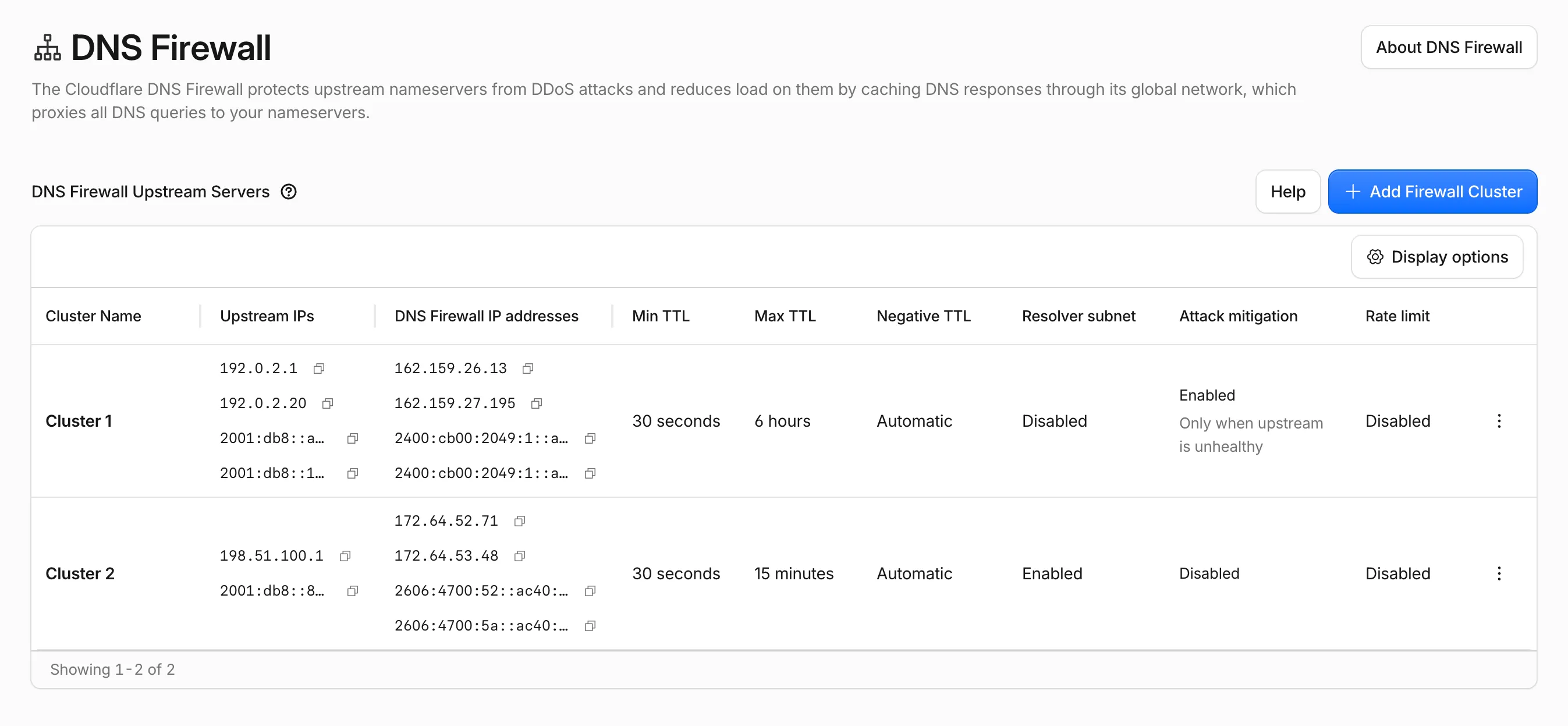
- More settings in the dashboard: cluster options that were previously only configurable through the API — such as attack mitigation, rate limiting, negative TTL, and resolver subnet — are now available directly in the dashboard.
- Better table experience: the DNS Firewall cluster table has been revised to surface cluster details at a glance, with resizable columns and the option to show or hide columns to tailor the view to your workflow.
- New create and edit UX: adding and editing clusters now uses a modernized form that groups related settings together, making configuration faster and clearer.
Available to all DNS Firewall customers as part of their existing subscription.
In the Cloudflare dashboard, go to the DNS Firewall page.
Go to ClustersFor more information, refer to DNS Firewall.
Your origin can serve different responses for the same URL — different languages based on
Accept-Language, or different formats based onAccept— by returning aVary↗ response header. Cloudflare's cache now honors that header directly in Cache Rules, so the same URL can hold multiple cached versions and each request is matched to the right one. Content that previously had to bypass cache to stay correct can now be cached, following standard HTTP caching behavior ↗.Your origin now decides which request headers matter by listing them in its
Varyresponse, and you control how Cloudflare treats each one. When you have enabled Vary using a cache rule and a response includes aVaryheader, the request headers listed become part of the cache key.For each header your origin varies on, choose one of three actions:
Action Behavior Best for normalizeConverts equivalent header values to the same cache key value before matching, collapsing redundant versions. Most Accept,Accept-Language, andAccept-Encodinguse cases.passthroughUses the raw header value to select the cached version and forwards it to the origin unchanged. When byte-for-byte differences in the header value should create versions. bypassBypasses cache whenever this header name appears in the origin's Varyresponse.Per-user values, or headers with too many possible values to cache safely. - Higher cache hit ratios:
normalizetreats semantically equivalent headers as one version. For example,Accept-Language: en-US, fr;q=0.8andAccept-Language: fr;q=0.8, en-GBboth resolve to the same cache key, so you serve more requests from cache instead of the origin. - Correct content negotiation: Requests always receive the cached version that matches their headers, so language and format variants stay accurate.
- No origin or Worker changes required: If your origin already sends
Vary, you configure the behavior entirely in Cache Rules. - Standards-aligned: Cache key calculation follows RFC 9111, and
Vary: *continues to bypass cache as required by RFC 9110.
Vary in Cache Rules is available on all plans (Free, Pro, Business, and Enterprise). For per-request control in Workers subrequests, use the
cf.varyproperty.Configure Vary in the Cloudflare dashboard ↗ under Caching > Cache Rules, or through the Rulesets API. To learn how Vary affects cache keys and how each action works, refer to Vary and the Cache Rules Vary setting.
- Higher cache hit ratios:
Regional Services now supports Regionalized IP Bindings, letting you regionalize traffic at the IP layer for prefixes you bring to Cloudflare through Bring Your Own IP (BYOIP).
Where Regional Hostnames regionalize traffic by hostname, Regionalized IP Bindings let you bind a CIDR from one of your prefixes to a region — ideal for address-map deployments and any service you address by IP rather than hostname. Cloudflare then terminates TLS and processes traffic to those addresses only within the data centers in that region.
Regionalized IP Bindings requires the Regional Services and Regional Services for BYOIP entitlements. Contact your account team to enable them.
To get started, refer to Regionalized IP Bindings.
Cloudflare Accelerated Mobile Pages (AMP) and Signed Exchanges (SXG) support has reached end of life. The features have been disabled since October 2025, so customers who had them configured should see no change to their traffic.
Customers will no longer be able to configure AMP/SXG through API or rulesets. The Zone API will start throwing errors. Rulesets with the SXG configuration will fail to save until SXG has been removed.
Cloudflare Fonts now forwards
/cf-fontsrequests to your origin server when it encounters invalid paths or unexpected runtime errors, instead of returning 4xx or 5xx responses directly. This update also adds additional input validation to enhance security.
Cloudflare now accepts ML-DSA ↗ (FIPS 204) post-quantum certificates on the connection between Cloudflare's edge and your origin server. Combined with our existing X25519MLKEM768 key agreement, this lets you establish end-to-end post-quantum authentication on the Cloudflare-to-origin connection.
ML-DSA is supported in two origin-facing features:
- Authenticated Origin Pulls (AOP) — upload an ML-DSA client certificate that Cloudflare will present during the mTLS handshake to your origin. Available at both zone-level and per-hostname scopes.
- Custom Origin Trust Store (COTS) — upload an ML-DSA certificate authority that Cloudflare will trust when validating your origin server certificate under Full (strict) encryption mode.
Refer to Post-quantum signatures for certificate generation and setup guidance, and to PQC in Cloudflare products for the current post-quantum deployment status across Cloudflare.
Cloudflare now enforces DNS records quotas at the account level for Enterprise accounts. Instead of a per-zone limit, these accounts have a quota on the total number of records across all of their zones, letting you distribute records across your zones however you like — regardless of each zone's plan. Public and internal zones are counted separately, each with a default quota of 1,000,000 records.
Accounts without an account-level quota are unaffected: existing per-zone quotas behave exactly as before.
For more details, refer to DNS records quota.
Cloudflare now returns a
BYPASScache status whenever a response is not cacheable, instead of the previous mix ofBYPASSandMISSthat depended on why Cloudflare chose not to cache the response.There are multiple reasons Cloudflare may refuse to cache a response — for example, the response exceeds the maximum cacheable file size for your plan, the origin sends
Cache-Control: no-cache,private, ormax-age=0, the response includes aSet-Cookieheader, or the request includes anAuthorizationheader.Previously, only some of these conditions returned
BYPASS. Others — such as responses exceeding the maximum cacheable file size — returnedMISSon every request, regardless of whether Origin Cache Control was on or off. Because the response could never be cached, every subsequent request also returnedMISS, which looked indistinguishable from a broken cache and made it hard to tell whether Cloudflare was trying and failing to cache the asset or had deliberately chosen not to cache it.BYPASSnow consistently signals that Cloudflare refused to cache the response, regardless of the reason.MISSis reserved for cacheable responses that simply were not in the local cache at request time.After this change rolls out, you should see:
- MISS rate decreases: Uncacheable responses no longer count as cache misses.
- BYPASS rate increases: These same responses are now reported as bypasses.
- Cache hit ratio increases: Hit ratio calculations no longer include uncacheable traffic that could never have been cached, giving you a more accurate view of cache effectiveness.
Your total request volume and origin traffic are unchanged — only the cache status label is different.
The cache status label is the only thing changing — browser cache TTL handling for any given response is identical to what it was before:
- Responses that historically returned
MISSbecause Cloudflare refused to cache them (for example, responses over the maximum cacheable file size) now returnBYPASS, but continue to have browser cache TTL applied — exactly as they did when they were labeledMISS. - Responses that historically returned
BYPASSand skipped browser cache TTL continue to skip browser cache TTL.
In both cases, the decision to apply browser cache TTL depends on the underlying reason Cloudflare did not cache the response, not on the new
BYPASSlabel.
Starting today, everyone can opt in to a refreshed DNS records page in the Cloudflare dashboard. Over the coming weeks, the new experience will become the default for Free plan users first, followed by paid plans.
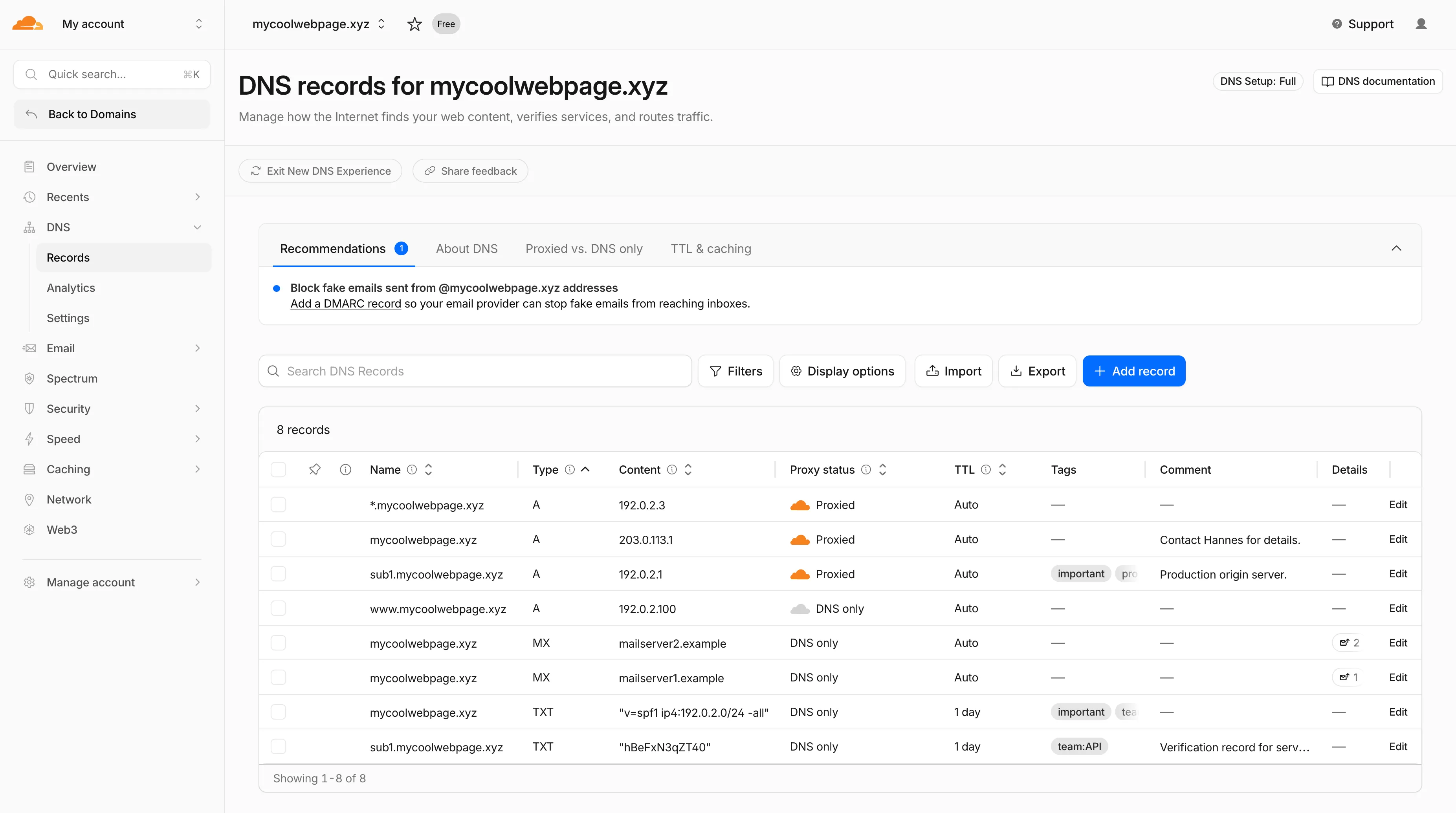
- Better table experience: resizable and hideable columns, row pinning, advanced filters with logical operators (AND/OR), configurable pagination, and expanded input fields so long values are no longer cut off.
- First-class mobile experience: responsive layout with a touch-friendly, card-based UI and compact controls for small screens.
- DNS quick reference: bite-sized explainers for DNS, proxy status, and TTL, available directly in the product to help users configure records without leaving the page.
- Modern frontend: a refactor onto Cloudflare's new UI framework that improves performance and lays the foundation for future improvements.

Dates are subject to change based on feedback received during the rollout.
- 20 May - 05 June: ramped rollout to Free, then Pro and Business plans.
- 08 June - 03 July: ramped rollout to Enterprise plans.
Once the new experience is turned on for your account, look for the feedback link at the top of the DNS records page in the Cloudflare dashboard and let us know what you think. Your input helps us prioritize the next round of improvements.
The
/cdn-cgi/rumbeacon endpoint now returns405 Method Not Allowedfor non-POST requests instead of404 Not Found. The response includes anAllow: POST, OPTIONSheader per RFC 9110 §15.5.6 ↗.Previously, sending a
GETor other non-POST request to this endpoint returned a404, which was misleading because it suggested the endpoint did not exist. The new405response clearly indicates that the endpoint exists but only acceptsPOSTrequests.The Web Analytics beacon (
beacon.min.js) already usesPOSTfor all metric submissions, so this change does not affect normal beacon operation.OPTIONSrequests for CORS preflight continue to work as before.For more information, refer to the Web Analytics FAQ.
Cloudflare's cache now runs on a new proxy built on Pingora ↗, the Rust-based framework that already serves a significant portion of Cloudflare's network traffic. The new proxy is faster, more memory-safe, and designed to evolve our cache architecture. It delivers immediate performance improvements and enables new caching capabilities.
- Lower latency: The new proxy reduces per-request overhead through improved connection reuse.
- Reduced cache MISSes: Enhanced cache retention improves origin offload.
- Better RFC compliance: Caching behavior more closely follows HTTP caching standards.
- Foundation for future features: The new architecture enables upcoming improvements to cache functionality and efficiency.
- Asynchronous
stale-while-revalidate: Every request returns stale content immediately while revalidation happens in the background, instead of the first request after expiry blocking on the origin. Refer to the asynchronousstale-while-revalidatechangelog for details. - Unbuffered bypass by default: Responses that bypass cache are streamed directly to the client without buffering, reducing time-to-first-byte for uncacheable content.
The new architecture introduces the following behavioral changes to improve RFC compliance and correctness:
Vary: *results in cache bypass: According to RFC 9110 Section 12.5.5 ↗, aVaryheader value of*indicates the response varies on factors beyond request headers and must not be served from cache. Cloudflare now bypasses cache for these responses instead of storing them.Set-Cookiestripped on MISS and EXPIRED: For cacheable assets,Set-Cookieis now stripped on MISS and EXPIRED responses, not only on HITs.- Floating-point TTL values: Floating-point time-to-live values (for example,
max-age=1.5) are rounded down to the nearest integer instead of being rejected as invalid.
A deeper look at the new cache proxy is coming soon to the Cloudflare blog ↗. For background on the underlying framework, read:
Shared dictionaries (RFC 9842 ↗) let an origin compress a response against a previous version of the same resource that the browser already has cached, so only the difference between versions travels over the wire. Shared dictionaries passthrough is now in open beta on all plans.
In passthrough mode, Cloudflare:
- Forwards the
Use-As-DictionaryandAvailable-Dictionaryheaders between client and origin without modification. - Treats
dcb(Dictionary-Compressed Brotli) anddcz(Dictionary-Compressed Zstandard) as validContent-Encodingvalues end to end, without recompressing them. - Extends the cache key to vary on
Available-DictionaryandAccept-Encodingso each delta-compressed variant is cached correctly.
Your origin manages the dictionary lifecycle: deciding which assets are dictionaries, attaching
Use-As-Dictionaryheaders, and producing deltas in response toAvailable-Dictionaryrequests. Cloudflare handles the transport and the cache.In internal testing on a 272 KB JavaScript bundle, the asset shrinks from 92.1 KB with Gzip to 2.6 KB with delta Zstandard against the previous version — a 97% reduction over standard compression — with download times improving by 81–89% versus Gzip.
Shared dictionaries work with browsers that advertise
dcbordczinAccept-Encoding. Today, this includes Chrome 130 or later and Edge 130 or later.Turn on passthrough for your zone with a single API call:
Terminal window curl "https://api.cloudflare.com/client/v4/zones/$ZONE_ID/settings/shared_dictionary_mode" \--request PATCH \--header "Authorization: Bearer $CLOUDFLARE_API_TOKEN" \--json '{"value": "passthrough"}'You can also turn it on under Speed > Settings > Content Optimization in the Cloudflare dashboard ↗. For full origin setup instructions and a working test recipe, refer to Shared dictionaries, or try the live demo at canicompress.com ↗.
- Forwards the
Cloudflare Web Analytics now supports Navigation Type reporting and filtering.
This update allows developers and performance analysts to see how users are navigating between pages — whether through a link click or form submission, a page reload, or using the browser's back/forward buttons — and whether a browser cache hit occurred for these behaviors.
Understanding navigation types is critical for optimizing user experience. For example, if a high volume of your traffic consists of "Back-forward" navigations versus "Back-forward Cache", those visitors are not benefiting from the Back/Forward Cache (bfcache) and therefore are experiencing higher load times due to potentially unnecessary network requests.
The same applies for regular "Navigate" entries — where "Navigate Cache", "Navigate Prefetch Cache" and "Prerender" would provide instant document retrieval — and "Reload", where "Reload cache" would be more optimal.
A high volume of "Reload" entries can also indicate a potential stability problem with your website.
By identifying these patterns, you can tune your browser caching strategies to ensure HTML documents are served instantaneously from local caches rather than requiring a roundtrip to the network.
For more information, refer to Navigation Types.
- Monitor Cache Effectiveness: See how often your site is served from the HTTP cache or bfcache.
- Identify Performance Bottlenecks: Filter by the different types to understand performance opportunity of improving browser cache hit ratio.
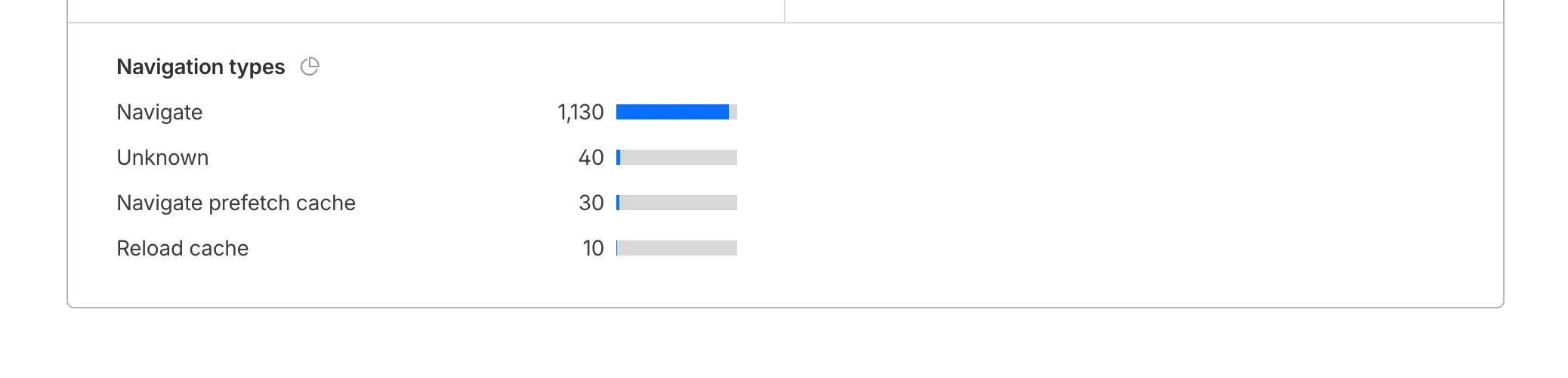
You can now find the Navigation Type dimension in the Web Analytics dashboard. You can filter to include/exclude one or more specific types using "equals", "does not equal", "in", or "not in" matchers.
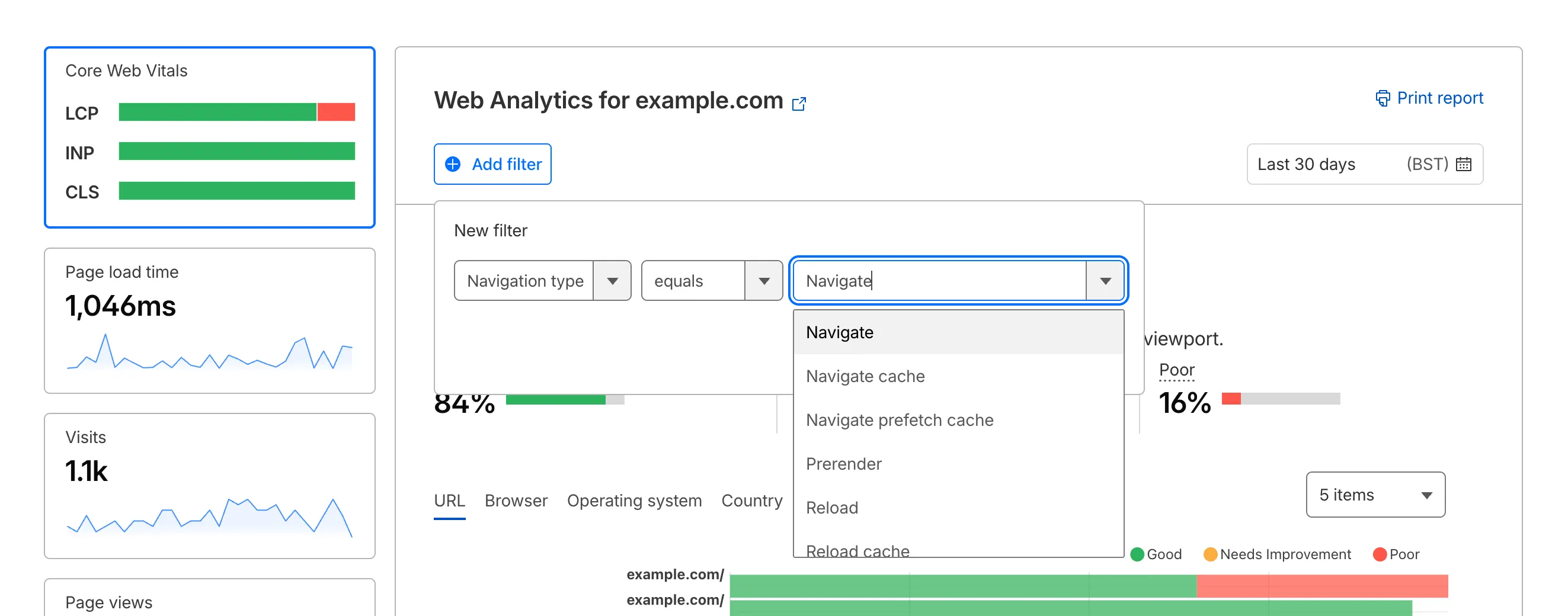
To check the list of popular navigation types, select Page views on the Web Analytics sidebar and scroll down to the bottom:
You can now disable Cloudflare's reverse proxy across all zones in your account simultaneously using the new
enforce_dns_onlysetting. When enabled, Cloudflare responds to DNS queries for all proxied records with your origin IP addresses instead of Cloudflare's anycast IPs. This account-level kill switch is designed for incident response scenarios where you need to quickly route traffic directly to your origin servers.- Account-level — Affects all zones in the account simultaneously with a single API call.
- Non-destructive — Does not modify your DNS records. Disabling the setting restores normal proxy behavior.
- API-only — Available through the API only, not in the Cloudflare dashboard.
Included: Standard proxied A, AAAA, and CNAME records, Load Balancing records, and records matching Worker routes.
Excluded: Spectrum applications, Cloudflare Tunnel CNAMEs, R2 custom domains, Web3 gateways, and Workers custom domains continue to operate normally.
- Verify your origin servers can handle direct traffic without Cloudflare's caching and filtering.
- Review which origin IPs will become publicly visible through DNS queries.
- Test the API in a staging account before relying on it for incident response.
Available via API to all Cloudflare customers.
For information on how to use it, refer to Enforce DNS-only developer documentation .
Cache Response Rules now work with Version Management. You can version response-phase cache settings and promote them through environments, just like Cache Rules and other supported configurations.
Previously, Cache Response Rules were excluded from zone versioning. Any response-phase rule you created applied globally across all environments with no way to test changes in staging first. Cache Rules already supported versioning, but the response phase, where you modify
Cache-Controldirectives, manage cache tags, and strip headers, did not.Cache Response Rules are now fully integrated with Version Management. You can create or modify response-phase rules within a version, and those changes stay scoped to that version until promoted.
- Safe rollout of cache behavior changes: Test response-phase rules in a staging environment before promoting to production. Catch unintended caching side effects early.
- Parity with Cache Rules: Cache Response Rules now follow the same versioning workflow as Cache Rules, so you can manage all cache configuration through a single promotion pipeline.
- Independent environment control: Run different response-phase cache settings per environment. For example, strip
Set-Cookieheaders in staging to validate cacheability without affecting production traffic.
Configure Cache Response Rules in the Cloudflare dashboard ↗ under Caching > Cache Rules, or via the Rulesets API. For more details, refer to the Cache Response Rules documentation and the Version Management documentation.
You can now achieve higher cache HIT rates and reduce origin load for origins hosted on public cloud providers with Smart Tiered Cache. By setting a cloud region hint for your origin, Cloudflare selects the optimal upper-tier data center for that cloud region, funneling all cache MISSes through a single location close to your origin.
Previously, Smart Tiered Cache could not reliably select an optimal upper tier for origins behind anycast or regional unicast networks commonly used by cloud providers. Origins on AWS, GCP, Azure, and Oracle Cloud would fall back to a multi-upper-tier topology, resulting in lower cache HIT rates and more requests reaching your origin.
Set a cloud region hint (for example,
aws/us-east-1orgcp/europe-west1) for your origin IP or hostname. Smart Tiered Cache uses this hint along with real-time latency data to select a primary upper tier close to your cloud region, plus a fallback in a different location for resilience.- Supported providers: AWS, GCP, Azure, and Oracle Cloud.
- All plans: Available on Free, Pro, Business, and Enterprise plans at no additional cost.
- Dashboard and API: Configure from Caching > Tiered Cache > Origin Configuration, or use the API and Terraform.
To get started, enable Smart Tiered Cache and set a cloud region hint for your origin in the Tiered Cache settings.
You can now manage mutual TLS (mTLS) and Bring Your Own Certificate Authority (BYO CA) configurations directly from the Cloudflare dashboard — no API required.
Previously, these advanced workflows required the Cloudflare API. The following are now available in the dashboard:
- AOP certificate management — Upload and manage your own certificate authorities for Authenticated Origin Pulls (AOP) directly from the dashboard.
- BYO Client mTLS certificate management — Upload and manage your own CA certificates for client mTLS enforcement without needing API access.
- CDN hostname to client mTLS certificate mapping — Associate client mTLS certificates with specific hostnames directly from the dashboard.
Two new fields are now available in rule expressions that surface Layer 4 transport telemetry from the client connection. Together with the existing
cf.timings.client_tcp_rtt_msecfield, these fields give you a complete picture of connection quality for both TCP and QUIC traffic — enabling transport-aware rules without requiring any client-side changes.Previously, QUIC RTT and delivery rate data was only available via the
Server-Timing: cfL4response header. These new fields make the same data available directly in rule expressions, so you can use them in Transform Rules, WAF Custom Rules, and other phases that support dynamic fields.Field Type Description cf.timings.client_quic_rtt_msecInteger The smoothed QUIC round-trip time (RTT) between Cloudflare and the client in milliseconds. Only populated for QUIC (HTTP/3) connections. Returns 0for TCP connections.cf.edge.l4.delivery_rateInteger The most recent data delivery rate estimate for the client connection, in bytes per second. Returns 0when L4 statistics are not available for the request.Use a request header transform rule to tag requests from high-latency connections, so your origin can serve a lighter page variant:
Rule expression:
cf.timings.client_tcp_rtt_msec > 200 or cf.timings.client_quic_rtt_msec > 200Header modifications:
Operation Header name Value Set X-High-Latencytruecf.edge.l4.delivery_rate > 0 and cf.edge.l4.delivery_rate < 100000For more information, refer to Request Header Transform Rules and the fields reference.
Internal DNS is now in open beta.
Internal DNS is bundled as a part of Cloudflare Gateway and is now available to every Enterprise customer with one of the following subscriptions:
- Cloudflare Zero Trust Enterprise
- Cloudflare Gateway Enterprise
To learn more and get started, refer to the Internal DNS documentation.
Cloudflare now exposes four new fields in the Transform Rules phase that encode client certificate data in RFC 9440 ↗ format. Previously, forwarding client certificate information to your origin required custom parsing of PEM-encoded fields or non-standard HTTP header formats. These new fields produce output in the standardized
Client-CertandClient-Cert-Chainheader format defined by RFC 9440, so your origin can consume them directly without any additional decoding logic.Each certificate is DER-encoded, Base64-encoded, and wrapped in colons. For example,
:MIIDsT...Vw==:. A chain of intermediates is expressed as a comma-separated list of such values.Field Type Description cf.tls_client_auth.cert_rfc9440String The client leaf certificate in RFC 9440 format. Empty if no client certificate was presented. cf.tls_client_auth.cert_rfc9440_too_largeBoolean trueif the leaf certificate exceeded 10 KB and was omitted. In practice this will almost always befalse.cf.tls_client_auth.cert_chain_rfc9440String The intermediate certificate chain in RFC 9440 format as a comma-separated list. Empty if no intermediate certificates were sent or if the chain exceeded 16 KB. cf.tls_client_auth.cert_chain_rfc9440_too_largeBoolean trueif the intermediate chain exceeded 16 KB and was omitted.The chain encoding follows the same ordering as the TLS handshake: the certificate closest to the leaf appears first, working up toward the trust anchor. The root certificate is not included.
Add a request header transform rule to set the
Client-CertandClient-Cert-Chainheaders on requests forwarded to your origin server. For example, to forward headers for verified, non-revoked certificates:Rule expression:
cf.tls_client_auth.cert_verified and not cf.tls_client_auth.cert_revokedHeader modifications:
Operation Header name Value Set Client-Certcf.tls_client_auth.cert_rfc9440Set Client-Cert-Chaincf.tls_client_auth.cert_chain_rfc9440To get the most out of these fields, upload your client CA certificate to Cloudflare so that Cloudflare validates the client certificate at the edge and populates
cf.tls_client_auth.cert_verifiedandcf.tls_client_auth.cert_revoked.For more information, refer to Mutual TLS authentication, Request Header Transform Rules, and the fields reference.
You can now control how Cloudflare handles origin responses without changing your origin. Cache Response Rules let you modify
Cache-Controldirectives, manage cache tags, and strip headers likeSet-Cookiefrom origin responses before they reach Cloudflare's cache. Whether traffic is cached or passed through dynamically, these rules give you control over origin response behavior that was previously out of reach.Cache Rules previously only operated on request attributes. Cache Response Rules introduce a new response phase that evaluates origin responses and lets you act on them before caching. You can now:
- Modify
Cache-Controldirectives: Set or remove individual directives likeno-store,no-cache,max-age,s-maxage,stale-while-revalidate,immutable, and more. For example, remove ano-cachedirective your origin sends so Cloudflare can cache the asset, or set ans-maxageto control how long Cloudflare stores it. - Set a different browser
Cache-Control: Send a differentCache-Controlheader downstream to browsers and other clients than what Cloudflare uses internally, giving you independent control over edge and browser caching strategies. - Manage cache tags: Add, set, or remove cache tags on responses, including converting tags from another CDN's header format into Cloudflare's
Cache-Tagheader. This is especially useful if you are migrating from a CDN that uses a different tag header or delimiter. - Strip headers that block caching: Remove
Set-Cookie,ETag, orLast-Modifiedheaders from origin responses before caching, so responses that would otherwise be treated as uncacheable can be stored and served from cache.
- No origin changes required: Fix caching behavior entirely from Cloudflare, even when your origin configuration is locked down or managed by a different team.
- Simpler CDN migration: Match caching behavior from other CDN providers without rewriting your origin. Translate cache tag formats and override directives that do not align with Cloudflare's defaults.
- Native support, fewer workarounds: Functionality that previously required workarounds is now built into Cache Rules with full Tiered Cache compatibility.
- Fine-grained control: Use expressions to match on request and response attributes, then apply precise cache settings per rule. Rules are stackable and composable with existing Cache Rules.
Configure Cache Response Rules in the Cloudflare dashboard ↗ under Caching > Cache Rules, or via the Rulesets API ↗. For more details, refer to the Cache Rules documentation ↗.
- Modify
DNS Analytics is now available for customers with Customer Metadata Boundary (CMB) set to EU. Query your DNS analytics data while keeping metadata stored in the EU region.
This update includes:
- DNS Analytics — Access the same DNS analytics experience for zones in CMB=EU accounts.
- EU data residency — Analytics data is stored and queried from the EU region, meeting data localization requirements.
- DNS Firewall Analytics — DNS Firewall analytics is now supported for CMB=EU customers.
Available to customers with the Data Localization Suite who have Customer Metadata Boundary configured for the EU region.
-
Authoritative DNS: In the Cloudflare dashboard, select your zone and go to the Analytics page.
Go to Analytics -
DNS Firewall: In the Cloudflare dashboard, go to the DNS Firewall Analytics page.
Go to Analytics
For more information, refer to DNS Analytics and DNS Firewall Analytics.
The
cf.timings.worker_msecfield is now available in the Ruleset Engine. This field reports the wall-clock time that a Cloudflare Worker spent handling a request, measured in milliseconds.You can use this field to identify slow Worker executions, detect performance regressions, or build rules that respond differently based on Worker processing time, such as logging requests that exceed a latency threshold.
Field Type Description cf.timings.worker_msecInteger The time spent executing a Cloudflare Worker in milliseconds. Returns 0if no Worker was invoked.Example filter expression:
cf.timings.worker_msec > 500For more information, refer to the Fields reference.