
Changelog
New updates and improvements at Cloudflare.

Gateway can now apply HTTP filtering to all proxied HTTP requests, not just traffic on standard HTTP (
80) and HTTPS (443) ports. This means all requests can now be filtered by A/V scanning, file sandboxing, Data Loss Prevention (DLP), and more.You can turn this setting on by going to Settings > Network > Firewall and choosing Inspect on all ports.
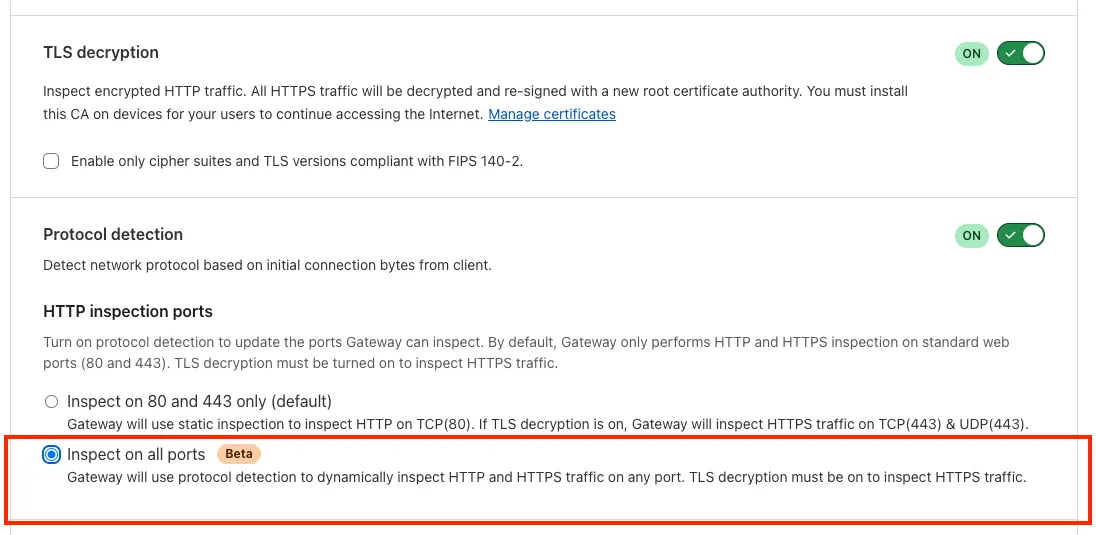
To learn more, refer to Inspect on all ports (Beta).
A new GA release for the Windows WARP client is now available on the stable releases downloads page.
This release contains minor fixes and improvements.
Changes and improvements
- WARP proxy mode now uses the operating system's DNS settings. Changes made to system DNS settings while in proxy mode require the client to be turned off then back on to take effect.
- Changes to the SCCM VPN boundary support feature to no longer restart the SMS Agent Host (
ccmexec.exe) service. - Fixed an issue affecting clients in Split Tunnel Include mode, where access to split-tunneled traffic was blocked after reconnecting the client.
Known issues
For Windows 11 24H2 users, Microsoft has confirmed a regression that may lead to performance issues like mouse lag, audio cracking, or other slowdowns. Cloudflare recommends users experiencing these issues upgrade to a minimum Windows 11 24H2 version KB5062553 or higher for resolution.
Devices using WARP client 2025.4.929.0 and up may experience Local Domain Fallback failures if a fallback server has not been configured. To configure a fallback server, refer to Route traffic to fallback server.
Devices with
KB5055523installed may receive a warning aboutWin32/ClickFix.ABAbeing present in the installer. To resolve this false positive, update Microsoft Security Intelligence to version 1.429.19.0 or later.DNS resolution may be broken when the following conditions are all true:
- WARP is in Secure Web Gateway without DNS filtering (tunnel-only) mode.
- A custom DNS server address is configured on the primary network adapter.
- The custom DNS server address on the primary network adapter is changed while WARP is connected.
To work around this issue, reconnect the WARP client by toggling off and back on.
A new GA release for the macOS WARP client is now available on the stable releases downloads page.
This release contains minor fixes and improvements.
Changes and improvements
- WARP proxy mode now uses the operating system's DNS settings. Changes made to system DNS settings while in proxy mode require the client to be turned off then back on to take effect.
- Fixed an issue affecting clients in Split Tunnel Include mode, where access to split-tunneled traffic was blocked after reconnecting the client.
- For macOS deployments, the WARP client can now be managed using an
mdm.xmlfile placed in/Library/Application Support/Cloudflare/mdm.xml. This new configuration option offers an alternative to the still supported method of deploying a managed plist through an MDM solution.
Known issues
- macOS Sequoia: Due to changes Apple introduced in macOS 15.0.x, the WARP client may not behave as expected. Cloudflare recommends the use of macOS 15.4 or later.
- Devices using WARP client 2025.4.929.0 and up may experience Local Domain Fallback failures if a fallback server has not been configured. To configure a fallback server, refer to Route traffic to fallback server.
A new GA release for the Linux WARP client is now available on the stable releases downloads page.
This release contains minor fixes and improvements.
Changes and improvements
- WARP proxy mode now uses the operating system's DNS settings. Changes made to system DNS settings while in proxy mode require the client to be turned off then back on to take effect.
- Fixed an issue affecting clients in Split Tunnel Include mode, where access to split-tunneled traffic was blocked after reconnecting the client.
Known issues
- Devices using WARP client 2025.4.929.0 and up may experience Local Domain Fallback failures if a fallback server has not been configured. To configure a fallback server, refer to Route traffic to fallback server.
The Google Bard application (ID: 1198) has been deprecated and fully removed from the system. It has been replaced by the Gemini application (ID: 1340). Any existing Gateway policies that reference the old Google Bard application will no longer function. To ensure your policies continue to work as intended, you should update them to use the new Gemini application. We recommend replacing all instances of the deprecated Bard application with the new Gemini application in your Gateway policies. For more information about application policies, please see the Cloudflare Gateway documentation.
The KVM-based virtual Cloudflare One Appliance is now in open beta with official support for Proxmox VE.
Customers can deploy the virtual appliance on KVM hypervisors to connect branch or data center networks to Cloudflare WAN without dedicated hardware.
For setup instructions, refer to Configure a virtual Cloudflare One Appliance.
You can now create document-based detection entries in DLP by uploading example documents. Cloudflare will encrypt your documents and create a unique fingerprint of the file. This fingerprint is then used to identify similar documents or snippets within your organization's traffic and stored files.
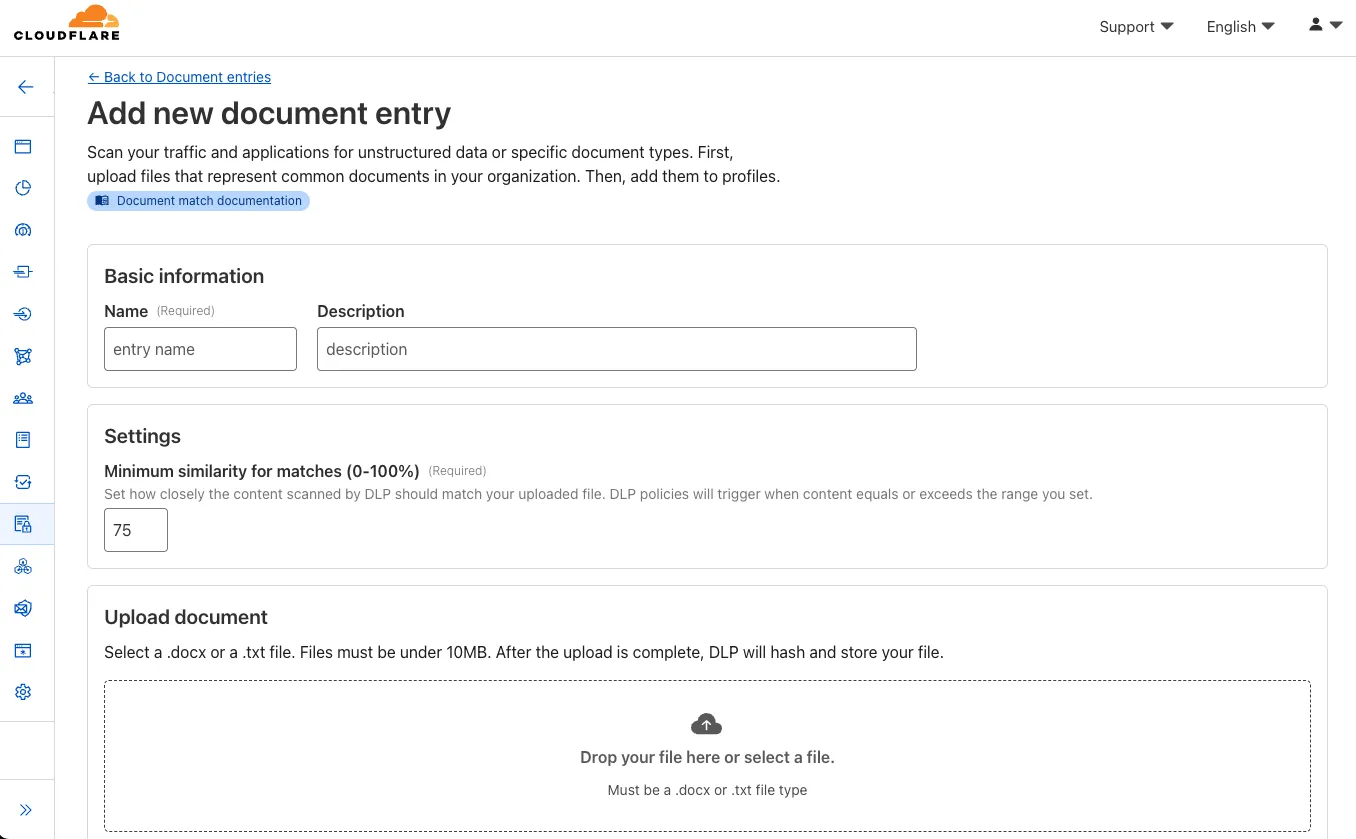
Key features and benefits:
-
Upload documents, forms, or templates: Easily upload .docx and .txt files (up to 10 MB) that contain sensitive information you want to protect.
-
Granular control with similarity percentage: Define a minimum similarity percentage (0-100%) that a document must meet to trigger a detection, reducing false positives.
-
Comprehensive coverage: Apply these document-based detection entries in:
-
Gateway policies: To inspect network traffic for sensitive documents as they are uploaded or shared.
-
CASB (Cloud Access Security Broker): To scan files stored in cloud applications for sensitive documents at rest.
-
-
Identify sensitive data: This new detection entry type is ideal for identifying sensitive data within completed forms, templates, or even small snippets of a larger document, helping you prevent data exfiltration and ensure compliance.
Once uploaded and processed, you can add this new document entry into a DLP profile and policies to enhance your data protection strategy.
-
Your real-time applications running over Cloudflare Tunnel are now faster and more reliable. We've completely re-architected the way
cloudflaredproxies UDP traffic in order to isolate it from other traffic, ensuring latency-sensitive applications like private DNS are no longer slowed down by heavy TCP traffic (like file transfers) on the same Tunnel.This is a foundational improvement to Cloudflare Tunnel, delivered automatically to all customers. There are no settings to configure — your UDP traffic is already flowing faster and more reliably.
What’s new:
- Faster UDP performance: We've significantly reduced the latency for establishing new UDP sessions, making applications like private DNS much more responsive.
- Greater reliability for mixed traffic: UDP packets are no longer affected by heavy TCP traffic, preventing timeouts and connection drops for your real-time services.
Learn more about running TCP or UDP applications and private networks through Cloudflare Tunnel.
Use our brand new onboarding experience for Cloudflare Zero Trust. New and returning users can now engage with a Get Started tab with walkthroughs for setting up common use cases end-to-end.
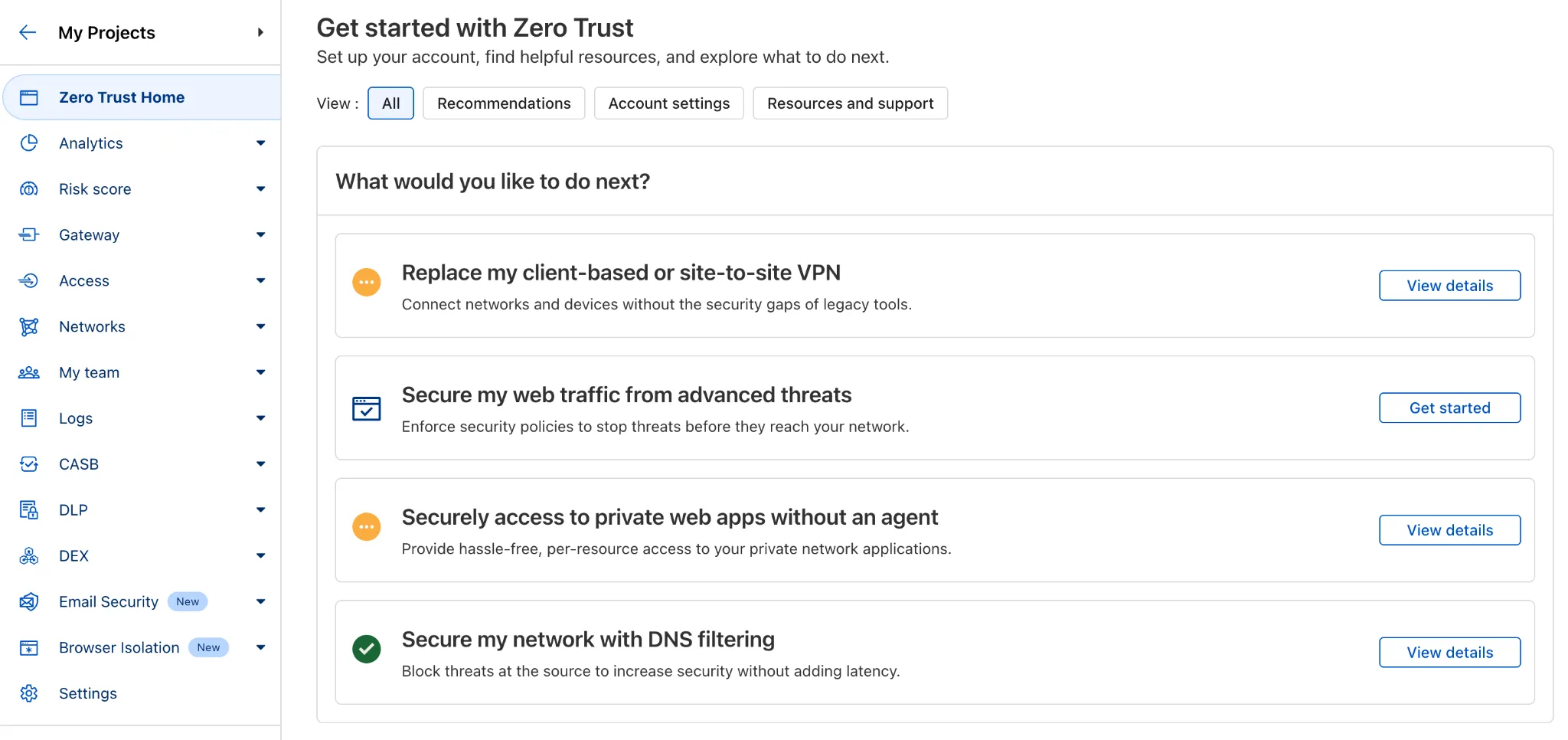
There are eight brand new onboarding guides in total:
- Securely access a private network (sets up device client and Tunnel)
- Device-to-device / mesh networking (sets up and connects multiple device clients)
- Network to network connectivity (sets up and connects multiple WARP Connectors, makes reference to Magic WAN availability for Enterprise)
- Secure web traffic (sets up device client, Gateway, pre-reqs, and initial policies)
- Secure DNS for networks (sets up a new DNS location and Gateway policies)
- Clientless web access (sets up Access to a web app, Tunnel, and public hostname)
- Clientless SSH access (all the same + the web SSH experience)
- Clientless RDP access (all the same + RDP-in-browser)
Each flow walks the user through the steps to configure the essential elements, and provides a “more details” panel with additional contextual information about what the user will accomplish at the end, along with why the steps they take are important.
Try them out now in the Zero Trust dashboard ↗!
Cloudy, Cloudflare's AI Agent, will now automatically summarize your Access and Gateway block logs.
In the log itself, Cloudy will summarize what occurred and why. This will be helpful for quick troubleshooting and issue correlation.
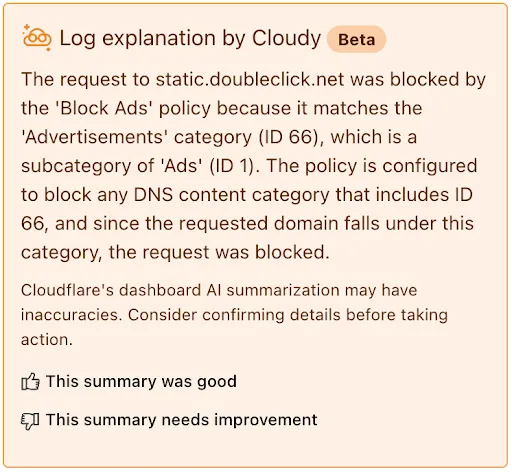
If you have feedback about the Cloudy summary - good or bad - you can provide that right from the summary itself.
Cloudflare Zero Trust customers can use the App Library to get full visibility over the SaaS applications that they use in their Gateway policies, CASB integrations, and Access for SaaS applications.
App Library, found under My Team, makes information available about all Applications that can be used across the Zero Trust product suite.
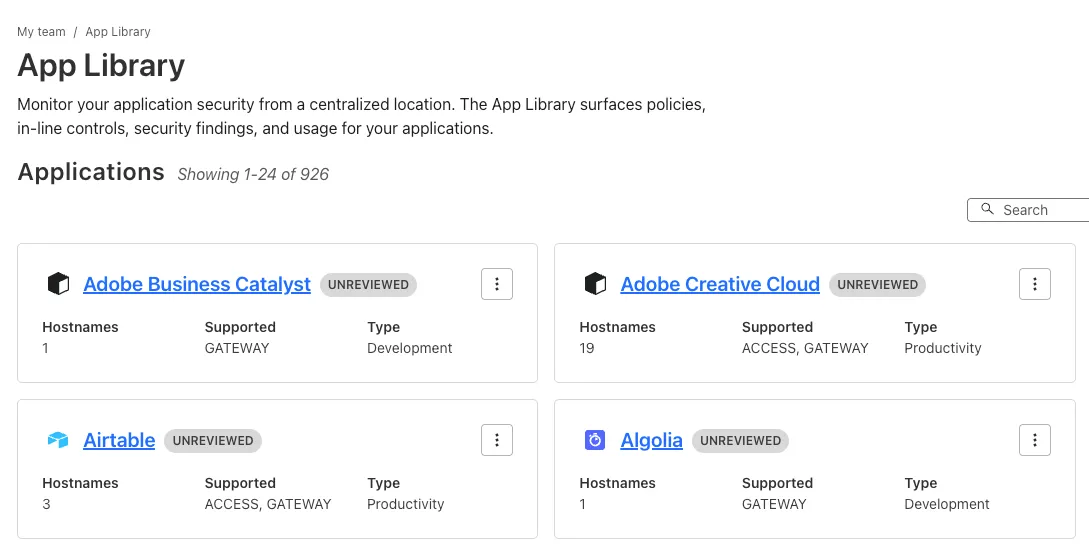
You can use the App Library to see:
- How Applications are defined
- Where they are referenced in policies
- Whether they have Access for SaaS configured
- Review their CASB findings and integration status.
Within individual Applications, you can also track their usage across your organization, and better understand user behavior.
Browser-based RDP with Cloudflare Access is now available in open beta for all Cloudflare customers. It enables secure, remote Windows server access without VPNs or RDP clients.
With browser-based RDP, you can:
- Control how users authenticate to internal RDP resources with single sign-on (SSO), multi-factor authentication (MFA), and granular access policies.
- Record who is accessing which servers and when to support regulatory compliance requirements and to gain greater visibility in the event of a security event.
- Eliminate the need to install and manage software on user devices. You will only need a web browser.
- Reduce your attack surface by keeping your RDP servers off the public Internet and protecting them from common threats like credential stuffing or brute-force attacks.
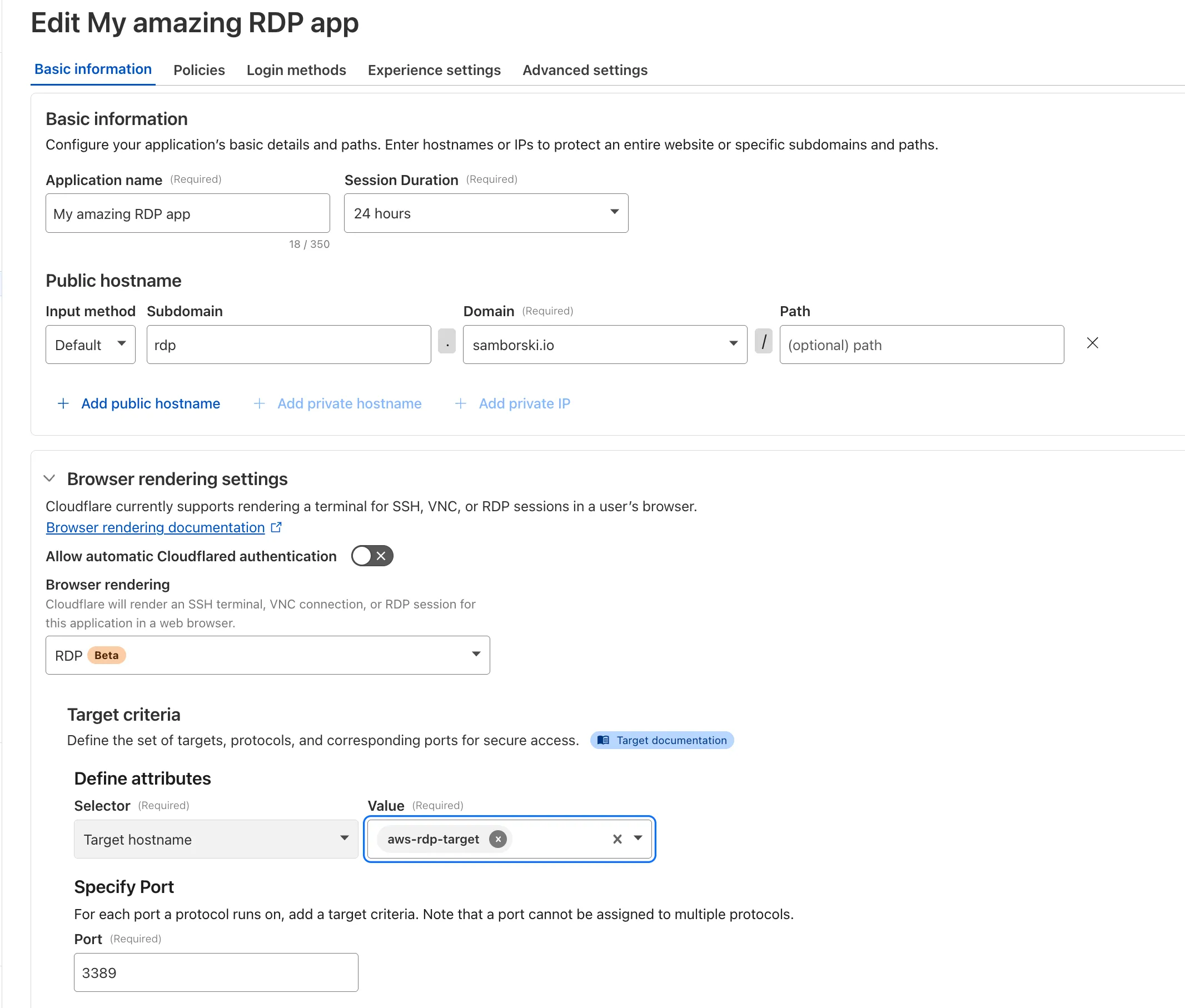
To get started, see Connect to RDP in a browser.
A new GA release for the Android Cloudflare One Agent is now available in the Google Play Store ↗. This release contains improvements and new exciting features, including post-quantum cryptography. By tunneling your corporate network traffic over Cloudflare, you can now gain the immediate protection of post-quantum cryptography ↗ without needing to upgrade any of your individual corporate applications or systems.
Changes and improvements
- QLogs are now disabled by default and can be enabled in the app by turning on Enable qlogs under Settings > Advanced > Diagnostics > Debug Logs. The QLog setting from previous releases will no longer be respected.
- DNS over HTTPS traffic is now included in the WARP tunnel by default.
- The WARP client now applies post-quantum cryptography ↗ end-to-end on enabled devices accessing resources behind a Cloudflare Tunnel. This feature can be enabled by MDM.
- Fixed an issue that caused WARP connection failures on ChromeOS devices.
A new GA release for the iOS Cloudflare One Agent is now available in the iOS App Store ↗. This release contains improvements and new exciting features, including post-quantum cryptography. By tunneling your corporate network traffic over Cloudflare, you can now gain the immediate protection of post-quantum cryptography ↗ without needing to upgrade any of your individual corporate applications or systems.
Changes and improvements
- QLogs are now disabled by default and can be enabled in the app by turning on Enable qlogs under Settings > Advanced > Diagnostics > Debug Logs. The QLog setting from previous releases will no longer be respected.
- DNS over HTTPS traffic is now included in the WARP tunnel by default.
- The WARP client now applies post-quantum cryptography ↗ end-to-end on enabled devices accessing resources behind a Cloudflare Tunnel. This feature can be enabled by MDM.
Zero Trust now includes Data security analytics, providing you with unprecedented visibility into your organization sensitive data.
The new dashboard includes:
-
Sensitive Data Movement Over Time:
- See patterns and trends in how sensitive data moves across your environment. This helps understand where data is flowing and identify common paths.
-
Sensitive Data at Rest in SaaS & Cloud:
- View an inventory of sensitive data stored within your corporate SaaS applications (for example, Google Drive, Microsoft 365) and cloud accounts (such as AWS S3).
-
DLP Policy Activity:
- Identify which of your Data Loss Prevention (DLP) policies are being triggered most often.
- See which specific users are responsible for triggering DLP policies.
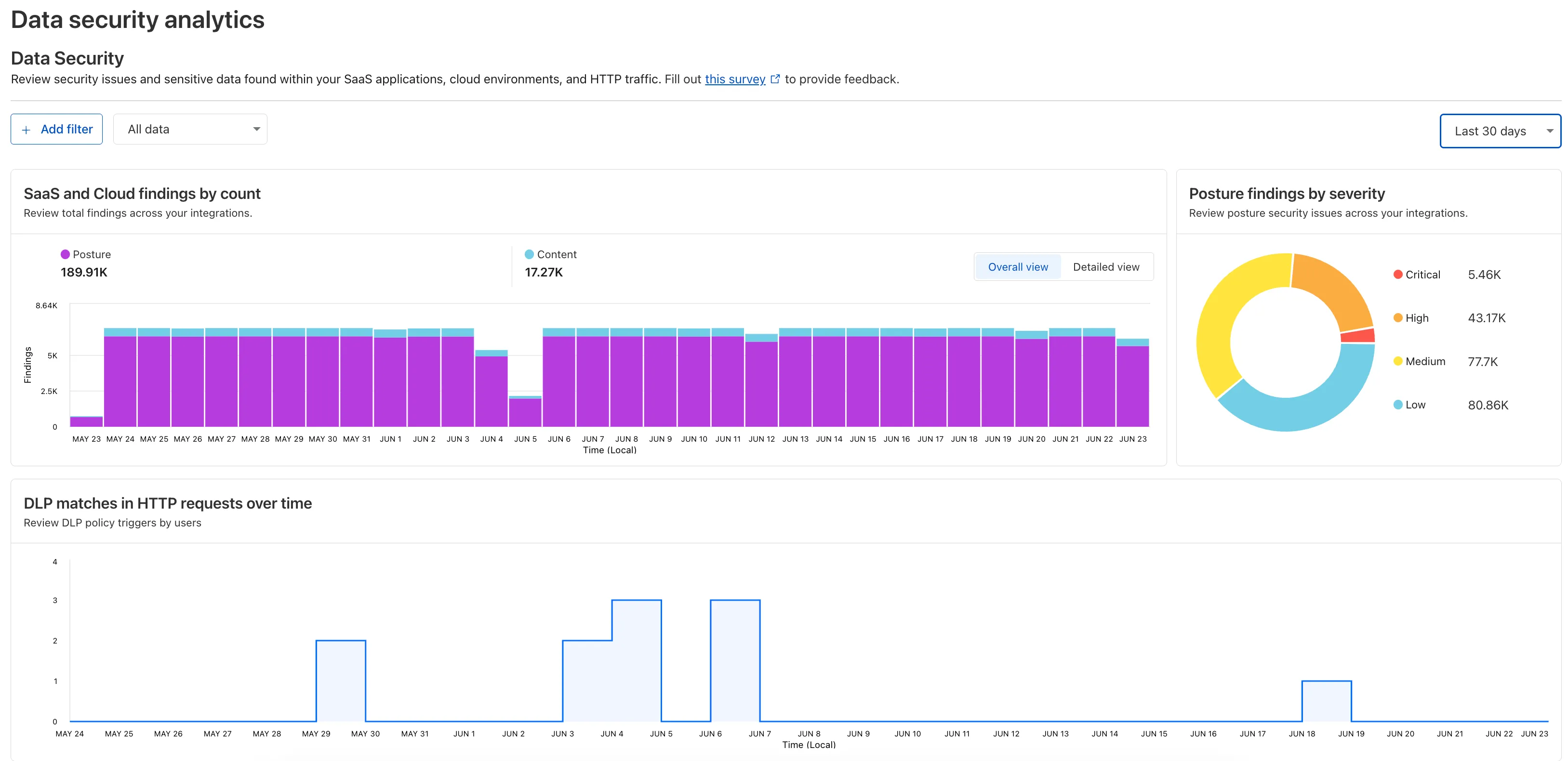
To access the new dashboard, log in to Cloudflare One ↗ and go to Insights on the sidebar.
-
Gateway will now evaluate Network (Layer 4) policies before HTTP (Layer 7) policies. This change preserves your existing security posture and does not affect which traffic is filtered — but it may impact how notifications are displayed to end users.
This change will roll out progressively between July 14–18, 2025. If you use HTTP policies, we recommend reviewing your configuration ahead of rollout to ensure the user experience remains consistent.
Previous order:
- DNS policies
- HTTP policies
- Network policies
New order:
- DNS policies
- Network policies
- HTTP policies
This change may affect block notifications. For example:
- You have an HTTP policy to block
example.comand display a block page. - You also have a Network policy to block
example.comsilently (no client notification).
With the new order, the Network policy will trigger first — and the user will no longer see the HTTP block page.
To ensure users still receive a block notification, you can:
- Add a client notification to your Network policy, or
- Use only the HTTP policy for that domain.
This update is based on user feedback and aims to:
- Create a more intuitive model by evaluating network-level policies before application-level policies.
- Minimize 526 connection errors by verifying the network path to an origin before attempting to establish a decrypted TLS connection.
To learn more, visit the Gateway order of enforcement documentation.
Cloudflare One now offers powerful new analytics dashboards to help customers easily discover available insights into their application access and network activity. These dashboards provide a centralized, intuitive view for understanding user behavior, application usage, and security posture.

Additionally, a new exportable access report is available, allowing customers to quickly view high-level metrics and trends in their application access. A preview of the report is shown below, with more to be found in the report:
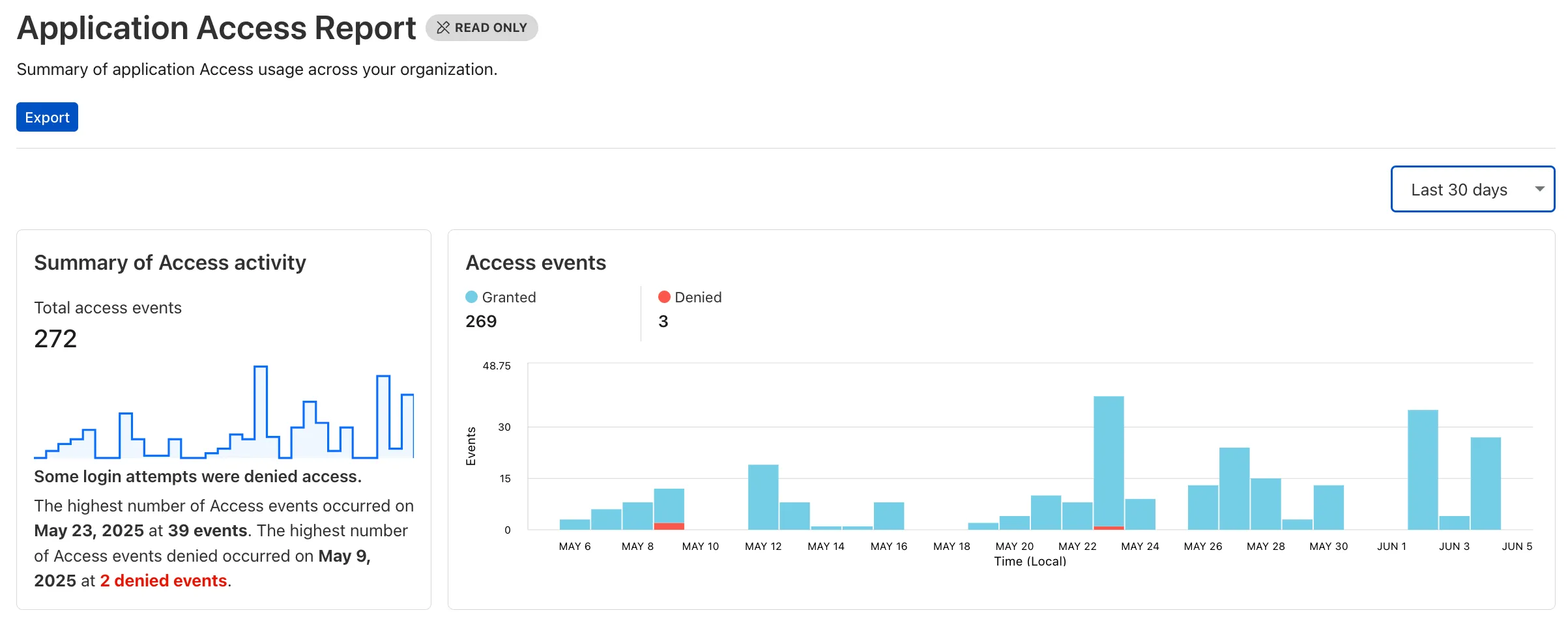
Both features are accessible in the Cloudflare Zero Trust dashboard ↗, empowering organizations with better visibility and control.
We've made two large changes to load balancing:
- Redesigned the user interface, now centralized at the account level.
- Introduced Private Load Balancers to the UI, enabling you to manage traffic for all of your external and internal applications in a single spot.
This update streamlines how you manage load balancers across multiple zones and extends robust traffic management to your private network infrastructure.
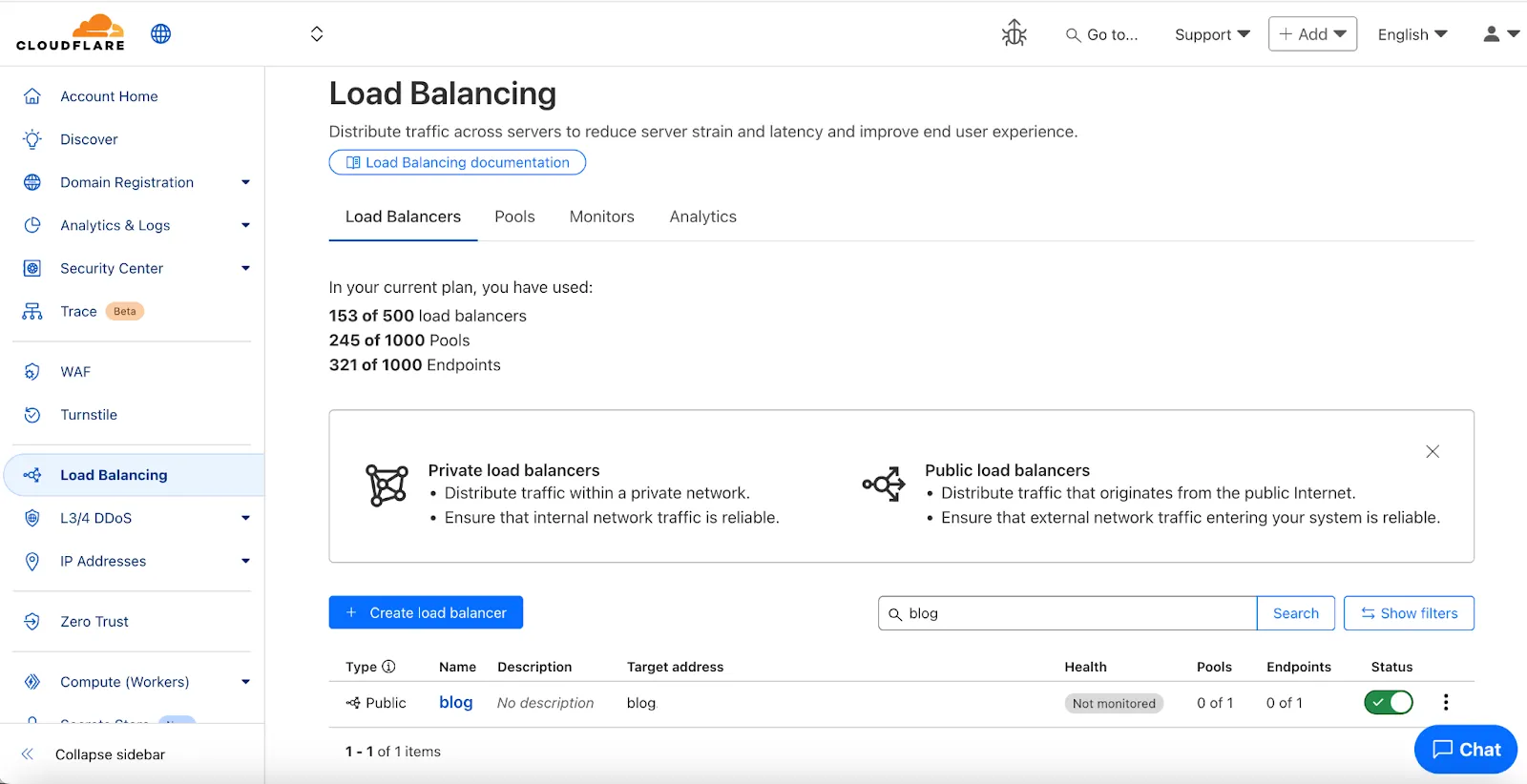
Key Enhancements:
-
Account-Level UI Consolidation:
-
Unified Management: Say goodbye to navigating individual zones for load balancing tasks. You can now view, configure, and monitor all your load balancers across every zone in your account from a single, intuitive interface at the account level.
-
Improved Efficiency: This centralized approach provides a more streamlined workflow, making it faster and easier to manage both your public-facing and internal traffic distribution.
-
-
Private Network Load Balancing:
-
Secure Internal Application Access: Create Private Load Balancers to distribute traffic to applications hosted within your private network, ensuring they are not exposed to the public Internet.
-
WARP & Magic WAN Integration: Effortlessly direct internal traffic from users connected via Cloudflare WARP or through your Magic WAN infrastructure to the appropriate internal endpoint pools.
-
Enhanced Security for Internal Resources: Combine reliable Load Balancing with Zero Trust access controls to ensure your internal services are both performant and only accessible by verified users.
-
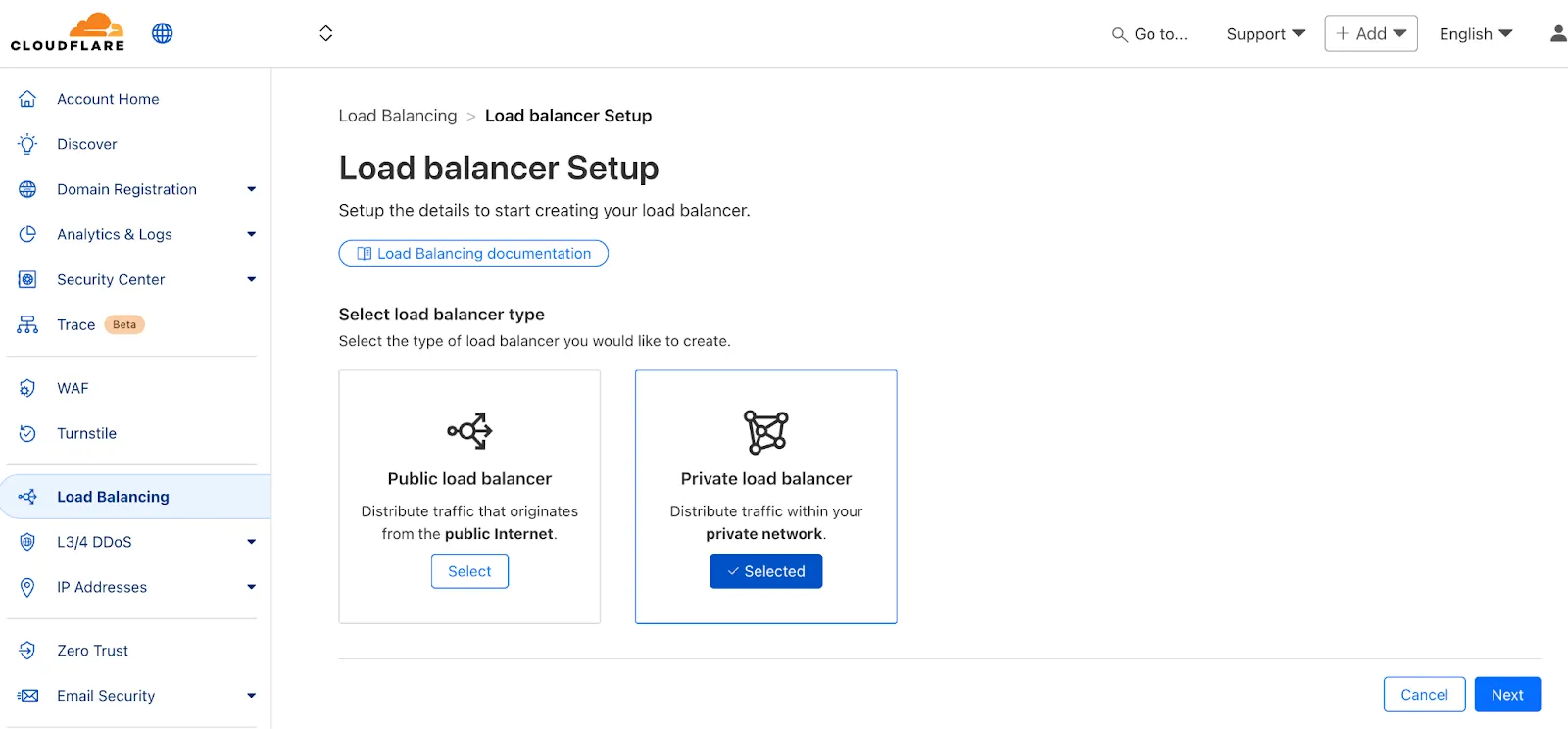
Users can now access significant enhancements to Cloudflare Gateway analytics, providing you with unprecedented visibility into your organization's DNS queries, HTTP requests, and Network sessions. These powerful new dashboards enable you to go beyond raw logs and gain actionable insights into how your users are interacting with the Internet and your protected resources.
You can now visualize and explore:
- Patterns Over Time: Understand trends in traffic volume and blocked requests, helping you identify anomalies and plan for future capacity.
- Top Users & Destinations: Quickly pinpoint the most active users, enabling better policy enforcement and resource allocation.
- Actions Taken: See a clear breakdown of security actions applied by Gateway policies, such as blocks and allows, offering a comprehensive view of your security posture.
- Geographic Regions: Gain insight into the global distribution of your traffic.
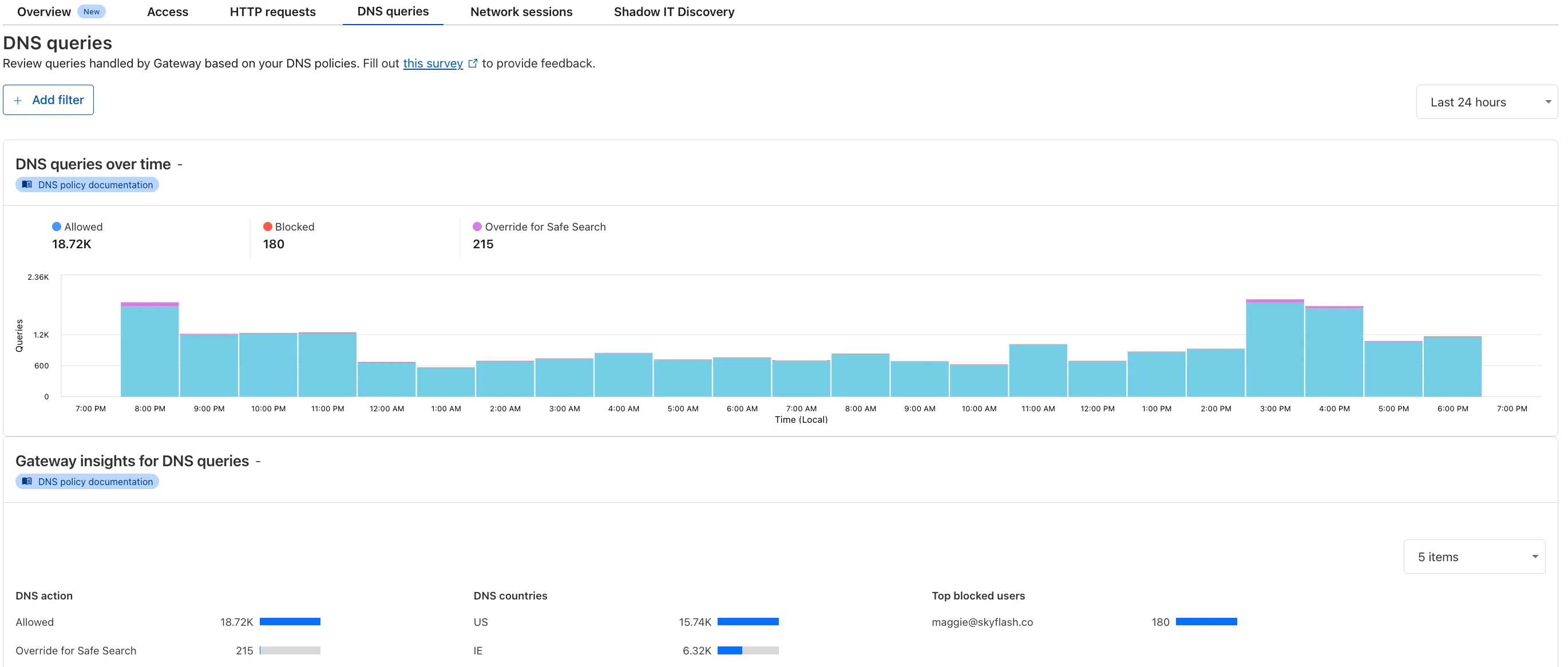
To access the new overview, log in to your Cloudflare Zero Trust dashboard ↗ and go to Analytics in the side navigation bar.
All Cloudflare One Gateway users can now use Protocol detection logging and filtering, including those on Pay-as-you-go and Free plans.
With Protocol Detection, admins can identify and enforce policies on traffic proxied through Gateway based on the underlying network protocol (for example, HTTP, TLS, or SSH), enabling more granular traffic control and security visibility no matter your plan tier.
This feature is available to enable in your account network settings for all accounts. For more information on using Protocol Detection, refer to the Protocol detection documentation.
42 new applications have been added for Zero Trust support within the Application Library and Gateway policy enforcement, giving you the ability to investigate or apply inline policies to these applications.
33 of the 42 applications are Artificial Intelligence applications. The others are Human Resources (2 applications), Development (2 applications), Productivity (2 applications), Sales & Marketing, Public Cloud, and Security.
To view all available applications, log in to your Cloudflare Zero Trust dashboard ↗, navigate to the App Library under My Team.
For more information on creating Gateway policies, see our Gateway policy documentation.
A new Access Analytics dashboard is now available to all Cloudflare One customers. Customers can apply and combine multiple filters to dive into specific slices of their Access metrics. These filters include:
- Logins granted and denied
- Access events by type (SSO, Login, Logout)
- Application name (Salesforce, Jira, Slack, etc.)
- Identity provider (Okta, Google, Microsoft, onetimepin, etc.)
- Users (
chris@cloudflare.com,sally@cloudflare.com,rachel@cloudflare.com, etc.) - Countries (US, CA, UK, FR, BR, CN, etc.)
- Source IP address
- App type (self-hosted, Infrastructure, RDP, etc.)
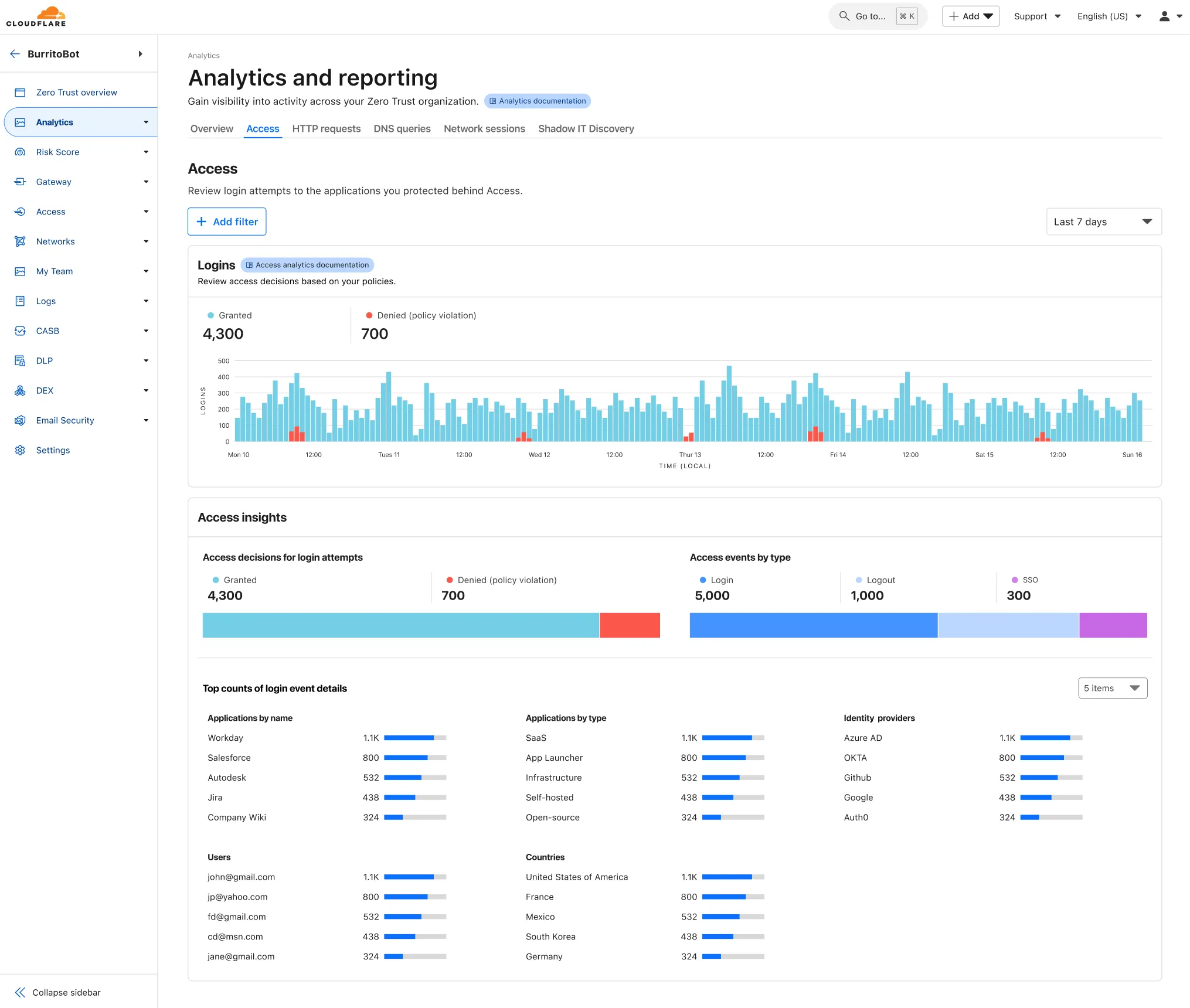
To access the new overview, log in to your Cloudflare Zero Trust dashboard ↗ and find Analytics in the side navigation bar.
You can now safely open email attachments to view and investigate them.
What this means is that messages now have a Attachments section. Here, you can view processed attachments and their classifications (for example, Malicious, Suspicious, Encrypted). Next to each attachment, a Browser Isolation icon allows your team to safely open the file in a clientless, isolated browser with no risk to the analyst or your environment.
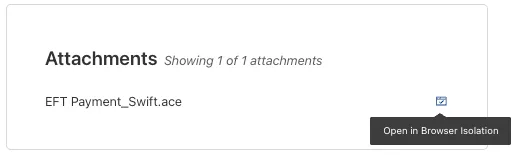
To use this feature, you must:
- Turn on Allow users to open a remote browser without the device client in your Zero Trust settings.
- Have Browser Isolation (BISO) seats assigned.
For more details, refer to our setup guide.
Some attachment types may not render in Browser Isolation. If there is a file type that you would like to be opened with Browser Isolation, reach out to your Cloudflare contact.
This feature is available across these Email security packages:
- Advantage
- Enterprise
- Enterprise + PhishGuard
New categories added
Parent ID Parent Name Category ID Category Name 1 Ads 66 Advertisements 3 Business & Economy 185 Personal Finance 3 Business & Economy 186 Brokerage & Investing 21 Security Threats 187 Compromised Domain 21 Security Threats 188 Potentially Unwanted Software 6 Education 189 Reference 9 Government & Politics 190 Charity and Non-profit Changes to existing categories
Original Name New Name Religion Religion & Spirituality Government Government/Legal Redirect URL Alias/Redirect Refer to Gateway domain categories to learn more.
Remote Browser Isolation (RBI) now supports SAML HTTP-POST bindings, enabling seamless authentication for SSO-enabled applications that rely on POST-based SAML responses from Identity Providers (IdPs) within a Remote Browser Isolation session. This update resolves a previous limitation that caused
405errors during login and improves compatibility with multi-factor authentication (MFA) flows.With expanded support for major IdPs like Okta and Azure AD, this enhancement delivers a more consistent and user-friendly experience across authentication workflows. Learn how to set up Remote Browser Isolation.