

You can now subscribe to Email Sending events through Queues event subscriptions and receive outbound transactional email lifecycle events on a queue. Each subscription is scoped to one sending domain — either the zone apex, such as
example.com, or a verified sending subdomain, such assend.example.com.Six event types are published:
message.delivered,message.deferred,message.bounced,message.failed,message.rejected, andmessage.complained. Use them to track deliverability, react to bounces and complaints, and drive suppression or retry logic. Email Routing events are not published on this source.Each event includes the message details, delivery status, and SMTP response:
{"type": "cf.email.sending.message.delivered","source": {"type": "email.sending","zoneId": "023e105f4ecef8ad9ca31a8372d0c353","domain": "example.com"},"payload": {"messageId": "0101018f7d0c4d9a-msg-deadbeef","recipient": "user@example.net","terminal": true,"delivery": {"status": "delivered","smtpStatusCode": "250"}}}Refer to Event subscriptions to see all event types and example payloads.
The legacy Workers KV API routes under
/accounts/{account_id}/workers/namespaces/*are deprecated as of July 15, 2026, and will stop working on October 15, 2026. Migrate to the documented Workers KV API routes under/accounts/{account_id}/storage/kv/namespaces/*before that date.The legacy and replacement routes are interchangeable. They accept the same request parameters and return the same response payloads. To migrate, update the URL path from
/workers/namespaces/to/storage/kv/namespaces/.Update any integration that calls a route under
/accounts/{account_id}/workers/namespaces/to use the equivalent route under/accounts/{account_id}/storage/kv/namespaces/. The migration is a direct URL path substitution — request parameters and response payloads are identical:GETandPOST /accounts/{account_id}/workers/namespaces→GETandPOST /accounts/{account_id}/storage/kv/namespacesGET,PUT, andDELETE /accounts/{account_id}/workers/namespaces/{namespace_id}→GET,PUT, andDELETE /accounts/{account_id}/storage/kv/namespaces/{namespace_id}GET /accounts/{account_id}/workers/namespaces/{namespace_id}/keys→GET /accounts/{account_id}/storage/kv/namespaces/{namespace_id}/keysGET /accounts/{account_id}/workers/namespaces/{namespace_id}/metadata/{key_name}→GET /accounts/{account_id}/storage/kv/namespaces/{namespace_id}/metadata/{key_name}GET,PUT, andDELETE /accounts/{account_id}/workers/namespaces/{namespace_id}/values/{key_name}→GET,PUT, andDELETE /accounts/{account_id}/storage/kv/namespaces/{namespace_id}/values/{key_name}
For more information about the deprecation timeline, refer to API deprecations.
R2 Data Catalog now accepts read-only API tokens, so query engines and clients that only read data no longer need a read-write token. Previously, every catalog operation required an Admin Read & Write token, which meant read-only clients were granted more access than they needed.
You can now authenticate your Iceberg engine based on your workload:
- Read-only operations (such as listing namespaces, loading tables, and querying data) work with an Admin Read only token (R2 Data Catalog read and R2 storage read).
- Write operations (such as creating or dropping tables and committing transactions) continue to require an Admin Read & Write token.
This lets you follow the principle of least privilege — for example, using a read-write token for the pipeline that writes to your tables and read-only tokens for engines like R2 SQL, DuckDB, or PyIceberg that query them.
Note that credentials vended by the catalog inherit the R2 storage permissions of the token used to authenticate. To ensure read-only access to your underlying data, scope the R2 storage permission to read-only as well.
For details on choosing and creating the right token, refer to Authenticate your Iceberg engine.
R2 Data Catalog, a managed Apache Iceberg ↗ catalog built into R2, now automatically optimizes manifest files as part of compaction.
Manifest files track the data files that make up an Iceberg table. As a table accumulates many small or fragmented manifests, query engines must read more metadata during query planning, which slows down queries even before any data is scanned.
When compaction runs, R2 Data Catalog now rewrites and clusters manifest files by partition as a best-effort pre-step. This consolidates fragmented manifests, reduces the number of manifests a query engine must open, and lowers metadata I/O overhead. Tables that are already well-clustered are skipped, so the operation only runs when it provides a benefit.
This happens automatically for tables with compaction enabled — no configuration changes are required.
For more information, refer to Table maintenance.
If your account does not already have a key-value (KV) backed Durable Object namespace, you can no longer create new ones. New Durable Object namespaces must use the SQLite storage backend, which has been recommended for all new Durable Objects since it became generally available ↗ in 2024.
Create a new class with a
new_sqlite_classesmigration:JSONC {"$schema": "./node_modules/wrangler/config-schema.json","migrations": [{"tag": "v1","new_sqlite_classes": ["MyDurableObject"]}]}TOML [[migrations]]tag = "v1"new_sqlite_classes = ["MyDurableObject"]SQLite-backed Durable Objects have feature parity with the key-value backend — including the key-value storage API — and additionally support relational SQL queries and point-in-time recovery to restore an object's storage to any point in the past 30 days.
If you attempt to create a new key-value backed namespace (a
new_classesmigration) on an affected account, the deployment fails with the following error:Creating new key-value backed Durable Object namespaces is no longer supported on this account. Please create a namespace using a `new_sqlite_classes` migration instead.This change only affects accounts that are not already using the key-value storage backend. Accounts with at least one existing key-value backed namespace can still create new ones for now, and the Workers Free plan has only ever supported SQLite-backed Durable Objects. It is part of a broader move toward SQLite as the single storage backend for Durable Objects, ahead of a future migration path for existing key-value backed objects.
For more information, refer to Durable Objects migrations.
R2 Data Catalog is a managed Apache Iceberg ↗ catalog built directly into your R2 bucket. Iceberg tracks your data through a tree of metadata files, so every insert, update, and delete must go through a catalog transaction. Manually adding, modifying, or deleting objects outside the catalog can leave pointers referencing files that no longer exist, corrupting the table into an inconsistent state that is difficult to recover from.
To help prevent this, the R2 dashboard and Wrangler now warn you when you attempt a manual delete operation on a Data Catalog-enabled bucket.
When you try to delete objects from a bucket that has R2 Data Catalog enabled, the dashboard displays a warning explaining that the operation could leave the catalog in an invalid state, with a link to the documentation for deleting data correctly. You can cancel the operation or choose to proceed anyway.
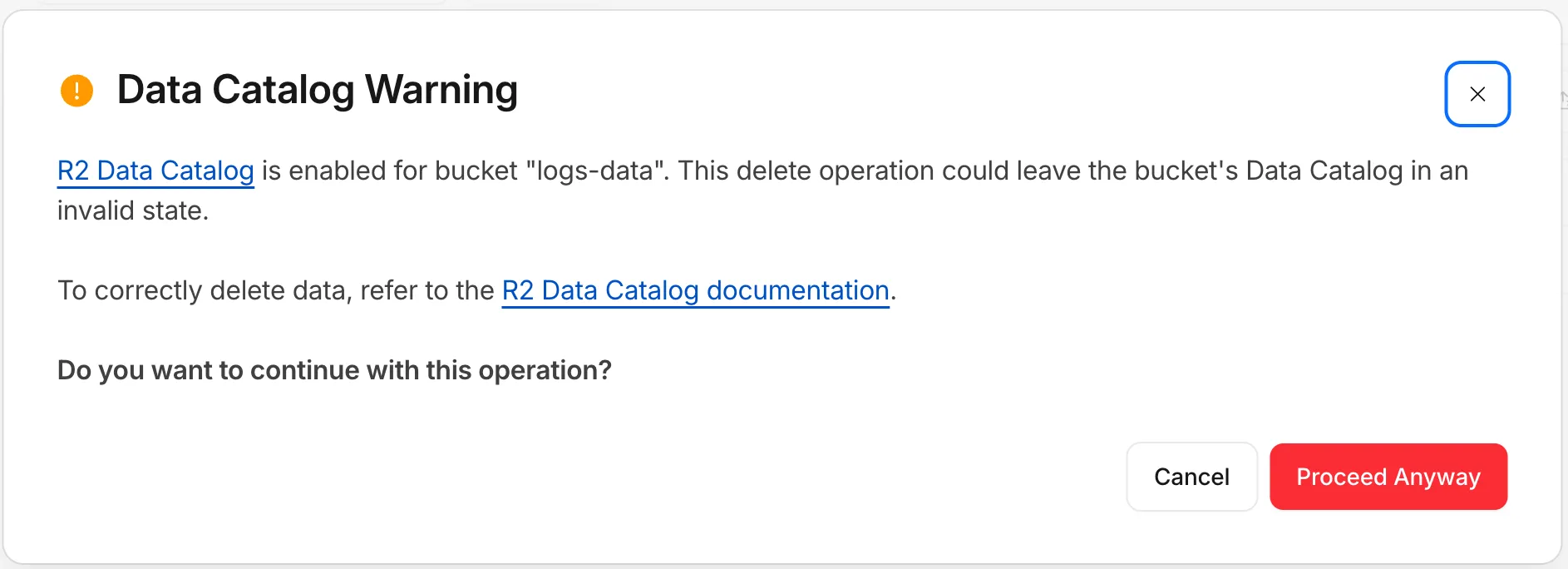
Wrangler now checks whether a bucket is Data Catalog-enabled before running a delete and warns you before continuing:
Data Catalog is enabled for this bucket.Proceeding may leave the data catalog in an invalid state. Continue?To learn how to safely manage and delete data in your tables, refer to the R2 Data Catalog documentation.
A new declarative
exportsfield in your Wrangler configuration file replaces the imperativemigrationsarray for managing Durable Object class lifecycle. Instead of writing an ordered list of migration steps with unique tags, you declare each Durable Object class your Worker exports and Cloudflare compares that against what's already deployed to determine what Durable Object state needs to be created, renamed, or deleted.With legacy migrations, renaming
ChatRoomtoRoomrequires retaining both tagged steps:Before — legacy migrations {"migrations": [{ "tag": "v1", "new_sqlite_classes": ["ChatRoom"] },{"tag": "v2","renamed_classes": [{ "from": "ChatRoom", "to": "Room" }],},],}With
exports, you instead declareRoomas the current class and markChatRoomas renamed:After — declarative exports {"exports": {"ChatRoom": {"type": "durable-object","state": "renamed","renamed_to": "Room",},"Room": { "type": "durable-object", "storage": "sqlite" },},}Each entry is keyed by class name. The
statefield carries the lifecycle (createdby default — a live class — plus tombstone statesdeleted,renamed, andtransferred, and theexpecting-transferreceiving state for cross-Worker transfers).Key improvements over the legacy
migrationsarray:- No migration tags. The current
exportsmap is the source of truth — there is no historical chain ofv1,v2,v3entries to maintain. - Structured deployment output. Wrangler reports when it creates, updates, deletes, renames, or transfers Durable Object classes. It also identifies stale configuration entries that are safe to remove. Deployments with no changes or notices do not print this output.
- Zero-downtime rename and transfer patterns are first-class. Tombstones may coexist with the source class still in code, enabling a three-deploy rename and a four-deploy cross-Worker transfer without runtime errors during the rollout window.
- Cross-Worker safety. When you delete or rename a class, Cloudflare lists every other Worker in your account whose bindings still reference the namespace, so you can redeploy them before the change goes live.
Existing Workers using the legacy
migrationsarray continue to work unchanged. To move toexports, refer to the migration guide.exportsandmigrationsare mutually exclusive within a single Worker.For the full reference, refer to Durable Object class exports.
- No migration tags. The current
We have greatly improved the throughput of the Vectorize write-ahead log (WAL) ↗. As a result, we have significantly reduced the end-to-end latency for a vector change to become queryable: median latency has dropped from 2 minutes to under 30 seconds, and p99 latency from 5 minutes to under 2 minutes.
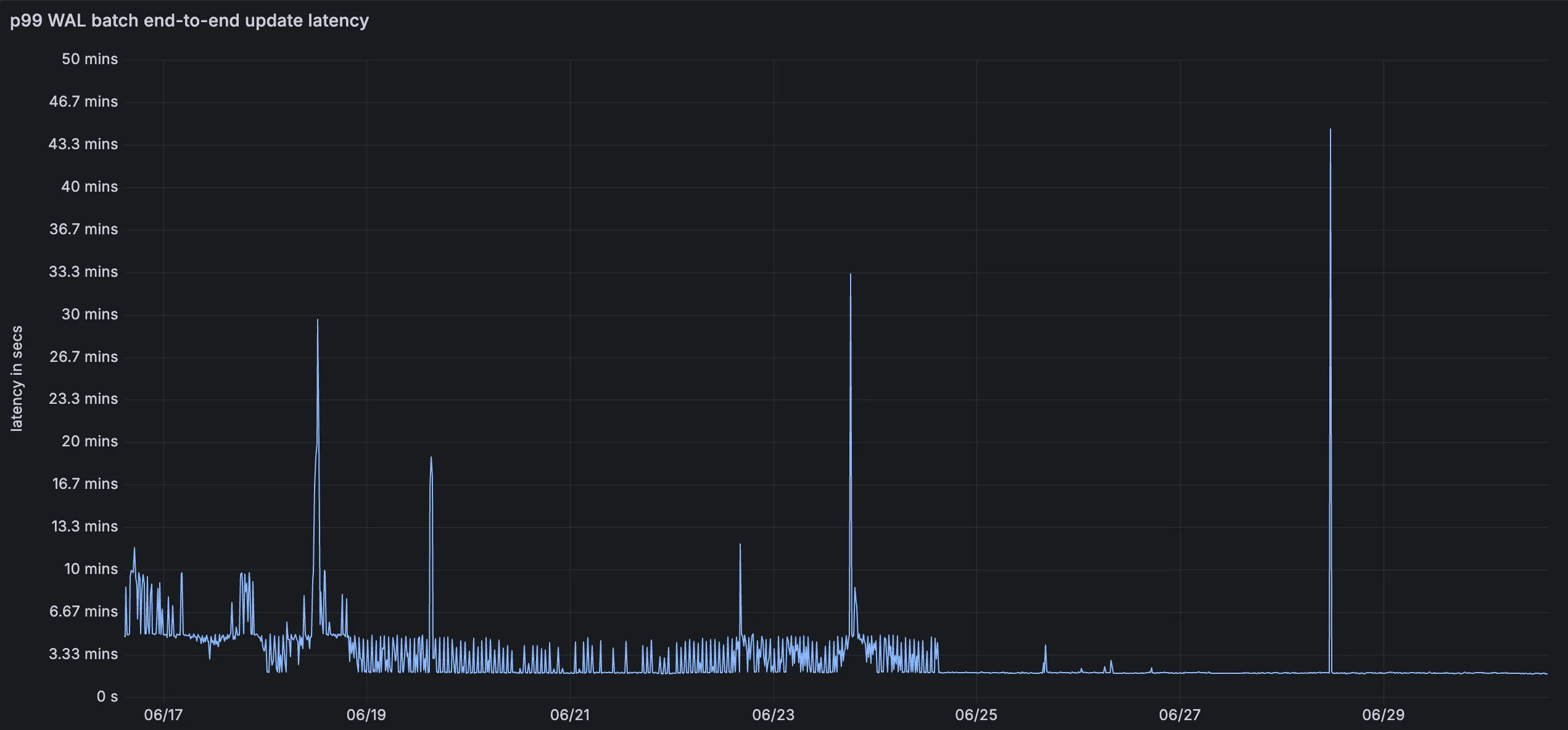
This means inserts, upserts, and deletes are reflected in query results faster, improving the freshness of semantic search, recommendation, and retrieval-augmented generation (RAG) workloads. You do not need to change your code or configuration to benefit from this improvement.
For more information, refer to the Vectorize documentation.
You can now monitor how much memory your Workers and Durable Objects consume across invocations with the new Memory Usage chart in the Workers Metrics tab, broken down by P50, P90, P99, and P999 percentiles.
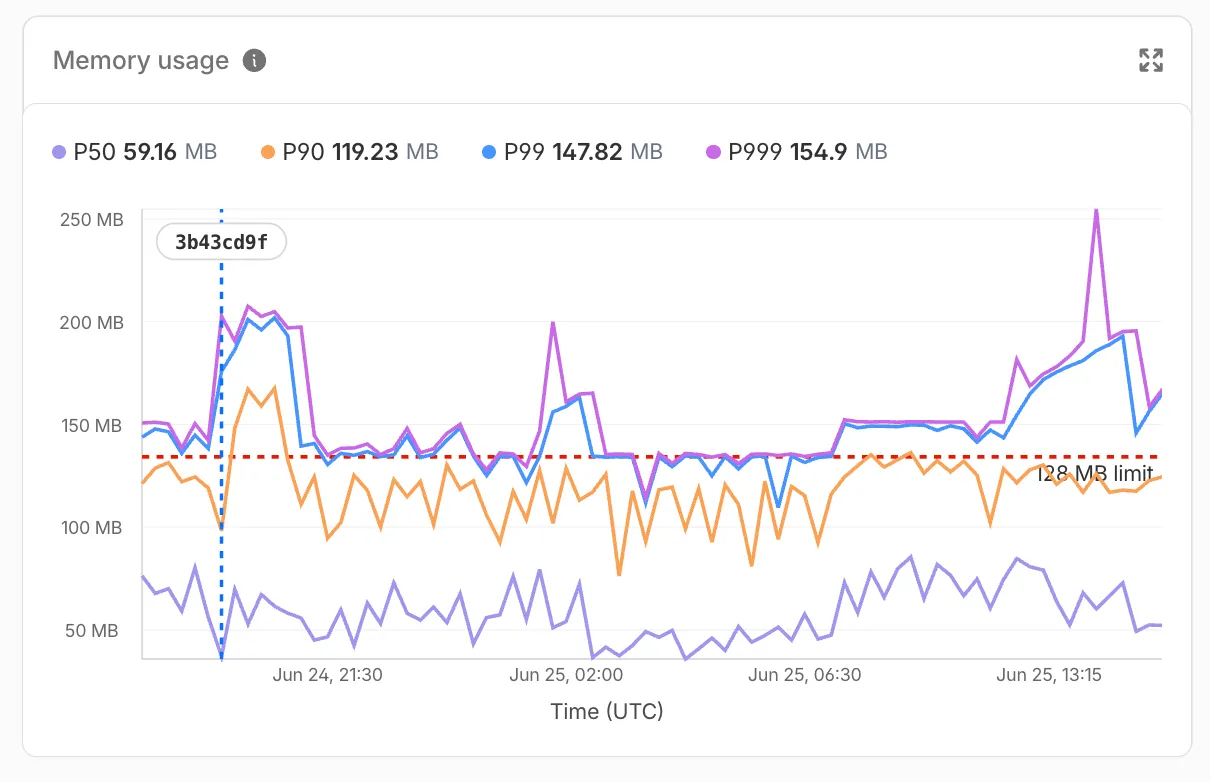
Memory usage measures the V8 isolate memory at the time of each invocation, subject to the 128 MB per-isolate limit — a single isolate can handle many concurrent requests and shares memory across them.
Use the Memory Usage chart to:
- Track memory trends — Spot gradual increases that may indicate a memory leak before they cause
Exceeded Memoryerrors. - Correlate with deployments — Deployment markers on the chart help you identify whether a new version introduced a memory regression.
- Right-size your Worker — Understand your baseline memory footprint and how much headroom you have before hitting the 128 MB limit.
For Durable Objects, memory usage reflects the in-memory state an object holds (class properties, caches, active WebSocket connections), which persists across invocations until the object is hibernated or evicted. This state is not preserved across eviction, hibernation, or a crash, so persist anything important to storage.
To view memory usage, open the Metrics tab for your Worker ↗ or Durable Object namespace ↗. For Durable Objects, you can filter by DO ID or name to drill down into memory usage for a specific object. You can also query memory usage programmatically via the GraphQL Analytics API using the
workersInvocationsAdaptivedataset — thequantiles.memoryUsageBytesP50throughquantiles.memoryUsageBytesP999fields return percentile values in bytes.For local memory debugging, you can also profile memory with DevTools to take heap snapshots and identify specific objects causing high memory usage.
- Track memory trends — Spot gradual increases that may indicate a memory leak before they cause
Durable Objects now supports a
usjurisdiction, letting you create Durable Objects that only run and store data within the United States. Use theusjurisdiction when you need to keep a Durable Object's compute and storage inside the United States to meet data residency requirements.Create a namespace restricted to the
usjurisdiction the same way as any other jurisdiction:JavaScript // Workerexport default {async fetch(request, env) {const usSubnamespace = env.MY_DURABLE_OBJECT.jurisdiction("us");const stub = usSubnamespace.getByName("general");return stub.fetch(request);},};Workers may still access Durable Objects constrained to the
usjurisdiction from anywhere in the world. The jurisdiction constraint only controls where the Durable Object itself runs and persists data.For the full list of supported jurisdictions, refer to Data location — Restrict Durable Objects to a jurisdiction.
The
@cloudflare/vitest-pool-workerspackage now includesevictDurableObjectandevictAllDurableObjectstest helpers, exported fromcloudflare:test.These helpers let you test how a Durable Object behaves across evictions, simulating the production lifecycle where an idle Durable Object can be evicted from memory.
For more context, refer to Lifecycle of a Durable Object.
TypeScript import { evictDurableObject, evictAllDurableObjects } from "cloudflare:test";import { env } from "cloudflare:workers";const id = env.COUNTER.idFromName("my-counter");const stub = env.COUNTER.get(id);// Evict the Durable Object instance pointed to by a specific stubawait evictDurableObject(stub);// Close WebSockets instead of hibernating themawait evictDurableObject(stub, { webSockets: "close" });// Evict all currently-running Durable Objects in evictable namespacesawait evictAllDurableObjects();These helpers are available in
@cloudflare/vitest-pool-workers@0.16.20and later.Learn more in the Test APIs reference and the Testing Durable Objects guide.
Regional Services now supports Regionalized IP Bindings, letting you regionalize traffic at the IP layer for prefixes you bring to Cloudflare through Bring Your Own IP (BYOIP).
Where Regional Hostnames regionalize traffic by hostname, Regionalized IP Bindings let you bind a CIDR from one of your prefixes to a region — ideal for address-map deployments and any service you address by IP rather than hostname. Cloudflare then terminates TLS and processes traffic to those addresses only within the data centers in that region.
Regionalized IP Bindings requires the Regional Services and Regional Services for BYOIP entitlements. Contact your account team to enable them.
To get started, refer to Regionalized IP Bindings.
Durable Objects now supports two new location hints for Asia-Pacific:
apac-ne(Northeast Asia-Pacific) andapac-se(Southeast Asia-Pacific). Useapac-neorapac-sewhen you want finer-grained placement within Asia-Pacific rather than the broaderapachint.Use the new hints the same way as any other
locationHint:JavaScript // Northeast Asia-Pacific (Japan, Korea, etc.)const stubNE = env.MY_DURABLE_OBJECT.get(id, { locationHint: "apac-ne" });// Southeast Asia-Pacific (Singapore, Indonesia, etc.)const stubSE = env.MY_DURABLE_OBJECT.get(id, { locationHint: "apac-se" });If your users are spread across all of Asia-Pacific, the existing
apachint remains the right choice. Only reach forapac-neorapac-sewhen your traffic is clearly concentrated in one sub-region and you want to minimize round-trip time to that audience. The default behavior and what we generally recommended is not adding a location hint unless absolutely needed, this will create the Durable Object as close to the initializing request as possible to reduce latency.As with all location hints, these are best-effort suggestions. Cloudflare will place the Durable Object in a nearby data center, not necessarily the exact hinted location.
For the full list of supported hints, refer to Data location — Provide a location hint.
Durable Objects now remain alive for the duration of active outbound connections created via
connect()or an outbound WebSocket. Previously, a Durable Object would be evicted after 70-140 seconds of no incoming traffic, even if the object had an open outbound connection, which is a common pattern when streaming responses from a large language model (LLM) over TCP or an outbound WebSocket.With this change, each active outbound connection prevents eviction. Once all outbound connections close, the standard 70-140 second inactivity window applies before the Durable Object is evicted.
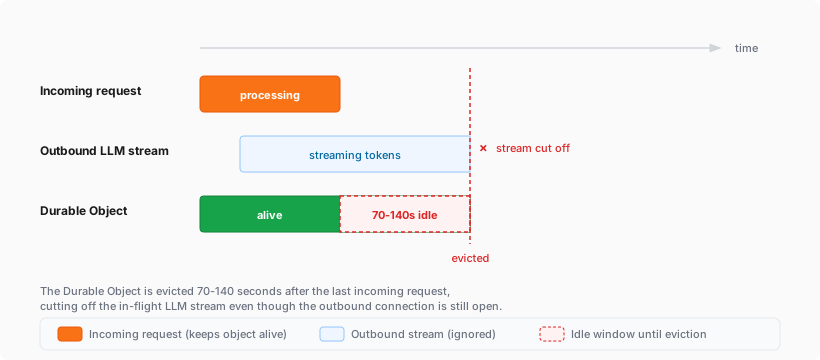
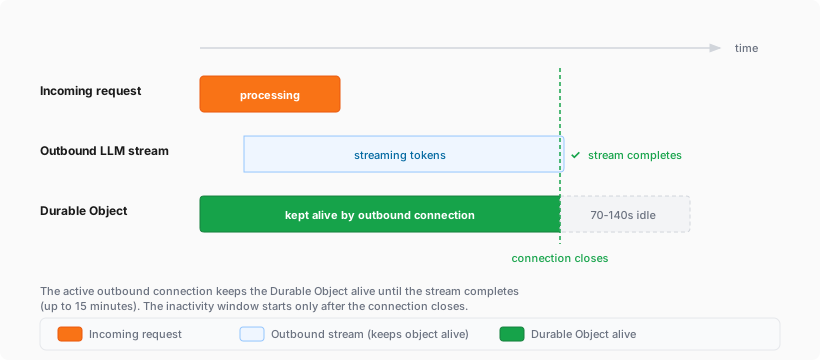
If you are building agents on Cloudflare, this is especially relevant. An agent that streams tokens from an LLM while calling models, or that performs long-running tasks over an outbound connection, now stays alive for the duration of that connection instead of being evicted mid-stream.
Limits:
- Each outbound connection keeps the Durable Object alive for a maximum of 15 minutes. After 15 minutes, the connection stops preventing eviction (the connection itself continues operating), and the standard eviction rules resume.
- The Durable Object's existing per-account instance limits still apply.
For more information, refer to Lifecycle of a Durable Object.
You can create PlanetScale Postgres and MySQL databases from Cloudflare and bill PlanetScale database usage through your Cloudflare account as a pay-as-you-go customer. Cloudflare contract customers will be able to add PlanetScale usage to their contract in July so reach out to your Cloudflare account team if interested.
Create a PlanetScale database from the Cloudflare dashboard to check out globally distributed Workers optimized for regional data access.
Go to Create a PlanetScale database
PlanetScale databases created from Cloudflare work with Workers through Hyperdrive. Hyperdrive manages database connection pools and query caching, so you can use PlanetScale as a centralized relational database for Workers applications without changing your database drivers, object-relational mapping (ORM) libraries, or SQL tooling.
PlanetScale usage appears on your Cloudflare invoice each billing period as a dollar total at PlanetScale's standard pricing ↗. You can introspect per-database billing usage via PlanetScale's dashboard ↗.
When you create a PlanetScale database from the Cloudflare dashboard, you receive the same PlanetScale developer experience, including development branches, query insights, and Model Context Protocol (MCP) server support for agents.
To get started, refer to PlanetScale Postgres and MySQL with Hyperdrive.
You can now filter the Metrics tab for a Durable Objects namespace by an individual Durable Object's ID or name in the Cloudflare dashboard. Previously, metrics charts only showed aggregate, namespace-level data, making it difficult to isolate the behavior of a specific object.
Go to Durable Objects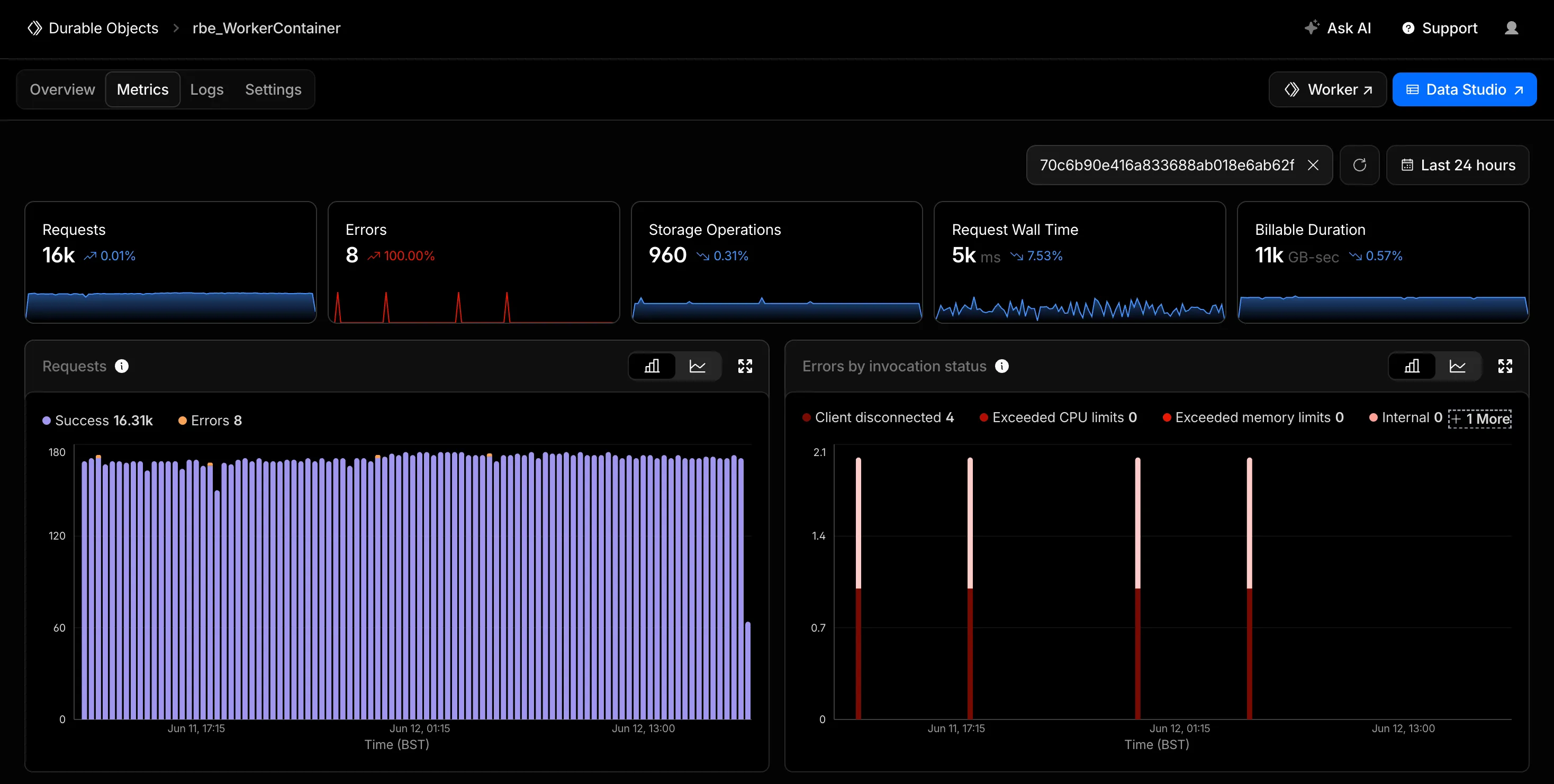
Start typing an ID or name into the filter and select a match from the autocomplete dropdown. The autocomplete only shows objects with invocations during the selected time range, so an object that does not appear has not been invoked in that window. This does not necessarily mean the object has been deleted. Every chart on the page updates to reflect only the selected object. This makes it easier to identify and investigate a single Durable Object when debugging a high-traffic object, an error spike, or unexpected storage usage. Clear the filter to return to namespace-level metrics.
Metrics are powered by the GraphQL Analytics API, so standard analytics behavior such as ingestion delay and sampling applies.
For more information, refer to Metrics and analytics.
Pay-as-you-go customers can now view billable usage and create budget alerts directly from the product overview pages for Workers & Pages, D1, R2, Workers KV, Queues, Vectorize, Durable Objects, and Containers. A new sidebar widget shows current-period spend and the billing cycle date range, alongside a button to create a budget alert.
The widget pulls from the same data as the Billable Usage dashboard and aligns to your billing cycle (or the current day on Free plans), so the numbers match your invoice. Enterprise contract accounts are not yet supported.
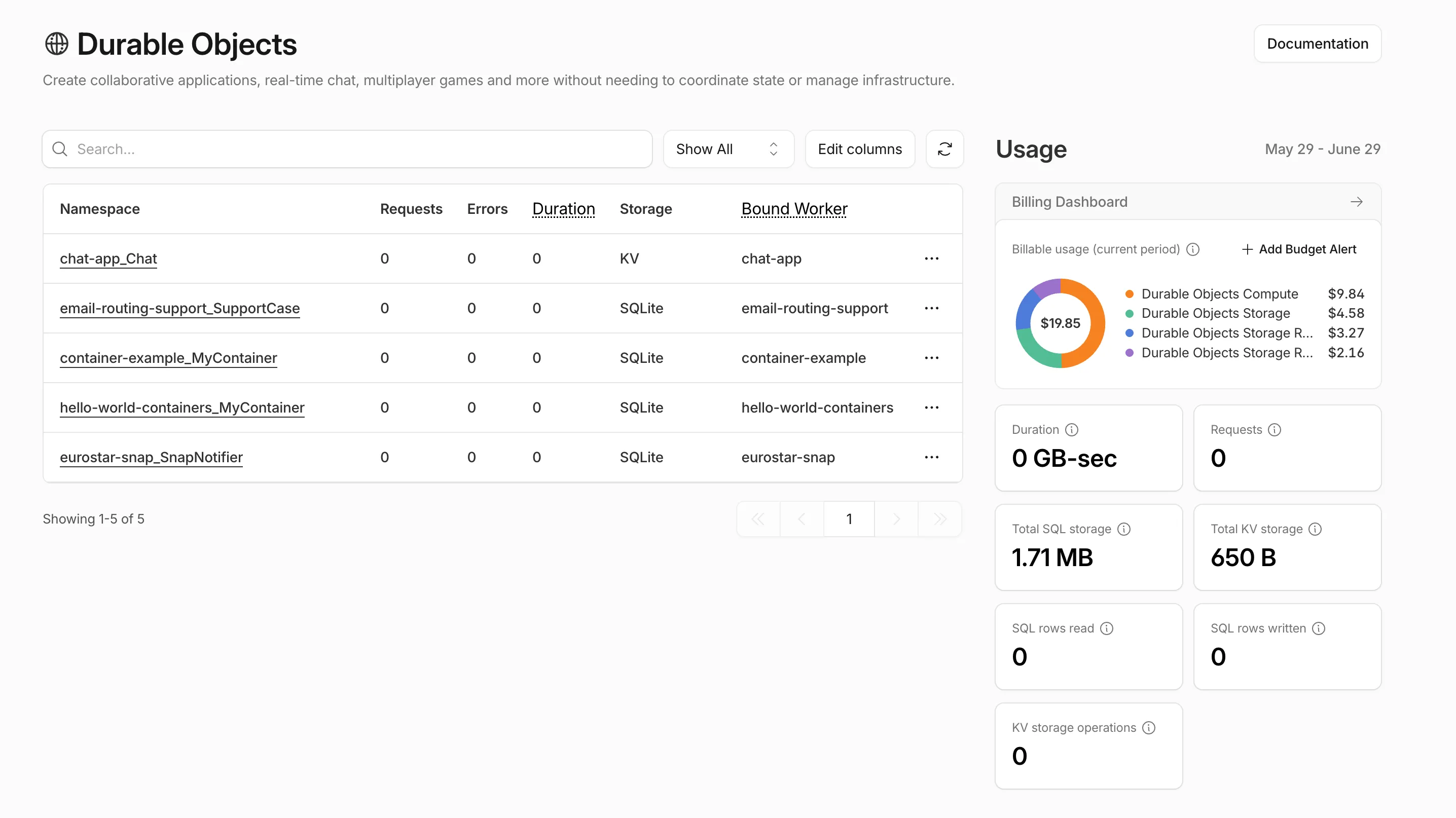
Selecting Create budget alert opens the budget alert flow inline so you can set a dollar threshold in the same place you are reviewing usage. Budget alerts apply to your total account-level spend across all products, not just the product page you create them from.
For more information, refer to the Usage-based billing documentation.
You can now point
wrangler d1 migrations applyat a nested migrations layout — such as the one produced by Drizzle ↗ (migrations/0001_init/migration.sql) — using the newmigrations_patternD1 binding config:JSONC {"d1_databases": [{"binding": "DB","database_name": "my-database","database_id": "<UUID>","migrations_dir": "migrations","migrations_pattern": "migrations/*/migration.sql",},],}migrations_patternis a glob (relative to your Wrangler config file) used to discover migration files. It defaults to${migrations_dir}/*.sql, so existing projects keep working unchanged. Each migration's name is recorded in the migrations table as a path relative tomigrations_dir.To learn more, visit D1's migrations documentation.
R2 Data Catalog is a managed Apache Iceberg ↗ data catalog built directly into R2 buckets, queryable by any Iceberg-compatible engine such as Spark, Snowflake, and DuckDB. R2 Data Catalog now has published pricing for catalog operations and table compaction, in addition to standard R2 storage and operations.
Billing is not yet enabled. We will provide at least 30 days notice before we start charging for R2 Data Catalog usage.
Pricing is based on two dimensions:
- Catalog operations: $9.00 / million operations for metadata requests such as creating tables, reading table metadata, and updating table properties.
- Compaction: $0.005 / GB processed and $2.00 / million objects processed. These charges only apply when automatic compaction is turned on for a table.
Both dimensions include a monthly free tier: 1 million catalog operations, 10 GB of compaction data processed, and 1 million compaction objects processed.
For full pricing details and billing examples, refer to R2 Data Catalog pricing.
R2 Data Catalog is a managed Apache Iceberg ↗ data catalog built directly into your R2 bucket. It exposes a standard Iceberg REST catalog interface so you can connect query engines like Spark, Snowflake, DuckDB, and R2 SQL to your data in R2.
R2 Data Catalog now has a dedicated section in the Cloudflare dashboard, replacing the previous settings panel embedded in R2 bucket configuration. The new experience includes:
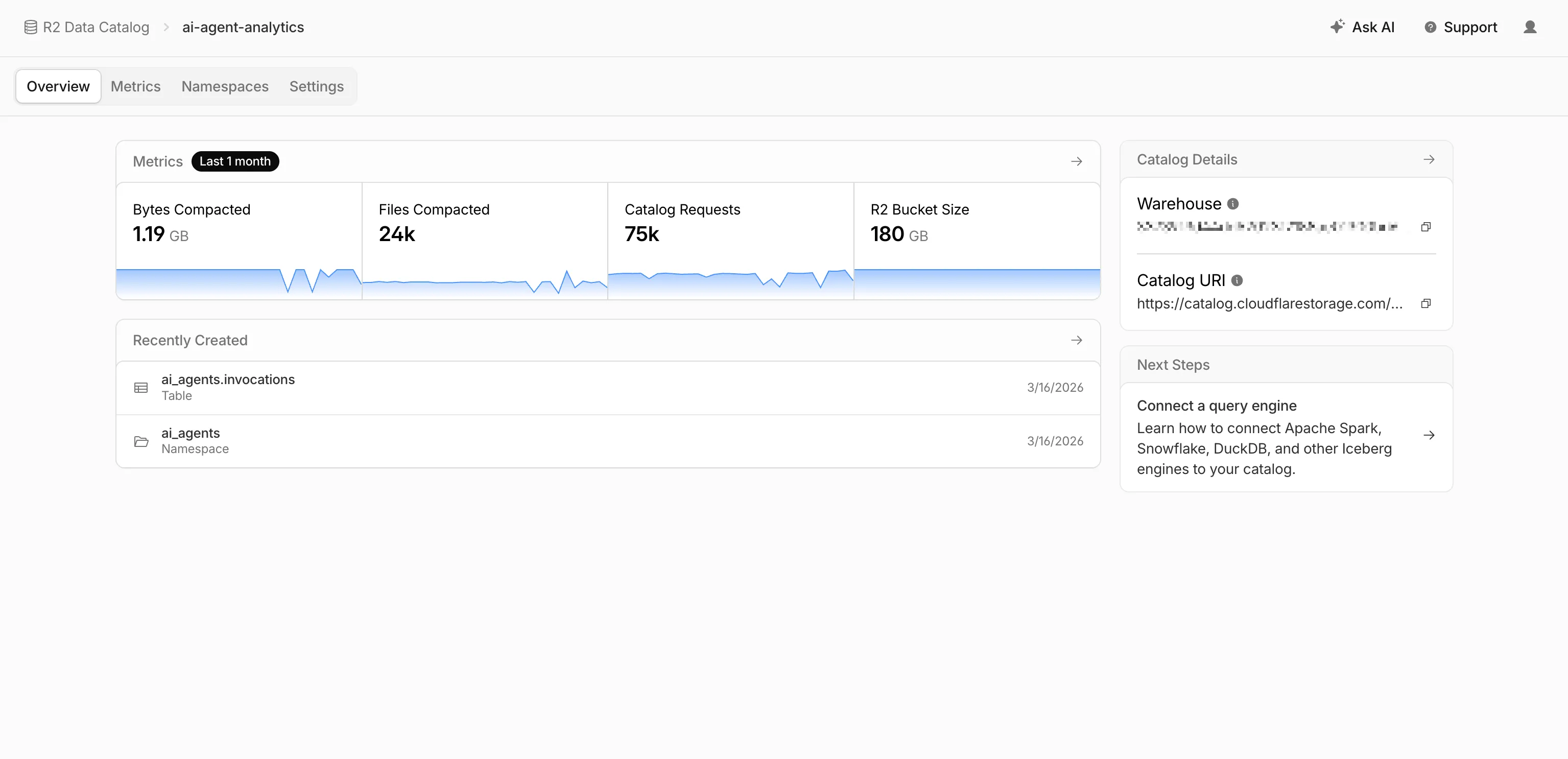
- Catalog overview — View all your catalogs in one place with catalog request counts, bucket sizes, and table maintenance status at a glance.
- Guided setup wizard — Create a catalog in three steps: choose or create an R2 bucket, configure table maintenance (compaction and snapshot expiration), and review. The wizard creates the bucket and generates a service credential automatically.
- Settings management — A dedicated settings page for each catalog with sections for general configuration, table maintenance, service credentials, and disabling the catalog. You can now enable and configure snapshot expiration directly from the dashboard.
- Built-in metrics — Five charts on each catalog's metrics tab: bytes compacted, files compacted, catalog requests, storage size, and snapshots expired.
To get started, go to R2 Data Catalog in the Cloudflare dashboard or refer to the getting started guide and manage catalogs documentation.
You can now receive event notifications for Artifacts repository changes and consume them from a Worker to build commit-driven automation.
This allows you to:
- Run custom workflows when a repository is created or imported
- Kick off a build and deploy a change when an agent pushes to a repo
- Trigger a review agent on every push
Available events include:
- Account-level events (
artifactssource) —repo.created,repo.deleted,repo.forked,repo.imported - Repository-level events (
artifacts.reposource) —pushed,cloned,fetched
To learn more, refer to Artifacts documentation.
You can now view the size of your Hyperdrive database connection pools, giving you the ability to self-diagnose connection issues. Using the Cloudflare dashboard or the
hyperdrivePoolSizesAdaptiveGroupsdataset in the GraphQL Analytics API, you can seewaitingClients,currentPoolSize,availablePoolSlots, andmaxPoolSizefor each of your configurations.A new Pool connections chart has been added to the Metrics tab of each Hyperdrive configuration in the Cloudflare dashboard ↗. You can use the location selector to drill down into specific locations hosting your connection pool by airport code.
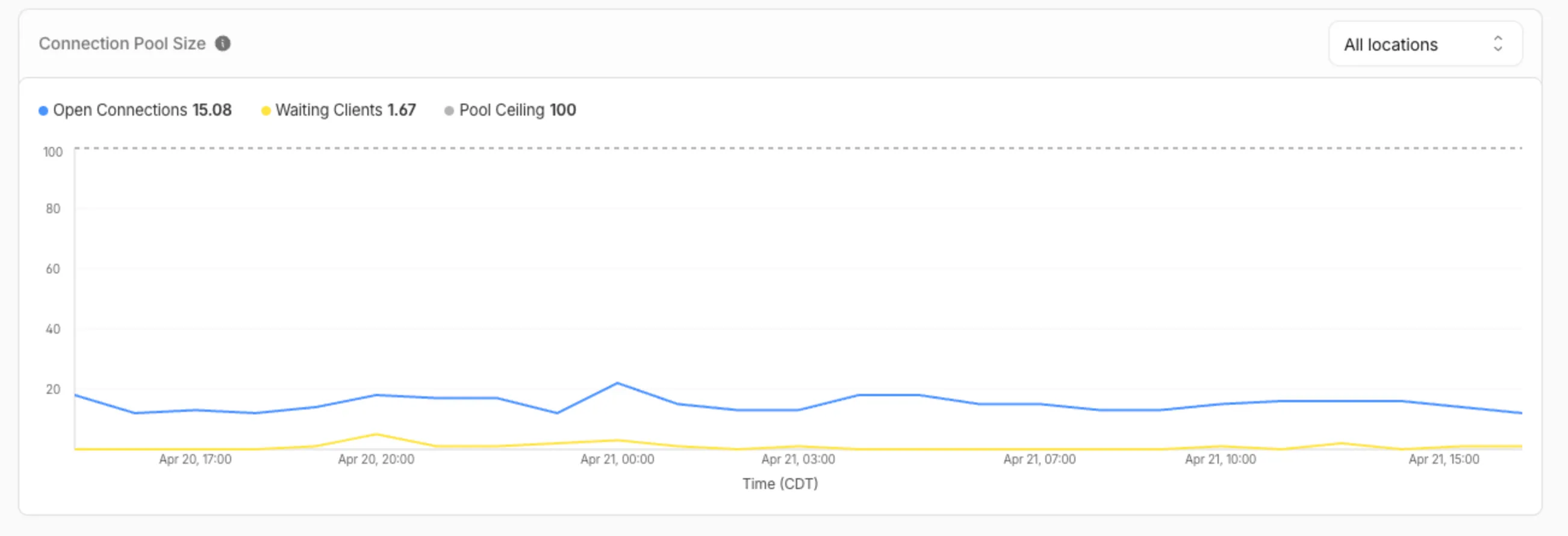
The chart shows:
- Waiting clients: Client requests waiting for an available connection.
- Open connections: Active connections to your database.
- Pool size maximum: Your configured origin connection limit.
Connection contention appears as a spike in waiting clients, or when open connections consistently approach the pool size maximum. If your open connections regularly approach this limit, consider contacting Cloudflare to increase your Hyperdrive connection limit.
The
hyperdrivePoolSizesAdaptiveGroupsdataset in the GraphQL Analytics API exposes the following key connection pool metrics for each Hyperdrive configuration:Under
avg:currentPoolSize— Average number of connections currently open in the pool.availablePoolSlots— Average number of pool connections available for checkout.waitingClients— Average number of clients waiting for a connection from the pool.
Under
max:maxPoolSize— Configured maximum size of the connection pool.currentPoolSize— Peak number of connections open in the pool.waitingClients— Peak number of clients waiting for a connection from the pool.
For more information, refer to Metrics and analytics and Connection pooling.
R2 Data Catalog is a managed Apache Iceberg data catalog built directly into your R2 bucket that allows you to connect query engines like R2 SQL, Spark, Snowflake, and DuckDB to your data in R2.
You can now query analytics for your R2 Data Catalog warehouses via Cloudflare's GraphQL Analytics API. Two new datasets are available:
r2CatalogDataOperationsAdaptiveGroupstracks Iceberg REST API requests made to your catalog, including operation type, request duration, HTTP status, and request body bytes. Use this to monitor request volume and latency across warehouses, namespaces, and tables.r2CatalogTableMaintenanceAdaptiveGroupstracks table maintenance jobs such as compaction and snapshot expiration. Use this to monitor job success rates, files processed, bytes read and written, and job duration.
Both datasets support filtering by warehouse name, namespace, table name, and time range. They also include percentile aggregations for duration metrics.
For detailed schema information and example queries, refer to the R2 Data Catalog metrics and analytics documentation.
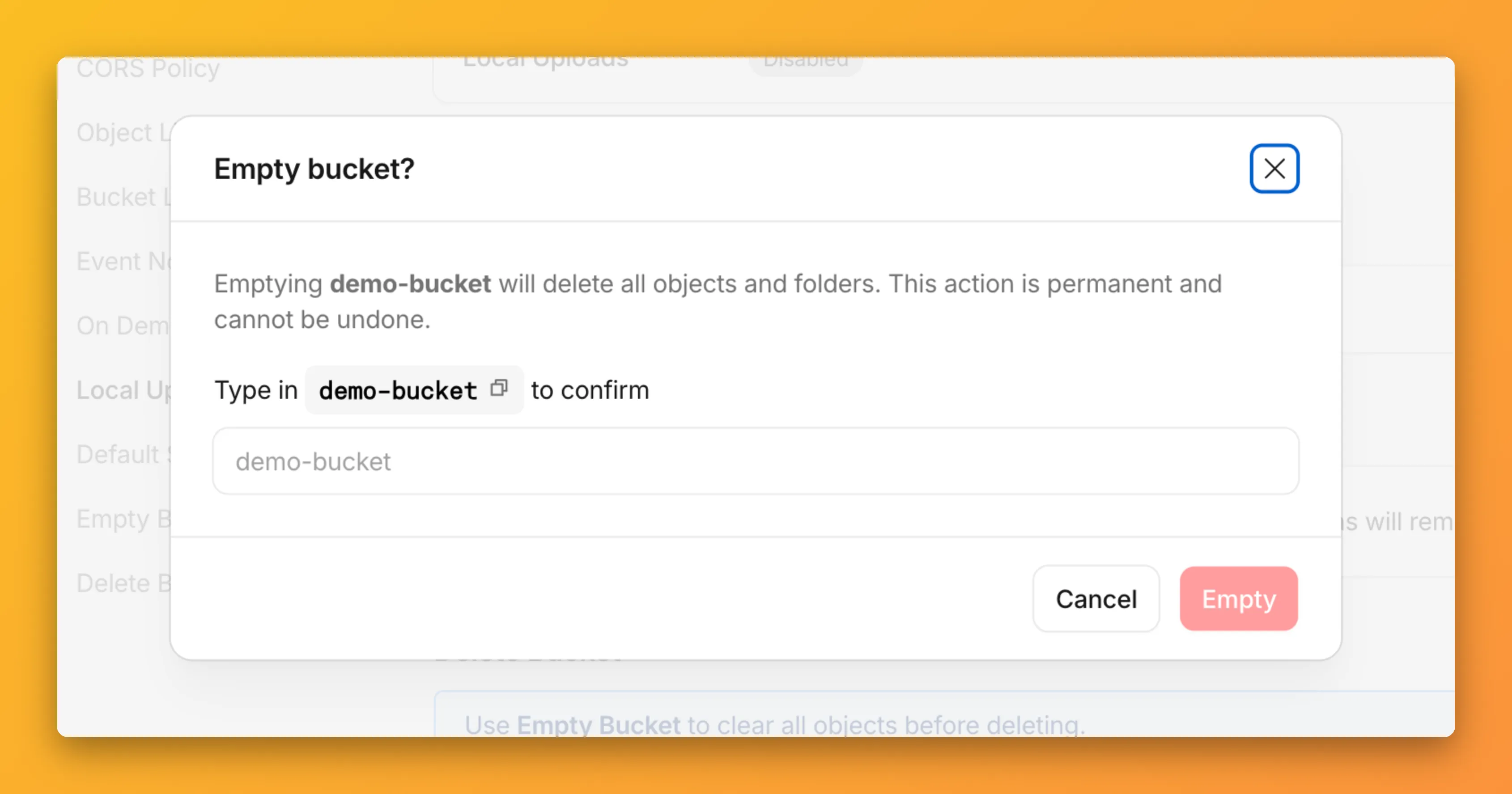
You can now empty an entire R2 bucket or delete folders directly from the dashboard. Emptying a bucket is required before you can delete it. Previously, this required scripting or configuring lifecycle rules. Now, the dashboard can handle it in a single action.
Go to your bucket's Settings tab and select Empty under the Empty Bucket section. This deletes all objects in the bucket while preserving the bucket and its configuration. For large buckets, the operation runs in the background and the dashboard displays progress.
Emptying a bucket is also a prerequisite for deleting it. The dashboard now guides you through both steps in one place.
R2 uses a flat object structure. The dashboard groups objects that share a common prefix into folders when the View prefixes as directories checkbox is selected. Deleting a folder removes every object under that prefix.
From the Objects tab, you can select one or more folders and delete them alongside individual objects.
For step-by-step instructions, refer to Delete buckets and Delete objects.
You can now connect Hyperdrive to a private database through a Workers VPC service. This is the recommended way to connect Hyperdrive to a private database that is not exposed to the public Internet.
When creating a Hyperdrive configuration in the Cloudflare dashboard, choose Connect to private database and then Workers VPC. From there, you can select an existing VPC service or create a new one inline by picking a Cloudflare Tunnel and entering your origin host and TCP port.
You can also create a Hyperdrive configuration backed by a Workers VPC service from the command line:
Terminal window npx wrangler hyperdrive create my-vpc-database \--service-id <YOUR_VPC_SERVICE_ID> \--database <DATABASE_NAME> \--user <DATABASE_USER> \--password <DATABASE_PASSWORD> \--scheme postgresqlWorkers VPC services are reusable across Hyperdrive configurations and can also be bound directly to Workers, so you can share the same private connection across multiple products.
To get started, refer to Connect Hyperdrive to a private database using Workers VPC.